1
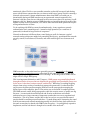
vendor who doesn’t offer this feature on the BMC, although sometimes only with their advanced or enterprise version (for an additional fee, of course.) Using the virtual media feature a user can mount Disk images, USB sticks, DVDs/CDs, and the like from anywhere on the net and they’ll appear immediately as a file system on the host exactly like their physical counterparts (beware of autorun!30) Virtual media is heavily used for provisioning or bootstrapping new servers or applications, remotely installing or reinstalling the OS, deploying diagnostic tools, etc., and uses the standard methods of remote file access (tftp, ftp, Window shares, etc.) I believe that most leverage a shared USB bus (not necessarily all USB busses!) with the server to accomplish the transparency – I’ve heard that some recent IBM servers go so far as to use USB as a communication channel for IPMI commands and networking, which might open up some interesting situations. Virtual media is also perhaps the most straightforward way to take control the server host, or at least the easiest to explain – simply mount a live CD with an OS of your choice, ensure the boot order is correct, and then reboot the system – after all, this is essentially what it was designed for. An ephemeral OS booted in RAM could explore its host server’s disks, applications and data, which could be folded, spindled, and/or mutilated unless encrypted. This is fast, as well – an automated attack might only take a minute or three to reboot and scan a server, and before operations explores the any failures of the server an attacker can reboot the server with things pretty much back to normal due to some mysterious failure. At least some vendors support the encryption of remote media, but both sides of the connection must support it, and some types simply don’t support it (e.g. ftp, tftp, etc.) Both the server and the BMC may listen to any shared USB hubs, and any virtual media that was encrypted over the network will show up unencrypted on the USB bus. Video and Remote Console The server’s video memory is accessible to the BMC to allow video recording and snapshots of the server’s screen, as well as remote console access. Not surprisingly an attacker may use the same tools available to the owner. Most vendors hand out large Java programs for users to run; Dell (and presumably others, given it appears to be an Avocent binary) has a little command line program that may be run on the BMC do this as well; here’s the command and a thumbnail of the image it took. [WPCM450 /bin]$ avct_control capture -‐-‐file /tmp/snap-‐from-‐bmc.png Capturing screen to file '/tmp/snap-‐from-‐bmc.png'... Captured. Figure 3 It was also simple to capture keystrokes when a user was logged into the BMC and was virtually “typing” commands to the BMC with the on-screen keyboard. 13