1
Universal Analog
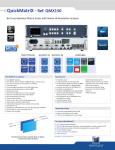
Computer/TV/HDTV:
inputs #1 to #4
Power supply:
100-240 VAC 2.5A 50/60HZ /
FUSE F4A 250 VAC; internal,
autoswitchable; 110W
On/Off
Stand-by: Hold
for 3 seconds for
stand-by mode
Menu scroll
knob
Input selection:
1 to 4: access source 1 to 4,
HDMI 1/2: access HDMI 1 or HDMI 2
SDI 1 to SDI 2: access SDI 1 to SDI 2
S/PDIF:
inputs #1 to #2
DVI connectors:
DVI-D inputs #1 to #4.
Capability to receive digital
audio signal from HDMI
connector via an adaptator
(HDMI-compatible)
HDMI connectors:
HDMI inputs #3 to #6.
Digital audio compliant
Ethernet
Plug
MCO male connector:
for inputs (balanced)
#1 to #4
Shortcut:
Effect: shortcut to transition menu
Preset: recall a custom stored preset
3G/HD/SD-SDI:
inputs #1 to #2
Control:
Exit/Menu: Home menu
or back one level
Enter: validate the menu
or command
Front panel display:
4-line VFD
QUICKVU - REF. QVU150 / FRONT & REAR PANELS DESCRIPTION
Communication port:
communication port
with a DB9 female
connector
S/PDIF:
outputs #1 to #2
MCO male connector:
for outputs (balanced)
#1 to #2
Universal Analog
Computer TV/HDTV:
outputs #1 to #2
Quick Frame: allows
to quickly display a
foreground Frame
CAUTION:
The user should avoid disconnecting the power source
(AC input) until the unit is in stand-by mode.
DVI connectors:
DVI-I outputs #1 to #2. Capability to transmit
digital audio signal towards a HDMI connector
via an adaptator (HDMI-compatible)
TAKE:
Transition the pre-selected
sources onto the Program
output with the selected effects
Layer:
Black: clear the output
Freeze: freeze the input linked to the
current layer on Program