1
Appendix B — Exporting Data
B.1. EXPORTING A DATA FILE
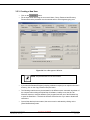
Refer to section 9.3.4. Exporting Data to learn how to export a Data File.
This section explains the file formats used to export the Data File or an Analysis Report.
B.1.1. Exporting the Analysis Report
The analysis report displayed in Data Review mode can be saved as a binary file in order to
be reloaded later or exported into other systems and offline software. An analysis report
contains a measured data file, the description of operations applied to the data and a
description of the layout for the presentation.
When an analysis document is reloaded, it is recalculated before it can be displayed.
A file containing an analysis document has a file extension ".MNT".
B.1.2. Exporting the data file
A single data file is composed of the z-height of the measured data (points). It does not
contain any information about the analysis, the document layout nor the recipe.
When reloaded, the data file will be displayed as a profile curve in an empty document. The
user will be allowed to analyze it using the analysis operators and studies.
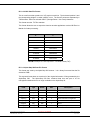
B.1.2.1. Alpha-Step IQ Data File Format
This is the most convenient and the most compact format, a binary format. It is saved as a
“.pro” file extension.
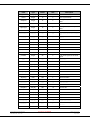
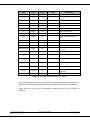
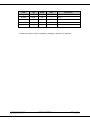
This format contains various fields that are not relevant in the Alpha-Step IQ software (these
fields are for use on other Profiler systems). The fields that appear in gray color can be
ignored when reading this format for a single or multiple 2D scan.
The file contains a fixed header size of 512 bytes followed by an optional comment (size
defined in the header) and followed by the points.
In the case of a multiple scan file, the format of one scan (header+points) is repeated.
Alpha-Step IQ User Manual
0084995-000 Rev AA
KLA-Tencor Confidential
Page 143 of 153
July 2004