1
3/124
Contents
Contents
1
Product Overview
10
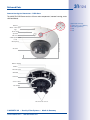
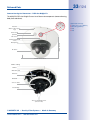
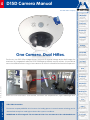
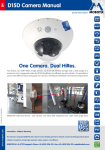
1.1D15D-DualDome
10
1.1.1
1.1.2
1.1.3
1.1.4
General Product Characteristics
Advantages And New Features
Decentralized Video System
Green IP Video
10
15
17
19
1.2
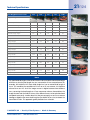
Technical Specifications
20
1.2.1
1.2.2
1.2.3
1.2.4
Lens Options
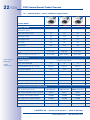
Camera Variants – Lenses, Hardware, Image Formats
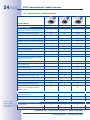
Camera Variants – Software Features
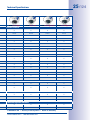
Technical Data
20
22
24
26
1.3
Delivered Parts
28
1.3.1
1.3.2
1.3.3
1.3.4
1.3.5
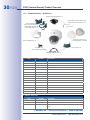
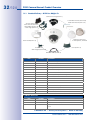
Standard Delivery – D15D
Standard Delivery – D15D-Pano
Standard Delivery – D15D-Sec-DNight-Fix
Delivered Parts For The Outdoor Wall Mount (Accessory)
Delivered Parts For The Corner And Pole Mount (Accessory)
28
30
32
34
35
1.4
Available Accessories
36
1.4.1NPA-PoE-Set
1.4.2 Replacement Dome
1.4.3 Vandalism Set
1.4.4 Ethernet Patch Cable With Bayonet Catch
1.4.5 Outdoor Wall Mount
1.4.6 Corner and Pole Mount
1.4.7MX-Patch-Box
1.4.8MX-NPA-Box
1.4.9MX-GPS-Box
1.4.10MX-232-IO-Box
1.4.11 ExtIO Expansion Module 1.4.12 Mx2wire+ Media Converter
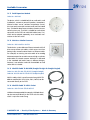
1.4.13 MiniUSB Cable To MiniUSB (Straight/Straight Or Straight/Angled)
1.4.14 MiniUSB Cable To USB A Socket
36
36
36
37
37
37
37
38
38
38
39
39
39
39
1.5
40
MOBOTIX Software
1.5.1 Integrated Camera Software (Firmware)
1.5.2MxControlCenter
1.5.3MxEasy
1.5.4 MOBOTIX App
40
41
42
43
2Mounting
44
2.1
44
Overview Of Mounting Options
2.1.1 Mounting Indoor Cameras To A Ceiling Or Wall (Without Accessories)
2.1.2 Outdoor Installation On A Wall, Pole Or Corner (With Accessories)
© MOBOTIX AG • Security-Vision-Systems • Made in Germany
www.mobotix.com • [email protected]
44
45