1
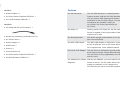
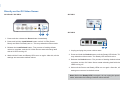
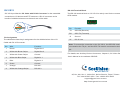
Directly on the GV-Video Server:
GV-VS04H / GV-VS14
GV-VS11
2
4
GV-VS12
2 1
4
1. Press and then release the Reset button immediately.
2. Press and hold the Load Default button until all 3 LEDs (Power,
Ready and Disk Full/Fault) are on. This may take about 30 seconds.
2
3. Release the Load Default button. The process of loading default
4
values is complete, and the GV-Video Server starts rebooting itself
with all 3 LEDs turning off.
4. Wait until the Power and Ready LEDs turn on again. After this, all the
settings are returned to default values.
1. Unplug and plug the power cable to start.
2. Press and hold the Default button until the Ready LED blinks. This
may take about 30 seconds. The Ready LED will blink twice.
3. Release the Default button. The process of loading default values is
complete, and the GV-Video Server starts rebooting itself with the 2
LEDs turning off.
4. Wait until the Power and Ready LEDs turn on again. After this, all the
settings are returned to default values.
Note: Before the Ready LED is on again, do not unplug the power
cable; otherwise the loading of default values will fail.