1
___M_M_M_M_M_M_M___M_M_M_M_M_M_M___
77
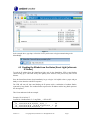
In the example above, type http://192.168.10.77 into your browser to begin communicating to the
WeatherBridge.
6.4 Using USB Stick (alternate IP finder)
A blank USB stick is optional with this package. If the weather station is connected to the USB port,
disconnect the AirBridge cradle and insert the blank USB stick into the WeatherBridge.
Press the Status/Reset button, then immediately let go to begin. Wait for the LED to turn back on, then
disconnect the USB stick from the WeatherBridge and insert into the USB port on your computer.
Your computer should recognize this file and display the directory.
The following file will be written to the USB stick:
network.log
Open this file with any text editor (such as notepad).
Sat Jan 5 00:23:16 UTC 2013
MAC:
xx:xx:xx:xx:xx:xx
LAN IP: 192.168.123.245
In the example above, type http://192.168.123.245 into your browser to begin communicating to the
WeatherBridge.
7 Browser Access
4B
Enter the IP address found in the previous step into your web browser.
If prompted for the Username and Password, enter:
Username: meteobridge
Password: meteobridge
8 License
5B
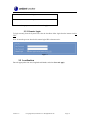
From the Menu tab, select License, as shown in Figure 6. Record the License Key for warranty
purposes:
License Key (case sensitive):
Version 1.0
©Copyright 2014, Ambient LLC. All Rights Reserved.
Page 8