1
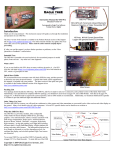
The Guardian requires unmixed control inputs from your receiver, even if you have a V-Tail or Elevon model. If you have a V-Tail or Elevon model, the Guardian does the mixing internally, so you will need to change your transmitter configuration to standard wing type, rather than having your transmitter do the mixing. For airframe types other than standard and dual Aileron/Flaperon, you will need to be change the “Model Control Type” setting, using either the radio stick configuration or the PC software. See the Menu Operation section below for more information on changing this setting. Dual Ailerons/Flaperons An exception to the unmixed input requirement is made for Dual Aileron and Flaperon models. By default, the Guardian will accept premixed Dual Aileron or Flaperon inputs to its Aileron and Aux inputs. But, if your controller does not have the capability of performing Dual Aileron or Flaperon mixing, then the Guardian can be configured to do this for you. See the List of Features and Options: Onboard Dual Aileron Mixing Enabled menu option for more information. Mounting the Guardian in your Model Please refer to Figure 5, which indicates correct and wrong Guardian mounting. Make sure you are mounting the Guardian in one of the correct ways shown below! The Guardian will not work correctly otherwise! Mount the Guardian securely with two sided servo tape, Velcro, or similar, so that it is in line with your direction of flight. It should be mounted near the model’s center of gravity and level to the horizon when your plane is flying straight and level, but the Guardian will compensate for small mounting errors. Choose a mounting location which will allow the Guardian to be easily connected to your receiver and servos. If the Guardian comes loose from its mounting location during flight, it will not be able to correctly stabilize your model! After mounting, be sure to pull up on the Guardian with a force greater than you expect to encounter in flight, to confirm mounting integrity. Figure 5 – Good and Bad Ways to Mount the Guardian If permanently mounting the Guardian, ensure that the USB port is still accessible for PC configuration and firmware update. Preflight Checks Before every flight, it is strongly recommended that you perform the following steps: Perform your normal preflight check. Ensure your servos respond correctly to your RC control stick commands. To test that the Guardian is working, hold the airplane level. Now, pitch, roll and yaw the model. Please see Figure 6. You should see the control surfaces deflecting appropriately to level the airplane and keep it on a straight heading. If the control surfaces do not move at all, ensure that the Master Gain knob on your transmitter (if used) is set so that stabilization will occur, and ensure that the Mode/Config switch (if used) is set for either 2D or 3D Mode. If either 2D or 3D Heading Hold is enabled, be sure to reset the locked direction of flight just before takeoff by moving the Aileron stick. If any of your control surfaces are moving the wrong direction, you need to reverse the direction of the appropriate Guardian Gain Control Dial! First Flight To account for trims and mounting errors of the Guardian within your plane, follow the instructions in the section titled “Reset Level Flight and Trims.” On your first flight, it is recommended that you do an unpowered hand-toss of your airplane, if it is capable of hand-toss launches. If the airplane safely glides to the Copyright 2013-2014 Eagle Tree Systems, LLC Figure 6 – Correct and Incorrect Control Surface Movement Page 6