1
Chapter
Installation
Wiring
1 Preparation
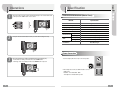
I Monitor Connection
Plug wires(from tenant monitor) into connectors on the camera
respectively according to illustrated diagrams as below.
Power Connection
Open Door Connection
Installation Method
1. It is recommended to mount the flush Box at the height of average adult’s eyelevel from the ground
2. Mount front panel on the flush Box with provided hexagonal screws.
3. Assemble each side mounting bracket on the front panel with provided hexagonal screws.
4. Leave the front panel unattached on the wall before you make sure all the stations have been
installed and wired properly.
Connection to VDP
No.
1
2
3
4
6
Color
Red
Blue
White
Black
Remark
POWER_ON
VOICE
VIDEO
GROUND
Note :
1. The connection between wires and connectors
should be completed in the reverse side of your
desired call buttons
2. No additional system set-up is necessary after
wiring
7