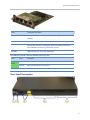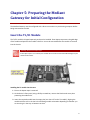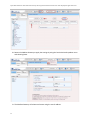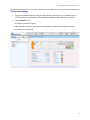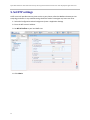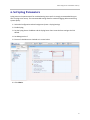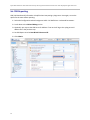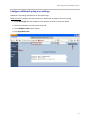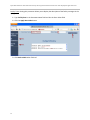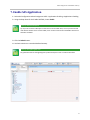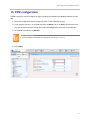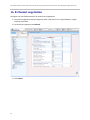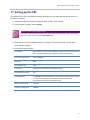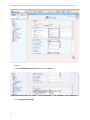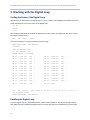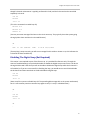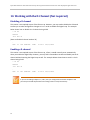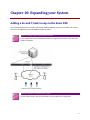
1
Polycom® SpectraLink ® 8400 Series with AudioCodes Mediant 1000 MSBG Gateway and Avaya/Nortel Communications Server 1000 Deployment Application Notes April 2012 | 1725-36972-001 Rev A Trademarks ©2012, Polycom, Inc. All rights reserved. POLYCOM®, the Polycom "Triangles" logo and the names and marks associated with Polycom's products are trademarks and/or service marks of Polycom, Inc. and are registered and/or common law marks in the United States and various other countries. All other trademarks are property of their respective owners. No portion hereof may be reproduced or transmitted in any form or by any means, for any purpose other than the recipient's personal use, without the express written permission of Polycom. Disclaimer While Polycom uses reasonable efforts to include accurate and up-to-date information in this document, Polycom makes no warranties or representations as to its accuracy. Polycom assumes no liability or responsibility for any typographical or other errors or omissions in the content of this document. Limitation of Liability Polycom and/or its respective suppliers make no representations about the suitability of the information contained in this document for any purpose. Information is provided "as is" without warranty of any kind and is subject to change without notice. The entire risk arising out of its use remains with the recipient. In no event shall Polycom and/or its respective suppliers be liable for any direct, consequential, incidental, special, punitive or other damages whatsoever (including without limitation, damages for loss of business profits, business interruption, or loss of business information), even if Polycom has been advised of the possibility of such damages. Customer Feedback We are constantly working to improve the quality of our documentation, and we would appreciate your feedback. Please send email to [email protected]. Visit support.polycom.com for software downloads, product document, product licenses, troubleshooting tips, service requests, and more. 2 Contents Introduction ..................................................................................................... 9 Who Should Read this Guide? .............................................................................................................. 9 Conventions Used in This Guide ........................................................................................................... 9 Product Support .................................................................................................................................. 11 Avaya .............................................................................................................................................. 11 Polycom ........................................................................................................................................... 11 Polycom References............................................................................................................................ 11 AudioCodes References ...................................................................................................................... 13 Part I: The AudioCodes Solution ........................................... 15 Chapter 1: Test Overview ............................................................................... 17 Results Overview ................................................................................................................................ 17 The Test Equipment......................................................................................................................... 18 Network Topology .............................................................................................................................. 18 Why Q.SIG? ..................................................................................................................................... 20 A Word about Wi-Fi ........................................................................................................................ 20 Chapter 2: What the Mediant Gateway Does ................................................. 21 How Stand Alone Survivability Application Works ............................................................................. 22 SAS Emergency State ...................................................................................................................... 22 User Authentication ........................................................................................................................ 22 Chapter 3: Features and Capacity ................................................................... 23 System Capacity Requirements .......................................................................................................... 23 Capacity Analysis................................................................................................................................. 23 Features Tested and Validated ........................................................................................................... 24 Footnotes ........................................................................................................................................ 26 Chapter 4: Unpacking and Familiarizing Yourself with the Mediant Gateway . 29 Package Contents................................................................................................................................ 29 Front-Panel Description .................................................................................................................. 29 T1/E1 Module .................................................................................................................................. 29 CRMX Module ................................................................................................................................. 30 Rear-Panel Description .................................................................................................................... 31 3 SpectraLink 8400 Series with AudioCodes Gateway and Avaya/Nortel Communications Server 1000: Deployment Application Notes Chapter 5: Preparing the Mediant Gateway for Initial Configuration.............. 33 Insert the T1/E1 Module ..................................................................................................................... 33 Connect to Power Connect to Computer ........................................................................................... 34 Part II: Configuring the Components ..................................... 35 Chapter 6: Initial Configuration of the Mediant Gateway ............................... 37 1. Connect Mediant Gateway to a single computer ........................................................................... 37 The Home screen ............................................................................................................................. 38 The Toolbar and Navigation pane................................................................................................... 38 The Burn button .............................................................................................................................. 38 Navigation Pane .............................................................................................................................. 38 The Search option ....................................................................................................................... 38 Device Actions ................................................................................................................................. 39 2. Feature Key/License Verification and Upgrade .............................................................................. 39 Verify License keys feature .............................................................................................................. 39 Minimum requirements for the License ..................................................................................... 39 Add Software upgrade key (optional if key needs to be installed).................................................. 40 3. Disable DHCP Client and Server ...................................................................................................... 41 Disable the Device's DHCP Server ................................................................................................... 41 Disable the DHCP Client .................................................................................................................. 42 4. Set Mediant Gateway IP Address.................................................................................................... 43 Verify the settings ........................................................................................................................... 45 5. Set NTP settings .............................................................................................................................. 46 6. Set Syslog Parameters ..................................................................................................................... 47 Set CDR Reporting ........................................................................................................................... 48 Configure additional syslog trace settings ...................................................................................... 49 7. Enable SAS Application ................................................................................................................... 51 Configure SAS .................................................................................................................................. 52 8. Configure Mediant Gateway Application SIP parameters .............................................................. 54 9. Configure Mediant Gateway Trunk Group ..................................................................................... 55 10. Configure Mediant Gateway Trunk Group Settings...................................................................... 57 11. Configure Tel to IP Routing ........................................................................................................... 59 12. Configure IP to Trunk Routing....................................................................................................... 60 Avoiding a Routing Loop ................................................................................................................. 60 Detecting a routing loop ................................................................................................................. 62 13. Configure Default Coder Group .................................................................................................... 63 14. Enable Early Media ....................................................................................................................... 64 15. TDM configuration ........................................................................................................................ 65 16. B-Channel negotiation .................................................................................................................. 66 4 Contents 17. Setting up the PRI ......................................................................................................................... 67 Q931 Layer Response Behavior .................................................................................................. 69 18. Changing the Password ................................................................................................................. 70 Chapter 7: Installing the Mediant Gateway .................................................... 71 Mount the Mediant Gateway ............................................................................................................. 71 Desktop mounting ........................................................................................................................... 71 19-inch Rack Mounting ................................................................................................................... 73 Cabling the Mediant Gateway ............................................................................................................ 74 Connecting to Ground ..................................................................................................................... 74 Connecting to the LAN .................................................................................................................... 75 Connecting to E1/T1 Trunks ............................................................................................................ 75 Connecting to Power ....................................................................................................................... 76 Chapter 8: Test Basic Functionality................................................................. 77 Chapter 9: Communication Server 1000 Configuration Requirements ............ 79 Program the QSIG PRI ......................................................................................................................... 79 1. Adding a PRI card ............................................................................................................................ 80 2. Adding a PRI D-channel ................................................................................................................... 80 3. Defining a PRI customer .................................................................................................................. 82 4. Defining a PRI route ........................................................................................................................ 82 5. Defining PRI trunks.......................................................................................................................... 83 6. Defining a Route List Index (RLI) ..................................................................................................... 83 7. Defining a Distance Steering Code (DSC) ........................................................................................ 84 8. Working with the TMDI card ........................................................................................................... 85 Getting the Status of the TMDI: ...................................................................................................... 85 Enabling a TMDI Card and Forcing a Download to it (This loads the New D-channel’s configuration) ................................................................................................................................. 85 Disabling a TMDI Card (Not Required) ............................................................................................ 85 9. Working with the Digital Loop ........................................................................................................ 86 Getting the Status of the Digital Loop............................................................................................. 86 Enabling the Digital Loop ................................................................................................................ 86 Disabling The Digital Loop (Not Required) ...................................................................................... 87 10. Working with the D-Channel (Not required) ................................................................................ 88 Disabling a D-channel ..................................................................................................................... 88 Enabling a D-channel ...................................................................................................................... 88 Chapter 10: Expanding your System ............................................................... 89 Adding a Second Trunk Group on the Same PBX ................................................................................ 89 1. Add another DS1 to the PBX........................................................................................................ 90 5 SpectraLink 8400 Series with AudioCodes Gateway and Avaya/Nortel Communications Server 1000: Deployment Application Notes 2. Adding a PRI card ........................................................................................................................ 90 3. Adding a PRI D-channel ............................................................................................................... 90 4. Defining a PRI route .................................................................................................................... 91 5. Defining PRI trunks ...................................................................................................................... 91 6. Defining a Route List Index (RLI) ................................................................................................. 91 7. Defining a Distance Steering Code (DSC) .................................................................................... 92 8. Completing the Turn-up of the PRI .............................................................................................. 92 Adding a Second PRI to an Existing Trunk Group on the PBX ............................................................. 93 1. Add another DS1 to the PBX........................................................................................................ 93 2. Adding a PRI card ........................................................................................................................ 94 3. Adding a PRI D-channel ............................................................................................................... 94 4. Defining a PRI route .................................................................................................................... 95 5. Defining PRI trunks ...................................................................................................................... 95 6. Completing the Turn-up of the PRI .............................................................................................. 95 7. Configure the Mediant Gateway ................................................................................................. 96 a. Change the Trunk Group settings ........................................................................................... 96 Two PRI interfaces in one T1 module...................................................................................... 96 Two PRI interfaces in two T1 modules .................................................................................... 97 b. Add Second PRI as Clock Source ............................................................................................ 98 c. Modify PSTN Trunk Settings ................................................................................................... 99 Part III: Deployment, Testing and Troubleshooting ............. 101 Chapter 11: Testing Mediant Gateway to PBX Functionality......................... 103 Chapter 12: Troubleshooting ........................................................................ 105 Features ............................................................................................................................................ 105 Path Replacement ......................................................................................................................... 105 Transfer ......................................................................................................................................... 105 Call Forward .................................................................................................................................. 105 Caller ID ......................................................................................................................................... 106 Program a 10-digit Caller ID ...................................................................................................... 106 Monitoring a D-channel ................................................................................................................ 107 Resetting the Mediant Gateway ....................................................................................................... 108 Clearing the configuration ............................................................................................................ 108 Manual method ........................................................................................................................ 108 Software method ...................................................................................................................... 108 Using the serial adapter cable ...................................................................................................... 109 Part IV: Appendices ............................................................ 111 6 Contents Appendix A: Module Maintenance ............................................................... 113 Appendix B: Software Upgrade Procedure ................................................... 115 Appendix C: Sample Files ............................................................................. 119 Sample AudioCodes .ini file .............................................................................................................. 119 Sample Phone Configuration Files .................................................................................................... 127 Appendix D: Information needed when you Contact Polycom Support ........ 129 7 Introduction This guide will help you understand how the Mediant Gateway functions and offers configuration parameters for the Avaya PBX to establish interoperability. This document describes a solution developed in Polycom’s wireless laboratories to deploy its advanced SIP wireless handsets, the 8400 Series, within non-SIP telephony facilities. This solution is comprised of an Avaya/Nortel Communication Server 1000 and an AudioCodes Mediant 1000 MSBG Gateway which provides SIP service to Polycom SpectraLink 8400 Series SIP handsets. The general test approach had the SpectraLink 8400 Series handsets register as SIP telephones with the Mediant Gateway. The test verified that calls could be routed through the Communication Server 1000 when PBX call routing was required, i.e. when connecting to a telephone other than the handsets registered to the same Mediant Gateway. The test also verified that the SpectraLink handsets were able to call each other without going through the PBX. Basic telephony features were tested. Who Should Read this Guide? This guide is designed for Polycom system engineers who will be installing the AudioCodes devices and site-based system administrators and network engineers who may need to alter the LAN to accommodate the equipment. PBX administrators should be on hand to manage the PBX configuration requirements and test the system before its deployment. Conventions Used in This Guide The following icons are used to alert you to various types of important information in this guide: Name Icon Description Note The Note icon highlights information of interest or important information needed to be successful in accomplishing a procedure or to understand a concept. Administrator Tip The Administrator Tip icon highlights techniques, shortcuts, or productivity related tips. 9 SpectraLink 8400 Series with AudioCodes Gateway and Avaya/Nortel Communications Server 1000: Deployment Application Notes Name Icon Description Caution The Caution icon highlights information you need to know to avoid a hazard that could potentially impact device performance, application functionality, or successful feature configuration. Warning The Warning icon highlights an action you must perform (or avoid) to prevent issues that may cause you to lose information or your configuration setup, and/or affect phone or network performance. Troubleshooting The Troubleshooting icon highlights information that may help you solve a relevant problem or to refer you to other relevant troubleshooting resources. Settings The Settings icon highlights settings you may need to choose for a specific behavior, to enable a specific feature, or to access customization options. A few typographic conventions, listed next, are used in this guide to distinguish types of in-text information. Convention Description Bold Highlights interface items such as menus, soft keys, file names, and directories. Also used to represent menu selections and text entry to the phone. Italics Used to emphasize text, to show example values or inputs, and to show titles of reference documents available from the Polycom Support Web site and other reference sites. Underlined Blue Used for URL links to external Web pages or documents. If you click on text in this style, you will be linked to an external document or Web page. Blue Text Used for cross references to other sections within this document. If you click on text in this style, you will be taken to another part of this document. Fixed-width-font Used for code fragments and parameter names. This guide also uses a few writing conventions to distinguish conditional information. Convention Description <MACaddress> Indicates that you must enter information specific to your installation, phone, or network. For example, when you see <MACaddress>, enter your phone’s 12-digit MAC address. If you see <installed-directory>, enter the path to your installation directory. > Indicates that you need to select an item from a menu. For example, Settings > Basic indicates that you need to select Basic from the Settings menu. 10 Introduction Product Support Avaya Contact your Avaya service representative for help with configuration of the Avaya/Nortel Communications Server 1000. The parameters recommended in this document assume familiarity with the equipment and are not meant to replace expert configuration knowledge. Polycom Polycom wants you to have a successful installation. If you have questions please contact the Customer Support Hotline at 1-800-POLYCOM (1-800-765-9266). The hotline is open Monday through Friday, 6 a.m. to 6 p.m. Mountain time. See Appendix D: Information needed when you Contact Polycom Support for important information about how to get the most from your support call. For Technical Support: mailto:[email protected] For Knowledge Base: http://support.polycom.com/PolycomService/support/us/support/voice/wifi/spectralink_8400_wireless.html For Return Material Authorization: mailto:[email protected] Polycom References This document does not presume to cover the complete range of deployment requirements for SpectraLink 8400 Series Wireless Handsets. Please refer to the Polycom Deploying Enterprise-Grade Wi-Fi Telephony white paper which is available at http://www.polycom.com/products/voice/wireless_solutions/wifi_communications/index.html This document covers the security, coverage, capacity and QoS considerations necessary for ensuring excellent voice quality with enterprise Wi-Fi networks. For more detailed information on wireless LAN layout, network infrastructure, QoS, security and subnets, please see the Best Practices Guide to Network Design Considerations for SpectraLink Wireless Telephones, which is available at http://www.polycom.com/global/documents/products/voice/datasheets/best-practices-for-deployingplcm-spectralink-8400.pdf This document identifies issues and solutions based on Polycom’s extensive experience in enterpriseclass Wi-Fi telephony. It provides recommendations for ensuring that a network environment is adequately optimized for use with SpectraLink Wireless Telephones. Deployment of the SpectraLink 8400 Series Wireless Handsets is fully outlined in the Polycom SpectraLink 8400 Series Deployment Guide available at 11 SpectraLink 8400 Series with AudioCodes Gateway and Avaya/Nortel Communications Server 1000: Deployment Application Notes http://supportdocs.polycom.com/PolycomService/support/global/documents/support/setup_maintena nce/products/voice/SpectraLink_8400_Deployment_Guide.pdf The comprehensive Polycom UC Software Administrators’ Guide covers all configuration parameters for the 8400 Series Wireless Telephones. It is available at http://supportdocs.polycom.com/PolycomService/support/global/documents/support/setup_maintena nce/products/voice/UC_Software_Admin_Guide_v4_0_1.pdf Other documents pertaining to the SpectraLink 8400 Wireless Handsets are available at http://support.polycom.com/PolycomService/support/us/support/voice/wifi/spectralink_8400_wireless.html 12 Introduction AudioCodes References AudioCodes references are available at http://www.audiocodes.com/downloads. Select the options as shown in the next screen to display a list of relevant documents. Note: Mediant Gateway Throughout this guide, the term Mediant Gateway refers to the AudioCodes Mediant 1000 MSBG Gateway. 13 Part I: The AudioCodes Solution Part I introduces you to the Mediant Gateway and how it solves the problem of using Polycom SpectraLink 8400 Series SIP endpoints with a Communication Server 1000 PBX. This solution was tested in the Polycom labs and the details of the test configuration and its results are covered here. This Part also guides you through unpacking the Mediant Gateway and preparing it for configuration. 15 Chapter 1: Test Overview The Polycom SpectraLink 8400 Series Wireless Handsets utilize standards-based SIP telephony signaling. In order to deploy these handsets in a facility that uses a legacy non-SIP PBX/call server, a device that converts the signal as it passes between the handset and the PBX is required. This document describes the Mediant Gateway solution and provides guidelines for provisioning the Mediant Gateway and PBX when used in conjunction with a Communications Server 1000. The Mediant Gateway provides a bridge between the SpectraLink 84xx wireless handsets and the Communications Server 1000—a PBX that offers traditional telephony interfaces such as T1 or E1. The Mediant Gateway transparently manages the protocol translation and interworking between the two systems, enabling deployment of advanced wireless VOIP technology without a complete overhaul of an existing system. Due to variations in facility systems, many configuration options exist. This document covers the basic setup that was tested in the Polycom laboratories and demonstrates the workability of this solution. For detailed configuration information as it applies to your facility please refer to the administrative or user manuals of the respective products. This document does not cover other functionality of the Mediant Gateway, how to configure the Communications Server 1000, how to deploy a WLAN or how to configure the SpectraLink 8400 Series Wireless Handsets for wireless connectivity. These subjects are covered in other documents referenced below. Results Overview During the compliance testing, the Polycom SpectraLink 8440/84580/8452 was able to register as a SIP client endpoint with the Mediant Gateway which routed calls to the Communication Server 1000 only when PBX call routing was required. The Polycom SpectraLink handsets were able to place and receive calls routed through the Communication Server 1000 and also place and receive calls with other 8400 Series endpoints through the Mediant Gateway without any PBX involvement. The compliance tests focused on basic telephony features. 17 SpectraLink 8400 Series with AudioCodes Gateway and Avaya/Nortel Communications Server 1000: Deployment Application Notes The Test Equipment The following equipment and software were used during the lab test. Table 1 Equipment Software/Firmware Communications Server 1000 v 5.50J AudioCodes Mediant 1000 w/ SAS option v 6.20A.054 SpectraLink 8440 Handsets UCS 4.0.2.8017 Communication Server 1000 software version supported. The test was conducted on an Communications Server 1000 running version 5.50J However, Polycom supports this solution on versions ranging from 5.0 to 6.1. The screens and parameters displayed in this document should be similar on all supported versions. Network Topology The solution tested at the Polycom 8400 laboratories consisted of a Communications Server 1000, an AudioCodes 1000 Mediant Gateway, and SpectraLink 8400 handsets. Four different configurations were tested as shown in the following diagrams. The handsets were already operational in the wireless network and that exact infrastructure is not directly relevant to this application note. 18 Test Overview The basic configuration The three expansion configuration options 19 SpectraLink 8400 Series with AudioCodes Gateway and Avaya/Nortel Communications Server 1000: Deployment Application Notes Why Q.SIG? When integrating SpectraLink 8400 series handsets with a legacy PBX using the Mediant Gateway, it is vital to select the right line interface between the Mediant Gateway and PBX. The recommended and supported line interface is Q.SIG PRI. Q.SIG has a richer signaling capability than T1 Channel Associated Signaling (CAS) or Analog line interfaces enabling the broadest telephony feature set on the SpectraLink 8400 using the Mediant Gateway solution. A Word about Wi-Fi Many customers install a single wireless network to support both voice and data. Deploying a Wi-Fi network that supports voice is not difficult but there are guidelines that should be followed. Polycom has documented these best practices and it is important that the wireless network meets these guidelines to achieve user satisfaction. Although not specifically covered in this document, for optimum performance the deployed access points should conform to the VIEW program as documented in the Polycom best practices references and listed in the Polycom VIEW Certified Products Guide. 20 Chapter 2: What the Mediant Gateway Does In a typical deployment, the Polycom SpectraLink 8400 Series Wireless Handsets use 802.11 a/b/g/n WiFi with the open-standard Session Initiated Protocol (SIP) for telephony signaling to and from the call server (i.e. PBX). In a facility where the call server does not recognize the SIP protocol, the Mediant Gateway provides protocol translation for smooth call operations. The Mediant Gateway and handsets communicate using SIP and the handsets are configured to register with the Mediant Gateway. The Mediant Gateway communicates with the PBX via the signaling protocol supported by the telephony lines. Fundamentally, the SIP User Agent in the SpectraLink 8400 Wi-Fi handset must register with a SIP Proxy for operation, and this SIP Proxy must provide routing capability for both outgoing calls from the handsets as well as incoming calls to them. For this solution, a SIP Proxy within the Mediant Gateway serves this role. This proxy is a component of a feature called Standalone Survivability (SAS). The primary application of SAS is to provide routing capability to SIP handsets that register to a Hosted SIP Proxy when connectivity to that SIP Proxy becomes unavailable. In our application of this feature, the Mediant Gateway is configured for continual SAS operation and the Mediant Gateway permanently operates in Standalone Mode with its local SIP Proxy enabled. The Mediant Gateway creates a database of user Registrations as handsets contact the Mediant Gateway. It uses this database to function as a local SIP Proxy and facilitate user-to- user calls. On the other side of the translation, the Mediant Gateway operates as a PRI gateway providing connectivity to the PBX. Consequently, configuration options for the SAS component and the PRI component of the Mediant Gateway must be configured. 21 SpectraLink 8400 Series with AudioCodes Gateway and Avaya/Nortel Communications Server 1000: Deployment Application Notes How Stand Alone Survivability Application Works The SAS application is an optional capability of the Mediant Gateway but is mandatory for the SpectraLink solution. It is a robust solution originally designed for system redundancy but this document only describes its application to the SpectraLink solution. SAS Emergency State The Mediant Gateway solution operates the SAS application, permanently, in the Outbound Proxy mode in the emergency state. This means SpectraLink SIP handsets use the Mediant Gateway SAS application as a proxy and calls are routed via the Mediant Gateway trunk to the PBX. When the Mediant Gateway receives calls from a SIP device, it searches its SAS registration database to locate the destination address (according to AOR or Contact). If the destination address is found in the SAS registration database, the call is placed to the other SIP device and no PBX functionality is required. If the destination address is not found, i.e. it is not another SIP device registered on this Mediant Gateway, the SAS application forwards the call to the core Mediant Gateway application, which in turn routes the call across the TDM trunk to the PBX. User Authentication Access to the Mediant Gateway from the Wi-Fi handsets is screened by the security mechanisms of WiFi access points. Basic SAS functionality does not authenticate users. It accepts all valid registrations which would theoretically allow one handset to emulate a different one. 22 Chapter 3: Features and Capacity System Capacity Requirements There are several relevant capacity metrics that must be determined before determining what resources are required in the type of system we have tested – the number of users, the number of simultaneous connections required to the PBX, and the various call configurations that are used in any particular facility. The number of users is straightforward – how many simultaneously registered users are required? Multiple users of a single wireless handset that are never registered at the same time do not need to be factored in – just the maximum number of simultaneously registered users. The next relevant metric, the number of simultaneous connections required to the PBX is not so easily calculated. A dedicated voice channel is not required for every user since all of the users would likely never be connected to the PBX at the same time in the same way that all the PBX users would be unlikely to be connected at the same time. Although endpoints registered to a single Mediant Gateway will not need a PBX channel when calling another endpoint registered to the same Mediant Gateway, a multiple Mediant Gateway system will require PBX channels to place calls between phones registered to different Mediant Gateways. The third measurement to consider is the number of endpoint to endpoint calls to/from handsets registered to a single Mediant Gateway. We have seen that the Mediant Gateway will directly connect locally registered SpectraLink 8400 handsets with each other and this type of call does not require connection through a PBX. In some environments this type of call could be the most prevalent. In other facilities, we would expect heavier use of a PBX. Every installation is unique and must be evaluated accordingly. Capacity Analysis The Mediant Gateway can support up to 600 handsets on the SIP side of the system. This means that if all calls were placed only between SIP handsets, 300 simultaneous calls would be possible. However, the T1 trunk has 23 channels and this is the limiting factor when calls are routed through the PBX. Each call uses at least one of these channels, and if multiple lines are deployed, then one handset could potentially utilize as many channels as it has lines. Therefore any analysis of capacity requirements must study the ratio of the endpoint-to-endpoint usage against the demands that will placed upon the PBX and the T1 line. Multiple PRIs installed in the Mediant Gateway solve the capacity issue to some degree. Each T1 module can support up to four T1 trunks and each Mediant Gateway can support up to four T1 modules, but the number of PRIs is limited to four therefore the capacity of any single Mediant Gateway is 92 channels. 23 SpectraLink 8400 Series with AudioCodes Gateway and Avaya/Nortel Communications Server 1000: Deployment Application Notes Additional Mediant Gateways can be added to increase capacity using the same formula as above. In almost every scenario, the trunk interface voice channels should not have a 1:1 mapping with telephony extensions. Instead the trunk interface is configured to dynamically support more SIP end points than the actual channels. In fact, tying channels to specific extension is undesirable as it prevents features requiring more than one active line such as transfer, forward, hold, etc. Typical business handset usage during busy hours requires somewhere between 0.1 and 0.2 voice circuits per user/extension to the PBX. In other words each voice channel to the PBX from the Wi-Fi handset users can support between 5 and 10 users. In more traditional telephony terms, each user requires between 100 and 200 milli-Erlangs of capacity to the PBX. Using the 100 milli-Erlang calculation, 230 handsets could be supported per T1 PRI (which has 23 voice DS0 channels). Each Mediant Gateway has a simultaneous registration maximum of 600 so here again the usage factor is critical to accurate deployment capacity. Features Tested and Validated The SpectraLink 8400 Series handsets are state of the art SIP endpoints. The extensive feature set and configuration possibilities create a custom telephony environment only available within the SIP protocol. Many of these features, if not most, are available within this solution. However some features do not survive the translation from one protocol to another and cannot be expected in this hybrid environment. See the table on the next page and the footnotes that follow. 24 Features and Capacity Mediant Gateway SIP Incoming/Outgoing calls 2 Y Y Call waiting Y Y Caller ID 3 Y Y Codec: G.711, G.729 Y Y Conference: 3-way Y Y Do not disturb Y Y Forward: busy, no answer, and manual Y Y Hold and Resume 4 Y Y Registration Y Y Transfer: blind and attended 9 Y Y Up to 6 call appearances per line 5 Y Y Speed dial 6 Y Y Contacts/Directory Y Y User Profiles Y Y Lines per phone Y Y Redial Y Y Handset Features 1 Call history Y Y Distinctive ring Y Y PTT Y Y OAI Y Y XML API applications Y Y Exchange calendar integration Y Y IM Y Y SIP URL calls Y Y Speaker and Mute Y Y Paging (off-PBX/8400s-only) Y Y Voicemail N Y N Y Message waiting indication PBX-based features 8 N Y N N Music on hold 4 N Y Hold recall N Y Park/Pickup/Directed Pickup N Y ‘Paired’ lines (shared line, bridged line, etc. – ‘ring both phones’ generally) Busy lamp field N Y Camp-on (“automatic callback”) N Y Authentication N Y Hunt groups N Y Group paging (integrated with PBX) 8 N Y Call Park N Y Distinctive Ring N Y HD Voice (Siren Codec) N Y Per Line Authentication N Y 25 SpectraLink 8400 Series with AudioCodes Gateway and Avaya/Nortel Communications Server 1000: Deployment Application Notes Footnotes 1. Core Features Core Features reside locally in the handset but require some interaction with the Mediant Gateway and PBX. These features work only as long as the phone is registered and turned on. If the phone is turned off, registered to a different user or moves out of range for an extended period of time, calls to the handset are neither received nor forwarded. When the phone is unavailable, the Mediant Gateway must provide a fallback option for how to handle these calls. We specify where to send calls like these in Chapter 3, section 12 Avoiding a Routing Loop. 2. Incoming/Outgoing calls Incoming/Outgoing calls include to/from another 8400, a (TDM or proprietary VoIP) desk phone, and a trunk. What happens during the timeout? Necessarily, we have to set a time period for the Mediant Gateway to realize that the handset is not available. Any timeout creates a window of time where the phone could be turned off or out of range during which calls that come to it will not respond in the usual way. The caller will hear only silence, not a busy tone or a ring. Too short a timeout will over-burden the Mediant Gateway with repeated registration requests. In this document we have recommended a 60 second timeout with the understanding that sometimes the phone will give an unexpected response to a caller during this 60 second window. 3. Caller ID display Caller ID can also be confusing. Let’s look at three scenarios while referring to the diagram below in which Alice and Ben have 8400 phones on the same Mediant Gateway, Dave has an 8400 phone on another Mediant Gateway, and Cindy has a deskphone. Rule: On calls that traverse the PRI circuit the Called Party name is not passed back to the Calling party. Scenario 1: Alice calls Ben. Alice will see Ben’s name since they are both registered on the same Gateway. Scenario 2: Alice calls Cindy or Dave. Alice will not see their name display unless previous calls to Alice from Cindy or Dave have already populated Alice’s Call Log with these callers’ names. Scenario 3: Cindy calls Dave. Cindy will see Dave’s number only. Dave will see Cindy’s name and number. 26 Features and Capacity 4. Music-on-Hold The Mediant Gateway does not provide music on hold or periodic tones to a caller placed on hold. If a PBX station places an 8400 Series phone attached to the Mediant Gateway on hold music on hold will be heard if the PBX is configured to provide it. 5. Calls per line “Calls per line” is an underlying capability needed for several of the above features, but is not considered a feature in its own right. 6. Speed dial Speed dial is configured locally at the 8400 – PBX configured speed dial, for groups for example, are listed separately. 7. Contacts/Directory Contacts are configured locally at the 8400 – PBX configured Directory is listed separately. 8. PBX-based features PBX features include: forward, conference, transfer, do not disturb, system/group speed dials 9. Caller ID during transfers. Let’s look at three scenarios while referring to the diagram below in which Alice and Ben have 8400 phones on the same Mediant Gateway, Dave has an 8400 phone on another Mediant Gateway, and Cindy has a deskphone. Scenario 1: Alice calls Ben, who transfers the call to Dave. When the transfer is complete Dave’s phone will see Ben’s caller ID (not Alice’s) displayed on his screen. Alice’s phone will show that she is talking to Dave. Scenario 2: Alice calls Dave, who transfers the call to Cindy. When the transfer is complete Alice continues to see Dave’s caller ID (not Cindy’s) displayed on his screen. Cindy’s phone also shows Dave’s Caller ID (not Alice’s). 27 SpectraLink 8400 Series with AudioCodes Gateway and Avaya/Nortel Communications Server 1000: Deployment Application Notes Scenario 3: Alice calls Cindy, who transfers the call either to Ben or to Dave. When the transfer is complete, Ben or Dave then see Cindy’s caller ID (not Alice’s) displayed on his screen. Alice also still show’s Cindy’s Caller ID. 28 Chapter 4: Unpacking and Familiarizing Yourself with the Mediant Gateway Package Contents Mediant Gateway shipments arrive with a large box for the Mediant Gateway and power cable and a smaller package containing the T1 module. You will need to supply Ethernet cables and a T1 crossover cable for each T1 module deployed. Front-Panel Description Item # Label Description 1 T1 Telephony modules. 2 CRMX or CMX Hosts either the CRMX module (for data routing) or the CMX module (CPU for VoIP Mediant Gateway functionality) 3 Power 1 (Optional) Spare Power Supply module slot 4 Power 2 Main Power Supply module 5 - Extractable Fan Tray module with a schematic displayed showing the chassis' slot numbers T1/E1 Module The chassis supports up to four digital E1/T1/J1 modules. The module is available in 1-, 2-, or 4-span configurations, providing RJ-48c ports (not RJ45). The ports are labeled I, II, III, and IIII. The maximum number of ports that can be utilized in any given system is four. 29 SpectraLink 8400 Series with AudioCodes Gateway and Avaya/Nortel Communications Server 1000: Deployment Application Notes Note: T1 Module The T1 Module is shipped separately from the chassis. Each port provides a LED that indicates operating status. Color State Description Green On Trunk is synchronized (normal operation) Red On Loss due to: LOS – Loss of Signal LOF – Loss of Frame AIS – Alarm Indication Signal (the Blue Alarm) RAI – Remote Alarm Indication (the Yellow Alarm) - Off Failure or disruption in the AC power supply or the power is currently not being supplied to the device through the AC power supply entry. CRMX Module The single CRMX Module supports data routing, switching, security, and voice security (SBC) capabilities. The module provides three LAN ports, a WAN port (not used in this deployment) and an RS-232 interface port. Note: CRMX Module The CRMX Module is installed in the chassis. 30 Unpacking the Mediant Gateway Label Component Description I, II, III 10/100/1000Base-T Ethernet LAN ports for connecting computers and/or switches |0|0 RS-232 port for accessing the CLI. A 9-pin DB adaptor cable is supplied. - Reset pinhole button for resetting the device and restoring the device to factory defaults. See Resetting the Mediant Gateway. 0/0 WAN WAN Interface (not used in this deployment) The LAN ports provide a LED that indicates operating status. Color Green State Description On Ethernet link established Flashing Data is being received or transmitted Off No Ethernet Link Rear-Panel Description 31 SpectraLink 8400 Series with AudioCodes Gateway and Avaya/Nortel Communications Server 1000: Deployment Application Notes Item # Label 1 Description Protective grounding screw. 2 ESD Electrostatic Discharge (ESD) socket. 3 100-240V~1A Dual AC Power Supply Entries. 4 - Slots for housing optional components (not used in this deployment) 5 - Slots reserved for future use. 32 Chapter 5: Preparing the Mediant Gateway for Initial Configuration The Mediant Gateway must be configured with a direct connection to a provisioning computer before being connected to the LAN. Insert the T1/E1 Module The T1/E1 module is shipped separately and must be installed. Clear Kapton tape covers the gold edge of the module and protects the module’s BUS line. It must be removed before the module is inserted into the chassis. Warning: Remove the Kapton tape If the Kapton tape is not removed, the module will not function and irreversible damage may be caused to the chassis. Installing the T1 module into slot one: 1 Ensure the Kapton tape is removed. 2 On the device's front panel, using a Phillips screwdriver, remove the black metal cover plate protecting the module slot. 3 Insert the required module into the empty slot (use slots 1-5 for the T1 module), aligning the module with the rails in the slot in the following module orientation depending on whether you are inserting it in the top- or bottom-row slots: 33 SpectraLink 8400 Series with AudioCodes Gateway and Avaya/Nortel Communications Server 1000: Deployment Application Notes ○ Top-row slots: ensure that the module is orientated such that the port number labels are located at the bottom of the module's front panel. This module orientation is considered as facing up. ○ Bottom-row slots: ensure that the module is orientated such that the port number labels are located at the top of the module's front panel. This module orientation is considered as facing down. 4 Push the module into the slot and press on it firmly to ensure it has been fully inserted. 5 Using a flathead screwdriver, tighten the module's mounting pins. Connect to Power Connect to Computer Warning: Do not connect the Mediant Gateway to the network Do not connect the Mediant Gateway to your corporate network before configuring it. Connect the Mediant Gateway to the power supply: • On the device's rear panel, connect the left (active) 100-240V~50-60 Hz power socket to a standard electrical outlet using the supplied AC power cord. Connect the Mediant Gateway to the PC to be used for initial configuration: • Use your own network cable to connect the PC (or laptop) network port to a LAN port on the CRMX module. 34 Part II: Configuring the Components Part II covers the steps to configure the Mediant Gateway, testing the handsets against the configuration, and installing the Mediant Gateway in its permanent location. Configuration requirements of the Communication Server 1000 are then covered in detail. Some facilities may require additional capacity and expanding the system to increase capacity is covered in Chapter 10 Expanding your System. 35 Chapter 6: Initial Configuration of the Mediant Gateway This chapter describes the procedure for initial configuration of a Mediant Gateway running software version 6.20. The default Mediant Gateway username and password is Admin and Admin respectively, this is required when web-browsing to the Mediant Gateway. Instructions for changing it are in the last section of this chapter. Caution: Backup your configuration Save and backup your configuration when you complete the configuration steps below. 1. Connect Mediant Gateway to a single computer Warning: Do not connect the Mediant Gateway to the network Do not connect the Mediant Gateway to your corporate network before configuring it per the instructions in this chapter. 1. Establish a connection between the Mediant Gateway and a single computer or laptop. By default the Mediant Gateway has the following settings: IP Address 192.168.0.1 Sub net 255.255.255.0 2. Change the Network Config of the pc to match the Mediant Gateway’s default network settings i.e. 192.168.0.100, 255.255.255.0. 3. Open a browser and enter the IP address of the Mediant Gateway http://192.168.0.1. 4. When prompted, enter the default username Admin and password Admin. Note the capital A. 37 SpectraLink 8400 Series with AudioCodes Gateway and Avaya/Nortel Communications Server 1000: Deployment Application Notes The Home screen The Home button opens the Home screen which displays information you may need as you proceed with configuration steps. The below example shows a configured Mediant Gateway. For more information about the Home screen, see the User Guide. The Home page shows the status of Mediant Gateway components. Any component of the simulated product image can be clicked to display operational information or additional configuration options. Verify the Firmware Version is 6.20A.054. If it is not this specific version, follow the Software Upgrade Procedure in Appendix B: Software Upgrade Procedure. The Toolbar and Navigation pane Elementary functionality is accessed through the toolbar along the top of the interface and the navigation pane along the left. The Burn button The Burn button writes configuration changes to flash memory. Do this periodically so that you do not lose your work due to a power outage or other system problem. Navigation Pane The Navigation Pane on the left side of the window provides the menus to the screens you see illustrated in this document. Ensure that the Full radio button is selected so that you can see all available options. The Search option You can find settings by searching with the Search button located on the Nav pane. 38 Initial Configuration of the Mediant Gateway Device Actions Use the Reset option on the dropdown menu to reset the Mediant Gateway and activate configuration settings. Certain settings require a reset of the Mediant Gateway to take effect and these are marked with a lightning bolt icon. The Device Actions menu is also where you will find the Software Upgrade Wizard. Admin Tip: When do you have to reset the Mediant Gateway? If you see a bolt symbol next to an option, it means that the Mediant Gateway has to be reset before that option takes effect. 2. Feature Key/License Verification and Upgrade Ensure you have the features required for Mediant Gateway implementation. Upgrade as needed. Verify License keys feature 1. Click Full to expand the list of drop down menu options 2. Using your web browser log into the Mediant Gateway, select the Maintenance tab>Software Update>Software Upgrade Key. 3. Select Software Upgrade Key. Minimum requirements for the License PSTN Protocols ISDN T1/E1Trunks 1 Channel Type RTP DspCh=31 Control Protocols SIP SASurvivability If you do not have this minimum feature key, contact the Polycom support number. Example (the screen shown includes more features than the minimum). 39 SpectraLink 8400 Series with AudioCodes Gateway and Avaya/Nortel Communications Server 1000: Deployment Application Notes Add Software upgrade key (optional if key needs to be installed) You will get a file from your representative that will look something like this: [LicenseKeys] ;Run Id = 142251 ;BoardType=Mediant1000 S/N3593541 = okRqr5topD458Btxxzw3814Zlid5cOda9gZzlhYg9j8aaRd1hSA4aiY3mOjaL2lc80MfeufIxxx qvGatewayq4PQba2celOF4cyB4rQceeeLA9j8ealJ9YZQba388ni15cOlc80M4f9uocykfa5Ne4 PQ5az8un26WeOSTSM00 Your key will look different than the one above. Your key is encrypted with the serial number of the Mediant Gateway you are using. Each Mediant Gateway will require its own key. Once you get a file with the correct key, 1. Copy the key and paste it into the Add a Software Upgrade Key field (key highlighted in yellow). 2. Press the Add Key button. 3. The key content appears in the display window. Verify the key content meets the minimum requirements. 4. Use Device Actions to Reset the Mediant Gateway. 40 Initial Configuration of the Mediant Gateway 3. Disable DHCP Client and Server Disable the Device's DHCP Server In order to avoid conflict with another DHCP server, during this initial configuration you must disable the DHCP server. 1. Select the Configuration tab and navigate to Data > Data Services > DHCP Server. 2. If Enabled, click the pencil icon to edit the settings. 3. Click the down arrow as shown below and select the Disabled option. Click OK. 4. Click Apply and Burn. 41 SpectraLink 8400 Series with AudioCodes Gateway and Avaya/Nortel Communications Server 1000: Deployment Application Notes Disable the DHCP Client 1. Select the Configuration tab and navigate to System > Application Settings. 2. Under DHCP Settings > Enable DHCP select Disable. 3. Click Submit. 42 Initial Configuration of the Mediant Gateway 4. Set Mediant Gateway IP Address By default the Mediant Gateway has the following settings: IP Address 192.168.0.1 Sub net 255.255.255.0 Default Gateway 192.168.0.1 2 Select the Configuration tab and navigate to VOIP > Network > IP Settings. 3 Select the Index to edit by doing one of the following: a Click the 0 (zero) Index radio button and then click the Edit button. b Add an Index by entering 1 in the box and pressing Add Index. 4 Configure these settings: Application Type OAMP+Media+Control IP Address The Mediant Gateway’s IP address Prefix length The subnet mask length in CIDR notation Gateway The default gateway’s IP address The VLAN ID 1 Interface Name Voice 5 Click the Apply button. 6 Click the Done button when finished. 7 Click the Burn button. 43 SpectraLink 8400 Series with AudioCodes Gateway and Avaya/Nortel Communications Server 1000: Deployment Application Notes 8 Restart the Mediant Gateway to apply the settings by using the Device Actions dropdown menu and selecting Reset. 9 The Mediant Gateway will reboot and restart using the new IP address. 44 Initial Configuration of the Mediant Gateway Verify the settings 1. Log into the Mediant Gateway using your web-browser (changing your PC’s IP address to one that will be able to communicate with the Mediant Gateway’s new IP address, if required). 2. Click the Home button. The LAN icon should show green. Under General Information, double check the IP Address, subnet mask and Default Gateway parameters are as expected. 45 SpectraLink 8400 Series with AudioCodes Gateway and Avaya/Nortel Communications Server 1000: Deployment Application Notes 5. Set NTP settings A NTP server will provide necessary time service to your phones, allow the Mediant Gateway to time stamp logs, and assist in any troubleshooting should the need to investigate any issues ever arise. 1 Select the Configuration tab and navigate to System > Application Settings 2 Enter the NTP server IP address. 3 Set NTP UTC offset to your local GMT time. 4 Click Submit. 46 Initial Configuration of the Mediant Gateway 6. Set Syslog Parameters Syslog traces are important tools for troubleshooting issues and it is strongly recommended that you have a syslog server set up. The recommended setting allow for maximum logging without sacrificing system quality. 1 Select the Configuration tab and navigate to System > Syslog Settings. 2 Enable Syslog. 3 Set the Syslog Server IP address and the Syslog Server Port. Leave the Port setting at the 514 default. 4 Set Debug Level to 7 5 Ensure all checkboxes are checked as in screen below. 6 Click Submit. 47 SpectraLink 8400 Series with AudioCodes Gateway and Avaya/Nortel Communications Server 1000: Deployment Application Notes Set CDR Reporting CDR (Call Data Record) information is helpful when interpreting syslog traces. Here again, we set the option for the most robust reporting. 1 Select the Configuration tab and navigate to VOIP > SIP Definitions > Advanced Parameters. 2 Scroll down to the CDR and Debug section. 3 Optionally you may set the CDR Server IP Address. If not set it will log to the syslog server IP address set in the previous step. 4 Set CDR Report Level to Start & End & Connect Call. 5 Click Submit. 48 Initial Configuration of the Mediant Gateway Configure additional syslog trace settings Additional trace settings should be set on the Admin Page. PSTNreserved3: Configures the low level PSTN i.e. Q931 trace messages to be sent to syslog. 1 Enter AdminPage after the IP address in the browser as shown in the screen below. 2 Select ini Parameters in the Nav pane on the left. 3 Enter PSTNReserved3 and the value 8 4 Click Apply New Value. 49 SpectraLink 8400 Series with AudioCodes Gateway and Avaya/Nortel Communications Server 1000: Deployment Application Notes Facility Trace: Setting this parameter allows you to display the description of the facility messages in the syslog. 1 Type FacilityTrace in the Parameter Name field and 1 in the Enter Value field. 2 Click the Apply New Value button. 3 Click Back to Main when finished. 50 Initial Configuration of the Mediant Gateway 7. Enable SAS Application 1 Select the Configuration tab and navigate to VOIP > Applications Enabling > Applications Enabling. 2 Using the drop-down for the Enable SAS field, choose Enable User Tip: View the SAS option Tip: If you do not see the SAS option as the last item on the VOIP menu, ensure you have the Full radio button checked. If it is still not visible, return to the License section and double check to see that SAS is available. 3 Click the Submit button. 4 Use Device Actions to reset the Mediant Gateway. User Tip: The Lightning Bolt Icon Any parameter that has the lightning bolt symbol will require a reset in order to take effect. 51 SpectraLink 8400 Series with AudioCodes Gateway and Avaya/Nortel Communications Server 1000: Deployment Application Notes Configure SAS 1 Select the Configuration tab and navigate to VOIP > SAS > Stand Alone Survivability. 2 Configure these options: SAS Local SIP UDP Port 5060 This allows the SAS application to send and receive SIP signaling on the Mediant Gateway’s port 5060. SAS Default Gateway IP The Mediant Gateway application’s IP address and port i.e. <ip address>:5080. SAS Registration Time 60 (seconds) When the phone is powered off or becomes unavailable, this is the amount of time that elapses before the Mediant Gateway will provide a busy alert to caller. See note below. SAS Local SIP TCP Port 5060 SAS Local SIP TLS Port 5061 SAS Binding Mode 1- User Part Only SAS Survivability Mode Always Emergency 3 Click the Submit button. 52 Initial Configuration of the Mediant Gateway Caveat: What happens during the timeout? Necessarily, we have to set a time period for the Mediant Gateway to realize that the handset is not available. Any timeout creates a window of time where the phone could be turned off or out of range during which calls that come to it will not respond in the usual way. The caller will hear only silence, not a busy tone or a ring. Too short a timeout will over-burden the Mediant Gateway with repeated registration requests. In this document we have recommended a 60 second timeout with the understanding that sometimes the phone will give an unexpected response to a caller. 53 SpectraLink 8400 Series with AudioCodes Gateway and Avaya/Nortel Communications Server 1000: Deployment Application Notes 8. Configure Mediant Gateway Application SIP parameters 1 Select the Configuration tab and navigate to VOIP > SIP Definitions > General Parameters. 2 Configure these options: SIP UDP Local Port 5080. SIP TCP Local Port 5080. SIP TLS Local Port 5081 Tel to IP No Answer Timeout Change this value to 60 seconds to match the SAS Registration Time. Note: What happens during the timeout? The 60 second timeout creates a window of time where the phone could be turned off or out of range during which calls that come to it will not respond in the usual way. The caller will hear only silence, not a busy tone or a ring. 54 Initial Configuration of the Mediant Gateway 3 Click the Submit button. 9. Configure Mediant Gateway Trunk Group Trunk group is a local entity that the Mediant Gateway will use for call routing. For most applications all available channels will be aggregated into one trunk group. Admin Tip: Adding multiple PRIs to a trunk group? If you are configuring multiple PRIs, review Chapter 10 Expanding your System. You will need to go through the configuration sequence below regardless of how many trunks are configured. 1 Select the Configuration tab and navigate to VOIP > GW and IP to IP > Trunk Group > Trunk Group. 2 Add Phone Context as Prefix: Ensure parameter is set to Disable. 3 Trunk Group Index: Using the drop-down menu, ensure the parameter is set to 1-10. 4 For Group Index 1: 55 SpectraLink 8400 Series with AudioCodes Gateway and Avaya/Nortel Communications Server 1000: Deployment Application Notes Module Use the dropdown list to select the correct module. From Trunk 1 To Trunk 1 Channels 1-23 (1-30 for E1) Phone Number Enter 100000 (see note below) Trunk Group ID 1 User Tip: Setting a sensible Phone Number The Phone Number is the starting point of a range of numbers that the Mediant Gateway uses internally. When choosing a phone number, choose a range of numbers that is outside the range of extensions used in your facility. The range will be from the configured phone number to the phone number plus the number of DS0 voice channels, i.e. for a single T1, 23 channels, the Mediant Gateway would use extensions 100000 through 100022. We are using 100000 here as it is unlikely that any facility will have extensions of this length. DO NOT USE EXTENSIONS THAT ARE USED ELSEWHERE IN THE SYSTEM. 5 Press the Submit button. To set “unknown” text to display if the Caller ID is not provided. 1 Select the Configuration tab and navigate to VOIP > GW and IP to IP > Manipulations > Source Number Tel > IP. 2 Add a source Trunk Group by entering 1 in the field and clicking the Add button. Set or verify the following parameters: 56 Source IP Group -1 Destination Prefix * Source Prefix 1000xx# This number is derived from the Phone Number entered in the Group Index for the Trunk Group configured previously. Stripped Digits from Left 6 Stripped Digits from Right 0 Prefix to Add unknown Suffix to Add [leave blank] Initial Configuration of the Mediant Gateway 3 Click Apply. 10. Configure Mediant Gateway Trunk Group Settings 1 Select the Configuration tab and navigate to VOIP > GW and IP to IP > Trunk Group > Trunk Group Settings. 2 Set Index to 1-10 using the dropdown menu. 3 For row 1: Trunk Group ID 1 Channel Select Mode Ascending Ascending assumes that the PBX uses Descending mode. Therefore we are setting the opposite channel mode. Double check with the PBX to ensure the opposite setting is used here. Refer to the AudioCodes user manual for explanation about all supported channel select modes. Registration Mode [blank] Serving IP Group ID [blank] 57 SpectraLink 8400 Series with AudioCodes Gateway and Avaya/Nortel Communications Server 1000: Deployment Application Notes 4 Click Submit. 58 Initial Configuration of the Mediant Gateway 11. Configure Tel to IP Routing Configure Tel to IP Routing is used to set up routing from PRI to the SAS application which manages the IP phone registration. 1 Select the Configuration tab and navigate to VOIP > GW and IP to IP > Routing > Tel to IP Routing. 2 Set Routing Index to 1-10 using the dropdown menu. 3 Set Tel to IP Routing Mode to Route calls before manipulation. 4 For Index 1, set or ensure: Source Trunk Group ID 1 Destination Phone Prefix * Source Phone Prefix * Dest IP Address Mediant Gateway IP Address Port Set to the configured SAS port, i.e. 5060 Transport Type Not Configured Dest IP Group ID -1 5 Click Submit. 59 SpectraLink 8400 Series with AudioCodes Gateway and Avaya/Nortel Communications Server 1000: Deployment Application Notes 12. Configure IP to Trunk Routing Configure IP to Trunk Routing is used to set up routing from IP telephony to PRI. All calls that would not be routed internally to another SIP registration will be routed to the PBX. 1 Select the Configuration tab and navigate to VOIP > GW and IP to IP > Routing > IP to Trunk Group Routing. 2 Set the following parameters Dest Host Prefix * Source Host Prefix * Dest IP Phone Prefix * Source Phone Prefix * Source IP Address * Trunk Group ID 1 IP Profile ID 0 Source IP Group ID -1 3 Click Submit. Avoiding a Routing Loop In the last section, we told the Mediant Gateway to route all calls that are not found registered to the SAS to the PRI and on to the PBX. This keeps our routing rules in the Mediant Gateway relatively simple, and allows almost all of our dialplan and routing rules to be maintained on the PBX. However, we must tell the Mediant Gateway what to do if it receives a call from the PBX intended for a station that is not 60 Initial Configuration of the Mediant Gateway found to be currently registered to the SAS. This could occur if an extension defined on the PBX as part of a block that “belongs” to the Mediant Gateway (see Chapter 9, Section 7. Defining a Distance Steering Code (DSC)) is sent to the Mediant Gateway and is not found to be currently registered, or if that station was simply never built, but happens to reside within the range of extensions defined on the PBX to be sent out to the Mediant Gateway. If we do not perform this step, the Mediant Gateway would send a call to an unregistered station back to the PBX. The PBX would check its rules and send these calls back to the Mediant Gateway. This could go on for some time. In our testing this “routing loop” eventually resolved itself without eating up all of the bearer channels on the PRI, and the calling party was presented with a re-order tone. However, we can make more efficient use of our resources and provide callers with a better indicator of what has happened. Options for handling such calls could include routing them to a vacant extension to a recorded announcement back on the PBX telling callers that they have dialed a number that is currently unavailable. Or you could have them ring to a desk station somewhere. Alternatively you could route them to a non-existent number on the PBX and callers would simply be given a re-order tone. 1 Navigate to VOIP->GW and IP to IP->Manipulations -> Dest Number IP->Tel 2 Add a Destination Index for each unique block of extensions you have defined on the Mediant Gateway (in our example we have only one: 70xx). 3 Configure: Destination Prefix This is the block of numbers you are sending to the Mediant Gateway followed by a # sign. Note that the Mediant Gateway will not look at this table to route these calls unless it has already checked the SAS proxy and determined that the phone is currently unregistered. (In our example we used 70x#) Source Prefix * Source IP Address * Stripped Digits From Left Enter the extension’s length. (We stripped all four digits in our example) Stripped Digits From Right 0 Prefix to Add Enter the extension number you wish the call to re-route to: For our testing purposes we pointed them to a CCMS station (x-3044) residing on the PBX. 4 The remaining fields should stay at the default value. 61 SpectraLink 8400 Series with AudioCodes Gateway and Avaya/Nortel Communications Server 1000: Deployment Application Notes 5 Submit and Burn. Note: Ensure correspondence between PBX and Mediant Gateway Configure a destination index for every unique set of numbers that you define in the AAR routing table as a Distance Steering Code (see Chapter 9 section 7). Using this method you will have a one to one correspondence between patterns entered into the AAR table destined for this Mediant Gateway and pattern indices you create here. Detecting a routing loop Routing loops are detected by the appearance of certain patters in the syslog. By way of explanation, consider the following example. Using our example number ranges we will define extensions 7xxx to reside on the Mediant Gateway, and tell the PBX to send all calls destined for extensions in the 7xxx range out the PRI circuit to the Mediant Gateway. Imagine if extension 7001 was not currently registered on the Gateway. Without providing an alternate number to route such calls to, the Mediant Gateway would just send the request back to the PBX. The PBX would look at the invite and route the call back to the Mediant Gateway. This is a loop. Here we have the D-channel attempting to set up this call, but since no one is around to accept it, the call would never get set up. It would be rather difficult to tell this was occurring without looking at syslog output from the Mediant Gateway. In our testing our syslogs showed many repeated attempts to set up calls to the same number going back and forth between the Mediant Gateway and the PBX. The above configuration would resolve this. 62 Initial Configuration of the Mediant Gateway 13. Configure Default Coder Group 1 Select the Configuration tab and navigate to VOIP > Coders and Profiles > Coders. 2 Using the drop-down, set the Coder Name to G.711U-law, G.711A law and G729 as shown below. 3 Set Silence Suppression to Disabled 4 Click Submit. Admin Tip: G.722 restriction G.722 (High Definition audio) will only work on intra-Mediant Gateway calls. 63 SpectraLink 8400 Series with AudioCodes Gateway and Avaya/Nortel Communications Server 1000: Deployment Application Notes 14. Enable Early Media To prevent “clipping” of audio when first connecting an IP call, Early Media should be enabled. You might notice this type of clipping when first connecting to an IVR or Voicemail system if this parameter is not enabled. 1 Select the Configuration tab and navigate to VOIP > Coders and Profiles > Tel Profile Settings. 2 Set Enable Early Media to Enable. 64 Initial Configuration of the Mediant Gateway 15. TDM configuration TDM Bus settings is used to configure the signal encoding used between the Mediant Gateway and the PBX. 1 Select the Configuration tab and navigate to VOIP > TDM > TDM Bus Settings. 2 If your physical channel is T1 set PCM Law Select to MuLaw. For E1 set ALaw. Note that there are very rare exceptions but this setting must match the configuration you create on the PBX side. 3 Set TDM Bus Clock Source to Network Note: Multiple Trunks If you have multiple trunks please see Chapter 10: Expanding your System. 4 Click Submit. 65 SpectraLink 8400 Series with AudioCodes Gateway and Avaya/Nortel Communications Server 1000: Deployment Application Notes 16. B-Channel negotiation Configures the most flexible behavior for the B-channel negotiation. 1 Select the Configuration tab and navigate to VOIP > GW and IP to IP > Digital Gateway > Digital Gateway Parameters. 2 Set B-channel negotiation to Preferred. 3 Click Submit. 66 Initial Configuration of the Mediant Gateway 17. Setting up the PRI The parameters you set in the Mediant Gateway will depend on your PBX’s PRI settings, but these can be used as a reference 1 Select the Configuration tab and navigate to VOIP > PSTN > Trunk Settings. 2 In the Protocol Type field, select T1 Q.SIG. Admin Tip: If the trunk is already started… If the trunk is already started, you will not be able to edit trunk parameters unless you shut down the trunk. If this is the case, click the Stop Trunk button. 3 When you first set up the Mediant Gateway or change the Protocol type field, click the Apply Trunk Settings and Burn. 4 Verify the following settings: Clock Master Recovered (this means that the Mediant Gateway will recover the clock from the T1 signal instead of using the Mediant Gateway internal clock) Auto Clock Trunk Priority leave at default 0 Line Code B8ZS Line Build Out Loss 0 dB Trace Level Full ISDN Trace to produce all messages in syslog Line Build Out Overwrite OFF Framing Method T1 FRAMING ESF CRC6 (important to verify that this setting matches the PBX. In many cases the PBX may not use CRC6 in which case select the appropriate variant from the dropdown menu) ISDN Termination Side User Side D-channel configuration PRIMARY 67 SpectraLink 8400 Series with AudioCodes Gateway and Avaya/Nortel Communications Server 1000: Deployment Application Notes Scroll to: a Local ISDN Ringback Tone Source and set it to Gateway. b Click Apply Trunk Settings. 68 Initial Configuration of the Mediant Gateway Q931 Layer Response Behavior 1 Scroll up to the Q931 Layer Response Behavior option and click the arrow to the right of the Q931 Layer Response Behavior row. 2 Set QSI ENCODE INTEGER to 1. This is the usual setting for an Avaya and other PBX. If left at 0 the Mediant Gateway will use ASN.1 encoding. 3 Click Submit. 4 Use Device Actions to reset the Mediant Gateway. 69 SpectraLink 8400 Series with AudioCodes Gateway and Avaya/Nortel Communications Server 1000: Deployment Application Notes 18. Changing the Password Please secure your system by changing the login username and password. 1 Select the Configuration tab and navigate to System > Management > Web User Accounts. 2 Create an Admin account for each user who will need access to the Mediant Gateway. 70 Chapter 7: Installing the Mediant Gateway Mount the Mediant Gateway Desktop mounting The device can be mounted on a desktop by attaching the four anti-slide bumpers (supplied) to the underside of the device. Once you have attached these bumpers, simply place it on a desktop in the desired position. To attach the anti-slide rubber bumpers to the device: 1 Turn the Mediant Gateway over so that its underside faces up. 2 Locate the four anti-slide grooves on the underside -- one on each of the four corners. 71 SpectraLink 8400 Series with AudioCodes Gateway and Avaya/Nortel Communications Server 1000: Deployment Application Notes 3 Peel each anti-slide rubber foot off the adhesive backing and stick one in each anti-slide groove. 4 Turn the device over so that it rests on its underside and place it in the required position on a desktop. 72 Installing the Mediant Gateway 19-inch Rack Mounting You can install the Mediant Gateway in a standard 19-inch rack that has pre-installed shelves (recommended) or by attaching it directly to the rack frame using the front mounting brackets and useradapted rear mounting brackets (not supplied). Warning: Rack Mount Safety Instructions When installing the chassis in a rack, implement the following safety instructions: • Elevated Operating Temperature: If installed in a closed or multi-unit rack assembly, the operating ambient temperature of the rack environment may be greater than room ambient temperature. Therefore, consideration should be given to installing the equipment in an environment compatible with the maximum ambient temperature (Tma) of 40°C (104°F). • Reduced Air Flow: Installation of the equipment in a rack should be such that the amount of air flow required for safe operation on the equipment is not compromised. Airflow is side to side so ensure sides are clear. • Mechanical Loading: Mounting of the equipment in the rack should be such that a hazardous condition is not achieved due to uneven mechanical loading. • Circuit Overloading: Consideration should be given to the connection of the equipment to the supply circuit and the effect that overloading of the circuits might have on overcurrent protection and supply wiring. Appropriate consideration of equipment nameplate ratings should be used when addressing this concern. • Reliable Grounding: Reliable grounding of rack-mounted equipment should be maintained. Particular attention should be given to supply connections other than direct connections to the branch circuit (e.g., use of power strips.) To mount the device on a pre-installed shelf in the rack: • Place the device on a pre-installed shelf in the rack. We recommend attaching the device's integral front mounting brackets to the rack's frame to prevent it from sliding off the shelf during cabling. Use standard 19-inch rack bolts (not provided) to fasten the front of the device to the frame of the rack. To install the device in a rack without shelves: 1 Position the device in a 19-inch rack and align the front and rear (refer to note below) bracket holes to the holes (of your choosing) in the vertical tracks of the 19-inch rack. 2 Use standard 19-inch rack bolts (not provided) to fasten the brackets to the frame of the rack. 73 SpectraLink 8400 Series with AudioCodes Gateway and Avaya/Nortel Communications Server 1000: Deployment Application Notes Caution: Assembling rear brackets If you are assembling the rear brackets, please note the following: • The distance between the screws on each bracket is 28 mm (1.1 inches). • To attach the brackets, use 4-40 screws with a maximal box penetration length of 3.5 mm (0.14 inch). Cabling the Mediant Gateway Note: Ethernet Cable Type Any type of Ethernet cable can be used, not necessarily cross connect, because gigabit connect detects cable type and adjusts settings accordingly. Older systems may require cross cable. Connecting to Ground The device must be permanently connected to ground, using an equipment-grounding conductor. Caution: Protective Grounding The equipment is classified as Class I EN60950 and UL60950 and must be grounded at all times. To ground the device: 1 Connect an electrically grounded strap of 16 AWG wire (minimum) to the chassis' grounding screw (located on the rear panel), using the supplied washer. 2 Connect the other end of the strap to a protective grounding. This should be in accordance with the regulations enforced in the country of installation. 74 Installing the Mediant Gateway Connecting to the LAN The CRMX module provides three 10/100/1000Base-T Gigabit Ethernet RJ-45 ports for connection to the LAN. To connect the device to the LAN using the GbE port: 1 Attach one end of a straight-through RJ-45 Ethernet Cat 6 or Cat 5e (two-pair Category 5 UTP) cable to any of the module's LAN ports. 2 Attach the other end of the cable directly to the LAN network (e.g., to a Ethernet switch or computer). Connecting to E1/T1 Trunks The procedure below describes the cabling of the device's TRUNKS module interfaces (i.e., E1/T1 trunks). Use a T1 crossover cable. Warning: Protection against electrical shock To protect against electrical shock and fire, use a 26 AWG min wire to connect T1 or E1 ports to the PSTN. To connect the digital trunk interfaces: 1 Connect the E1/T1 trunk cables to the ports on the device's TRUNKS module(s). 2 Connect the other ends of the trunk cables to your PBX/PSTN switch. 75 SpectraLink 8400 Series with AudioCodes Gateway and Avaya/Nortel Communications Server 1000: Deployment Application Notes Connecting to Power The device can house up to two extractable power supply modules (Power 1 and Power 2), each providing an AC power connector on the device's rear panel. The dual power option provides the device with power redundancy. Warning: Protection against electrical shock • Units must be connected (by service personnel) to a socket-outlet with a protective grounding connection. • Use only the AC power cord supplied with the device Note: Using both power units • If both power units are used (for load sharing - failure protection / redundancy), ensure that you connect each power supply unit to a different AC supply circuit. • The two AC power sources must have the same ground potential. Connect the device to the power supply: On the device's rear panel, connect the left (active) 100-240V~50-60 Hz power socket to a standard electrical outlet using the supplied AC power cord. The front panel of the power supply module provides a LED (labeled POWER) that is lit green when the device is powered up. If this LED is off, a power supply problem may be present. Color Green - 76 State Description On The LED of each AC power supply is lit green when the power supply is operating correctly. Off Failure / disruption in the AC supply, or the power is currently not being supplied to the device through the AC power supply entry. Chapter 8: Test Basic Functionality Once the Mediant Gateway configuration is complete, conduct a test of basic handset functionality following the following table. These tests exercise the handsets connectivity with the Mediant Gateway without using the PBX link. Registration After powering on the phone, check the Mediant Gateway’s AoR screen and check the handset’s line registration status. Outgoing Call Dial another 8400 handset or SIP endpoint registered with the Mediant Gateway. Verify that a call path is established. The test does not require the PRI link. Incoming Call Have another registered SIP endpoint call a registered 8400, ensure the handset rings and a call path is established. The test does not require the PRI link. SIP URL Call Call an 8400 directly using the IP address. This bypasses the Mediant Gateway. If this call fails there may be basic network issues. Up to 6 call appearances per line Each line registration supports by default 24 calls per line. This may be changed using the configuration parameter. Call Hold & Resume When in call use the hold feature to hold the active call. Retrieve the call using the resume button. Speaker & Mute When in call try the handset mute and speakerphone capability. Do Not Disturb (DND) Using the handset set the DND capability, and try calling the handset, it should not ring, and the calling party should receive an busy tone. Transfer (Attended/ Unattended) If three wireless handsets are available, set up a call between two handsets, then using the phone softkey redirect the call to the third handset using blind or attended transfer. Verify the call is handed off to the third handset. 77 Chapter 9: Communication Server 1000 Configuration Requirements You will need to verify that your system has the appropriate licensing installed to support the QSIG interface referenced in this guide. Testing performed in Polycom’s labs was performed using a system with the following Feature Packages related to QSIG. Please contact your CS1000 service representative to help ensure you have all the packages installed on your system that may be required to allow the fullest interoperation and functionality: • Feature Package 145 (Integrated Services Digital Network) • Feature Package 263 (Q.sig Interface) • Feature Package 305 (Q.sig General Functional Protocol) • Feature Package 316 (Q.sig Supplementary Service) This configuration also assumes that the Communication Server 1000 is already installed in the facility and has at least one available PRI card. Program the QSIG PRI The following is a brief overview of the steps taken to build and turn-up a new QSIG - PRI circuit on the Nortel CS1000: No. Overlay Action 1 LD 17 Adding a PRI card 2 LD 17 Adding a PRI D-Channel 3 LD 15 Defining a PRI customer 4 LD 16 Defining a PRI route 5 LD 14 Define PRI trunks 6 LD 86 Defining a Route List Index (RLI) 7 LD 87 Defining a Distance Steering Code 8 LD 96 Working with the TMDI Card 9 LD 60 Working with the Digital Loop 10 LD 96 Working With the D-channel 79 SpectraLink 8400 Series with AudioCodes Gateway and Avaya/Nortel Communications Server 1000: Deployment Application Notes 1. Adding a PRI card The programming example below shows how to add a PRI card using LD 17. For this example we used a TMDI card rather than a MSDL card. If you are using a MSDL card please consult the NTP’s for appropriate values for your system. For all other fields not listed in the example press RETURN to use default values. Prompt Response Description REQ CHG Change data. TYPE CFN Configuration data block. CEQU YES Changes to common equipment. DLOP 33 Digital Trunk Loop number– pick one appropriate to your environment MG_CARD Supl sh card MODE PRI Mode of operation TMDI YES Card is TMDI card TRSH 0 Threshold Loop, shelf and card number of your TMDI card. For our example we used 004 0 03 2. Adding a PRI D-channel The programming example below shows how to add a PRI D-channel using LD 17. For all other fields not listed in the example press RETURN to use default values. Prompt Response Description REQ CHG Change existing data TYPE CFN Configuration data block. Add a primary D-channel (any unused SDI port.) ADAN NEW DCH x = 0-79 – Primary D-channel Number x Choose a D-Channel Number appropriate to your environment. For our example we used D-channel # 33 80 Configuration Requirements of the CS1K Prompt Response Description Card type where: CTYP TMDI MSDL = The NTBK51BA Downloadable D-Channel Daughterboard. TMDI = TMDI (NTRB21) card. Loop, shelf and card number of your TMDI card. MG_Card Supl sh card DES ACODE1 A name for the D-channel. Use something appropriate for your installation USR PRI D-channel is for ISDN PRI only. IFC ISGF Interface type. DCHL xx SIDE NET For our example we used 004 0 03 The D-channel Number you are assigning for this D-channel. For our example we used D-channel # 33 NET = network, the controlling switch (We will make the CS1000 the Network side of the D-channel, and the Mediant Gateway the User Side of the D-channel) USR = slave CCBI CCNI RCAP PRI DV3I CTI NDI COLP Remote Capabilities. DIV 2 3 PR_TRIGS PR_TRIGS PR_TRIGS PR_TRIGS CNG 2 3 CON 2 3 Path Replacement Triggers. (Note: There is currently an interop issue between the CS1000 and the Mediant Gateway and Path Replacement is not working as desired at this time. Polycom hopes this will be resolved in the future.) CTR2 2 3 81 SpectraLink 8400 Series with AudioCodes Gateway and Avaya/Nortel Communications Server 1000: Deployment Application Notes 3. Defining a PRI customer It is likely that this step will already be completed for any customer already using ISDN, but it is included in this guide in case that is not true. You may print the CDB in LD 21 in order to verify that ISDN is already set to a value of Yes for the customer. If not, follow the procedure below to enable it. The programming example below shows how to define a PRI customer using LD 15. For all other fields not listed in the example press RETURN to use default values. Prompt Response Description REQ CHG Change existing data. TYPE CDB Customer data block. CUST 0 Customer number. ISDN YES Customer is equipped with ISDN. 4. Defining a PRI route The programming example below shows how to add a PRI route using LD 16. For all other fields not listed in the example press RETURN to use default values. Prompt Response Description REQ NEW Create new data TYPE RDB Route data block CUST 0 Customer number ROUT x Route number you wish to create. For our example we matched the Route and D-channel numbers and created ROUT 33 DES ACODE1 This is a name for the route. You may call it whatever you want. TKTP TIE Trunk type DTRK YES Digital trunk route DGTP PRI Digital trunk type for route (PRI for T1, PRI2 for E1) ISDN YES ISDN option MODE PRA Route used for PRI only IFC ISGF Interface type. PNI 1 ICOG IAO Incoming and outgoing ACOD xxxx Trunk access code – This will need to fit into your dialplan and will be unique for each site. For our example we used 2033 82 Customer private network identifier. Is the same as the CDB PNI at far-end. Configuration Requirements of the CS1K 5. Defining PRI trunks The programming example below shows how to create service channels and PRI trunks using LD 14. For all other fields not listed in the example press RETURN to use default values. Prompt Response Description REQ NEW 23 Create 23 new trunks TYPE TIE Trunk type TN xx y Loop and channel number for digital trunks. (For our example we used 33 1 PCML MU System PCM law. DES ACODE1 Designator field for trunk CUST 0 Customer number RTMB xy Service route number and trunk member number. For our example we used 33 1 CLS UNR DTN Trunk Class Of Service 6. Defining a Route List Index (RLI) This step describes the creation of a Route List Index that we will use to allow callers dialing extensions that will reside on the Mediant Gateway out the Route we created previously. The programming example below shows how to define the Route List Index (RLI) using LD 86. For all other fields not listed in the example press RETURN to use default values. Prompt Response Description REQ new Create a new route list CUST 0 Customer Number FEAT RLB Route List Block RLI x Route List Index Number To Be Accessed. (For our example we created RLI 3. Use an available RLI) ENTR 0 This will be the first entry in the Route List ROUT x Route number to be accessed. This is the Route number you created in LD 16. For our example we used Route 33 83 SpectraLink 8400 Series with AudioCodes Gateway and Avaya/Nortel Communications Server 1000: Deployment Application Notes 7. Defining a Distance Steering Code (DSC) This step describes the creation of a Distance Steering Code that we will use to direct the digits we provision on the Mediant Gateway out the RLI we defined. In the below example we set the DSC to a value of 70 with a length of 4 digits. This would result in the PBX sending any number of the form 70xx to the RLI we built in the last step. You might build several different DSC’s to allow for several different number ranges to all be provisioned on the Mediant Gateway. The programming example below shows how to define the Distance Steering Code (DSC) using LD 87. For all other fields not listed in the example press RETURN to use default values. Prompt Response Description REQ new Create a new route list CUST 0 Customer Number FEAT CDP Coordinated Dialing Plan TYPE DSC Distance Steering Code x Enter as much of the unique pattern as you can easily define. This example is assuming that all extensions on the Mediant Gateway will be of the form 70xx, and as such we entered a value of 70 for our DSC value. If, for example, we wanted all 7xxx numbers to be sent to this RLI, we would just use a 7. If we wanted only calls to numbers of the form 701x to go out this PRI we would use 701. FLEN x Flexible Length number of digits. This is the total length of the extensions you will be dialing. Our example uses 4 digit extensions, i.e. 70xx, so we used a value of 4 here. If your extensions were 5 digits long, define FLEN as 5. RLI x Route List to be accessed for Distant Steering Code. This is the Route List Index we built in the previous step. In our Example it is RLI 3 DSC 84 Configuration Requirements of the CS1K 8. Working with the TMDI card After building our TMDI / MSDL Card in the CS1000’s configuration, we will want to enable the card and force a download to it. The example below shows how to enable a TMDI card using LD 96. In this example 4 0 3 is the Loop, shelf, and card number of the TMDI card we installed. After the download the TMDI card should show as enabled if you stat it again. (Note: If using a MSDL card instead of a TMDI card please consult the NTP’s for the equivalent commands.) Getting the Status of the TMDI: >ld 96 DCH000 .stat tmdi TMDI 004 0 3 MAN DSBL (Here we can see our new card is disabled) Enabling a TMDI Card and Forcing a Download to it (This loads the New D-channel’s configuration) >ld 96 DCH000 .enl tmdi 4 0 3 fdl (This enables the TMDI card in slot 3, shelf 0, loop 4 and forces a download) OK Disabling a TMDI Card (Not Required) This section not required as part of the PRI turn-up. It is provided for reference only. (You may need to do this if you make changes to a D-channel and then want to load the new configuration into the card. You would follow this up by re-enabling the TMDI and forcing a download.) > ld 96 DCH000 .dis tmdi 4 0 3 all DCH: 34 DISABLED (TMDI 4 0 3 MAN DSBL) OK 85 SpectraLink 8400 Series with AudioCodes Gateway and Avaya/Nortel Communications Server 1000: Deployment Application Notes 9. Working with the Digital Loop Getting the Status of the Digital Loop We may want to see whether our Digital Loop (T1) is up or down. The example below shows how to use LD 60 to determine the current status of the Digital Loop. >ld 60 DTI000 .stat (This command will show the status of all digital loops in the system. You might use .stat 33 to see just the loop of interest to you) PRI* TRK LOOP 1 – ENBL (This is an example of a T1 that is already up and running) FFMT/LCMT/YALMT: ESF/B8Z/FDL TRACKING SERVICE RESTORE: YES YEL ALM PROCESS: YES ALARM STATUS : NO ALARM CH 01 - IDLE DID VOD * CH 02 - IDLE DID VOD * CH 03 - IDLE DID VOD * CH 04 - IDLE DID VOD * CH 05 - IDLE DID VOD * CH 06 - IDLE DID VOD * CH 07 - IDLE DID VOD * CH 08 - IDLE DID VOD * CH 09 - IDLE DID VOD * CH 10 - IDLE DID VOD * CH 11 - IDLE DID VOD * CH 12 - IDLE DID VOD * CH 13 - IDLE DID VOD * CH 14 - IDLE DID VOD * CH 15 - IDLE DID VOD * CH 16 - IDLE DID VOD * CH 17 - IDLE DID VOD * CH 18 - IDLE DID VOD * CH 19 - IDLE DID VOD * CH 20 - IDLE DID VOD * CH 21 - IDLE DID VOD * CH 22 - IDLE DID VOD * CH 23 - IDLE DID VOD * CH 24 - DCH 1 PRI* TRK LOOP 33 – DSBL (This is our new T1. You can see it is still in the disabled state) FFMT/LCMT/YALMT: ESF/B8Z/FDL Enabling the Digital Loop Since our Digital Loop is in the Disabled State, we will need to enable it. You do this through LD 60 as well. Note that when enabling the digital loop, the system will attempt to establish the D-channel too, 86 Configuration Requirements of the CS1K though D-channel maintenance is typically performed in LD 96, and the D-channel can be controlled separately in that LD. >ld 60 DTI000 .enll 33 (This is the command to enable loop 33) PRI000 33 5 PRI000 33 5 DTA023 33 (You may see some messages like these as the circuit comes up. They typically show the system going through yellow alarm and then circuit establishment.) OK . DCH: 33 EST CONFIRM TIME: 0:14:39 26/07/2000 (If everything is setup correctly you will see a message like this within a minute or so, this indicates the D-channel has been established) Disabling The Digital Loop (Not Required) This section is not required as part of the PRI turn-up. It is provided for reference only. Through the course of troubleshooting it may also be desirable to disable the Digital Loop at some time. You do this through LD 60 as well. Note that you will not be able to disable the Digital Loop while the D-channel is still enabled, so if you are not successful in disabling the loop, you would want to use LD 96 to disable the D-channel and then come back to LD 60 to disable the Digital Loop. >ld 60 DTI000 .disl 33 (Here we tell the system to disable loop 33. The preceding OK message tells us the system understood, but it is still common practice to stat the loop again to verify it is truly in a disabled state.) OK . >ld 60 DTI000 .enll 33 OK . 87 SpectraLink 8400 Series with AudioCodes Gateway and Avaya/Nortel Communications Server 1000: Deployment Application Notes 10. Working with the D-Channel (Not required) Disabling a D-channel This section is not required as part of the PRI turn-up. However, you may need to disable the d-channel to allow you to make configuration changes to it or in order to disable the Digital Loop. The example below shows how to disable the D-channel using LD 96. > ld 96 DCH000 .dis dch 33 (Here we disable D-channel number 33) . DCH: 33 RLS CONFIRM TIME: 0:25:11 26/07/2000 Enabling a D-channel This section is not required as part of the PRI turn-up. In fact, it would normally occur automatically when you enable the digital loop. However, you may find it reasonable to enable and disable just the dchannel without bouncing the Digital Loop as well. The example below shows how to enable the Dchannel using LD 96. > ld 96 DCH000 .enl dch 33 . DCH: 33 EST CONFIRM TIME: 0:33:13 26/07/2000 Note: Test the configuration If you are not adding multiple T1’s / PRI’s, then your configuration should be complete at this point and you should skip forward to the testing section to verify functionality. 88 Chapter 10: Expanding your System Adding a Second Trunk Group on the Same PBX One method of expansion is to simply add another Mediant Gateway with one T1 module. This section covers the configuration of the two-Mediant Gateway system. Admin Tip: Configuring the second Mediant Gateway In this configuration, the second Mediant Gateway is configured just like the first one. Only PBX changes are needed. Admin Tip: Allocate a second PRI card in the PBX You will need to install or allocate a second PRI card in the PBX for this configuration. 89 SpectraLink 8400 Series with AudioCodes Gateway and Avaya/Nortel Communications Server 1000: Deployment Application Notes 1. Add another DS1 to the PBX Earlier in this guide we detailed the process for building a single PRI circuit to a Mediant Gateway. The process for building a second PRI will be exactly the same, except you will use a different TMDI card and define a new loop, route and trunk numbers appropriate to your environment. I am including only the portions that we changed for this second PRI in the examples below, otherwise, follow the format we used to build the first PRI: 2. Adding a PRI card The programming example below shows only the differences between the second and the first PRI card we added using LD 17. Prompt Response Description DLOP 34 This will be another available Loop Number in your system - – pick one appropriate to your environment MG_CARD Supl sh card Loop, shelf and card number of your TMDI card. For our example we used 004 0 04 3. Adding a PRI D-channel The programming example below shows only the differences between the second and the first Dchannel we added using LD 17. Prompt Response Description Add a primary D-channel (any unused SDI port.) ADAN NEW DCH x MG_Card Supl sh card DES ACODE2 DCHL xx 90 x = 0-79 – Primary D-channel Number Choose a D-Channel Number appropriate to your environment. For our example we used D-channel # 34 Loop, shelf and card number of your TMDI card. For our example we used 004 0 04 A name for the D-channel. Use something appropriate for your installation The D-channel Number you are assigning for this D-channel. For our example we used D-channel # 34 Expanding your System 4. Defining a PRI route The programming example below shows only the differences between the second and the first Route we added using LD 16. Prompt Response Description ROUT X Route number you wish to create. For our example we matched the Route and D-channel numbers and created ROUT 34 DES ACODE2 This is a name for the route. You may call it whatever you want. ACOD xxxx Trunk access code – This will need to fit into your dialplan and will be unique for each site. For our example we used 2034 5. Defining PRI trunks The programming example below shows only the differences between the trunks we are created for the second Route and the trunks we created for the first Route in LD 14. Prompt Response Description TN xx y Loop and channel number for digital trunks. (For our example we used 34 1 DES ACODE2 Designator field for trunk RTMB xy Service route number and trunk member number. For our example we used 34 1 6. Defining a Route List Index (RLI) The programming example below shows only the differences between the RLI created for the calls we wish to send to the first Mediant Gateway in LD 86 and the RLI we created for the calls we wish to send to the second Mediant Gateway. Prompt Response Description RLI x Route List Index Number To Be Accessed. (For our example we created RLI 4. Use an available RLI) ENTR 0 This will be the first entry in the Route List ROUT x Route number to be accessed. This is the Route number you created in LD 16. For our example we used Route 34 91 SpectraLink 8400 Series with AudioCodes Gateway and Avaya/Nortel Communications Server 1000: Deployment Application Notes 7. Defining a Distance Steering Code (DSC) The programming example below shows only the differences between the DSC created for the calls we wish to send to the first Mediant Gateway in LD 87 and the DSC we created for the calls we wish to send to the second Mediant Gateway. In the below example we set the DSC to a value of 71 with a length of 4 digits. This would result in the PBX sending any number of the form 71xx to the RLI we built in the last step. You might build several different DSC’s to allow for several different number ranges to all be provisioned on the Mediant Gateway. Prompt Response Description DSC x Enter as much of the unique pattern as you can easily define. This example is assuming that all extensions on the Mediant Gateway will be of the form 71xx, and as such we entered a value of 71 for our DSC value. If, for example, we wanted all 7xxx numbers to be sent to this RLI, we would just use a 7. If we wanted only calls to numbers of the form 701x to go out this PRI we would use 701. RLI x Route List to be accessed for Distant Steering Code. This is the Route List Index we built in the previous step. In our Example it is RLI 4 8. Completing the Turn-up of the PRI Follow the steps in the single PRI setup to enable and download this information to your TMDI card, then enable the new Digital Loop you have built. 92 Expanding your System Adding a Second PRI to an Existing Trunk Group on the PBX Another method of expansion is to add another trunk to the existing Mediant Gateway by either having a 2-port T1 module or adding a second T1 module. The PBX does not recognize the difference but the Mediant Gateway will need to be configured differently for each scenario. OR Admin Tip: Allocate a second PRI card in the PBX You will need to install or allocate a second PRI card in the PBX for this configuration. We will add the trunks on this card to the same route as one of our existing PRI’s. (In this case Route 33) This will give us 23 additional channels in this trunk group. Note that we are using FAS (Facility Associated Signaling) for this integration and consider that this provides better service should a single PRI failure occur. 1. Add another DS1 to the PBX Earlier in this guide we detailed the process for building a single PRI circuit to a Mediant Gateway. The process for building a second PRI that will be a part of the same route will be exactly the same, except you will use a different TMDI card and define a new loop, and trunk numbers appropriate to your environment. I am including only the portions that we changed for this second PRI in the examples below, otherwise, follow the format we used to build the first PRI: 93 SpectraLink 8400 Series with AudioCodes Gateway and Avaya/Nortel Communications Server 1000: Deployment Application Notes 2. Adding a PRI card The programming example below shows only the differences between the second and the first PRI card we added using LD 17. Prompt Response Description DLOP 34 This will be another available Loop Number in your system - – pick one appropriate to your environment MG_CARD Supl sh card Loop, shelf and card number of your TMDI card. For our example we used 004 0 04 3. Adding a PRI D-channel The programming example below shows only the differences between the second and the first Dchannel we added using LD 17. Prompt Response Description Add a primary D-channel (any unused SDI port.) ADAN NEW DCH x MG_Card Supl sh card DES ACODE2 DCHL xx 94 x = 0-79 – Primary D-channel Number Choose a D-Channel Number appropriate to your environment. For our example we used D-channel # 34 Loop, shelf and card number of your TMDI card. For our example we used 004 0 04 A name for the D-channel. Use something appropriate for your installation The D-channel Number you are assigning for this D-channel. For our example we used D-channel # 34 Expanding your System 4. Defining a PRI route There is no need to define a new Route for these trunks. They will just become members of the existing Route, so we can skip to the next step. 5. Defining PRI trunks The programming example below shows only the differences between the trunks we are created for the second Route and the trunks we created for the first Route in LD 14. Prompt Response Description TN xx y Loop and channel number for digital trunks. (For our example we used 34 1 DES ACODE2 Designator field for trunk RTMB xy Service route number and trunk member number. For our example we used 33 24, since these new trunks will be the 24th through 46th members of the Route. 6. Completing the Turn-up of the PRI Follow the steps in the single PRI setup to enable and download this information to your TMDI card, then enable the new Digital Loop you have built. 95 SpectraLink 8400 Series with AudioCodes Gateway and Avaya/Nortel Communications Server 1000: Deployment Application Notes 7. Configure the Mediant Gateway On the Mediant Gateway side there are two possibilities; the first is that we have a single T1 module with two PRI interfaces in it, and the second is that we have two separate T1 modules each with a single PRI interface. Trunk Group settings need to be changed depending on which system you are using. a. Change the Trunk Group settings Two PRI interfaces in one T1 module 1 Select the Configuration tab and navigate to VOIP > GW and IP to IP > Trunk Group > Trunk Group. 2 Change these settings: 96 Module Select the module for the second PRI (The same module as the first PRI) From Trunk 2 To Trunk 2 Channels 1-23 Phone Number 100024 (Begin with the next available channel number) Trunk Group ID 1 Tel Profile ID 0 Expanding your System 3 Press Submit and Burn. Two PRI interfaces in two T1 modules 1 Select the Configuration tab and navigate to VOIP > GW and IP to IP > Trunk Group > Trunk Group. 2 Change these settings: Module Select the module for the second PRI From Trunk 1 To Trunk 1 Channels 1-23 Phone Number 100024 (Begin with the next available channel number) Trunk Group ID 1 Tel Profile ID 0 3 Press the Submit button and Burn. 97 SpectraLink 8400 Series with AudioCodes Gateway and Avaya/Nortel Communications Server 1000: Deployment Application Notes b. Add Second PRI as Clock Source When using Multiple PRI’s we will also want to allow the PRI to use the secondary PRI as a clock source. With this configured, if the first PRI becomes out of service for some reason, the Mediant Gateway can use the second PRI for clocking. 1 Select the Configuration tab and navigate to VOIP > TDM > TDM Bus Settings. 2 Enable TDM Bus PSTN Auto Fallback Clock 3 Enable TDM Bus PSTN Auto Clock Reverting 4 Press Submit and Burn. 98 Expanding your System c. Modify PSTN Trunk Settings The Trunk Settings for the second PRI need to be modified. Navigate to VoIP => PSTN => Trunk Settings, and click on the 2nd trunk at the top of the screen. (This will apply regardless of whether the additional trunks are in the same module or two separate modules). We now need to configure the same settings that we applied to the first trunk 1 Select the Configuration tab and navigate to VOIP > PSTN > Trunk Settings. 2 Click the second trunk at the top of the screen. 3 Modify these parameters: Local ISDN Tone Ringback Source Gateway 4 Press Submit and Burn. Reboot the Mediant Gateway. 99 Part III: Deployment, Testing and Troubleshooting Part III covers the deployment of the solution in a functional environment and adjusting the configuration to provide specific functionality for certain features, as needed. Testing features and resetting the Mediant Gateway are also covered here. 101 Chapter 11: Testing Mediant Gateway to PBX Functionality Outgoing Call to PBX Station From an 8400 registered to the Mediant Gateway, dial a station attached directly to the PBX. Ensure the calling party hears ringback and the called party’s phone rings. Answer the call and verify two way voice path. Check that the Caller ID is also appropriate. Incoming Call from the PBX From a station attached to the PBX, dial an 8400. Ensure the calling party hears ringback and the called party’s phone rings. Answer the call and verify two way voice path. Check that the Caller ID is also appropriate. Transferring a call from a PBX Station to the 8400 From an 8400 registered to the Mediant Gateway, dial a station attached directly to the PBX. Answer the call and initiate a transfer to another 8400 phone. Verify you can successfully transfer the call. Outgoing Call to the PSTN From an 8400 registered to the Mediant Gateway, dial a PSTN number (such as your cell phone). Remember to include the NARS code necessary to reach an outside line from the PBX just as you would from a station directly attached to the PBX. Verify the PSTN number rings and can be answered with two way voice path. Check Caller ID on both the 8400 and the PSTN phone. If you register the 8400 phones as 4 digit extension numbers, and then place calls to the PSTN, the PBX may simply pass our 4 digit caller id from the 8400 phones to the PSTN dependent on the CS1000’s configuration. The PSTN is likely to insert the Trunks’ Billed Telephone Number into this field as a response to what it perceives as an “invalid” Caller ID. In this case the caller’s actual DID number will not be presented. Please refer to Chapter 12 Troubleshooting Section Program a 10-digit Caller ID in for a suggestion of one way to resolve this issue. Call Hold & Resume From an 8400 registered to the Mediant Gateway, dial a station attached directly to the PBX. Answer the call and initiate a hold from the 8400 to the PBX station. The held party will not hear any Music on Hold or Comfort Tone. Retrieve the call using the Resume softkey. Next place the 8400 on hold from the PBX station and then resume the call. The held party will hear Music On Hold if supplied by the PBX. 103 Chapter 12: Troubleshooting Features Path Replacement Path replacement (the freeing of used T1 bearer channels provided by QSIG) was disabled on the Mediant Gateway in order to resolve a forwarding issue discovered in the course of testing. Therefore transfers, forwards, or conferences that must traverse the PRI will continue to consume bearer channels after the transfer, forward, or conference is complete and until the parties involved in the transfer, forward or conference end the call. Transfer If you are just transferring between extensions attached to the Mediant Gateway, then the PBX's configuration shouldn't matter, but if you are transferring to and from extensions attached to the PBX, the PSTN, or another Mediant Gateway then the PBX's settings are very important. You must configure access restrictions on the CS1000 in a manner that will allow trunk to trunk transfers to take place. One way to monitor whether or not a transfer (or other call from a PBX station) is indeed being sent out would be to monitor the D-channel(s) or PRI going between the CS1000 PBX and the Mediant Gateway. A brief summary of commands to use in the CS1000 is presented below in the Monitoring a D-channel section of this Troubleshooting section. Caution: Toll fraud warning This configuration will increase your system’s exposure to toll fraud. Call Forward If users want to be able to Call Forward from extensions on the PBX to mobile extensions you need to set the Class of Service of the phone that is doing the forwarding to a CLS that does not Restrict Call Fwd-Off Net 1 (CS1000) Check parameters: ○ Check the current CLS of the station by printing the TNB associated with the terminal. The terminal needs to have a CLS of CFXA (rather than CFXD) to allow Call Forwarding Off-Net. 105 SpectraLink 8400 Series with AudioCodes Gateway and Avaya/Nortel Communications Server 1000: Deployment Application Notes ○ Ensure with the customer that it is ok to toggle this field if all stations with this CLS that have the need to forward to extensions on the Mediant 1000 Gateway be modified to allow call forward off net. (For some customers this may be a toll fraud concern.) 2 (CS1000) Change value: ○ Ensure that stations have the correct NCLS and TGAR to allow dialing out the new route you have created. Caller ID Program a 10-digit Caller ID In some cases, you may wish to modify the Caller ID that you are sending. In the examples used in this application note, we were sending a four digit Caller ID because that is how we registered the phones to the Mediant Gateway, as four digit extensions. This worked well when communicating with other extensions on the PBX, or extensions on another Mediant1000 Mediant Gateway attached to the PBX. However, when you begin calling to other off-PBX locations, a four digit Caller ID may not be appropriate. Consider the case where you wish to send an entire 10 digit Caller ID, such as when you are planning on placing calls out to the PSTN. For on-PBX stations in the CS1000 you might modify your Caller ID using theCLID features within the CS1000. In the example below we show you where you would go to modify your outbound Caller ID for stations registered to the Mediant Gateway. 1 (AUDC) Navigate to VOIP->GW and IP to IP->Manipulation->Source Number IP->Tel In our example below, all of our DID numbers registered to the CS1000 begin with 303-583, followed by the number we used for registration. Our CS1000 is also configured to use 9 as the NARS Access-Code 1. 2 Configure: a Destination prefix = 9* b Prefix to Add = 303583 (adds a 6 digit prefix to the existing 4 digit extension of the phone) 3 Submit and Burn. 106 Troubleshooting Monitoring a D-channel In the course of Troubleshooting we may wish to watch the messaging on the D-channel of a particular PRI. This would help determine whether or not the CS1000 (or the AudioCodes Gateway) is truly trying to send or receive calls. You can monitor D-channel messages, as well as see the digits that are sent and received for call setup in LD 96 of the CS1000 >ld 96 DCH000 .enl msgi 33 (This turns on D-channel messaging monitoring for inbound calls on D-channel #33) OUTPUT TARGETS: TTY .enl msgo 33 (This turns on D-channel messaging monitoring for outbound calls on D-channel #33) OUTPUT TARGETS: TTY . The below shows the system’s output when initiating a call from Unistim Extension 3404 to extension 7010 that resides on the AudioCodes Gateway DCH 33 UIPE_OMSG CC_SETUP_REQ REF 0000000B CH 33 23 TOD 3F39B893 0:32:20 CK You may also gather a great deal of information about calls to and from the Mediant Gateway by examining the output of the Mediant Gateway’s syslogs. Syslog output will show called and received numbers on the PRI as well. 107 SpectraLink 8400 Series with AudioCodes Gateway and Avaya/Nortel Communications Server 1000: Deployment Application Notes Resetting the Mediant Gateway Clearing the configuration Manual method If you have a situation where the box completely freezes, you can reset it to factory defaults by inserting a paperclip in the tiny hole on the CPU board. Hold it in for about 6 seconds until the LAN LED starts blinking and then release the clip. The box will reboot and search for a new ini file. Software method You may also reset the Mediant Gateway’s configuration by loading an empty board.ini file, using the Web interface. The only settings that are not restored to default using this method are the management (OAMP) LAN IP address, the Default Gateway address, and the Web interface's login user name and password. How to prepare an empty .ini file: The ini file to be loaded must be empty (i.e., contain no parameters) or include comment signs (i.e., semicolons ";") preceding lines (parameters). One method to create this file: 1 Open a new notepad doc, do not type anything into it as text. 2 Save the document, naming it empty.ini. The result should be a 0kb file named empty.ini To restore defaults using the Web interface: 1 Prepare an empty ini file (empty.ini) and save it in a folder on your PC. 2 Log on to the Web interface. 3 Open the Configuration File by doing one of the following: a On the toolbar, click Device Actions, and then choose Load Configuration File. Or, b Open the Maintenance tab and navigate to Software Update > Configuration File. 108 Troubleshooting 4 Click the Browse button corresponding to the Send INI File button, navigate to the empty ini file, select the file, and then click Open. 5 Click the Send INI File button, and then at the prompt, click OK; the device uploads the ini file and then resets the device to default settings (based on the cmp file currently running on the device). 6 After a few minutes you should be able to browse back into the device using the same IP address the device had prior to restoring defaults. Using the serial adapter cable (see AudioCodes document LTRT-30300 Restoring Factory Defaults Technical Note) A serial adapter cable ships with the Mediant Gateway and it is used when you cannot access the Mediant Gateway through the network. It has a proprietary com port connector which is not commercially available through other sources. Please keep this cable close to the Mediant Gateway in case troubleshooting is needed. 109 Part IV: Appendices Part IV contains Appendices: Module Maintenance, Software Upgrade Procedure and a sample .ini file are included. 111 Appendix A: Module Maintenance The T1 module can be removed or added while the GW is operational but will not be activated until the Mediant Gateway is rebooted. On the home screen, select the module by pointing to the slot title “Digital” and double click. A popup “Remove Module” will appear. Click and follow the instructions. Caution If you only have one T1 card, you will get an error message as removing the card will make the Mediant Gateway inoperable and calls will be terminated/not allowed. If you need redundancy, you will need two T1 cards. Once the removal is done, the slot title will display Digital Reserved. To insert the new module, double click the slot title and insert the new module. The module will be recognized. You may have to reboot the Mediant Gateway in order for the module to activate. 113 Appendix B: Software Upgrade Procedure When you need to upgrade the software, follow this procedure: Obtain the software from your service representative. It will be a .cmp file. Download or copy it to a location where you can retrieve it. Use Device Actions and select Software Upgrade Wizard to open the wizard. Click Start Software Upgrade. You will be prompted for the .cmp file. Browse to the location and click the file. 115 SpectraLink 8400 Series with AudioCodes Gateway and Avaya/Nortel Communications Server 1000: Deployment Application Notes press Send file The software will load: 116 Software Upgrade Procedure The screen will display: Click the reset button and the Mediant Gateway will reset 117 SpectraLink 8400 Series with AudioCodes Gateway and Avaya/Nortel Communications Server 1000: Deployment Application Notes After the Mediant Gateway resets, this screen displays: Click the End Process button. 118 Appendix C: Sample Files These sample files are provided for reference and orientation. Your files will be different but will have similar elements. Sample AudioCodes .ini file This sample board.ini file should be representative of the type of configuration you should see in a customer’s board.ini file, however the configuration will vary with the number of PRI’s and type of modules installed, the number ranges being used to avoid routing loops, the Mediant Gateway’s IP address and other configuration that will be site specific. This file is for reference only. Sample board.ini file: ;Board: Mediant 1000 - MSBG ;Serial Number: 3437322 ;Slot Number: 1 ;Software Version: 6.20A.054 ;DSP Software Version: 624AE3 => 620.10 ;Board IP Address: 172.29.102.137 ;Board Subnet Mask: 255.255.255.0 ;Board Default Gateway: 172.29.102.1 ;Ram size: 512M Flash size: 64M ;Num of DSP Cores: 8 Num DSP Channels: 48 ;Profile: NONE ;Key features:;Board Type: Mediant 1000 - MSBG ;IP Media: Conf VXML VoicePromptAnnounc(H248.9) ExtVoicePrompt=1MB ;DSP Voice features: IpmDetector ;Coders: G723 G729 GSM-FR G727 ILBC ;E1Trunks=4 ;T1Trunks=4 ;DATA features: Routing FireWall&VPN WAN Advanced-Routing ;PSTN Protocols: ISDN IUA=4 CAS ;Channel Type: RTP DspCh=240 IPMediaDspCh=240 ;Security: IPSEC MediaEncryption StrongEncryption EncryptControlProtocol ;Control Protocols: MGCP MEGACO SIP SASurvivability MSFT ;Default features:;Coders: G711 G726; ;--------- Mediant-1000 HW components --------; ; Slot # : Module type : # of ports : # of DSPs ;---------------------------------------------; 1 : FALC56 ; 2 : Empty : 1 : 2 119 SpectraLink 8400 Series with AudioCodes Gateway and Avaya/Nortel Communications Server 1000: Deployment Application Notes ; 3 : Empty ; 4 : Empty ; 5 : Empty ; 6 : Empty ;---------------------------------------------- [SYSTEM Params] SyslogServerIP = 172.29.66.97 EnableSyslog = 1 NTPServerIP = 172.29.0.37 NTPServerUTCOffset = -25200 ENABLEPARAMETERSMONITORING = 1 ActivityListToLog = 'pvc', 'afl', 'dr', 'fb', 'swu', 'ard', 'naa', 'spc', 'll' PM_VEDSPUtil = '1,79,88,15' [BSP Params] PCMLawSelect = 3 TDMBusClockSource = 4 [Analog Params] [ControlProtocols Params] AdminStateLockControl = 0 [MGCP Params] [MEGACO Params] EP_Num_0 = 0 EP_Num_1 = 1 EP_Num_2 = 1 EP_Num_3 = 0 EP_Num_4 = 0 120 Sample Files [PSTN Params] TraceLevel = 1 ProtocolType = 23 FramingMethod = D ISDNIBehavior = 1073741824 PSTNReserved3 = 8 [SS7 Params] [Voice Engine Params] [WEB Params] LogoWidth = '145' HTTPSCipherString = 'RC4:EXP' [SIP Params] LOCALSIPPORT = 5080 BCHANNELNEGOTIATION = 0 CDRREPORTLEVEL = 4 GWDEBUGLEVEL = 7 ENABLEEARLYMEDIA = 1 ENABLEMWI = 1 IPALERTTIMEOUT = 60 TCPLOCALSIPPORT = 5080 TLSLOCALSIPPORT = 5081 LOCALISDNRBSOURCE = 1 SASDEFAULTGATEWAYIP = '172.29.102.137:5080' ENABLESAS = 1 SASLOCALSIPUDPPORT = 5060 SASREGISTRATIONTIME = 60 SASLOCALSIPTCPPORT = 5060 SASLOCALSIPTLSPORT = 5061 SASBINDINGMODE = 1 SASSURVIVABILITYMODE = 1 121 SpectraLink 8400 Series with AudioCodes Gateway and Avaya/Nortel Communications Server 1000: Deployment Application Notes FACILITYTRACE = 1 [SCTP Params] [VXML Params] [IPsec Params] [Audio Staging Params] [SNMP Params] ; ; *** TABLE InterfaceTable *** ; ; [ InterfaceTable ] FORMAT InterfaceTable_Index = InterfaceTable_ApplicationTypes, InterfaceTable_InterfaceMode, InterfaceTable_IPAddress, InterfaceTable_PrefixLength, InterfaceTable_Gateway, InterfaceTable_VlanID, InterfaceTable_InterfaceName; InterfaceTable 0 = 6, 10, 172.29.102.137, 24, 172.29.102.1, 1, Voice; [ \InterfaceTable ] ; ; *** TABLE DspTemplates *** ; This table contains hidden elements and will not be exposed. ; This table exists on board and will be saved during restarts ; ; ; ; ; 122 *** TABLE PREFIX *** Sample Files [ PREFIX ] FORMAT PREFIX_Index = PREFIX_DestinationPrefix, PREFIX_DestAddress, PREFIX_SourcePrefix, PREFIX_ProfileId, PREFIX_MeteringCode, PREFIX_DestPort, PREFIX_SrcIPGroupID, PREFIX_DestHostPrefix, PREFIX_DestIPGroupID, PREFIX_SrcHostPrefix, PREFIX_TransportType, PREFIX_SrcTrunkGroupID, PREFIX_DestSRD; PREFIX 0 = *, 172.29.102.137, *, 0, 255, 5060, -1, , -1, , -1, 1, -1; [ \PREFIX ] ; ; *** TABLE TrunkGroup *** ; ; [ TrunkGroup ] FORMAT TrunkGroup_Index = TrunkGroup_TrunkGroupNum, TrunkGroup_FirstTrunkId, TrunkGroup_FirstBChannel, TrunkGroup_LastBChannel, TrunkGroup_FirstPhoneNumber, TrunkGroup_ProfileId, TrunkGroup_LastTrunkId, TrunkGroup_Module; TrunkGroup 0 = 1, 0, 1, 23, 100000, 0, 0, 1; [ \TrunkGroup ] ; ; *** TABLE NumberMapIp2Tel *** ; ; [ NumberMapIp2Tel ] FORMAT NumberMapIp2Tel_Index = NumberMapIp2Tel_DestinationPrefix, NumberMapIp2Tel_SourcePrefix, NumberMapIp2Tel_SourceAddress, NumberMapIp2Tel_NumberType, NumberMapIp2Tel_NumberPlan, NumberMapIp2Tel_RemoveFromLeft, NumberMapIp2Tel_RemoveFromRight, NumberMapIp2Tel_LeaveFromRight, NumberMapIp2Tel_Prefix2Add, NumberMapIp2Tel_Suffix2Add, NumberMapIp2Tel_IsPresentationRestricted, NumberMapIp2Tel_SrcTrunkGroupID, NumberMapIp2Tel_SrcIPGroupID; NumberMapIp2Tel 1 = 70xx#, *, *, 255, 255, 4, 0, 255, 3044, , 255, -1, -1; [ \NumberMapIp2Tel ] ; 123 SpectraLink 8400 Series with AudioCodes Gateway and Avaya/Nortel Communications Server 1000: Deployment Application Notes ; *** TABLE SourceNumberMapIp2Tel *** ; ; [ SourceNumberMapIp2Tel ] FORMAT SourceNumberMapIp2Tel_Index = SourceNumberMapIp2Tel_DestinationPrefix, SourceNumberMapIp2Tel_SourcePrefix, SourceNumberMapIp2Tel_SourceAddress, SourceNumberMapIp2Tel_NumberType, SourceNumberMapIp2Tel_NumberPlan, SourceNumberMapIp2Tel_RemoveFromLeft, SourceNumberMapIp2Tel_RemoveFromRight, SourceNumberMapIp2Tel_LeaveFromRight, SourceNumberMapIp2Tel_Prefix2Add, SourceNumberMapIp2Tel_Suffix2Add, SourceNumberMapIp2Tel_IsPresentationRestricted, SourceNumberMapIp2Tel_SrcTrunkGroupID, SourceNumberMapIp2Tel_SrcIPGroupID; SourceNumberMapIp2Tel 1 = 9*, *, *, 255, 255, 0, 0, 255, 303583, , 255, -1, -1; [ \SourceNumberMapIp2Tel ] ; ; *** TABLE SourceNumberMapTel2Ip *** ; ; [ SourceNumberMapTel2Ip ] FORMAT SourceNumberMapTel2Ip_Index = SourceNumberMapTel2Ip_DestinationPrefix, SourceNumberMapTel2Ip_SourcePrefix, SourceNumberMapTel2Ip_SourceAddress, SourceNumberMapTel2Ip_NumberType, SourceNumberMapTel2Ip_NumberPlan, SourceNumberMapTel2Ip_RemoveFromLeft, SourceNumberMapTel2Ip_RemoveFromRight, SourceNumberMapTel2Ip_LeaveFromRight, SourceNumberMapTel2Ip_Prefix2Add, SourceNumberMapTel2Ip_Suffix2Add, SourceNumberMapTel2Ip_IsPresentationRestricted, SourceNumberMapTel2Ip_SrcTrunkGroupID, SourceNumberMapTel2Ip_SrcIPGroupID; SourceNumberMapTel2Ip 1 = *, 1xxxxx#, *, 255, 255, 6, 0, 255, unknown, , 255, 1, -1; [ \SourceNumberMapTel2Ip ] ; ; ; 124 *** TABLE PstnPrefix *** Sample Files ; [ PstnPrefix ] FORMAT PstnPrefix_Index = PstnPrefix_DestPrefix, PstnPrefix_TrunkGroupId, PstnPrefix_SourcePrefix, PstnPrefix_SourceAddress, PstnPrefix_ProfileId, PstnPrefix_SrcIPGroupID, PstnPrefix_DestHostPrefix, PstnPrefix_SrcHostPrefix, PstnPrefix_TrunkId; PstnPrefix 0 = *, 1, *, *, 0, -1, *, *, -1; [ \PstnPrefix ] ; ; *** TABLE TrunkGroupSettings *** ; ; [ TrunkGroupSettings ] FORMAT TrunkGroupSettings_Index = TrunkGroupSettings_TrunkGroupId, TrunkGroupSettings_ChannelSelectMode, TrunkGroupSettings_RegistrationMode, TrunkGroupSettings_GatewayName, TrunkGroupSettings_ContactUser, TrunkGroupSettings_ServingIPGroup, TrunkGroupSettings_MWIInterrogationType; TrunkGroupSettings 0 = 1, 4, 255, , , -1, 255; [ \TrunkGroupSettings ] ; ; *** TABLE ProxySet *** ; ; [ ProxySet ] FORMAT ProxySet_Index = ProxySet_EnableProxyKeepAlive, ProxySet_ProxyKeepAliveTime, ProxySet_ProxyLoadBalancingMethod, ProxySet_IsProxyHotSwap, ProxySet_SRD, ProxySet_ClassificationInput, ProxySet_ProxyRedundancyMode; ProxySet 0 = 0, 60, 0, 0, 0, 0, -1; [ \ProxySet ] ; ; *** TABLE SASRegistrationManipulation *** ; 125 SpectraLink 8400 Series with AudioCodes Gateway and Avaya/Nortel Communications Server 1000: Deployment Application Notes ; [ SASRegistrationManipulation ] FORMAT SASRegistrationManipulation_Index = SASRegistrationManipulation_RemoveFromRight, SASRegistrationManipulation_LeaveFromRight; SASRegistrationManipulation 0 = 0, 0; [ \SASRegistrationManipulation ] ; ; *** TABLE CodersGroup0 *** ; ; [ CodersGroup0 ] FORMAT CodersGroup0_Index = CodersGroup0_Name, CodersGroup0_pTime, CodersGroup0_rate, CodersGroup0_PayloadType, CodersGroup0_Sce; CodersGroup0 0 = g711Ulaw64k, 20, 0, -1, 0; CodersGroup0 1 = g711Alaw64k, 20, 0, -1, 0; CodersGroup0 2 = g729, 20, 0, -1, 0; [ \CodersGroup0 ] 126 Sample Files Sample Phone Configuration Files Below is a sample of the configuration files used by an 8400 phone during the course of the testing. In this example we utilized MAC specific configuration for a phone with the MAC address of 00907a0cd96e: Filename: 00907a0cd96e.cfg <?xml version="1.0" standalone="yes"?> <APPLICATION APP_FILE_PATH="sip.ld" CONFIG_FILES="sip_7001.cfg, fwd.cfg" MISC_FILES="" LOG_FILE_DIRECTORY="" OVERRIDES_DIRECTORY="" CONTACTS_DIRECTORY="" LICENSE_DIRECTORY=""/> Filename: sip_7001.cfg <PHONE_CONFIG> <reg reg.1.address="your extension number goes here" reg.1.displayName="your name goes here " reg.1.label="your extension number goes here " reg.1.auth.userId="your extension number goes here " reg.1.auth.password="your extension number goes here " reg.1.server.1.address="ip address of your mediant 1000 gateway" reg.1.server.1.port="5060" /> <dialplan dialplan.removeEndOfDial="0" dialplan.digitmap="" /> </PHONE_CONFIG> Filename: fwd.cfg <PHONE_CONFIG> 127 SpectraLink 8400 Series with AudioCodes Gateway and Avaya/Nortel Communications Server 1000: Deployment Application Notes <divert divert.1.contact="the number you wish the phone to forward to when you are unavailable goes here"> <divert.dnd divert.dnd.1.enabled="1"> </divert.dnd> <divert.fwd divert.fwd.1.enabled="1"> </divert.fwd> <divert.noanswer divert.noanswer.1.enabled="1" divert.noanswer.1.timeout="30"> </divert.noanswer> </divert> </PHONE_CONFIG> 128 Appendix D: Information needed when you Contact Polycom Support To ensure that you get the best service possible, certain information about your system is required so that any service issue can be speedily resolved. Before logging a Service Request: The following checklist identifies tasks that you should complete prior to logging a Service Request with Polycom Technical Support: Describe the application/network (Optional - provide network diagram) Describe when the problem started and what has recently changed. (Required) What is the software version? (Required) Have you reproduced the issue, and documented the procedure? (Required) Have you collected all the relevant logs and configuration files? (Required) Board INI file – (Required - Extract from Web interface) Syslog – (Required) Ethernet Capture – (Optional - Readable by Ethereal or Wireshark) DSP Trace – (Optional) PSTN Trace – (Optional) 129