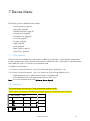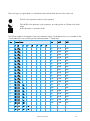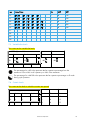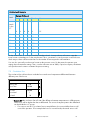
1
Manual for use and maintenance Farm-Manager Climate Controller Ag/MIS/UmGB-2042-01/13 rev. 1.2 P/N: 110251 FarmManager Farm-Manager Manual for use and maintenance Revision: N.1.2 of 15.03.2014 Product Software: 1.09 This manual for use and maintenance is an integral part of the apparatus together with the attached technical documentation. This document is destined for the user of the apparatus: it may not be reproduced in whole or in part, committed to computer memory as a file or delivered to third parties without the prior authorization of the assembler of the system. Munters reserves the right to effect modifications to the apparatus in accordance with technical and legal developments. © Munters AB, 2012 2 Index Chapter 1 INTRODUCTION ------------------------------------------------------------------------------------------------------------------------------------------------- 6 1.1 1.2 1.3 2 3.2 3.3 3.4 3.5 Components ----------------------------------------------------------------------------------------------------------------------------------------------------------------- 8 3.1.1 Farm-Manager .................................................................................................................................8 3.1.2 Farm-Master ......................................................................................................................................8 3.1.3 Extension box ...................................................................................................................................9 3.1.4 Communication ................................................................................................................................9 Features -------------------------------------------------------------------------------------------------------------------------------------------------------------------------- 9 Network Setup --------------------------------------------------------------------------------------------------------------------------------------------------------- 10 Front Panel------------------------------------------------------------------------------------------------------------------------------------------------------------------ 11 3.4.1 Keyboard........................................................................................................................................ 11 3.4.2 Interface and status screen ........................................................................................................ 12 3.4.3 Status screen .................................................................................................................................. 14 Hotkeys ------------------------------------------------------------------------------------------------------------------------------------------------------------------------ 14 HARDWARE INSTALLATION ------------------------------------------------------------------------------------------------------------------------ 18 4.1 4.2 4.3 4.4 4.5 4.6 5 Grounding --------------------------------------------------------------------------------------------------------------------------------------------------------------------- 7 Checking the battery level ------------------------------------------------------------------------------------------------------------------------------------- 7 Frequency inverters --------------------------------------------------------------------------------------------------------------------------------------------------- 7 BEFORE USING --------------------------------------------------------------------------------------------------------------------------------------------------- 8 3.1 4 Disclaimer ---------------------------------------------------------------------------------------------------------------------------------------------------------------------- 6 Introduction ------------------------------------------------------------------------------------------------------------------------------------------------------------------- 6 Notes ------------------------------------------------------------------------------------------------------------------------------------------------------------------------------- 6 SAFETY ASPECTS------------------------------------------------------------------------------------------------------------------------------------------------- 7 2.1 2.2 2.3 3 page 10 Step installation Guide---------------------------------------------------------------------------------------------------------------------------------- 18 Mounting the unit ---------------------------------------------------------------------------------------------------------------------------------------------------- 19 4.2.1 Sensors and shielded wiring ..................................................................................................... 20 4.2.2 Installation and electrical connections.................................................................................... 20 Farm-Manager wiring diagrams ---------------------------------------------------------------------------------------------------------------------- 21 Dip Switch configuration ------------------------------------------------------------------------------------------------------------------------------------- 28 Basic setup ----------------------------------------------------------------------------------------------------------------------------------------------------------------- 29 Environmental protection ------------------------------------------------------------------------------------------------------------------------------------- 30 TECHNICAL DATA -------------------------------------------------------------------------------------------------------------------------------------------- 31 © Munters AB, 2012 3 6 CONTROL MENU --------------------------------------------------------------------------------------------------------------------------------------------- 32 6.1 6.2 6.3 6.4 6.5 6.6 7 DEVICE MENU --------------------------------------------------------------------------------------------------------------------------------------------------- 43 7.1 7.2 7.3 7.4 7.5 7.6 7.7 7.8 7.9 7.10 7.11 8 Cycle operation ------------------------------------------------------------------------------------------------------------------------------------------------------- 43 Vent levels ------------------------------------------------------------------------------------------------------------------------------------------------------------------- 43 Variable fan levels -------------------------------------------------------------------------------------------------------------------------------------------------- 45 Curtain Levels ------------------------------------------------------------------------------------------------------------------------------------------------------------ 45 Circulation Fan --------------------------------------------------------------------------------------------------------------------------------------------------------- 46 Cool Pad --------------------------------------------------------------------------------------------------------------------------------------------------------------------- 47 Foggers ------------------------------------------------------------------------------------------------------------------------------------------------------------------------ 48 Light ------------------------------------------------------------------------------------------------------------------------------------------------------------------------------- 48 Feed ------------------------------------------------------------------------------------------------------------------------------------------------------------------------------- 48 Extra System -------------------------------------------------------------------------------------------------------------------------------------------------------------- 49 Time Clocks ---------------------------------------------------------------------------------------------------------------------------------------------------------------- 49 MANAGEMENT MENU --------------------------------------------------------------------------------------------------------------------------------- 50 8.1 8.2 8.3 8.4 8.5 8.6 8.7 9 Temperature curve -------------------------------------------------------------------------------------------------------------------------------------------------- 32 Minimum maximum level ------------------------------------------------------------------------------------------------------------------------------------- 33 6.2.1 Soft Min Max by Day Levels .................................................................................................... 34 6.2.2 Setting Cold Warm Levels ......................................................................................................... 35 6.2.3 By Weight ...................................................................................................................................... 35 Humidity ---------------------------------------------------------------------------------------------------------------------------------------------------------------------- 36 Static pressure----------------------------------------------------------------------------------------------------------------------------------------------------------- 37 System parameters ------------------------------------------------------------------------------------------------------------------------------------------------- 38 Control Mode ----------------------------------------------------------------------------------------------------------------------------------------------------------- 42 Animal Inventory------------------------------------------------------------------------------------------------------------------------------------------------------ 50 Day & Group ------------------------------------------------------------------------------------------------------------------------------------------------------------ 50 Alarm setting-------------------------------------------------------------------------------------------------------------------------------------------------------------- 51 Alarm reset ----------------------------------------------------------------------------------------------------------------------------------------------------------------- 52 Version ------------------------------------------------------------------------------------------------------------------------------------------------------------------------- 52 Read from plug -------------------------------------------------------------------------------------------------------------------------------------------------------- 53 Write to plug ------------------------------------------------------------------------------------------------------------------------------------------------------------- 53 HISTORY MENU ------------------------------------------------------------------------------------------------------------------------------------------------ 55 9.1 9.2 9.3 9.4 9.5 9.6 9.7 Temperature--------------------------------------------------------------------------------------------------------------------------------------------------------------- 55 Humidity ---------------------------------------------------------------------------------------------------------------------------------------------------------------------- 55 Water---------------------------------------------------------------------------------------------------------------------------------------------------------------------------- 56 Feed ------------------------------------------------------------------------------------------------------------------------------------------------------------------------------- 56 Mortality ---------------------------------------------------------------------------------------------------------------------------------------------------------------------- 56 Heater--------------------------------------------------------------------------------------------------------------------------------------------------------------------------- 57 Alarm ---------------------------------------------------------------------------------------------------------------------------------------------------------------------------- 57 © Munters AB, 2012 4 9.8 10 CALIBRATION MENU ------------------------------------------------------------------------------------------------------------------------------------- 59 10.1 10.2 10.3 10.4 11 Temperature--------------------------------------------------------------------------------------------------------------------------------------------------------------- 59 Humidity ---------------------------------------------------------------------------------------------------------------------------------------------------------------------- 59 Pressure ------------------------------------------------------------------------------------------------------------------------------------------------------------------------ 60 Water & feed ------------------------------------------------------------------------------------------------------------------------------------------------------------ 60 INSTALLATION MENU ----------------------------------------------------------------------------------------------------------------------------------- 61 11.1 11.2 11.3 11.4 11.5 11.6 11.7 11.8 12 Event ------------------------------------------------------------------------------------------------------------------------------------------------------------------------------ 58 Relay layout --------------------------------------------------------------------------------------------------------------------------------------------------------------- 61 Sensors layout ---------------------------------------------------------------------------------------------------------------------------------------------------------- 62 Digital input---------------------------------------------------------------------------------------------------------------------------------------------------------------- 62 Analog output ----------------------------------------------------------------------------------------------------------------------------------------------------------- 62 Variable speed fan------------------------------------------------------------------------------------------------------------------------------------------------- 63 Sensor definition ------------------------------------------------------------------------------------------------------------------------------------------------------ 63 Curtain setup ------------------------------------------------------------------------------------------------------------------------------------------------------------- 64 Fan Air Capacity ----------------------------------------------------------------------------------------------------------------------------------------------------- 64 STATUS SCREEN FUNCTIONS ------------------------------------------------------------------------------------------------------------------- 65 12.1 12.2 12.3 12.4 Cold start--------------------------------------------------------------------------------------------------------------------------------------------------------------------- 65 Set unit number -------------------------------------------------------------------------------------------------------------------------------------------------------- 65 Main Menu ---------------------------------------------------------------------------------------------------------------------------------------------------------------- 65 Calibration------------------------------------------------------------------------------------------------------------------------------------------------------------------ 65 12.4.1 Temperature sensor calibration ....................................................................................... 65 12.4.2 Calibration procedure........................................................................................................ 66 12.5 Test --------------------------------------------------------------------------------------------------------------------------------------------------------------------------------- 66 13 WARRANTY --------------------------------------------------------------------------------------------------------------------------------------------------------- 67 © Munters AB, 2012 5 1 Introduction 1.1 Disclaimer Munters reserves the right to make alterations to specifications, quantities, dimensions etc. for production or other reasons, subsequent to publication. The information contained herein has been prepared by qualified experts within Munters. While we believe the information is accurate and complete, we make no warranty or representation for any particular purposes. The information is offered in good faith and with the understanding that any use of the units or accessories in breach of the directions and warnings in this document is at the sole discretion and risk of the user. 1.2 Introduction Congratulations on your excellent choice of purchasing an Farm-Manager! In order to realize the full benefit from this product it is important that it is installed, commissioned and operated correctly. Before installation or using the fan, this manual should be studied carefully. It is also recommended that it is kept safely for future reference. The manual is intended as a reference for installation, commissioning and day-to-day operation of the Munters Controllers. 1.3 Notes Date of release: December 2012 Munters cannot guarantee to inform users about the changes or to distribute new manuals to them. All rights reserved. No part of this manual may be reproduced in any manner whatsoever without the expressed written permission of Munters. The contents of this manual are subject to change without notice. © Munters AB, 2012 6 2 Safety aspects 2.1 Grounding • Always connect temperature and sensor shields to earth ground. Avoid mixing high voltage wiring with sensor and low voltage wiring. • Keep the controller as far as possible from heavy contactor boxes and other sources of electrical interference. • Do not connect communication wire shields, which go from one house to another at both ends. Connect them at one end only. Connection at both ends can cause ground loop currents to flow, which reduce reliability. • The COM connection for communications is not the shield wire. The COM, RX and TX wires must connect to each other at all controllers. 2.2 Checking the battery level • Check the battery once a year. The output must be 2.7 volts (minimum). Authorized personnel only must replace the battery if the output is below the minimum required level or every five years. 2.3 Frequency inverters Frequency inverters can cause severe electrical and electromagnetic interference. Therefore, when employing a frequency inverter, it is critical that you carefully follow the manufacturer's installation instructions. In particular verify: • that the cable shielding between the inverter and any motor meets industry standards • proper grounding of the inverter's chassis and motor power cable • proper grounding of low voltage cable shield wire • that the controller and inverter cables are kept in separate conduits or wire bundles © Munters AB, 2012 7 3 Before using This manual will help you get the most out of your new MUNTERS Farm-Manager controller. This manual provides easy-to-use information for installation, operation, long/short term planning and parts listing. Read this manual before operating your MUNTERS Controller. • Components, page 8 • Features, page 9 • Network Setup, page 10 • Front Panel, page 11 • Hotkeys, page 14 3.1 Components • Farm-Manager • Farm-Master • Extension box • Communication 3.1.1 FARM-M ANAGER Farm-Manager is the ultimate pig house controller, providing you maximum capability with minimal complexity in programming and controlling a large number of relays and outputs in a single room. Equipped with an easy programming interface, Farm-Manager provides programmable outputs for all major features and a 4x20 character LCD that provides display feedback on the programming and device status. In addition, the Farm-Manager collects history, events and alarms along with all relevant data for up to 100 days. The unit supports: • eight output relays • four analog outputs • three temperature or humidity sensors 3.1.2 FARM-M ASTER As an option, Farm-Manager connects to Farm-Master units to extend control to other rooms. The unit has high performance and quick response time. Farm-Master features include accurate temperature and humidity sensors, secure transmission of data even in noisy environments and the added convenience of eight output relays as well as four analog outputs. Each Farm-Master can operate independently, in case of a malfunction or loss of power in the FarmManager. When using its internal battery (operating as a standalone), there is no history collection or possibility to change parameters. There are three Farm Master models: • 5020: No variable speed • 5021: One channel variable speed © Munters AB, 2012 8 • 5022: Two channels variable speed 3.1.3 E XTENSION BOX The Farm Master Extension box enables adding eight additional relays to a Farm Master network. Refer to the Farm Master Extension manual for details. 3.1.4 COMMUNICATION Communication between the controllers and PCs/Internet is provided via a MUX or the Farm Guard. Refer to the relevant manuals for details regarding these products. 3.2 Features • Farm-Manager o o o o o o o o o o o o o Easy programming LCD 4x20 characters Positioning scrollbar Swift device and feature selection Data plug Large numeric keypad Communication with up to ten Farm-Master units Extensive history of events & alarms Data collection Real time visual outlook Alarm system (for every Farm-Master unit) Multi language support PC communication NOTE In addition to the features above, each Farm-Manager supports the Farm Master features listed below. • Farm-Master o o o o o o o o o o o o Easy programming Programmable outputs Alarm system Large display Up to three temperature sensors Up to eight heavy duty relays (1 HP) On/Off/Auto override switches Static pressure control (optional) Four analog outputs (0-10 volts) Variable speed fan output with bypass Water, feed, and humidity control Automatic curtain calibration © Munters AB, 2012 9 3.3 Network Setup Fig. 1: Farm-Manager Network with Options Fig. 1 illustrates the elements of a Farm Manager network. Keep in mind that Farm Guard, Farm Master and Farm Master Extension units are optional. © Munters AB, 2012 10 3.4 Front Panel 3.4.1 KEYBOARD Table 1: Keyboard Functions Letter Function Description A Menu Toggles the menu function B Room The room key is used to switch between rooms. Press the room key and press a number to reach the desired room. C Arrows Use the arrows to scroll; a short press in any direction moves one notch. D Round Arrows The Round Arrows key is used to scroll between options (Yes/No, On/Off and '-'). E OK The OK key is a confirmation key. F Numeric Pad The Number keys are selected when a numeric choice is done and when numbers should be selected. Moreover, those keys are used for Hot Keys purposes. G Delete The 'Del' key erases typing mistakes. H Arrows Use the arrows to scroll; a short press in any direction moves one notch. © Munters AB, 2012 11 Letter Function Description I Select The Select key is a confirmation key. J Relays Use the switch to set each relay to the required status (On, Off, Auto) 3.4.2 INTERFACE AND STATUS SCREEN • Main screen • Menu 3.4.2.1 Main screen TEMP 27.1 ROOM RH% 75.0 DAY TRGT 24.0 Hr. RH%T 80.0 LEVEL #01 1 13:21 1 Farm-Manager displays here and in Hot Screen 2: • inside temperatures as low as -20° C • outside temperatures as low as -40° C • inside/outside temperatures as high as +50° C NOTE The main screen shows basic information regarding rooms controlled by the Farm-Manager, depending on what equipment is plugged in. Other parameters like static pressure (PRESS), outside temperature (OUT), level, message and offset are also shown on the main screen when they are plugged in. Parameters are shown according to priority. There is a square in level line indicating tunnel level. Parameter Description TEMP Current room temperature RH% Current room humidity TRGT Target Temperature OUT Outside Temp TRGT Target temperature ROOM #01 Room number DAY Growth day Hr. Time LEVEL Current ventilation level CAUTION In case of an alarm, a blinking message appears on any one of the main screens in addition to the siren. Pressing "0" on the main screen, when the alarm message is on, directs you to the room with the alarm. Resetting the alarm is possible, but it only stops the siren and not the screen message. Only by fixing the problem will the message stop. © Munters AB, 2012 12 Pressing the zero on the numeric pad, while the alarm is activated opens the room status screen. O.K No com. N/A Alarm 1 2 3 4 5 6 7 8 9 10 • An empty square indicates that the Farm-Manager identifies the houses correctly. • A filled square indicates an alarm is on. • A dotted square indicates that there is no communication with the Farm-Master. NOTE Once communication is off there is no history accumulation in the Farm-Manager. • A dotted lined square indicates N/A (not available). 3.4.2.2 Menu The table below details thee Interface and Status screen menu structure. 1 CONTROL 2 DEVICE 3 MANAGEMENT 4 HISTORY 5 CALIBRATION 6 INSTALLATION 1. Temp Curve 1. Vent Levels 1. Animal Inv. 1. Emp 1. Temp 1. Relay Layout 2. Min/Max Level 2. Var. Fan Levels 2. Day Group 2. Hum 2. Hum 2. Sensors Layout 3. Humidity 3. Curtain Levels 3. Alarm Setting 3. Water 3. Pressure 3. Dig. Input 4. Alarm Reset 4. Feed 4. Water & Feed 4. An. Output 4. Static Pressure 4. Circulation Fans 5. System Param 5. Cool Pad 5. Version 5. Mortality 5. Var. Speed Fan 6. Control Mode 6. Foggers 6. Read From 6. Heater 6. Sensor Def 7. Light 7. Write To 7. Alarm 7. Curtain Setup 8. Event 8. Comm Test 8. Feed 9. Ex. Sys. 10. Time Clocks 11. Var. Heat For details on the menus, refer to: • Control Menu, page 31 • Device Menu, page 43 © Munters AB, 2012 13 • Management Menu, page 50 • History menu, page 55 • Calibration menu, page 59 • Installation menu, page 61 3.4.3 S TATUS SCREEN The Status screen displays the following: • trg: The target temperature for the room. (Can be changed from the Farm-Master itself, only if a curve was not defined.) • rH: Humidity in room. • rH.t: Target humidity. • day: Growth day for the room. The display alternates between the name and the figure. Once Farm-Manager is activated the main screen appears showing the inside average temperature of the rooms. Pressing SEL for 2 seconds allows the user through the main screen’s information. For further information on this screen, refer to Status Screen functions, page 65. 3.5 Hotkeys To reach the Hotkeys screens, press the Hotkey number while viewing the main screen. The room number is located on the upper right side of the Hot screen. To view the status of different rooms: 1. Enter the desired room using the room key and pressing the room number. 2. Press the desired screen Hotkey number. Hot key 1: Main screen Hot key 2: Temperature screen The temperature hot screen displays information regarding the status of temperature sensors attached to the Farm-Manager. The average temperature (defined in table 6.6) is displayed on the upper left side and shows the average of temperature sensors T1 through T3. Table 6.2 enables the user to set the temperature sensor T3 as 'OUT' and therefore T3 presents the outside temperature. On the right side, you can see the temperature for entering tunnel ventilation mode. T1 24.4 #01 T2 25.1 AVG. 22.9 T3 22.5 TUN. 23.3 T4 23.3 OUT 31.3 Room Number Farm-Manager displays here and in the Main Screen: • inside temperatures as low as -20° C • outside temperatures as low as -40° C © Munters AB, 2012 14 • inside/outside temperatures as high as +50° C Hot key 3: Targets Screen This screen shows all of the target levels selected for any of the controller's functions. TARGETS #01 TEMP 22.5 PRESS 0.01 MIN LEVEL 5 ON 60 MAX LEVEL 15 OF 240 Hot key 4: Curtain Position Screen This screen shows the curtain opening position as a percentage. If for example curtain 2 show 40%, it is 40% open. CURTAIN POSITION #01 CURT.1 50 CURT.2 CL CURT.3 40 CURT.4 -- TUNNEL OP INLET -- Hot key 5: Curtain Steps This screen shows the number of steps for each curtain. CURTAIN STEPS #01 CURT.1 12 CURT.2 -- CURT.3 14 CURT.3 -- TUNNEL -- INLET -- Hot key 6: System Status This screen shows if humidity treatment is ON/OFF, if the cycle is ON/OFF and how many seconds left for the current cycle. SYSTEM STATUS #01 HUMIDITY TREAT. ON/OFF CYCLE STATUS ON/OFF CYCLE LEFT 29 © Munters AB, 2012 15 Hot key 7: Variable Fans This screen shows each variable fan’s speed in percentages. VARIABLE FANS #01 FAN 1 30% FAN 3 n/a FAN 2 40% FAN 4 n/a Hot key 8: Variable Heat This screen shows each variable heaeter’s heat in percentages. VARIABLE HEAT #01 HEAT 1 70% HEAT 2 n/a Hot key 9: Relay Status This option shows the status of each relay; pressing 9 again dsiplays the extension box's relay activity. RELAY STATUS #01 R1– R2– R3– R4– R5– R6– R7– R8– Relay Active Relay Not Active EXTENSION RELAYS '9' Hot Key Round Arrow key: Temperature History This option shows a summary of temperature according to temperature room. This screen consists of the following columns: • Day: Day number • Min: Minimum value measured on that day • AVG: Average value calculated on the measured temperatures through the whole day • MAX: Maximum value measured on that day TEMPERATURE ROOM #1 DAY MIN AVG MAX 23 21.4 23.5 24.5 24 21.8 24.6 24.7 © Munters AB, 2012 16 Hot Key: Ventilation by Weight Hot Screen This option displays critical parameters connected to the Ventilation by Weight option: o Current requested calculated air volume per kilo o Current requested airflow per weight o Average weight AIR STATUS #1 Req. Air Vol. 0 Cur. Air Vol. 0 A. Wg 22.0 Ar. Fl 0.13 NOTE Versions 1.09 or higher support this option. Refer to By Weight, page 35 for more information. © Munters AB, 2012 17 4 Hardware Installation CAUTION The Farm-Manger (and any controller in the network) must be installed by an authorized electrician. WARNING! Disconnec the power before installing to avoid electrical shock and damage! CAUTION To avoid exposing the Farm-Manager to harmful gases or high humidity, install it in the service room. NOTE Installation Category (Over-voltage Category) II. Protect the power supply to the controller with a 10 amp circuit breaker. All electrical connections should comply with the National Electrical code. • 10 Step installation Guide, page 18 • Mounting the unit, page 19 • Farm-Manager wiring diagrams, page 21 • Dip Switch configuration, page 28 • Environmental protection, page 30 4.1 10 Step installation Guide This quick guide details the order of actions when installing the system: 1. Hardware Installation: Read all technical specs and use the wiring diagrams, from page 19 on this manual, to properly install all hardware. This action erases the memory completely and loads the default definitions. 2. Farm-Manager setup (Room #0): Follow the instructions in Basic setup, page 29. NOTE Before making any changes make sure you are changing the correct room by checking the room number on the upper right side of the screen. 3. Farm-Manager Installation: Follow the instructions from page 61. If you have more than one room, don’t forget to change room number and install the rest. 4. Farm-Manager Calibration: Calibrate your equipment on each room using the service menu. 5. Farm-Manager Control: Follow the instructions from page 31 regarding the control parameters for each room. 6. Farm-Manager Device: Follow the instructions from page 43 regarding the device settings for each room. 7. Farm-Manager Management: Follow the instructions from page 50 regarding live stock and alarm management for each room. The History menu is for view-only. If Farm Master units have been installed, do the following after installing the hardware (step 1): © Munters AB, 2012 18 8. Farm-Master Cold Start: Plug in the controller and hold its three keys simultaneously for a few seconds until a CLD sign appears. This action erases the memory completely and loads the default definitions 9. Farm-Master Unit Number: Press the two arrow keys together until the number sign (no.) blinks. Select the unit number with the up and down arrows and press Select. 10. Farm-Manager Cold Start: Plug in the controller and hold the delete key (DEL) for a few seconds until a Cold Start sign appears. 4.2 Mounting the unit 1. Screw the metal sheet on the back of the box using the four supplied screws. Mount the Piguard Plus through the mounting holes. 2. Measure the outer hanging holes of the sheet and drill hanging screws parallel to the holes. 3. Hang the controller. Hanging Holes Hanging Holes Fig. 2: Metal sheet assembly diagram 4. Open the enclosure lid by unfastening the four screws. 5. Drill holes at bottom of the box and place cable holders. 6. Place the required cables through the cable holders at the bottom of the unit. Connect the wires according to the wiring diagrams. 7. Make sure that you use wires large enough for the load of the variable speed circuit. 8. To connect temperature and humidity sensors use shielded two or four conductor #18-#24 gauge cables. Connect the shields to the ground metal strip. Do not connect the shields to more than one point, or you may induce ground loop currents. 9. Close the Farm-Manager (and Farm Master) enclosure lid carefully and tightly. Use RTV silicon or equivalent sealant to seal the cable holders. © Munters AB, 2012 19 10. After installation is completed, operate the units for a few hours and re- check for proper operation. 4.2.1 S ENSORS AND SHIELDED WIRING • For long shielded wires, connect the shield to ground at one end only. • From the ground terminal, run a heavy wire directly to the ground rod. It is acceptable, if necessary, to run the heavy ground wire to the electrical service grounding system rather than directly to the ground rod. • Do not use light wires for these ground connections. They must carry heavy lightning currents, sometimes exceeding thousands of amperes. In addition, do not use the shielding of sensor and low voltage wiring for this purpose. • Ensure that all ground connections go to a single local point. When lightning strikes, grounds a meter or two apart are at significantly different voltages. If you have several electronic boxes with individual grounds, connect all these together to a single point (if possible), preferably to the surge protector ground. This should continue to the ground rod or the electrical service. In particular, avoid grounding any controls remotely through shield wiring. • Do not use shields to create a path for lightning. For long shield wires, such as building to building runs, connect the shield to ground at one end only, to reduce the chance of conducting lightning from one building to another. • When splicing sensors to longer wires, ensure that the splice is waterproof. Use adhesive lined heat shrink (marine grade) to make waterproof connections. • Use a good compression connector for splicing. This is better than soldering. Do not simply twist wires together and then cover with electrical tape. • Keep sensor wiring separate from other power distribution and high voltage wiring. Ensure that lightning on other wiring will not transfer to the sensors. • Install outside temperature sensors so that the sun will not cause false readings and exhaust air from the building does not affect the sensor. 4.2.2 INSTALLATION AND ELECTRICAL CONNECTIONS • Install computerized electronic controls at least one meter (three feet) away from interference sources such as high voltage wiring to motors, variable speed, light dimmers, relays. • Install electronic controls in a separate ventilated control room that is protected from extreme temperatures and dirty environments. Place the controls so that the operators can conveniently use the control and read indicators and displays. • Give your installation a professional appearance, with all wiring in conduit or neatly installed. Keep low voltage wires separate from high voltage wires. • Use shielded wiring for low level signals. For buried wiring (building to building runs) use high grade jell filled cables that are impervious to moisture. • Seal cable entry points and control boxes to prevent contamination and corrosion. If you use silicon sealant with acetic acid cure, keep the control open and ventilated until cured. Otherwise, acetic acid attacks the metal parts, including circuitry. • Drill cable entry holes on the bottom of the box only. © Munters AB, 2012 20 4.3 Farm-Manager wiring diagrams • Fig. 3: Relay Cards • Fig. 4: Display Cards • Fig. 4: MUX – Farm-Manager – Farm Master Wiring Diagram • Fig. 5: Farm Guard – Farm-Manager – Farm Master Wiring Diagram • Fig. 6: Farm-Manager outputs • Fig. 7: Wiring Diagram of Main Voltage Section Showing Filtering • Fig. 8: Temperature Sensors and Relays Wiring Fig. 3: Relay Cards © Munters AB, 2012 21 Fig. 4: Display Cards © Munters AB, 2012 22 Fig. 5: MUX – Farm-Manager – Farm Master Wiring Diagram © Munters AB, 2012 23 Fig. 6: Farm Guard – Farm-Manager – Farm Master Wiring Diagram © Munters AB, 2012 24 Fig. 7: Farm-Manager outputs The following table details the inputs. Input Digital input Number Wire 25 COM 26 Digital input 1 28 Digital input 2 27 Digital input 3 © Munters AB, 2012 25 Input Humidity Number Wire 12 White 14 Red 16 Black 1 4 2 Analog output 3 4 6 COM 3 + 5 COM 8 + 10 COM 7 + 9 COM NOTE To ensure compliance with EMC 61000-6-3, install an appropriate filter; for example a TDKRSHN-2016 L or similar device. Fig. 8: Wiring Diagram of Main Voltage Section Showing Filtering © Munters AB, 2012 26 Fig. 9: Temperature Sensors and Relays Wiring CAUTION Each output requires a 16 amp circuit breaker! Refer to the following table. Temperature sensor Number Wire 18 COM 20 T1 21 T2 © Munters AB, 2012 27 Temperature sensor Number Wire 22 T3 23 T4 4.4 Dip Switch configuration On the Farm-Manager’s CPU there are two parallel blue dip switches, located on the left hand side of the PCB. If you want hardware protection during the curtains' activity, connect the curtains in pairs, according relay numbers (1-2; 3-4; 5-6), and to move the three matching dipswitches to off position. On the PCB is written which switch goes with the relay. Not doing so may result in the motors closing and opening the curtains simultaneously, due to bad configuration or programming on behalf of the user. Fig. 10: Farm-Manager’s CPU © Munters AB, 2012 28 4.5 Basic setup The Farm-Manager setup is a procedure for customizing the Farm-Manager and Farm Master units to match the system. After performing the Basic Setup, configure the menus as required. Refer to the following chapters for details. To reach the Farm-Manager Setup screen go to: • Room key, press '0' and "Enter" from any of the main screens. The following appears: Farm-Manager ===COMM.=== FarmManager# 1 PC.Baudrate 4800 Total Rooms 5 =Language= Language ►English ===UNITS=== Temp. ►F Press ►IN.W.C Other Units IMPER =OUT TEMP.= From Room ►1 ===TIME=== Time(hh:mm) ►12:06 =PASSWORD= Full Access 0 Read Only ►0 Table 2 details the setup parameters. Table 2: Farm-Manager Setup Screen Parameter Description FARM-MANAGER Farm-Manager identity (Maximum: 32). Define the Farm-Manager’s unit number. If only one Farm-Manager exists, the unit number is 1. Otherwise, the unit numbers are sequential (1, 2, 3…). BAUDRATE Select communication baud rate with the PC. TOTAL ROOMS Set the number of Farm-Masters connected to the Farm-Manager (if any) (Maximum: 10). Make sure you define the Farm-Masters' numbers consecutively without skipping digits. For example: 1, 2, 3, 4... If not © Munters AB, 2012 29 Parameter Description set this way, the Farm-Manager does not detect any Farm-Masters. After defining the number of Farm-Master controllers, the FarmManager begins a search to find the controllers defined. LANGUAGE Select language. TEMPERATURE UNIT Select between Celsius and Fahrenheit. PRESSURE Select between: Milibar, IN.W.C, Pascal, CM.W.C, MM.W.C. OTHER UNIT Select between meter and imperial. Controls the speed and rain flow. Units for speed are meter/h or mile/h and for rain millimeter/h or inch/h. TIME Set clock time. PASSWORD Set a password to protect data. NOTE The last six parameters apply to any installed Farm-Masters. 4.6 Environmental protection Recycle raw materials instead of disposing as waste. The controller, accessories and packaging should be sorted for environmental-friendly recycling. The plastic components are labeled for categorized recycling. © Munters AB, 2012 30 5 Technical data Power Supply Mains voltage single phase 115/230 VAC Main fuse 315 mA Secondary fuse 1A Maximum power consumption 22 VA Available power for peripheral equipment Analog Inputs 3 temperature sensors RTS-2 (Thermistor) 4 analog outputs 20 mA, 0-:-10V 1 humidity sensor input 0-:-3V 2 analog inputs 0-:-5V Digital inputs 3 digital inputs Dry contact 5 V/ 2 mAmp Relays Outputs 8 Normally Open power relays 2HP, 12 Amps, 250 VAC Variable Speed Output 2.2 KW, 10 Amps, 230 VAC 4.4 KW, 10 Amps, 1150 VAC Housing dimensions (L x W x H cm) 92.5 x 73 x 36 Ambient climate Operating temperature range 0º to + 50º C Storage temperature range -10º to + 70º C CAUTION The Farm-Manager is designed for indoor applications only! © Munters AB, 2012 31 6 Control Menu • Temperature curve, page 33 • Minimum maximum level, page 33 • Humidity, page 36 • Static pressure, page 37 • System parameters, page 38 • Control Mode, page 42 6.1 Temperature curve TEMP CURVE #01 # Day Target Heat Tunnel Low Alarm High Alarm 1 1 23.3 21.1 37.2 21.1 37.2 2 14 22.2 20.0 37.2 10.0 35.0 3 42 21.1 18.8 32.2 10.0 35.0 4 70 20.5 17.8 29.4 10.0 35.0 5 98 20.0 16.6 26.6 10.0 32.2 ..10 The Farm-Manager provides separate temperature curves for growth day, target temperature, heat temperature, tunnel temperature and low/high alarm temperatures. The controller creates a curve for each one and uses it as reference. The program alters at midnight prior to the next day on the next row programmed. There are up to 10 programmable rows, but the controller maintains the previous day’s settings for every empty line; therefore it is not necessary to fill the entire table. Limits: • Day 0 - 999 • Target -20 to +50° C • Low Alarm -20° to +50° C (without floating point) • High Alarm -20° to +50° C (without floating point) © Munters AB, 2012 32 6.2 Minimum maximum level The Minimum/Maximum Level menu sets the current absolute minimum and maximum ventilation levels available. There are five minimum/maximum level choices: • Min/Max by Growth Day • Soft Min/Max by Day • Min/Max by Time of Day • Soft Min/Max by Time • Cold/Warm (refer to Setting Cold Warm Levels, page 35) • By Weight (refer to By Weight, page 35) How do these options work? • Min/Max by Growth Day and Min/Max by Time of Day define the ventilation by the growth day or time, respectively. • Soft Min/Max by Day and Soft Min/Max by Time enable decreasing the minimum level of ventilation in extreme cold. For that, the user uses the Soft Min level that operates according to outside or inside temperature. Refer to Soft Min Max by Day Levels, page 34. • Cold/Warm is used to limit the ventilation levels when temperatures are extremely cold or hot. These settings override any other definitions when temperatures reach the levels defined in the Outside T.Cold and Outside T.Warm parameters (refer to page 38). Refer to Setting Cold Warm Levels, page 35. • By Weight determines the ventilation by the total projected weight of the animals. By Day Day Min Max 1 1 21 14 3 30 98 9 30 Soft Minimum By Day Day Min Cold Min Warm Max 1 1 11 25 14 3 13 30 98 9 19 30 Soft Minimum By Time From Time Min Cold Min Warm Max 8:00 1 7 25 20:00 3 5 23 © Munters AB, 2012 33 By Time From Time Min Max 8:00 1 21 20:00 3 21 Cold/Warm Day 1 14 98 Min Level 1 3 9 M/C 02 13 19 M/W 25 30 30 6.2.1 S OFT M IN M AX BY DAY L EVELS Day Min Cold Min Warm 1 1 10 Max 30 System parameters -> Min/Max Level control DSFT (Soft Min by days) Soft Min temp Out (Control by outside temperature) Soft Min Band 2.2° C (Differential below heat temperature) If the inside temperature is above 21° C (heat temperature) the controller operates according to the Min Warm levels. If the inside temperature is below 19° C (Soft Temp) the controller works according to Min Cold levels. When the temperature is between 21° C and 19° C the controller creates a curve between the Min Cold and Min Warm levels. For example, at 20° C the controller operates in level 5. Important: • When using Soft Min according to inside temperature there is a curve between minimum warm and minimum cold, while decreasing levels. When temperature increases the level remains at the lowest level reached, until reaching the heat temperature. © Munters AB, 2012 34 • When using Soft Min according to outside temperature there is a curve between minimum warm and minimum cold while decreasing and increasing levels. To select the type of minimum/maximum go to System Parameters and change the level control (page 38). 6.2.2 S ETTING COLD WARM LEVELS To set Cold/Warm Vent levels: 11. Go to Control > System Parameters > Outside T.Cold. 12. Set the outside cold temperature (default: -5° C, minimum -20° C, maximum +20° C) 13. Go to Control > System Parameters > Outside T.Warm. 14. Set the outside warm temperature (default: +20° C, minimum 0° C, maximum +40° C) 15. Go to Control > System Parameter > Level Control. 16. Select C/W. 17. Go to Control > Min. Max. Level 18. Enter the required ventilation levels. 6.2.3 BY WEIGHT The By Weight option enables controlling the minimum air flow depending on the number of pigs, their weight and the current outside temperature. When using the Weight option, Farm-Manager takes several parameters and calculates the air speed, level of ventilation and cycle time needed to supply the required volume. As opposed to the other ventilation methods, the Weight option is dynamic, with the ventilation changing according to the current parameters (quantity of air required, weight of animals and number of pigs, outside air temperature). In addition, Ventilation by Weight sends out an alarm if the current ventilation is below the minimum required level. NOTE This option is available in Version 1.09 and higher. To set up the Weight Option: 1. In the Install > Fan Air Capacity menu, define the air capacity / hour (page 64). 2. In the Control > Min. Max Level menu, select By Weight. 3. Set the parameters as required. Day 1 3 6 10 12 15 17 19 21 SOFT MIN/MAX LEVEL BY Min Air Per Kg/Lb Level Cold Warm 1 0.5 1.5 1 0.5 1.5 1 0.5 1.5 4 1.1 1.7 4 1.1 1.7 7 1.1 1.7 7 1.1 1.7 7 1.1 1.7 7 1.1 1.7 WEIGHT (OUT TEMP) Max Level Animal Weight 16 16 16 16 21 21 21 21 21 4.0 15.0 30.0 45.0 55.0 80.0 120 170 240 o Day: Set growth day o Min Level: Set the minimum level of ventilation (refer to Vent levels, page 43) default: 1; range 1 - 30 o Air Per Kg/Lb: Volume of air per kilogram/pound per hour per pig. © Munters AB, 2012 35 Cold: Volume of air supplied when the outside temperature goes down to the Cold Temperature parameter (see the following section). default : 0.5; range 0.1 - 99.9 Warm: Volume of air supplied when the outside temperature reaches Warm Temp. – Diff Below Heat (see the following section). default : 0.5; range 0.1 - 99.9 NOTE As the level rises between days (for example between day 6 and day 10 in the screen above), the air volume rises proportionally each day, once a day. For example, on Day 7, the Cold Air per Kg/Lb rises to 0.65; on Day 8, 0.8 and so on. o Max Level: Set the maximum level of ventilation (refer to Vent levels, page 43). o Animal Weight Curve: This curve enables defining the animal average weight per day. The curve provides the day's current animal weight to be used when calculating the total livestock weight: Total Weight = (Average Animal Weight) x (Total Animals Count) default: 10.0; range 1.0 - 999 4. In the Management > Animal Inventory menu, type the number of pigs. Ventilation by Weight is configured. 6.3 Humidity This screen sets the humidity specifications. HUMIDITY #01 Target 0 Delay (minute) 0 Duration (sec) 0 Band (%) 2 Dif From Heat 0.0 • Target: Set the target humidity. • Delay: Delay time before humidity treatment. The controller checks during the delay time when the humidity is above the target. • Duration: Humidity treatment duration time. • Band: Band zone to balance the treatment. • Below heat: Enter the difference from the target temperature at which the humidity treatment begins. The difference can be positive or negative.. © Munters AB, 2012 36 6.4 Static pressure This screen sets the static pressure parameters. STATIC PRESSURE #01 Out temp low 5 Press. (low t) 0.08 Out temp high 35 Press. (high t) 0.12 Tunnel press. 0.08 Low alarm 0.05 High alarm 0.15 Band 0.04 Wind delay (s) 10 Pre open (s) 5 Alarm MINIMUM level 0 • Out Temp low: Set outside low temperature definition for low pressure target. • Press (Low T): Static pressure target for the outside low temperature (See graph below, point 1). • Out Temp High: Set outside high temperature definition for high pressure target. • Press (High T): Static pressure target for outside high temperature (See graph below, point 2). • Tunnel Pressure: Static pressure target during tunnel ventilation mode. • Low Alarm: If static pressure drops below set point, an alarm is active. • High Alarm: If static pressure rises above set point, an alarm is active. • Band: Set band zone to balance the system. • Wind Delay: Static pressure is affected by wind; this definition ensures that an alarm is given due to a stable change in pressure and not an accidental one that may have been caused by a wind gust. • Pre Open: Time setting for curtains to open before fans activate. This ensures that the curtains are open before fan activity. • Alarm minimum level: The level at which low static pressure alarm is activated. © Munters AB, 2012 37 6.5 System parameters SYSTEM PARAMETERS =====TEMP===== Offset ► 0.0 Band 1.0 Cool Factor 10% Cold Above TRG 3.0 Cold Below TRG 1.0 ====HEATER==== Heat Band 1.0 Heat Lamp Diff 0.0 Heat Offset 0.0 ====MIN MAX==== Curve NO Level Control Day Soft Min Temp OUT Soft Temp Band 10.0 Outside T.Cold -5 Outside T.Warm +20 ====PRESSURE==== Press Control NO ====LEVELS==== Inc Delay (s) 180 Dec Delay (s) 120 ====TUNNEL==== st 1 Tun Level 0 Dif Below, Exit 2.0 T.Out Dif, Exit 18.0 Exit Delay (m) 5 ===CURTAINS=== Calib Steps 99 ===INLETS=== Power Fail Calib No ==COOL PAD== From Level 0 Temp Band 1.0 © Munters AB, 2012 38 Humidity Band% 2.0 ===FOGGERS=== From Level 0 Temp Band 1.0 Humidity Band% 2.0 ===VAR. FAN=== Freeze Protect NO Fan Cycle High Min Fan 1 Spd% 30 Min Fan 2 Spd% 30 Min Fan 3 Spd% 30 Min Fan 4 Spd% 30 ===VAR. HEAT === Temp. Diff No Temp. Band 0.0 Min Heat 30% ==TEMP== • Offset: Use this parameter to change the offset target temperature up or down for any purpose. Default: 0.0 • Band: This refers to the target temperature zone range. The User’s Manual refers to this as the Happy Zone. Default: 1.0 • Cool Factor (%): The minimum correction towards target happy zone during each increase ventilations delay (patience factor). If the temperature does not improve by this amount, the controller will increase one level. Default: 10% • Cold Above TRG: Temp Change To Be Considered As Quick Drop In Degrees, To Reduce A Level To Reach Above Target Temp (Degrees). Default: 3.0 • Cold Below TRG: Temp Change To Be Considered As Quick Drop In Degrees, To Reduce A Level To Reach Below Target Temp (Degrees). Default: 1.0 ==HEATER== • Heat Band: Set the happy zone for the heaters on/off. Default: 1.0 • Heat Lamp Diff: Differential from target temperature to initiate heat lamps. Default: 0.0 © Munters AB, 2012 39 • Heat Offset: Use this parameter to change the offset Heat temperature up or down for any purpose. Default: 0.0 ==MIN MAX== • Curve: If Yes - Min max table curve between the days. Default: NO - Works according to previous line until current day. • Level Control: Four options for the min max table method: Five options for the min max table method: by days, soft minimum by days, by time, soft minimum by time, cold/warm.. Default: Day • Soft Min Temp: Choose whether to use the current inside temperature or the outside temperature to determine when to use the soft minimum. Default: OUT • Soft Temp Band: Difference below heat temperature to set temperature at which to enforce low temperature minimum ventilation level. Default: 10.0 • Outside T.Cold: This parameter defines the temperature below which ventilation is reduced to the minimal level defined when using Cold/Warm Min Max Ventilation. Default: -5° C • Outside T.Warm: This parameter defines the temperature above which ventilation is increased to the minimal level defined when using Cold/Warm Min Max Ventilation. Default: +20° C ==PRESSURE== • Press Control (Yes / No): If a pressure control should be done in Min Vent mode by the inlet and in Tunnel mode by tunnel curtain, select Yes. Otherwise, select No. Default: No. ==LEVELS== • Inc Delay Time: This is the standard minimum delay before increasing ventilation levels. Default: 120 (sec) • Dec Delay Time: This is the standard minimum delay before decreasing ventilation levels. Default: 180 (sec) ==TUNNEL== st • 1 Tunnel Level: Switching into and out of tunnel ventilation is a major change in ventilation. For tunnel ventilation, enter the first tunnel level here. If set on 0 there is no tunnel level. Default: 0 • Dif Below, Exit: This parameter sets amount below the tunnel entry temperature at which to exit tunnel ventilation. Tunnel temperatures are determined by the sensors specified in Temperature Definition. Entry and exit is also controlled by these sensors. The controller can not exit tunnel until the tunnel temperature is this much less than the tunnel entry temperature. It must be a positive number. Default: 2.0 © Munters AB, 2012 40 • T.Out Dif, Exit: Set the relative temperature for the outside sensor at which to exit tunnel. The controller can not exit tunnel until the outside temperature is less than tunnel temperature plus this differential. This number can be positive or negative. To eliminate the effect of this parameter on tunnel exit, enter a large positive number such as 90.0. Default: 0.0 • Exit Delay (m): Delay time after satisfying tunnel exit conditions. Default: 5 (minutes) ==CURTAINS== • Calibration Steps: To ensure accurate positioning of the curtains, the controller may periodically calibrate the curtain position. This parameter sets the maximum number of curtain movements or stages between calibrations. Calibration consists of forcing the curtain to the nearest limit, 0% or 100% with adequate overtime to ensure reaching the limit switch. Then the curtain returns to its proper position. In the event several curtains require calibration, they calibrate one at a time to reduce the amount of restriction to normal ventilation. The stage counter resets automatically each time the curtains reach a limit point to prevent excessive calibration. Default: 99 ===INLETS=== • Power Fail Calibration: When set to yes, Farm-Manager automatically resets (calibrates) the inlet after a power failure or power reset. The inlet opens completely and then closes according to the static pressure at the required position. Default: No ==COOL PAD== • From Level: From which ventilation level to begin cool pad operation. 0 is no operation. Default: 0 • Temp Band: On/off differential or Happy Zone with respect to temperature for the ‘Cool #’ and ‘Cool Pad #’ relays. These normally control the water pump for the cool cells. Default: 1.0 • Humidity Band: On/off differential or Happy Zone with respect to inside humidity for the ‘Cool #’ and ‘Cool Pad #’ relays. Default: 2.0 ==FOGGER== • From Level: From which ventilation level to begin fogger operation. 0 is no operation. Default: 0 • Temp Band: See cool pad above. Default: 1.0 • Humidity Band: See cool pad above. Default: 2.0 ==VAR. FAN== • Freeze Protect: A general protection for the variable speed fan motor. When the variable speed fan starts from zero speed, the freeze protection activates it to 100% for 5 seconds. Default: No © Munters AB, 2012 41 • Min Motor1, 2, 3, 4 Spd: Safety speed fan operation delay. This is the Fan minimum speed to begin operation. Default: 30. • Fan Cycle: Enables cycle operation in cold temperatures when set to Low. Default: High. ==VAR. HEAT== • Temp. Diff: Differential from heat temperature to initiate variable heaters. Default: High. 0.0 • Temp. Band: Temperature range in which the variable heater operates in the power range between minimum and 100%. For example: the heater temperature is 80°F, the temp diff is -1 and the temp band is 2. At 79°F the heater will operate at minimum power according to minimum heat. At 77°F and down the heater will operate at 100% and between 79°Fand 77°F there will be a power band between minimum and 100%. Default: High. 0.0 • Minimum Heat: Minimum heaters operation for safety measures. This parameter refers to both var. heat 1 and var. heat 2. Default: 30% 6.6 Control Mode This screen sets enables system operations (Normal mode) or disables operations (Empty mode). CONTROL MODE #01 Set Mode ►Normal Empty In this screen control mode can be set, choosing between Normal mode and Empty mode. EMPTY MODE Empty mode is applied in cases of empty houses. When Empty mode is selected: • All alarms will be disabled • A flashing massage will appear while displaying temperature. o "Empty House" in Farm-Manager o "E" In Farm-Master Setting controller to Normal or Empty mode inserts an event to History/Event table © Munters AB, 2012 42 7 Device Menu The following sections detail the Device Menu. • Cycle operation, page 43 • Vent levels, page 43 • Variable fan levels, page 45 • Curtain Levels, page 45 • Circulation Fan, page 46 • Cool Pad, page 47 • Foggers, page 48 • Light, page 48 • Feed, page 48 • Extra System, page 49 • Time Clocks, page 49 7.1 Cycle operation The Vent Levels and Variable Fan Levels features enable Cycle Operation. Cycle Operation means that the fans operate at two levels, minimum and maximum. When the cycle is off, the fans run at the minimum level. When the cycle is on, the fans run at maximum level. To enable Cycle Operation: 1. In Control > System Parameters > Var. Fan, set the Min Motor Speeds (up to 4). 2. In Control > System Parameters > Var. Fan, set the Fan Cycle to High (default) or low. • High: Maximum level is 100%; minimum level is user-determined. • Low: Maximum level is user determined; minimum level is zero. Note: In Low, the maximum level is the Minimum Motor Speed. 7.2 Vent levels The Farm-Manager provides up to 30 programmable ventilation levels. NOTE When employing the Ventilation by Weight option, the On/Off times don't appear. VENT LEVELS # 12345678 #01 on Off Diff 01 30 240 0 02 40 220 0 30 © Munters AB, 2012 43 The usual way to program them is to start the first level with the least amount of air to be used. The full circles represent continuous fan operation. The half full circle represents cycle operations according to the on/off time set for each stage. A dot represents no operation at all. The following table is an example of a proper ventilation setting. Note that tunnel is not noticeable on the st current table and is set according to the system parameter- 1 tunnel level. Lev Tunnel Fans On Off Diff 1 30 570 0.0 2 40 560 0.0 3 52 548 0.0 4 70 530 0.0 5 90 510 0.0 6 30 270 0.0 7 40 260 0.0 8 52 248 0.0 9 70 230 0.0 10 90 210 0.0 11 120 180 0.0 12 160 140 0.0 13 225 75 0.0 14 300 15 100 200 0.0 16 70 230 0.0 17 90 210 0.0 18 120 180 0.0 19 160 140 0.0 20 225 75 0.0 21 0 0 0.0 1 2 3 4 5 6 7 8 © Munters AB, 2012 0.0 44 Lev Tunnel Fans On Off Diff 22 0 0 1.0 23 0 0 2.0 24 0 0 3.0 25 0 0 4.0 26 0 0 5.0 27 28 29 30 7.3 Variable fan levels This screen sets the variable fan levels. SPEED (%) #01 # Fan 1 Fan 2 Fan 3 Fan 4 01 30 32 35 40 02 20 25 40 40 …30 The percentage for a full circle represents the fan operation percentage form the maximum. If set on 30% it will operate up to 30% of the maximum. The percentage for a half full circle represents the fan operation percentage in off mode during cycle operation. 7.4 Curtain Levels This screen sets the levels to which the curtains are opened. CURTAIN (%) #01 # Crt. 1 Crt. 2 Crt. 3 Crt. 4 Tun. inlet 01 0 0 0 0 0 15 02 0 0 0 0 0 15 …30 0 0 0 0 0 15 © Munters AB, 2012 45 Curtain Level Example Curtain (% Open) Level 1 2 3 4 Tunnel Inlet Levels 1 thru 17 0 . . . 0 0 . . . 0 0 . . . 0 0 . . . 0 0 . . . 0 15 . . . 15 18 0 0 0 0 30 19 0 0 0 0 45 20 0 0 0 0 70 21 0 0 0 0 100 22 0 0 0 0 100 23 0 0 0 0 100 24..30 0 0 0 0 0 Set the curtain levels to correspond with the ventilation levels. Some producers will want to open the tunnel curtain somewhat prior to the actual tunnel. This is convenient to control pressure in retrofit houses which may not have sufficient side inlets for the number of fans required in side ventilation. You can also optionally run the tunnel curtain under pressure control. In that event, the percent open settings become minimum settings. Then, once the side vents are at 100%, if pressure requires, the Master will open the tunnel curtain to maintain the pressure setting. 7.5 Circulation Fan The circulation fans will mix the air inside the house and control temperature differentials between different parts of the house. CIRCULATION FAN #01 Sensors Dif From Time 3.0 00:00 To Time From Level To Level 00:00 1 10 • Sensors Dif: the circulation fan will start if the difference between temperatures in different parts of the house will be higher then the set differential. The sensors that participate in this differential can be divided in to 3 groups: o If no sensors are set for circulation fans in temp definition, the current defined sensors will control this operation. If for example the house is in tunnel mode, the tunnel sensors will © Munters AB, 2012 46 control the circulation fans. If there will be difference higher then 3 (like the example above) between 2 sensors the circulation fans will begin to operate. o If one sensor is defined for the circulation fans, the difference between this sensor and the average will control the circulation fans. o If more then one sensor is defined for the circulation fans, when the difference increase between any 2 sensors, the circulation fans will begin operation. • From Time: from what time to start the application. • To Time: to what time operate this application. • From Level: from what level to operate this application. • To Level: up to what level operate this application. If any of the above four definitions is set to 0, the circulation fan operates at any time or level according to the differential. 7.6 Cool Pad The cooling table provides settings for the evaporative cool pad system. There are up to 5 fragments allowing precise control over this system. Several fragments can be selected for the same day. Cool Pad #01 # From To Diff %RH On Off 1 2 08:00 10:00 20:00 18:00 3.0 5.0 85 75 30 60 90 60 • From: (HH:MM) Start time. • To: (HH:MM) End time. • Diff: Differentiation from target temperature to activate cooling. When temperature raises diff above target, cooling process will begin. When temperature reduces back to target, cooling process will stop. • %RH: As long as the humidity + Band are below this level the cooling operates. Cooling stops only at humidity level + band. (See figure below) • On/off: (sec) On/Off cycle by seconds. • Band: The cooling table has its own ‘happy zone’ for temperature and humidity that can be set at the system parameters under cooling section. The cooling system turns on the amount above specified in the column ‘Diff’ and turns off when the temperature drops the amount specified in the band. + + Temp - Activate (Diff) Band Temp. Stop Band RH% - Activate Stop © Munters AB, 2012 47 7.7 Foggers The Foggers' table provides settings for the fogger system. There are up to five fragments allowing precise control over this system. Several fragments can be selected for the same day. Foggers #01 # From To Diff %RH On Off 1 2 08:00 10:00 20:00 18:00 3.0 85 30 90 5.0 75 60 60 The Foggers' table provides settings for the fogger system. There are up to 5 fragments allowing precise control over this system. Several fragments can be selected for the same day. • From: (HH:MM) Start time. • To: (HH:MM) End time. • Diff: Differentiation from target temperature to activate foggers. When temperature raises diff above target, fogger's process will begin. When temperature reduces back to target, fogger's process will stop. • %RH: As long as the humidity + Band are below this level the foggers operates. Foggers stop only at humidity level + band. (See figure below) • On/Off: (sec) On/Off cycle by seconds. 7.8 Light This screen sets the light on/off times, according to the growth days. There are up to five programmable lines. LIGHT # Day From To 1 2 1 5 14:00 10:00 12:00 16:00 7.9 Feed Set from what hour to what hour you want the feeding to take place, there are up to five programmable lines. FEED # Day From To 1 2 5 10 10:00 14:00 12:00 16:00 © Munters AB, 2012 48 7.10 Extra System Any relay can be set as an extra system. There are up to 3 functions (relays) available to program as extra system. EXTRA SYSTEM #01 # From To From T. To T. on off 1 2 10:00 14:00 12:00 16:00 15 40 50 15 50 20 30 60 The extra system’s relays will activate according to the settings in this table and regardless of the conditions, or other devices. • From: (HH:MM) Start time. • To: (HH:MM) End time. • To/From Temperature (From T./To T.): the temp range for extra system activity. • On/Off: (sec) On/off cycle by seconds. This table consists of up to five programs. 7.11 Time Clocks This is a simple device definition table with operation time and cycle. There are up to 5 functions (relays) available to program as time clocks. TIME CLOCKS #01 # From To on off 1 2 10:00 14:00 12:00 16:00 20 30 50 © Munters AB, 2012 60 49 8 Management Menu • Animal Inventory, page 50 • Day & Group, page 50 • Alarm setting, page 51 • Alarm reset, page 52 • Version, page 52 • Read from plug, page 53 • Write to plug, page 53 8.1 Animal Inventory This table provides an update for animal inventory. ANIMAL INVENTORY #01 1 Add Mortality Animal Placed 2 Animal Update 998 1000 • Add Mortality: insert mortality. • Animals Placed: insert animals placed. • Animal Update: update number of animals. NOTE If incorrect figures are entered, it is possible to correct them by entering negative figures. 8.2 Day & Group This screen sets the day, designates a group as new, and sets the group number. DAY & GROUP #01 Growth Day 2 New Group Yes/no Group No. 4 Day and group keeps monitor the growth of groups • Growth Day: Set the number of growth day. This parameter can also help determine the animals age. • New Group: To start a new group, select YES under new group fragment and the controller will automatically increase group number by one and set growth day to 1. CAUTION When starting a new group, history will be deleted!!! © Munters AB, 2012 50 • Group No.: You can manually change the group number. 8.3 Alarm setting ALARM SETTING Alarm Delay ► 60 =SENSOR ALARM= Low Alarm Diff 18.0 Hi. Alarm Diff 18.0 ====HIGH TEMP==== Out Compensate 0.0 Emergency Temp 35 =====LOW TEMP===== Var Fan Stop NO ======WATER======= Min Water/hour 0 Max Water/hour 0 =======FEED======= Min Feed/hour 0 Max Feed/hour 0 ===Aux. Alarm=== Aux Relate f() NONE • Alarm Delay (sec): represents the number of seconds between failure detection and the alarm operation. NOTE If the problem is solved before the delay time ends, an alarm is not recorded in the history log. ==SENSOR ALARM== • Low/High: High and low temperature ranges beyond which alarm is activated. ==HIGH TEMP== • Out Compensation: This parameter is added to the high temperature alarm when outside temperatures are high, like noontime in desert countries. Ensuring you won't get an alarm just because it's a hot day. The emergency temperature has no compensation, so the compensation feature only works when temperatures do not exceed the emergency temperature. Example: Outdoor+comp.> Alarm then Alarm = Outdoor+Comp. If the preset compensation is 1°C, the outside temperature is 24°C and alarm is set to 25°C, the controller adds the outside temperature to the comp, and the alarm will rise to 26. (25+1=26) © Munters AB, 2012 51 Fig. 11: Out Temperature Compensation • Emergency Temp.: The temperature beyond which the controller goes into emergency mode and an alarm is activated. ==LOW TEMP== • Variable Speed Stop (Yes/No): When in low temperature alarm, decide whether to keep variable speed in minimum operation or totally shut down the function. ==WATER & FEED== o Min/Max Water/Hour: A quantity of water per our, above which alarm will activate. o Min/Max Feed/Hour: A quantity of feed per our, above which alarm will activate. ==AUX. ALARM== When assigning a related function, alarm occurs if the associated digital input fails to follow the relay. Digital input must be active when its associated relay is on. If there is no related function the alarm will turn on when digital input is active. 8.4 Alarm reset This screen resets the alarms ALARM RESET Alarm Reset #01 ►NO To reset the alarm press Enter and use the Round Arrows key to change from NO to YES. 8.5 Version Use this window to check the controller's software version. CONTROLLER Farm-Master Farm-Manager Use the arrow keas to switch between controllers and press select to view the software version. © Munters AB, 2012 52 8.6 Read from plug There are two types of data plugs regular and gold. The gold data plug can store up to 8 different settings. By naming each setting differently you can easily write/read data from the plug to the controller and vice versa. Gold data plug Read from Plug? SELECT SETTING NO◄ YES #1 Room No.1 Room No.2 Use the arrow keys to shift from NO to YES and press Enter to read from data plug. <NO SETTING> …8. DATA ON THE PLUG Name: Room No. 1 Ver.: 1.00r01 OK ENTER, Abort MENU Before loading the setting, you can view setting name and software version for this setting. Press enter to load the data on the controller. To cancel reading from this setting, press MENU. READING FROM PLUG PLEASE WAIT 8.7 Write to plug Gold data plug SELECT SETTING Write to Plug? NO◄ #1 Room No.1 YES Room No.2 <NO SETTING> …8. Use the arrow keys to shift from NO to YES and press Enter to write over the data plug. You can name your current configuration by using the arrow keys. On the Gold Data plug, select NO SETTING to create a new setting or overwrite an existing one. © Munters AB, 2012 53 ENTER SETTING NAME Name: Room No. 1 To Change ARROWS OK ENTER, Abort MENU Press enter to load data to the plug. © Munters AB, 2012 54 9 History menu The history section maintains a memory of activity of the last 100 days and 100 events or alarms. • Temperature, page 55 • Humidity, page 55 • Water, page 56 • Feed, page 56 • Mortality, page 56 • Heater, page 57 • Alarm, page 57 • Event, page 58 9.1 Temperature TEMPERATURE #01 DAY MIN AVG MAX 1 24.5 25.8 26.5 2 24.0 25.0 26.5 . 100 9.2 Humidity HUMIDITY #01 DAY MIN AVG. MAX 1 55.0 60.0 67.0 2 55.0 60.0 66.0 . 100 • Sensors: Data collection for minimum, maximum and average in temperature and humidity for the last 100 days. © Munters AB, 2012 55 9.3 Water WATER #01 DAY DAILY % 1 0.0 N/A 2 0.0 N/A . 100 • DAY: Growth day. • DAILY: Daily consumption. • %CHANGE: % Change from previous day. 9.4 Feed FEED #01 DAY DAILY % 1 0.0 N/A 2 0.0 3 0.0 N/A N/A . 100 • DAY: Growth day. • DAILY: Daily consumption. • %CHANGE: % Change from previous day. 9.5 Mortality MORTALITY #01 DAY DAILY TOTAL 1 0 N/A 2 1 1 . 2 100 • DAY: Growth day. • DAILY: Daily mortality. • TOTAL: Mortality total since growth day one. © Munters AB, 2012 56 9.6 Heater HEATER ROOM #01 DAY Heat 1 Heat 2 1 01:05 00:00 2 00:42 00:00 . 100 The history heater displays the amount of HH:MM the heater was on that day. 9.7 Alarm ALARM #01 MESSAGE TIME DAY Press. Fail 18:50 18 High Temp 10:45 14 The following is an example of an Icon status that indicates activation of alarms. NOT ACTIVE AN ALARM THAT WAS RESET ACTIVE There are 21 possible alarm messages: • Ana. In Fail - analog input failure • High Temp - high temperature alarm • Low Temp – low temperature alarm • Hum.Sen Fail- humidity sensor failure • Lost Comm- lost communication • W. Overflow- water over flow • F. Overflow- feed over flow • Sn. 1 Fail – Sensor #1 failure. • Sn. 2 Fail • Sn. 3 Fail • Sn.1 Def Err- sensor definition error • Sn.2Def Err © Munters AB, 2012 57 • Sn.3 Def Err • Sn.1 Out Rng- sensor out of range • Sn.2 Out Rng • Sn.3 Out Rng • Sn. Not Def- sensor not defined • Aux Alarm- auxiliary alarm. • Press. Fail • Low S. Press. • High S. Press. 9.8 Event EVENTS ROOM #1 EVENT DAY TIME 1 Menu #11 2 18:53 2 Power up 4 14:42 Besides the menu # event message there are three kinds of events: • Power up: How many times the controller was turned on. • Reset:- How many times the controller was reset. • Cold: How many cold starts were performed. • Menu#: Which menu number has been changed. The events table is similar to the alarms table but without icons. For example: In the table above “menu #11” means that there was a change of settings in CONTROL menu 1, Temp Curve table. © Munters AB, 2012 58 10 Calibration menu • Temperature • Humidity • Pressure • Water & feed 10.1 Temperature This screen is used to calibrate temperature sensors. TEMP. CALIB. #01 Temp-1(Factor)► 0.0 Temp-2(Factor) 0.0 Temp-3(Factor) 0.0 Temp-4(Factor) n/a The temperature sensor is a very accurate sensor with a deviation of 0.1. If required, calibrate the temperature sensor by using a very accurate reference instrument and enter the offset number for each sensor in the Temp factor line. Use the up and down arrow keys to select sensors. 10.2 Humidity This screen is used to calibrate humidity sensors. HUM. CALIB. #01 Humid.(factor)► 0.0 If required, calibrate the humidity sensor by using a very accurate reference instrument and enter the offset number in the Humidity factor line. © Munters AB, 2012 59 10.3 Pressure This screen is used to calibrate pressure sensors. PRESS. CALIB. Value #01 A/D Press ENTER to calib 10.4 Water & feed Water/feed #01 Water per pulse 0.1 Feed per pulse 1.0 The water and feed system operates on a pulse counting method. Enter the amount of feed/water per pulse. © Munters AB, 2012 60 11 Installation Menu The following sections detail how to configure the Farm-Manager software. For details on the physical installation, refer to Hardware Installation, page 17. • Relay layout • Sensors layout • Digital input • Analog output • Variable speed fan • Sensor definition • Curtain setup 11.1 Relay layout RELAY LAYOUT #01 # FUNCTION 01 Heater 1 02 Heater 2 Each relay can be defined to any of the functions on the following list: • None • Heater 1-2 • Heat lamp 1-2 • Fan 1-8 • Cool Pad • Foggers • Curt. 1-4 open • Curt. 1-4 close • Tunnel open • Tunnel close • Inlet open • Inlet close • Light • Feed • Circulation • Extra system 1-3 • Timer 1-5 © Munters AB, 2012 61 11.2 Sensors layout In this screen, define the temperature and humidity sensors ANALOG INPUT #01 OPTIONS Temp-1 IN IN / NONE Temp-2 NONE IN / NONE Temp-3 NONE IN / NONE Temp-4 OUT NO / YES/OUT Humidity YES NO / YES The Sensor Layout accommodates up to four temperature sensors and one humidity sensor. Three can be defined for use inside the house and up to one can be used out of the house. Just mark "IN" for a temperature sensor connected in the house and OUT for a temperature sensor outside of the house. NOTE Only Sensor number 4 can be 'Out'. 11.3 Digital input DIGITAL INPUT #01 Input-1 Water Input-2 Feed Input-3 None OPTIONS None / Water / Feed / Aux. Alarm There are three digital inputs and a selection between water, feed, aux. alarm or none. • AUX. ALARM: When Farm-Manager begins to function, a digital input signal is transmitted to ensure that the alarm is actually on; if not the alarm starts. 11.4 Analog output ANALOG OUTPUT #01 # FUNCTION 0% 100% 1 Var. Heat 1 0.0 10.0 2 Var. Heat 2 0.0 10.0 3 Var. Fan 3 4 Var. Fan 4 5 Var. Fan 3 6 Var. Fan 4 © Munters AB, 2012 62 7 Damper 1 8 Damper 2 9 Damper 3 10 Damper 4 Use the Round Arrows key to run through the list of outputs and press enter to select an output. 11.5 Variable speed fan This screen enables variable speed fans. VAR. SPEED FAN FUNCTION #01 1 VAR. Fan 1 ► YES 2 VAR. Fan 2 YES To define a speed fan select yes. This table will fill out according to the number of triacs in your system (0-2). 11.6 Sensor definition Use the round arrows key to select the temperature sensors 1 - 4. NOTE You can view only those devices defined in the relay layout and variable heat. FUNCTION 1234 Average +-+- Tunnel +- - - Heater 1 +- - - Heater 2 -+-+ Heat Lamp 1 +-- Heat Lamp 2 ---+ Curtain 1 + +- - Cool cell ---- Ex. System 1 ---- Tun. Curt ---+ Var. Heat 1 --+- NOTE The average definition refers to the average temperature, according to the sensor defined. An empty line defined for a certain sensor, indicates that the sensor will operate according to the average temperature definition. © Munters AB, 2012 63 11.7 Curtain setup CURTAIN SETUP #01 CURTAIN OPEN CLS Curtain1► 60 60 Curtain2 60 60 Curtain3 60 60 Curtain4 60 60 Tunnel 60 60 Inlet 60 60 Curtain Setup tells the controller how fast your curtains and side inlets move. It needs this information to properly calculate automatic inlet advance as well as inlet and curtain positions. 11.8 Fan Air Capacity In this screen set the fan air capacity for the, exhaust, tunnel, and variable speed fans. Fan M3/H Fan 1 30000 Fan 2 30000 Fan 3 30000 Fan 4 30000 Var.Fan 1 20000 Var.Fan 2 20000 #01 • Default capacity: 30000 M3/H o Range: 0 – 99999 • Default capacity unit: M3/H o Variable: M3/H or CFM • Default weight value: KG; Options: KG or LB • Default temperature unit: Celsius; Options: Celsius or Fahrenheit NOTE To select the capacity unit, weight value, and temperature unit refer to Basic setup, page 29. © Munters AB, 2012 64 12 Status Screen functions The following sections detail the Status Screen functions. NOTE If the system architechure includes Farm Master units, this section describes their screen as well. 12.1 Cold start To execute a cold start, disconnect the power, then reconnect the power while pressing the 3 buttons of the Farm-Masters together and hold them for about 3 seconds. The following appears: CLd When this screen appears the controller preformed a cold start. CAUTION Cold Start erases all data and history from the memory and load factory defaults!!! 12.2 Set unit number • Press the two arrow key simultaneously until NO. is blinking. • Set the unit number with the up and down arrows and press Select. 12.3 Main Menu Once the unit is activated the main screen appears displaying the inside average temperature of the rooms. Press SELECT for two seconds to allow the user to access the main screen’s information. • trg: The target temperature for the room. (Can be changed from the Piguard Plus itself only if a curve was not defined.) • rH: Humidity in room. • rH.t: Target humidity. • day: Growth day for the room. The display alternates between the name and the figure. 12.4 Calibration Temperature sensors are very accurate and most likely will not require calibration. However, if calibration is required it will be done in the following way: 12.4.1 TEMPERATURE SENSOR CALIBRATION • Use an accurate thermometer reference. • Place it near the temperature sensor. • Make sure that the inside temperature is stable. • Calibrate the temperature sensor immediately after reading. © Munters AB, 2012 65 12.4.2 CALIBRATION PROCEDURE 1. Press SELECT and the “up” arrow keys simultaneously and hold them together for about two seconds. The display alternates between the sensor number and the temperature measured. 2. Use the arrow key to change the temperature. 3. Press SELECT to move through the sensors and the arrows to change temperatures. NOTE Calibration of humidity sensor is done exactly the same way; the only difference is that instead of measuring temperature, the humidity is measured by an external humidity sensor. 12.5 Test The test option is used mostly in the installation process and it enables the installer to check systems. To test a menu: 1. Press “SELECT” and “down” arrow keys simultaneously and hold them together for about two seconds. The display alternates between the name of the I/O and an ON/OFF sign. 2. Press the arrow keys to allow switching between On and Off. o rL.1-7: Relays 1 to 7. o SPd: Variable speed (check minimum to full capacity using the arrow keys). o AO1-4: Analog outputs 1 to 4. o t1, t2: Temperature sensors with the A/D counts blinking on the screen. o Hu: Humidity sensor A/D counts. o Ai1-2: Analog inputs 1 to 2. o Prs: Pressure A/D counts. o DG1-3: Digital inputs 1 to 3. © Munters AB, 2012 66 13 Warranty Warranty and technical assistance Munters products are designed and built to provide reliable and satisfactory performance but cannot be guaranteed free of faults; although they are reliable products they can develop unforeseeable defects and the user must take this into account and arrange adequate emergency or alarm systems if failure to operate could cause damage to the articles for which the Munters plant was required: if this is not done, the user is fully responsible for the damage which they could suffer. Munters extends this limited warranty to the first purchaser and guarantees its products to be free from defects originating in manufacture or materials for one year from the date of delivery, provided that suitable transport, storage, installation and maintenance terms are complied with. The warranty does not apply if the products have been repaired without express authorisation from Munters, or repaired in such a way that, in Munters’ judgement, their performance and reliability have been impaired, or incorrectly installed, or subjected to improper use. The user accepts total responsibility for incorrect use of the products. The warranty on products from outside suppliers fitted to Farm-Manager, (for example Farm-Manager’s thermostats, sensors, cables, extension boxes etc.) is limited to the conditions stated by the supplier: all claims must be made in writing within eight days of the discovery of the defect and within 12 months of the delivery of the defective product. Munters has thirty days from the date of receipt in which to take action, and has the right to examine the product at the customer’s premises or at its own plant (carriage cost to be borne by the customer). Munters at its sole discretion has the option of replacing or repairing, free of charge, products which it considers defective, and will arrange for their despatch back to the customer carriage paid. In the case of faulty parts of small commercial value which are widely available (such as bolts, etc.) for urgent despatch, where the cost of carriage would exceed the value of the parts, Munters may authorise the customer exclusively to purchase the replacement parts locally; Munters will reimburse the value of the product at its cost price. Munters will not be liable for costs incurred in demounting the defective part, or the time required to travel to site and the associated travel costs. No agent, employee or dealer is authorised to give any further guarantees or to accept any other liability on Munters’ behalf in connection with other Munters products, except in writing with the signature of one of the Company’s Managers. WARNING: In the interests of improving the quality of its products and services, Munters reserves the right at any time and without prior notice to alter the specifications in this manual. The liability of the manufacturer Munters ceases in the event of: • dismantling the safety devices; • use of unauthorised materials; © Munters AB, 2012 67 • • inadequate maintenance; use of non-original spare parts and accessories. Barring specific contractual terms, the following are directly at the user’s expense: • • • • • preparing installation sites; providing an electricity supply (including the protective equipotential bonding (PE) conductor, in accordance with CEI EN 60204-1, paragraph 8.2), for correctly connecting the equipment to the mains electricity supply; providing ancillary services appropriate to the requirements of the plant on the basis of the information supplied with regard to installation; tools and consumables required for fitting and installation; lubricants necessary for commissioning and maintenance. It is mandatory to purchase and use only original spare parts or those recommended by the manufacturer. Dismantling and assembly must be performed by qualified technicians and according to the manufacturer’s instructions. The use of non-original spare parts or incorrect assembly exonerates the manufacturer from all liability. Requests for technical assistance and spare parts can be made directly to the nearest Munters office. A full list of contact details can be found on the back page of this manual. © Munters AB, 2012 68 Australia Munters Pty Limited, Phone +61 2 8843 1594, Brazil Munters Brasil Industria e Comercio Ltda, Phone +55 41 3317 5050, Canada Munters Corporation Mason, Phone +1 517 676 7070, China Munters Air Treatment Equipment (Beijing) Co. Ltd, Phone +86 10 80 418 000, Denmark Munters A/S, Phone +45 9862 3311, India Munters India, Phone +91 20 3052 2520, Indonesia Munters, Phone +62 818 739 235, Italy Munters Italy S.p.A., Chiusavecchia, Phone +39 0183 52 11, Japan Munters K.K., Phone +81 3 5970 0021, Korea Munters Korea Co. Ltd., Phone +82 2 761 8701, Mexico Munters Mexico, Phone +52 818 262 54 00, Russia Munters AB, Phone +7 812 448 5740, Singapore Munters Pte Ltd., Phone +65 744 6828, South Africa and Sub-Sahara Countries Munters (Pty) Ltd., Phone +27 11 997 2000, Spain Munters Spain S.A., Phone +34 91 640 09 02, Sweden Munters AB, Phone +46 8 626 63 00, Thailand Munters Co. Ltd., Phone +66 2 642 2670, Turkey Munters Form Endüstri Sistemleri A.Ş, Phone +90 262 751 37 50, USA Munters Corporation Mason, Phone +1 517 676 7070, Vietnam Munters Vietnam, Phone +84 8 3825 6838, Export & Other countries Munters Italy S.p.A., Chiusavecchia Phone +39 0183 52 11 Ag/MIS/UmGB-2042-01/13 rev. 1.2 www.munters.com