1
ellips
Chapter 8.35
6.2
7. 0
Electric Shock: To prevent electric shock, do not change any switch settings and plug
connections. All the measurements are done using the GEMP software.
St at i st ic al / P roc e s s D at a
N/A
8. 0
Av ai l abl e P ro c es s es & P ro ce s s Not es
8.1
8.2
9. 0
Available Programs
8.1.1
Thin Oxide: Default program of GEMP software. It can be used to measure a single
layer oxide film about 500Å thick.
8.1.2
Thin Nitride: Default program of GEMP software. It can used to measure a single layer
nitride film about 1000Å thick.
Process Notes
8.2.1
The LSE Stokes Ellipsometer is capable of measuring the top film thickness/refractive
index of a four layer film stack. To do so, the film thicknesses and refractive indices of
the lower layers need to be measured before the top layer film is deposited.
8.2.2
The refractive index measurement is unstable in the thickness range within about 25%
of zero thickness or period value). If the oxide film to be measured is under 700 Å, the
refractive index should be entered into the computer before measurement.
8.2.3
The best film thickness for refractive index measurement is about the half the period
value, e.g. 1400 Å for Oxide and 900 Å for nitride.
Equ ip men t O p e r at io n
9.1
Equipment Description
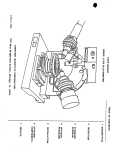
The LSE Stokes Ellipsometer is comprised of the ellipsometer itself and table top PC running
GEMP software, running under WINDOWS OS, for film thickness and refractive index calculation.
See Figure 11.1 for the physical layout of the ellipsometer and Figure 11.2 for the display screen
of the GEMP software. There are two lasers used: One from top module for sample alignment.
The other from the left module for measurement. Both of them can be clearly seen at the center
of the sample table.
CAUTION: To prevent any possible eye damage refrain from looking into the laser beam or its
specular reflection from wafers.
9.2
Measurement Procedures
9.2.1
Enable the LSE Stokes Ellipsometer (ELLIPS).
9.2.2
Check the both lasers are ON and the center of the sample stage is illuminated.
9.2.3
Place your sample/wafer on the sample stage. You may not see the lasers light spot
because of the film on the sample. Note the measuring spot is at the center of the stage.
Sample Alignment
9.2.4
Log onto the PC. Double click the GEMP icon to start the software. Click the
ellipsometer icon on the top of the screen, or use the drop down menu under
Ellipsometer/Measurement and Calculation to open the Measurement and Calculation
Window Figure 11.2.
9.2.5
Click the Adjust Sample Table button on the left lower corner of the Measurement and
calculation screen. A new window will pop out to assist you, see Figure 11.3.
-2-