1
ellips
Chapter 8.35
9.2.6
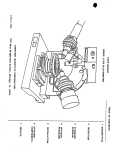
Locate the X and Y plane adjustment knobs, and vertical adjustment wheel below the
sample stage, see Figure 11.4.
9.2.7
Adjust the sample tilt by turning the X and Y plane adjustment knobs until the target cross
is centered in the box shown under the TILT adjustment section of the screen.
9.2.8
Adjust the sample stage height by turning the vertical adjustment wheel until the two
horizontal cursors shown on the left side of the screen line up with each other (long bar is
even with the shorter bar).
9.2.9
Click OK button to return to the Measurement and Calculation Window.
Film Measurement
9.2.10 At the top of the Measurement and Calculation Window, enter the film stack information
for your layers or load a stack model file that has already been stored in the PC. Skip this
step if you are measuring a single layer of thin oxide or nitride.
9.2.11 For a single layer enter a rough estimate of your film thickness in the thickness1 field.
The refractive index of the film will need to also get entered or calculated by clicking on
Nf1 button, then entered in the Nf1 field.
9.2.12 Click Measure & Calculate button to perform film thickness measurement. The
measured film thickness will appear in the Measured Data windows. There are two
predefine recipes for Thin Oxide and Thin Nitride that can be used by a click of a button
at the lower left side of the screen. These can be used for single layer oxide or nitride
measurement. Please do not modify these recipe.
9.2.13 Remove your sample and logoff the WINDOWS when you are done.
9.3
Film Stack Model Set Up
9.3.1
Instrument Parameter Fields (software default, do not change)
Φ: 70° (Laser incidence angle)
Λ: 6328 Å (HeNe laser wavelength)
Ambient N: 1 (refractive index of air)
9.3.2
Film Parameter Fields (film stack information, white background)
Thickness 1: Estimated top layer film thickness to be measured.
Nf 1: Estimated top layer film refractive index to be measured.
Kf 1: Estimated top layer film extinctive coefficient to be measured. Enter 0 for
transparent film.
Thickness 2,3,4: Underlayer film thicknesses if exist. Needs to be measured before
depositing the top layer film.
Nf 2,3,4: Underlayer film refractive indices if exist. Needs to be measured before
depositing the top layer film.
Kf 2,3,4: Underlayer film extinctive coefficient if exist. Enter 0 for transparent film.
Ns, Ks: Refractive index and extinctive coefficient of the substrate
9.3.3
Calculation Modes or Combinations (selection of Thickness, Nf, and Kf buttons, do not
confused with the Film parameter Field described in the above section)
Thickness 1: Calculate top layer film thickness using the refractive index entered in Nf1
Field.
Thickness 1 & Nf 1: Calculate both the thickness and refractive index of the top layer film.
-3-