1
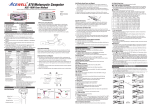
* Flip open the battery compartment cover and install a
9V Battery.
* Non-Contact: Stick the self-adhesive reflective tape on
the object whose rotational speed is to be measured. The
reflective tape should be stocked as close to the outer
edge of the object to be measured as possible.
* Contact: Attach the contact adapter to the tachometer.
Select the adapter included and slides it onto the shaft of
the contact adapter. Align the adapter with the alignment
pin on the shaft of the contact adapter.
* Press the “MEAS” button .Point the laser spot at the
object or bring the contact probe to the object .Then read
the measurement on the LCD display.
4 Function Description
In scan mode, the current measurement is displayed
on the main display. The main display will hold the last
values until the tachometer automatically turns off.
* Data Storage: Press the “MEAS” button until the
reading displayed on the LCD display. Observe the
reading and press the “MEM” bottonto record. The
maximum,minimum,average and data during one shot
measurement will be stored into a memory set. Then the
Data numer will increase by one.
Recall Data: Use the “MEM” botton to scroll and
view the stored data point. Press the “MEM” button once
to next storage,you will view the MAX measurements,
MIN measurements, AVG measurements and DATA
measurements. Press the “MEM” button and don’t to
3