1
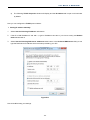
User Manual of WNAP-6350 5) The following TCP/IP Properties window will display and the IP Address tab is open on this window by default. Now you can configure the TCP/IP protocol below: Setting IP address manually 1 Select Use the following IP address radio button. 2 If the AP's LAN IP address is 192.168.1.1, type in IP address 192.168.1.x (x is from 2 to 254), and Subnet mask 255.255.255.0. 3 Select Use the following DNS server addresses radio button. In the Preferred DNS Server field you can type the DNS server IP address which has been provided by your ISP Figure B-4 Now click OK to keep your settings. -89-