1
User Interface
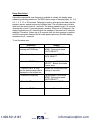
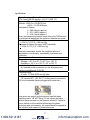
1. Keypad Functions
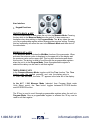
ON/OFF & BACK ◄ KEY
Turns the manometer on and enters the unit into the Measure Mode. Pressing
the key while in the Measure Mode turns the unit off. It also serves as a
backspace key when editing in the Program Mode. The ◄ key takes the user
out of a programmable register without changing the previous setting. Pressing
this key repeatedly will return the user to the Measure Mode and then shut off
the manometer.
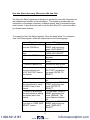
MIN/MAX & UP ▲ KEY
In the Measure Mode activates the Min/Max function of the manometer. When
activated the minimum value is displayed on the upper left of the display and
the maximum value on the upper right. This key also deactivates and resets
this function. The ▲ key is used to scroll through the programmable registers
when the unit is in the Program Mode. Once a programmable register is
selected the ▲ key can be used to edit that register.
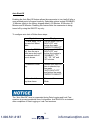
TARE & DOWN ▼ KEY
In the Pressure Measure Mode, toggles on/off the Tare function. The Tare
function nulls the applied pressure and sets the display value to
“0”. With Tare activated, the letter “T” appears in the lower left of the display.
In the ALT / IAS Measure Mode (selected from Program Mode under
Units Select menu), the Tare button toggles between ALTITUDE function
and AIR SPEED function.
The ▼ key is used to scroll through programmable registers when the unit is in
Program Mode. Once a programmable register is selected the ▼ key can be
used to edit that register.
2
1.800.561.8187
www.
.com
[email protected]