1
VDSL 4-band Modem Manual
Transmission Mode
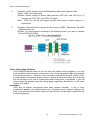
The default method of selecting the transmission mode for RJ-45 ports is 10/100 Mbps
ETHERNET, for RJ-11 port are 5/15/25Mbps VDSL. Therefore, if the Link signal is
disrupted (e.g., by unplugging the network cable and plugging it back in again, or by
resetting the power), the port will try to reestablish communications with the attached
device via auto-negotiation. If auto-negotiation fails, then communications are set to half
duplex by default. Based on this type of industry-standard connection policy, if you are
using a full-duplex device that does not support auto-negotiation, communications can be
easily lost (i.e., reset to the wrong mode) whenever the attached device is reset or
experiences a power fluctuation. The best way to resolve this problem is to upgrade
these devices to a version that support Ethernet and VDSL.
Physical Configuration
If problems occur after altering the network configuration, restore the original connections,
and try to track the problem down by implementing the new changes, one step at a time.
Ensure that cable distances and other physical aspects of the installation do not exceed
recommendations
System Integrity
As a last resort verify the switch integrity with a power-on reset. Turn the power to the
switch off and then on several times. If the problem still persists and you have
completed all the preceding diagnoses, then contact your dealer
14
CTC Union Technologies Co., Ltd