1
Figure 4.2: Driver install: step 2
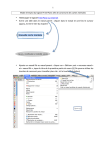
When the instrument is still connected, the driver install utility
will recognize it and report this. You will be asked to continue
anyway.
Figure 4.3: Driver install: Instrument is still connected
Clicking ”No” will bring back the previous screen. The instrument
should now be disconnected. Then the removal of the existing
driver can be continued by clicking ”Next”.
Clicking ”Yes” will ignore the fact that the instrument is still
connected and continue removal of the old driver. This option is
not recommended, as removal may fail, after which installation of
the new driver may fail as well.
When no existing driver was found or the existing driver is removed, the location for the pre-installation of the new driver can
be selected.
Driver installation
15