1
LX Flarm Red Box
LX Navigation d.o.o.
Dec. 2006
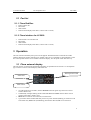
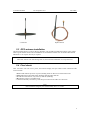
The external display has two modes of operation:
•
WARNING Mode will activate a red blinking diode, if another glider equipped with Flarm will
be close and a prediction for a collision risk will exist. An audio warning will be also executed.
Higher collision risk will increase blinking frequency and the same is with audio. The warnings
are classified into three levels (See Flarm manual for details)
-First level approximately 18 seconds before predicted collision
-Second level approximately 13 seconds before predicted collision
-Third level approximately 8 seconds before predicted collision
•
NEAREST Mode will show the direction to the nearest glider which position is inside of radio
range. One red LED will light permanently and there will be no audio. The unit will change over
to Warning Mode automatically, if warning criteria will be fulfilled and will continue in
NEAREST after collision risk will disappear.
Note!
The external displays produced by LX Navigation will change over to Demo mode after MODE button
will be pressed 10 times. Nearest mode and all possible warnings will be displayed. To change over back to
normal operation switch the unit off.
•
Pressing of MODE selector continuously for approximately 4 seconds will deactivate Flarm
external display for 5 minutes, no warnings and no near information will be displayed during this
period. A very typical situation only Power LED on, will characterize this status.
Note!
To change mode of operation press MODE button for approximately 2 seconds. If the radial LED’s will
run from top toward bottom means change over to NEAREST and vice versa. After new power on, the
mode active before switching off will remain.
•
Obstacles. Flarm electronic is capable to store coordinates of obstacles, which could cause a
collision during flight. This data is available on www.flarm.com, use Flarm tools to update. The
unit is factory loaded with actual obstacle database. An obstacle warning will be activated, if an
obstacle is to be found in the front of the glider and a collision risk is predicted.
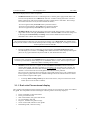
After a low level warning has been activated two upper LEDs will be active (such a situation will
Newer appears by glider collision risk). Medium and high risk will be indicated with more LED’s
Active and more frequent audio signal.
•
To change audio warning volume press short mode selector, each press will increase audio
volume (three levels and mute available).
3.1.1 Dual color Flarm external display
The LX Flarm external displays delivered after June 2007 includes on any position two LEDs, one red and
one green. The manipulation remained unchanged. Following statuses are clearly displayed.
•
•
•
•
•
•
•
Power red flashing, no data from Flarm
Power green data received
GPS red GPS BAD, GPS green GPS OK/3D
Tx green flashing, data send
Rx green , minimum one glider in range
Green circular LED, indication f near gliders
Red flashing LED, collision warning
5