1
VERTICAL CAMERA BALANCING
4. The second step of balancing the camera is the vertical balancing, which is a
little more involved and less intuitive.
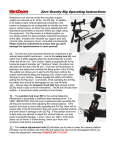
As you may have noticed, the camera platform adjusts up and down along
the two support rods (pictured at right). The two levers on either side of the
platform must be loosened to make the adjustment – DO NOT LOOSEN AT
THIS TIME. These levers can be repositioned without loosening or tightening
by simply pressing on the button and lifting the lever, then rotating it. When
you want to loosen or tighten the lever, simply rotate it normally (“lefty
loosey, righty tighty”).
With the camera horizontally balanced, rotate the platform so the camera is
exactly vertical. Be sure to keep the gears disengaged.
1
If the camera stays vertical, it is pretty close to vertically balanced.
If the camera platform swings down, the camera is too low and you
need to slide it upward (1). Loosen levers and adjust.
2
If the camera platform swings up, you need to slide it downward (2).
Loosen levers and adjust.
It is easier to adjust the camera platform with the camera pointing up (the rods horizontal, as pictured above),
as you won’t have to support the weight of the camera while you adjust the platform position.
If the camera stays vertical, go ahead and tighten the levers.
NOW TILT THE CAMERA AT VARIOUS ANGLES ALL THE WAY AROUND – IT SHOULD HOLD ANY POSITION
IF PROPERLY BALANCED. YOU MAY NEED TO TWEAK THE HORIZONTAL AND VERTICAL POSITIONS TO
GET IT EXACTLY RIGHT.
A BALANCED CAMERA WILL HOLD ANY POSITION THROUGH 360 DEGREES WITHOUT THE MOTORS
ENGAGED. THE CAMERA MUST BE THOROUGHLY BALANCED FOR PROPER OPERATION.
5. Engage the brass motor gears to the large black gears on the arm
and tighten. Be sure the levers are pointing away from the rotating
arm.
-NOTE: Once tightened, you can adjust the position of the lever by
simply pulling out on it and then rotating the lever until it faces
away. This will NOT loosen the fastener. Failure to aim lever
away will impede the movement of the MC100.
2