1
2.6.4 Using Ref
The reference control saves waveforms to a nonvolatile waveform memory. The
reference function becomes available after a waveform has been saved.
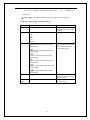
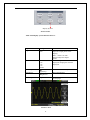
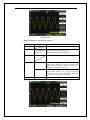
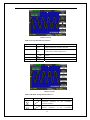
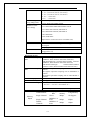
Table 2-11 REF function menu:
Option
Source
Setting
CH1,CH2,
CH3,CH4
CH1 off
CH2 off
CH3 off
CH4 off
REFA
REFB
REFC
REFD
Save
REFA/REFB
/REFC/REFD
Introduction
Choose the waveform display to store.
Choose the reference location to store or recall
a waveform.
Stores source waveform to the chosen reference
location.
on
off
Recall the reference waveform on the screen.
Turn off the reference waveform.
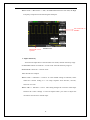
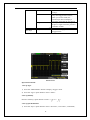
Press the Ref button to display the “Reference waveform menu”.
Picture 2.6-13
Operation step:
1. Press the “REF” menu button to display the “Reference waveform menu”.
2. Press the “Source” option button to select input signal channel.
3. Turn the vertical “POSITION” knob and “Volt/div” knob to adjust the vertical
position and scale to conformable positions.
4. Press the third option button to select “REFA” , “REFB” , “REFC” or “REFD”as
35