1
4 Libraries and System FP
The standard library assignment, shown in the example, can be found after installing the floppy disk set.
The library assignment is stored in each FP and MP. If the selected library assignment and the assignment
selected when generating the FP do not coincide, then the FP-DIA function is aborted with a error message.
The same is true for MP configuring for IB libraries. In this case, the current library assignment must be
appropriately changed (refer to Section 4.1.3).
4.1.2
Select libraries
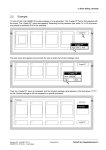
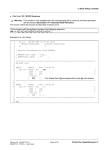
After the "select libraries" function was called using the "library" function, in the basic dialog, additional libraries
can be assigned as libraries A:, B: and C:. Click on the field behind A:, B: or C: using the cursor, and a window
opens with all of the stored FB libraries.
Libraries
Project:
Create project
fba121
Processors:fbsI03
Basic software GSW V400
FB-libraries
fbslib
Version Release
V400
930315
Masterprogramm:
950401
??????
IB-libraries
P16 P32
x
x
ibslib
A:
A:
B:
B:
C:
OK
Abort
Help
Create MP
Select libraries
Version Release
V420
P16 P32
950401
x
x
C:
Create FP
OK
A library can be selected using the cursor. It is then provided with a black background. The selection must then
be confirmed with "OK" and its name appears in the field after the library. e.g.: assignment of library "fba121",
as library B.
Fehler! Nur Hauptdokument-4
Edition 06.95
Siemens AG 465 982.7101.21
SIMADYN D STRUC L User Manual