1
Configure MySQL
MySQL will need to be configured so that it has the database required for the system to run and
then will need to add a user with all privileges so that the Carpool System can access the
database. Start the MySQL database (Start menu Select RUN. Enter ‘cmd’ [PRESS ENTER]. Enter
‘ NET START “Mysql” ’ [PRESS ENTER]).
Create database:
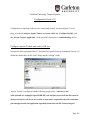
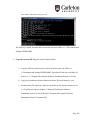
1. Login to mysql as admin. Open a dos command prompt and navigate to the bin
folder within the program files installed for mysql. To login type mysql –u root.
(If you have a password on the root/admin type the following mysql -- user=root
--password= ‘yourpassword’)
2. Open the file “Carpool_db_initialization_v3.0.txt”. Copy the sections and paste
sections of commands in the command prompt (copy then right-click mouse over
command prompt to paste). You will see that the database is being created.
Create the user used to login to mysql from the servlets:
1. Login to mysql as admin. Open a dos command prompt and navigate to the bin
folder within the program files installed for mysql. To login type mysql –u root.
(If you have a password on the root/admin type the following mysql -- user=root
--password= ‘yourpassword’)
2. Copy and paste the following: GRANT ALL PRIVILEGES ON *.* TO
'carpool'@'localhost' IDENTIFIED BY 'system' WITH GRANT OPTION;
Page 110