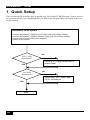
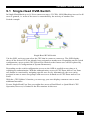
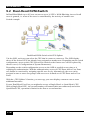
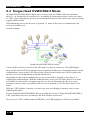
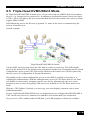
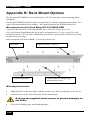
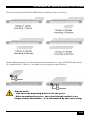
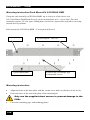
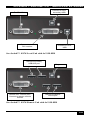
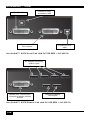
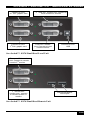
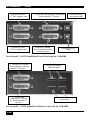
1
ACX0000 ACX0808 ACX0816 ACX0832 ACX1616 ACX1632 ServSwitchTM DKM Manual http://www.blackbox.com ServSwitch™ DKM Welcome to the ServSwitch™ Family! Thank you for purchasing a ServSwitch™ DKM! We appreciate your business, and we think you’ll appreciate the many ways that your ServSwitch™ DKM will save you money, time, and effort. The ServSwitch™ DKM offers four fundamental uses: As a Crosspoint Switch with a maximum of 32 input ports and 16 output ports. Optionally, in reverse mode, the device supports a maximum of 16 input ports and 32 output ports. Thus, you can, for example, switch and distribute the signals from multiple signal sources on up to 32 displays (allowing explicitly simultaneous presentations on several displays). Alternatively, signals coming from up to 32 signal sources can be switched in turn to a single display. The changeover can be triggered remotely using the remote control (included), the serial interface (RS232) and/or by the built-in web interface. As a KVM Switch with a maximum of 32 CPU ports and 16 Console ports. The ports can be configured as Single-Head ports (a “Single-Head” extender system supports 1x monitor, 1x keyboard, 1x mouse), Dual-Head ports (a Dual-Head extender system supports 2x monitor, 1x keyboard, 1x mouse) or even Quad-Head ports (a Quad -Head extender system supports 4x monitor, 1x keyboard, 1x mouse). The changeover can be triggered remotely using the remote control (included), the serial interface (RS232) and/or by the built-in web interface. In KVM Switch Mode CPU Ports and CON Ports can be configured as USB2.0 Ports. This can be done for single Ports as well as for combinations of one SingleHead (Triple-Head-)Port and one USB2.0 Port. In the latter case the respective consoles will always be switched together with its assigned USB2.0 Port. As a special case of the KVM Switch, you can choose the “Control Room” Mode with 2, 4 or 8 monitors. In “Control Room” Mode, up to 8 CPU’s are permanently displayed on up to 8 monitors. With a hotkey, you can switch to any of these monitors for operation. In “Teacher/Student” Mode, the teacher can attend up to 31 students. The ServSwitch™ DKM has the advantage that it can be positioned (CATx version) up to 140m away from both your signal source and display device. This becomes possible by using the proven ServSwitch™- Extender technology for the transmission of DVI- Monitor and USB-Keyboard and Mouse signals over CATx cable. The operation of a ServSwitch™ DKM always requires up to 32 Local Units and up to 16 Remote Units from the ServSwitch™-Extenders range. 1 ServSwitch™ DKM Wherever long distances cause problems for remotely locating and switching a monitor (keyboard/mouse) signal, e.g. airports, industrial plants, call centres or in distributed computer centres, the ServSwitch™ DKM is the best solution to distribute and switch monitor (keyboard/mouse) signals. Its flexibility allows it to tackle almost every task. There are 8 pre-configured ServSwitch™ DKMes for CATx as well as an empty chassis for individual configuration. In addition, there are 4 Media Extenders (DVI + optional audio) and 8 KVM- Extenders (DVI+USB keyboard mouse + optional audio) available. The transmission of the signals requires connecting CATx cable. For fibre applications, all switch elements and extenders are also available in multimode or singlemode versions, requiring the respective cabling. This manual will tell you all about your new ServSwitch™ DKM, including how to install, operate and troubleshoot it. For an introduction to the device, see Chapter 2. The product codes covered in this manual are: ServSwitch™ DKM Devices for CATx ACX0808: ServSwitch™ DKM for 8 User and 8 CPUs ACX0816: ServSwitch™ DKM for 8 User and 16 CPUs ACX0824: ServSwitch™ DKM for 8 User and 24 CPUs *** ACX0832: ServSwitch™ DKM for 8 User and 32 CPUs ACX1608: ServSwitch™ DKM for 16 User and 8 CPUs*** ACX1616: ServSwitch™ DKM for 16 User and 16 CPUs ACX1624: ServSwitch™ DKM for 16 User and 24 CPUs*** ACX1632: ServSwitch™ DKM for 16 User and 32 CPUs ACX0000: ServSwitch™ DKM for individual configuration ServSwitch™ DKM Devices for Multimode/Singlemode and ***marked versions… to be individually configured, deriving from ACX0000 or others 2 ServSwitch™ DKM CATx Local and Remote Units ACS4100A-T: ServSwitch™-Media Local Unit ACS4122A-T: ServSwitch™-Media Local Unit, +Audio ACS4001A-T: ServSwitch™- KVM Local Unit, Single-Head ACS4201A-T: ServSwitch™- KVM Local Unit, Dual-Head ACS4022A-T: ServSwitch™- KVM Local Unit, +Audio, Single-Head ACS4222A-T: ServSwitch™- KVM Local Unit, +Audio, Dual-Head ACS4004A-T: ServSwitch™-KVM Local Unit, Single-Head, 4x USB-HID ACS4204A-T: ServSwitch™-KVM Local Unit, Dual-Head, 4x USB-HID ACS4002A-T: ServSwitch™- KVM Local Unit, +USB2.0, Single Head ACS4011A-T: ServSwitch™- KVM Local Unit, +VGA, Single-Head ACS4100A-R: ServSwitch™-Media Remote Unit ACS4122A-R: ServSwitch™-Media Remote Unit, +Audio ACS4001A-R: ServSwitch™- KVM Remote Unit, Single-Head ACS4201A-R: ServSwitch™- KVM Remote Unit, Dual-Head ACS4022A-R: ServSwitch™- KVM Remote Unit, +Audio, Single-Head ACS4222A-R: ServSwitch™- KVM Remote Unit, +Audio, Dual-Head ACS4004A-R: ServSwitch™-KVM Remote Unit, Single-Head, 4x USB-HID ACS4204A-R: ServSwitch™-KVM Remote Unit, Dual-Head, 4x USB-HID ACS4002A-R: ServSwitch™- KVM Remote Unit, +USB2.0, Single Head 3 ServSwitch™ DKM Multimode Local and Remote Units ACS4100A-T-MM: ServSwitch™-Media Local Unit ACS4122A-T-MM: ServSwitch™-Media Local Unit, +Audio ACS4001A-T-MM: ServSwitch™- KVM Local Unit, Single-Head ACS4201A-T-MM: ServSwitch™- KVM Local Unit, Dual-Head ACS4022A-T-MM: ServSwitch™- KVM Local Unit, +Audio, Single-Head ACS4222A-T-MM: ServSwitch™- KVM Local Unit, +Audio, Dual-Head ACS4004A-T-MM: ServSwitch™-KVM Local Unit, Single-Head, 4x USB-HID ACS4204A-T-MM: ServSwitch™-KVM Local Unit, Dual-Head, 4x USB-HID ACS4002A-T-MM: ServSwitch™- KVM Local Unit, +USB2.0, Single Head ACS4011A-T-MM: ServSwitch™- KVM Local Unit, +VGA, Single-Head ACS4100A-R-MM: ServSwitch™-Media Remote Unit ACS4122A-R-MM: ServSwitch™-Media Remote Unit, +Audio ACS4001A-R-MM: ServSwitch™- KVM Remote Unit, Single-Head ACS4201A-R-MM: ServSwitch™- KVM Remote Unit, Dual-Head ACS4022A-R-MM: ServSwitch™- KVM Remote Unit, +Audio, Single-Head ACS4222A-R-MM: ServSwitch™- KVM Remote Unit, +Audio, Dual-Head ACS4004A-R-MM: ServSwitch™-KVM Remote Unit, Single-Head, 4x USBHID ACS4204A-R-MM: ServSwitch™-KVM Remote Unit, Dual-Head, 4x USBHID ACS4002A-R-MM: ServSwitch™- KVM Remote Unit, +USB2.0, Single Head 4 ServSwitch™ DKM Singlemode Local and Remote Units ACS4100A-T-SM: ServSwitch™-Media Local Unit ACS4122A-T-SM: ServSwitch™-Media Local Unit, +Audio ACS4001A-T-SM: ServSwitch™- KVM Local Unit, Single-Head ACS4201A-T-SM: ServSwitch™- KVM Local Unit, Dual-Head ACS4022A-T-SM: ServSwitch™- KVM Local Unit, +Audio, Single-Head ACS4222A-T-SM: ServSwitch™- KVM Local Unit, +Audio, Dual-Head ACS4004A-T-SM: ServSwitch™-KVM Local Unit, Single-Head, 4x USB-HID ACS4204A-T-SM: ServSwitch™-KVM Local Unit, Dual-Head, 4x USB-HID ACS4002A-T-SM: ServSwitch™- KVM Local Unit, +USB2.0, Single Head ACS4011A-T-SM: ServSwitch™- KVM Local Unit, +VGA, Single-Head ACS4100A-R-SM: ServSwitch™-Media Remote Unit ACS4122A-R-SM: ServSwitch™-Media Remote Unit, +Audio ACS4001A-R-SM: ServSwitch™- KVM Remote Unit, Single-Head ACS4201A-R-SM: ServSwitch™- KVM Remote Unit, Dual-Head ACS4022A-R-SM: ServSwitch™- KVM Remote Unit, +Audio, Single-Head ACS4222A-R-SM: ServSwitch™- KVM Remote Unit, +Audio, Dual-Head ACS4004A-R-SM: ServSwitch™-KVM Remote Unit, Single-Head, 4x USBHID ACS4204A-R-SM: ServSwitch™-KVM Remote Unit, Dual-Head, 4x USB-HID ACS4002A-R-SM: ServSwitch™- KVM Remote Unit, +USB2.0, Single Head 5 ServSwitch™ DKM Copyrights and Trademarks ©2009. All rights reserved. This information may not be reproduced in any manner without the prior written consent of the manufacturer. Information in this document is subject to change without notice and the manufacturer shall not be liable for any direct, indirect, special, incidental or consequential damages in connection with the use of this material. All trademark and trade names mentioned in this document are acknowledged to be the property of their respective owners. Disclaimer While every precaution has been taken in the preparation of this manual, the manufacturer assumes no responsibility for errors or omissions. Neither does the manufacturer assume any liability for damages resulting from the use of the information contained herein. The manufacturer reserves the right to change the specifications, functions, or circuitry of the product without notice. The manufacturer cannot accept liability for damage due to misuse of the product or due to any other circumstances outside the manufacturer’s control (whether environmental or installation related). The manufacturer shall not be responsible for any loss, damage, or injury arising directly, indirectly, or consequently from the use of this product. Cautions and Notes The following symbols are used in this guide: CAUTION: This indicates an important operating instruction that should be followed to avoid any potential damage to hardware or property, loss of data, or personal injury. NOTE. This indicates important information to help you make the best use of this product. 6 EMPTY PAGE 7 ServSwitch™ DKM EC DECLARATION OF CONFORMITY The products listed below in the form as delivered are in conformity with the provisions of the following European Directives: 2004/108/EG Council Directive on the approximation of the laws of the Member States relating to electromagnetic compatibility CE-marking 2009 Product list: List on page 2 - 5 Conformity to the Directives is assured through the application of the following standards: EN 55022: IEC 61000-4-2: IEC 61000-4-3: IEC 61000-4-4: IEC 61000-4-5: 09/2006 Class A 02/2001 05/2006 12/2004 11/2006 This declaration certifies the conformity to the specified directives but contains no assurance of properties. The safety documentation noted in this manual shall be considered in detail. The length of the attached CPU- or Console Cables must not exceed 3m. The use of suggested interconnect cables is mandatory. Oberteuringen, June 23rd, 2009 The management manufacturer: IHSE GmbH Maybachstrasse 11 88094 Oberteuringen Germany WARNING: This equipment has been found to comply with the limits for a Class A digital device, pursuant to Part 15 of the FCC Rules. These limits are designed to provide reasonable protection against harmful interference when the equipment is operated in a commercial environment. This equipment generates, uses, and can radiate radio frequency energy and, if not installed and used in accordance with the instruction manual, may cause harmful interference to radio communications. Operation of this equipment in a residential area is likely to cause harmful interference in which case the user will be required to correct the interference at his own expense. 8 SAFETY PRECAUTIONS AND INSTALLATION GUIDLINES Safety Precautions and Installation Guidelines To ensure reliable and safe long-term operation, please note the following installation guidelines: Do not use CATx- devices to link between buildings – please use fibre devices. Only use in dry, indoor environments. If the building has 3-phase AC power, try to ensure that equipment connected to the Local and Remote Units is on the same phase. Try not to route a CATx- link cable alongside power cables. The Remote Unit, Local Unit and any power supplies can get warm. Do not locate them in an enclosed space without any airflow. Do not place a power supply directly on top of a unit. Do not obscure a unit’s ventilation holes. To safeguard against personal injury and avoid possible damage to equipment or property, please observe the following: Only use power supplies originally supplied with the product or manufacturer-approved replacements. Do not attempt to dismantle or repair any power supply. Do not use a power supply if it appears to be defective or has a damaged case. Connect all power supplies to grounded outlets. In each case, ensure that the ground connection is maintained from the outlet socket through to the power supply’s AC power input. Do not attempt to modify or repair this product, or make a connection from the CATx- link interface (RJ45) to any other products, especially telecommunications or network equipment. 9 ServSwitch™ DKM Contents 1 Quick Setup 14 2 Overview 15 2.1 2.2 2.3 2.4 2.5 2.6 2.7 Introduction Glossary 17 Example of a ServSwitch™ DKM System Features 19 Product Range Compatibility How to Use This Guide 2.7.1 2.7.2 2.7.3 2.7.4 Connection & Compatibility DDC Information Selecting the moment of switching to the next frame Selection of Color reduction for transfer acceleration 3 Installation 3.1 3.2 3.3 3.4 Package Contents Interconnection Cable Requirements System Setup Installation Instructions 4 Device Views 4.1 ServSwitch™ DKM 5 Diagnostic 15 18 21 26 27 27 27 27 28 29 29 31 33 34 35 35 37 5.1 ServSwitch™ DKM – I/O Boards 37 6 ServSwitch™ DKM Configuration 39 6.1 Configuration via Console 6.1.1 6.1.2 6.1.3 6.1.4 6.1.5 6.1.6 6.1.7 6.1.8 6.1.9 6.1.10 6.1.11 6.1.12 6.1.13 6.1.14 10 On-Screen Display (OSD) Open „Configuration“ Menu Load Configurations System Configurations Touch Screen Settings Configuration of User Attributes User Matrix Configuration Configuration of CON Ports CON Matrix Configuration Configuration of CPU Ports Configuration of Network Parameters Programming of Macros Saving Configurations inside the Switch Saving Configurations into File 39 39 44 46 47 52 53 54 56 58 60 61 62 64 65 CONTENTS 6.1.15 Restart your Switch 6.2 Configuration via Browser and Web Interface 6.3 Configuration via Serial Interface 6.4 Configuration via IR Remote Control and LCD-Display 6.4.1 6.4.2 6.4.3 6.4.4 6.4.5 6.4.6 6.4.7 6.4.8 IR Remote Control Home Mask Menu Mask Configuration Mask Configuration of Network Parameters Configuration of System Parameters Restart your Switch Reset your Switch 6.5 Configuration via FTP 6.5.1 6.5.2 6.5.3 FTP Access to Configuration Files External Saving of Configuration Files Loading External Configuration Files 7 Status Information 7.1 Status Display via Console and OSD 7.1.1 7.1.2 7.1.3 7.1.4 7.1.5 Open the „Status“ Menu Status Display of CON Ports Status Display of CPU Ports Display of Network Status Display of Firmware Status 7.2 Status Display via Browser / Web Interface 7.3 Status Display via Serial- Interface 7.4 Status Display via LCD-Display 7.4.1 7.4.2 7.4.3 7.4.4 7.4.5 7.4.6 7.4.7 Home Mask Menu Mask Status Mask Display of CPU-/CON-Ports Status Display of Network Status Display of Flash Status Display of Tasks Status 8 Control of ServSwitch™ DKM 8.1 Instant Switching 8.1.1 8.1.2 8.1.3 8.1.4 Keyboard Hot Keys Changing the default Instant Switching Hotkey Macro Keyboard Macros via Function keys of a standard keyboard 8.2 Switching in OSD / KVM Mode 8.2.1 8.2.2 8.2.3 Switching in „KVM-List“ Mask: Switching in „KVM-Switch“ Mask: Switching in „Follow Me“ Mask: 8.3 Switching in OSD / Crosspoint Mode 8.3.1 8.3.2 8.3.3 Open the „CP-Switch“ Menu Switching in „Crosspoint Switch / CON Ports“ Mask Switching in „Crosspoint Switch / CPU Ports“ Mask“ 8.4 Switching via Browser / Web Interface 66 67 68 69 69 70 70 71 72 73 75 75 76 76 77 77 78 79 79 80 82 84 86 88 89 90 90 90 91 91 92 94 96 97 98 98 98 99 99 100 100 102 104 105 106 107 109 111 11 ServSwitch™ DKM 8.5 Switching via Serial Interface 8.6 Switching via LCD-Display 9 Operating Modes 9.1 9.2 9.3 9.4 9.5 9.6 9.7 9.8 Single-Head KVM-Switch Dual-Head KVM-Switch Quad-Head KVM-Switch Single-Head KVM/USB2.0 Mode Triple-Head KVM/USB2.0 Mode Teacher/Student System 15 Teacher/Student System 30 Crosspoint Switch 10 Troubleshooting 10.1 10.2 Monitor USB HID 112 113 114 115 116 117 118 119 120 121 122 123 123 124 Appendix A: Example Applications 126 Appendix B: Rack Mount Options 130 Appendix C: Serial Interface 134 Appendix D: Network Interface 139 Appendix E: Calling Technical Support 140 Appendix F: List of supported USB devices 141 Appendix G: Specifications 142 Appendix H: Connectors 144 Appendix I: ServSwitch™ Media/KVM Extender 145 I.1. I.2. I.3. I.4. I.5. I.6. 12 ServSwitch™- Media Extender ServSwitch™- KVM Extender Diagnostics of ServSwitch™- Media/ KVM Service Setup Extenders Setup at the Local Unit Setup at the Remote Unit 145 148 159 160 161 163 CONTENTS I.7. Devices with serial/audio option I.8. Specifications ServSwitch™-Media/KVM Units I.9. Connectors ServSwitch™-Media/KVM Units 164 166 169 13 ServSwitch™ DKM 1 Quick Setup This section briefly describes how to install your ServSwitch™ DKM system. Unless you are an experienced user, we recommend that you follow the full procedures described in the rest of this manual. Installation of the system Connect ServSwitch™ DKM to Local unit(s) with CATx/Fibre cable(s). Connect ServSwitch™ DKM to Remote unit(s) with CATx/Fibre cable(s). Connect the devices to the power supplies. Power up the system. NO Power LED illuminated? YES Link LED illuminated? NO Check the CATx- cable, and CATx- connectors YES Done 14 Check p.s.u.’s and connection to power outlet OVERVIEW 2 Overview 2.1 Introduction The ServSwitch™ DKM can be set up to support four different applications: Crosspoint Switch: Maximum configuration (without cascading) of 32 input ports and 16 output ports. Optionally, in reverse mode, the device supports a maximum of 16 input ports and 32 output ports. Set-Up: Local units are installed at up to 32 DVI signal sources. The Crosspoint Switch may now be installed up to 10 km away from the sources. The received signals (DVI + optional serial/Audio) can now be switched to the respective output ports. One input signal may be distributed simultaneously to several output ports. From these output ports, the displays (again, up to 10 km away) are controlled via remote units to be installed at each display. The changeover can be triggered remotely using the serial interface (RS232) and/or by the built-in web interface. KVM Switch: As a KVM Switch the device supports several operation modes: 16 User ports on 32 CPU ports for Single-Head access, 8 User ports on 16 CPU ports for Dual-Head access or even 4 User ports on 8 CPU ports for Quad-Head access. Single-Head/ Dual-Head/ Quad-Head CPUs/ and User ports may also be operated in mixed mode. In this case, the maximum number of User ports depends on the detailed configuration. A maximum of 32 CPUs (up to 10 km away) can be connected to the KVM Switch via Local units to be installed at each CPU. The received signals (DVI, Keyboard, Mouse + optional serial/Audio) can now be switched to the respective output ports. From these output ports, up to 16 consoles (again, up to 10 km away) are controlled via remote units to be installed at each console. The changeover can be triggered remotely by a hotkey sequence (only in KVM mode), using the serial interface (RS232) or by the built-in web interface. A comfortable OSD (On Screen Display) allows the selection of the CPUs, user administration and offers further administrative functions. A special function called “Partner Viewing” allows copying one (or more) display signal(s) to one or more additional displays. This mode is especially useful e.g. if one display signal shall be shown on both the user display and a beamer or if the monitor information shall be shared with an administrator. The “Follow Me” function ensures that the monitor information is updated whenever the original display signal source is changed. 15 ServSwitch™ DKM “Control Room” Mode: As a special case of the KVM Switch, you can choose the “Control Room” Mode. In this mode, several displays are assigned to a work place. A comfortable OSD (On Screen Display) allows at any time to choose from a list of available CPUs the CPU to be displayed on a specific monitor. With a hotkey sequence, you can switch keyboard and mouse to any of these monitors for operation without need to know the associated CPU. Now you can operate this CPU. Also in this mode, one (or more) display signal(s) can be copied to one or more additional displays (“Partner Viewing”). “Teacher/Student” System: Two configurations are available: a) Attend up to 15 Students – Each student work place is connected by CATxDuplex cable. Each CPU can be displayed at any work place – both student and teacher work place – even simultaneously. The teacher can observe every student work place. b) Attend up to 31 Students – Each student work place is connected by CATxSimplex cable. Each CPU can be displayed at a specific monitor, e.g. beamer or large display – both student and teacher work place. The teacher can observe every student work place. A ServSwitch™ DKM system comprises a ServSwitch™ DKM and one or more Local/Remote Units. The ServSwitch™ DKM and the Local/ Remote Units are attached by CATx or Fibre interconnection cables. The operation of a ServSwitch™ DKM requires always the use of Local Units and Remote Units of a ServSwitch™-Extender. 16 OVERVIEW 2.2 Glossary The following terms are used in this guide: CATx Any Category 5, 5e, 6 or higher cable, solid wires type AWG24. If Patch Cables are used, all distances count twice. Fibre Singlemode or Multimode fibre cable. Singlemode 9µ Singlemode fibre cable. Multimode 62,5µ Multimode- or 50µ Multimode fibre cable. KVM Keyboard, Video and Mouse. Console Keyboard, Mouse and Monitor Dual Access A system allowing connection of Local and Remote User Consoles. Single-Head An extender system that supports one Monitor + Keyboard/ Mouse Dual-Head An extender system that supports two Monitors + Keyboard/ Mouse Quad-Head An extender system that supports four Monitors + Keyboard/ Mouse DVI Digital Video standard, installed by Digital Display Working Group (www.ddwg.org) R, G, B, CLOCK in a data stream with up to 3x1,6 Gbit/sec. Signals are TMDS Level. PSU The desktop power supply connected to the ServSwitch™ DKM or to the Local/ Remote Unit. HID Human Interface Devices are units, which are used for human access to the CPU: keyboard and mouse, touch-screen, light pen, fingerprint sensor, graphic tablets etc. 17 ServSwitch™ DKM 2.3 Example of a ServSwitch™ DKM System Application example for a ServSwitch™ DKM System (Single-Head KVM Switch) 18 OVERVIEW 2.4 Features The ServSwitch™ DKM offers the following features: Support for DVI-D Graphic cards (all devices) Support for USB-Keyboard and USB-Mouse (KVM-Extender) ServSwitch™- KVM standard devices with USB-HID connectors support the extension of keyboard and mouse ONLY; use with other HID devices (Human Interface Device) such as touch screens, graphics tablets, barcode readers or similar may be successful – but there is no guarantee for this! The ServSwitch™- KVM standard device is NOT suitable for use with other USB- devices such as scanners, web- cams, data sticks etc. ServSwitch™- KVM standard devices support only two devices simultaneously – keyboard and mouse or keyboard and touch-screen, etc. but not e.g. keyboard, mouse and touch-screen simultaneously. You can extend by a USB hub but this does not raise the number of supported devices. Maximum length of interconnection cable from a Local Unit to a ServSwitch™- Minor Switch, between two ServSwitch™- Minor Switches or from a ServSwitch™- Minor Switch to a Remote Unit). 140m (400ft) with CATx- cable 200 m mit Multimode 62.5μm 400 m mit Multimode 50μm 10.000 m mit Singlemode 9μm Maximum Resolution (DVI): 1920x1200@60Hz Supports:16/24 Bit auto-switching or 24 Bit (= full) color depth (selectable) Status indicator LEDs for Power and Link on each device. Compact footprint chassis. Rack mount options available. International power supplies included. Options: USB 2.0 Support Bidirectional Audio Interface Serial Interface Single-Head Devices support a transparent serial interface with up to 19.2 KBaud and Hardware handshake. This serial interface can be used to control a single device requiring full Hardware handshake or up to three devices without Handshake (XON/XOFF) 19 ServSwitch™ DKM 20 Dual-Head Devices support TxD and RxD ONLY – no Hardware handshake (XON/XOFF) OVERVIEW 2.5 Product Range The following products are available as well as various upgrade kits: ServSwitch™ DKM and Accessories ACX0808 ServSwitch™ DKM for 8 Users and 8 CPUs (CATx) ACX0816 ServSwitch™ DKM for 8 Users and 16 CPUs (CATx) ACX0824 ServSwitch™ DKM for 8 Users and 24 CPUs (CATx) ACX0832 ServSwitch™ DKM for 8 Users and 32 CPUs (CATx) ACX1608 ServSwitch™ DKM for 16 Users and 8 CPUs (CATx) ACX1616 ServSwitch™ DKM for 16 Users and 16 CPUs (CATx) ACX1624 ServSwitch™ DKM for 16 Users and 24 CPUs (CATx) ACX1632 ServSwitch™ DKM for 16 Users and 32 CPUs (CATx) ACX0000 ServSwitch™ DKM empty (consisting of housing, base PCB, Controler Board and 1x p.s.u. (slide in version) for customized assembly ACXPSR P.s.u. (slide in version) for spare or for upgrade to redundant p.s.u. ACX8OSD ServSwitch™ DKM OSD Board ACXDIS ServSwitch™ DKM Display Board ACX8CAT ServSwitch™ DKM CATx I/O Board ACX8SFP ServSwitch™ DKM I/O Board empty, for customized assembly ACXSFPC CATx GBIC for use with ACX8SFP ACXSFPM Multimode GBIC for use with ACX8SFP ACXSFPS Singlemode GBIC for use with ACX8SFP 21 ServSwitch™ DKM Media Extenders ACS4100A-T ServSwitch™-Media Local Unit (CATx) ACS4122A-T ServSwitch™-Media Local Unit + Audio (CATx) ACS4100A-R ServSwitch™-Media Remote Unit (CATx) ACS4122A-R ServSwitch™-Media Remote Unit + Audio (CATx) ACS4100A-T-MM ServSwitch™-Media Local Unit (Multimode) ACS4122A-T-MM ServSwitch™-Media Local Unit + Audio (Multimode) ACS4100A-R-MM ServSwitch™-Media Remote Unit (Multimode) ACS4122A-R-MM ServSwitch™-Media Remote Unit + Audio (Multimode) ACS4100A-T-SM ServSwitch™-Media Local Unit (Singlemode) ACS4122A-T-SM ServSwitch™-Media Local Unit + Audio (Singlemode) ACS4100A-R-SM ServSwitch™-Media Remote Unit (Singlemode) ACS4122A-R-SM ServSwitch™-Media Remote Unit + Audio (Singlemode) KVM Extenders for CATx ACS4001A-T ServSwitch™-KVM Local Unit, Single-Head ACS4201A-T ServSwitch™-KVM Local Unit, Dual-Head ACS4022A-T ServSwitch™-KVM Local Unit, + Audio, Single-Head ACS4222A-T ServSwitch™-KVM Local Unit, + Audio, Dual-Head ACS4004A-T ServSwitch™-KVM Local Unit, Single-Head, 4x USBHID ACS4204A-T ServSwitch™-KVM Local Unit, Dual-Head, 4x USB-HID ACS4002A-T ServSwitch™-KVM Local Unit, Single-Head, 4x USB-2.0 ACS4011A-T ServSwitch™-KVM Local Unit, DVI-I Input (VGA) ACS4001A-R ServSwitch™-KVM Remote Unit, Single-Head ACS4201A-T ServSwitch™-KVM Remote Unit, Dual-Head ACS4022A-T ServSwitch™-KVM Remote Unit, + Audio, Single-Head ACS4222A-R ServSwitch™-KVM Remote Unit, + Audio, Dual-Head ACS4004A-R ServSwitch™-KVM Remote Unit, Single-Head, 4x USBHID ACS4204A-R ServSwitch™-KVM Remote Unit, Dual-Head, 4x USBHID ACS4002A-R ServSwitch™-KVM Remote Unit, Single-Head, 4x USB- 22 OVERVIEW 2.0 23 ServSwitch™ DKM KVM Extenders for Multimode ACS4001A-T-MM ServSwitch™-KVM Local Unit, Single-Head ACS4201A-T-MM ServSwitch™-KVM Local Unit, Dual-Head ACS4022A-T-MM ServSwitch™-KVM Local Unit, + Audio, Single-Head ACS4222A-T-MM ServSwitch™-KVM Local Unit, + Audio, Dual-Head ACS4004A-T-MM ServSwitch™-KVM Local Unit, Single-Head, 4x USB- ACS4204A-T-MM ServSwitch™-KVM Local Unit, Dual-Head, 4x USB-HID ACS4002A-T-MM ServSwitch™-KVM Local Unit, Single-Head, 4x USB-2.0 ACS4011A-T-MM ServSwitch™-KVM Local Unit, DVI-I Input (VGA) ACS4001A-R-MM ServSwitch™-KVM Remote Unit, Single-Head ACS4201A-R-MM ServSwitch™-KVM Remote Unit, Dual-Head ACS4022A-R-MM ServSwitch™-KVM Remote Unit, + Audio, Single-Head ACS4222A-R-MM ServSwitch™-KVM Remote Unit, + Audio, Dual-Head ACS4004A-R-MM ServSwitch™-KVM Remote Unit, Single-Head, 4x USB- ACS4204A-R-MM ServSwitch™-KVM Remote Unit, Dual-Head, 4x USB- ACS4002A-R-MM ServSwitch™-KVM Remote Unit, Single-Head, 4x USB- KVM Extenders for Singlemode ACS4001A-T-SM ServSwitch™-KVM Local Unit, Single-Head ACS4201A-T-SM ServSwitch™-KVM Local Unit, Dual-Head ACS4022A-T-SM ServSwitch™-KVM Local Unit, + Audio, Single-Head ACS4222A-T-SM ServSwitch™-KVM Local Unit, + Audio, Dual-Head ACS4004A-T-SM ServSwitch™-KVM Local Unit, Single-Head, 4x USB- ACS4204A-T-SM ServSwitch™-KVM Local Unit, Dual-Head, 4x USB-HID ACS4002A-T-SM ServSwitch™-KVM Local Unit, Single-Head, 4x USB-2.0 ACS4011A-T-SM ServSwitch™-KVM Local Unit, DVI-I Input (VGA) ACS4001A-R-SM ServSwitch™-KVM Remote Unit, Single-Head ACS4201A-R-SM ServSwitch™-KVM Remote Unit, Dual-Head ACS4022A-R-SM ServSwitch™-KVM Remote Unit, + Audio, Single-Head ACS4222A-R-SM ServSwitch™-KVM Remote Unit, + Audio, Dual-Head ACS4004A-R-SM ServSwitch™-KVM Remote Unit, Single-Head, 4x USB- ACS4204A-R-SM ServSwitch™-KVM Remote Unit, Dual-Head, 4x USB- ACS4002A-R-SM ServSwitch™-KVM Remote Unit, Single-Head, 4x USB- 24 OVERVIEW Upgrade Kits ACS1009A-RMK 19”/1HE rack mount kit to mount up to 4 Single-Head devices ACS2209A-RMK 19”/1HE rack mount kit to mount up to 4 Dual-Head devices/ SERVSWITCH™ DKM devices ACS2209A-PS 19“mountable power supply for up to three SERVSWITCH™ DKM devices. ACS1009A-SMK Mounting plate to mount by screws DRMACU-S DIN Rail Mounting plate to mount by snap on Accessories AC1038A DVI-D to VGA Converter, to connect the local output to a traditional VGA-KVM-Switch ACXCWDM4 CWDM MUX/DEMUX to send up to 4 ServSwitch™ fiber interconnections simultaneously over only two fibres ACX1000 CATx Repeater to double the maximum allowed distance to up to 280m (also available for Multi-/Singlemode) ACX1000-CM CATx/Multimode Cross Repeater to convert from CATx to Multimode or back (also available for Singlemode) ACX1000-MS Multimode/Singlemode Cross Repeater to convert from Multimode to Singlemode 25 ServSwitch™ DKM 2.6 Compatibility Interface Compatibility Digital Video (DVI-D): Digital Video standard, installed by Digital Display Working Group (www.ddwg.org) R, G, B, CLOCK in a data stream with up to 3x 1,6 Gbit/sec. Signals are TMDS Level. USB Keyboard: Compatible with all standard keyboards. Certain keyboards with enhanced features may also be supported with custom firmware. Keyboards with built-in hub are also supported – but there are never more than two HID devices supported. USB Mouse: Compatible with all standard 2-button, 3-button and wheel mice. ServSwitch™- KVM standard devices with USB-HID connectors support the extension of keyboard and mouse ONLY; use with other HID devices (Human Interface Device) such as touch screens, graphics tablets, barcode readers or similar may be successful – but there is no guarantee for this! The ServSwitch™- KVM standard device is NOT suitable for use with other USB- devices such as scanners, web- cams, data sticks etc. ServSwitch™- KVM standard devices support only two devices simultaneously – keyboard and mouse or keyboard and touch-screen, etc. but not e.g. keyboard, mouse and touch-screen simultaneously. You can extend by a USB hub but this does not raise the number of supported devices. Fibre-/CATx Devices: A ServSwitch™ Switch may be equipped with both CATx GBICs and fibre GBICs. This allows to switch both fibre and CATx Signals with one ServSwitch™ Switch. Currently, it is NOT possible to connect devices of different topologies (CATx and fibre). The related signals are switched correctly but the data format is not compatible. If this feature is required, please consider using our CrossRepeater. Our technical support will assist you (cf. Appendix E: Calling Technical Support Page 140). 26 OVERVIEW 2.7 How to Use This Guide This guide describes the installation and configuration of the ServSwitch™ DKM. Although the connection and operation of the system is relatively straightforward, you should consider the following before getting started: 2.7.1 Connection & Compatibility The individual ServSwitch™ DKM components consist of: ServSwitch™ DKM includes the device and power supply. ServSwitch™- KVM/ Media Local Unit: includes the device, power supply and all cables required to connect the ServSwitch™- KVM/ Media Local Unit to your CPU/ Signal source. ServSwitch™- KVM/ Media Remote Unit: includes the device and power supply Please see also Package Contents (Page 29). For information about connection and installation, see page 31. 2.7.2 DDC Information Normally, it is not necessary to make any adjustments to the ServSwitch™- KVM/ Media device. However, in some circumstances, it may be necessary to redefine the source of DDC information for the CPU. By default, the ServSwitch™- KVM/ Media device uses its own internal DDC table. If this setting does not satisfy your requirements, the DDC table can either be switched to the DDC table of the locally attached screen or can be downloaded from the remotely located screen and stored in the internal DDC table. Default: Download from Remote Monitor To modify the DDC Setup, see Loading the DDC information from the remote monitor (Page 161). 2.7.3 Selecting the moment of switching to the next frame The transmission of screen data is not synchronous to the screen changes of the graphic card. Normally, the transmission is terminated during the display of a frame on the screen (at the remote unit). If the device switches to the new frame during the displaying period of the old frame (somewhere on the screen), it is possible that you will see horizontal screen breaks at the moment of switching (default). On the other hand, if the device idles until the actual frame is displayed completely (until VSYNC) then the number of frames per second transmitted may be reduced. To modify the switching behaviour, see Setup at the Remote Unit (Page 163). 27 ServSwitch™ DKM 2.7.4 Selection of Color reduction for transfer acceleration You can select, whether always 24 Bit colors (=full color depth) are transmitted or whether the compression algorithm automatically switches between 16 and 24 Bit colors to accelerate the data transfer (default). Normally the difference between 24 Bit and 16 Bit is not recognizable but under some special circumstances e.g. in photo processing installations there might be disturbing color abberations. While the automatic color switching enhances the number of frames, transmitted per second, fixed 24 Bit color depth gives smooth color grades under all circumstances. Please select your preferred mode. To modify the color depth, see Setup at the Local Unit (Page 161). 28 INSTALLATION 3 Installation For first-time users, we recommend that you carry out a test placement, confined to a single room, before commencing full installation. This will allow you to identify and solve any cabling problems and experiment with the ServSwitch™ DKM System more conveniently. 3.1 Package Contents You should receive the following items in your ServSwitch™ DKM for CATx package: ServSwitch™ DKM 1x 5V DC universal power supply for the ServSwitch™ DKM 1x German type power cord 1x USB (1.8m) cable (USB type A to type B) 1x IR Remote Control User manual (Quick Setup) CDROM with utilities and complete User Manual The following parts should be in your ServSwitch™- KVM/ Media Local Unit package: ServSwitch™- KVM/ Media Local Unit 1x 5V DC universal power supply for the ServSwitch™- Minor KVM/ Media Local Unit 1x German type power cord DVI-I (1.8m) video cable (DVI male-to-male) User manual (Quick Setup) Additionally with the Dual-Head devices: DVI-I (1.8m) video cable (DVI male-to-male) 29 ServSwitch™ DKM Additionally with the ServSwitch™-KVM devices: USB (1.8m) cable (USB type A to type B) Additionally with the ServSwitch™-Media/ KVM devices +audio: Serial cable 1.8m (Serial DB9-male/female) 2 audio cables 1.8m Additionally with the ServSwitch™- KVM Dual-Head and Media Devices + Audio: Serial/Audio Combo cable (1,8m) –DSUB9 female and 2x 3,5mm Stereo Jacks on one side, 8pol. miniDIN male The following parts should be in your ServSwitch™- KVM/ Media Remote Unit package: ServSwitch™- KVM/ Media Remote Unit 1x 5V DC universal power supply for the ServSwitch™- KVM/ Media Remote Unit 1x German type power cord User manual (Quick Setup) If anything is missing, please contact our Technical Support (see Appendix E: Calling Technical Support on page 140) 30 INSTALLATION 3.2 Interconnection Cable Requirements To connect the ServSwitch™-Media Local Unit to your CPU/signal source you will need (Please ensure that the connection is tension-free!): DVI: Connect the supplied DVI-cable 1.8m (DVI-I male to DVI-I male) to your CPU (KVM- Switch, DVI- signal source, etc.). USB: Connect the supplied USB- cable 1.8m (USB Type A to USB Type B) to your CPU (KVM- Switch, DVI- signal source, etc.). Serial /Audio (Combo) cable: Connect the supplied Serial/Audio (Combo) cable to your CPU/signal source (DVI male to DVI male, serial DB9 male/female and Audio). Serial cable: Connect the supplied Serial cable to your CPU/signal source (DB9 male to DB9 female). Audio cable: Connect the supplied Audio cable to your CPU/signal source (2x 3,5 Stereo Audio jacks). CATx Cable: Recommended cable: S/UTP (Cat5) according EIA/TIA 56A, TSB 36 or Digital STP 17-03170. Four pairs AWG 24. Wiring according EIA/TIA 568A (10BaseT). Use of cables from a higher category (Cat5e, Cat6, Cat7) is possible. The use of unshielded CATx- cable is possible; because of the higher electromagnetic noise/sensitivity, the device class may not be reached. You may use flexible cables (patch cable) type AWG26/7 but because of the higher loss of the stranded cables, the maximum extension distance is reduced to approximately half the value of solid cables. A point-to-point connection is required. You may use one or more patch panels in the line. Do not connect the CATx- link interface (RJ45) to any other products, especially telecommunications or network equipment. 31 ServSwitch™ DKM Fibre optical cable: Two fibres are required for Single-Head transmission and four fibres for Dual-Head transmission. The achievable distance depends on both the cable type and the device type. Recommended cables: Multimode Type 50/125µ Multimode Type 62.5/125µ Singlemode Type 9/125µ Achievable Distance approx. 400m (1,300ft) Achievable Distance approx. 200m (650ft) Achievable Distance approx. 10km (32,750ft) A point-to-point connection is required. You may use one or more patch panels in the line. Do not connect the Fiber- link interface (LC-duplex) to any other products, especially telecommunications or network equipment. Empirically, Singlemode devices work well with Multimode cables but not vice versa. Furthermore, Singlemode devices with Multimode cables might double the achievable distance via Multimode cable! This cannot be guaranteed, however, and must be verified by the user at own risk and cost. Power Supply: Connect the supplied 5V/DC power supply to the ‘POWER’ socket of the ServSwitch™ Local Unit or ServSwitch™ Remote Unit. 32 INSTALLATION 3.3 System Setup To install your ServSwitch™ DKM system: 1. Switch off all devices. 2. Connect keyboard, monitor(s), mouse to the Remote Unit (depending on device type). 3. Connect the CPU/signal source to the Local Unit using the supplied cable(s). 4. Connect the ServSwitch™ Local units and Remote units with the INTERCONNECT cable(s) (CATx or Fibre) 5. Connect the ServSwitch™ DKM with the INTERCONNECT cable(s) (CATx / Fibre) 6. Type 474-8X only: Equip the Cage sockets with GBICs according to your desired configuration. 7. Depending upon your application, it may be necessary to make a connection to a controller over the serial interface. Attach the provided RJ45 to DSUB 9-pin cable at the socket of the serial interface and connect it with your controller. More information for control through the serial interface can be found in Appendix C: Serial Interface on page 139. 8. Connect the 5V power supplies to the units. Only use the power supply originally supplied with this equipment or a manufacturer-approved replacement. 9. For a dual access system, connect the monitor for the local console to the appropriate port on the Local Unit. The port may also be used to feed into a KVM switch. To attach a local (USB-) keyboard/mouse, please use additional USB port(s) at your CPU or use a USB hub between the CPU and Local Unit’s USB- connector. 10. Power up the system. 11. Login at any console as Administrator 12. Configure your system 13. Done! 33 ServSwitch™ DKM 3.4 Installation Instructions Please ensure that the ServSwitch DKM has sufficient ventilation space by ensuring the following distances between the unit and other devices and/or mounting parts: Space directions while putting the device onto a desk Space directions while mounting the device into a 19” rack The ServSwitch™ DKM, its extenders and power supplies may become warm. Do not install the unit in closed areas without adequate ventilation. Never place the power supplies on top of the devices. Ensure that the existing ventilation openings on the device are free at all times. 34 DEVICE VIEWS 4 Device Views 4.1 ServSwitch™ DKM Status and Configuration Display Plug-in Power Supply 100-240VAC 50-60Hz Bay for optional second Plug-in Power Supply Slot for IR Remote Control 35 ServSwitch™ DKM Connect to Local Units (CPU) Network, Serial, USB Interfaces Connect to AC Power Supply Connect to Remote Units (Console) Rear View with two AC Sockets for redundant Power Supply 36 DIAGNOSTIC 5 Diagnostic 5.1 ServSwitch™ DKM – I/O Boards Each ServSwitch™ DKM I/O Board is fitted with indicator LEDs for status diagnostics. The location of the LEDs is shown below: Diagnostic LED Link Status Left Socket Diagnostic LED Link Status Right Socket Diagnostic LED Link Status Left Socket Diagnostic LED Link Status Right Socket Diagnostic LEDs at CATx I/O Boards The Link Status LEDs are at the left CATx- sockets in the upper and lower corner. The LEDs in the upper corners show the status for the left CATx- connection, the lower LEDs for the right CATx- connection. LED Appearance Diagnostics Link Status (Green / Orange LED) Green blinking CATx cable connection OK Data transmission active CATx cable connection OK No data transmission Port active, no CATx cable connection (no cable, cable defective, local / remote unit off or attached to wrong port) Port deactivated Green On Orange blinking Off 37 ServSwitch™ DKM Diagnostic LEDs at Fibre I/O Boards The Link Status LED are located between the upper and the lower fibre sockets. The LED indicates the status of the left connection, the LED indicates the status of the right connection. LED Appearance Diagnostics Link Status (Green / Red LED) Green blinking Green On Red blinking Green On OFF Port activated, signal OK. Port deactivated, signal OK Port activated, no signal detected Port activated, module error signal. Port deactivated. 38 SERVSWITCH™ DKM CONFIGURATION 6 ServSwitch™ DKM Configuration The ServSwitch™ DKM has an own operating system that can be configured in five different ways: By means of a console connected to a console port and the On-Screen Display (OSD) By means of a PC, a Browser and the web interface (under development) By means of a PC and the serial interface (under development, limited functionality) By means of the supplied IR Remote Control at the LCD-Display (limited functionality) By means of externally stored configuration files and the FTP interface 6.1 Configuration via Console With the OSD, the ServSwitch™ DKM can be completely configured from any console. In the following, settings in the menu “configuration” are described. All other menus are described in later chapters. 6.1.1 6.1.1.1 On-Screen Display (OSD) Enter into the OSD Enter into the OSD by simultaneously pressing the following button combination: <Strg>+ <Shift>+ <O> (Letter ‚o’) Please note: on many keyboards, the <STRG>- button is indicated by <CTRL>. The character input is NOT case-sensitive. <SHIFT> indicates the button for capital letters. <Button1>+< Button2>+ … means that all buttons must be pressed simultaneously <Button1>,< Button2>, … means that the buttons must be pressed sequentially 6.1.1.2 Leave the OSD Leave the OSD by simultaneously pressing the following button combination: <Shift> + <ESC> Leave the OSD Mode 39 ServSwitch™ DKM 6.1.1.3 General frame structure of the OSD: Upper status area Work area Lower status area 6.1.1.4 Upper Status Area (left corner) Name of the current console port Name of the current menu 40 Operating mode of the current console port Name of the user currently logged-in SERVSWITCH™ DKM CONFIGURATION (right corner) Function Key Description 6.1.1.5 Lower Status Area (left corner) Name of the current device (right corner) Product description 6.1.1.6 Working Area The possible inputs are described with the respective OSD frame description. 41 ServSwitch™ DKM Example: Menu Example: Input Mask Mask fields: Name Text field with xx characters Type Selection field CON Numerical field with xx digits 6.1.1.7 Keyboard Control: Within the masks you may navigate with the following keys (key sequences) <Cursor left> Cursor left – only inside an Input field or Switch Mask <Cursor right> Cursor right – only inside an Input field or Switch Mask <Cursor up> Line up (with wrap around) in Input fields or Switch Mask, Line up (without wrap around) in Menus <Cursor down> Line down (with wrap around) in Input fields or Switch Mask, Line down (without wrap around) in Menus <Page up> Page up in Input-/Status Masks with several pages <Page down> Page down in Input-/Status Masks with several pages <Tab> Next field in Input Masks <Shift> + <Tab> Previous field in Input Masks <+> Next Option in Select fields 42 SERVSWITCH™ DKM CONFIGURATION <-> Previous Option in Select fields <SPACE> Switch in selection fields with two options only (On/Off or No/Yes) Only if „Allow Sharing“ active: Apply and save data in Mask „KVMSwitch“ <RETURN> Apply and save data – in Input Masks Select option – in Menus <ESC> Cancel data input without saving – in Input Masks Back to Menu – in Selection masks and Menus ALL Select all options CLEAR Clear all options CANCEL SAVE Cancel data input without saving Apply and save data 43 ServSwitch™ DKM 6.1.2 Open „Configuration“ Menu Please perform the following steps: Enter into the OSD with key sequence <Strg>+ <Shift>+ <O> (Letter ‚o’) The “KVM List” Mask is displayed full screen (If Option “Listview” is not active, “KVM Switch” Mask will be displayed instead). Leave the “KVM List” Mask by hitting <ESC> The “Menu” is displayed full screen: Please select the menu option „Configuration“ by using the cursor buttons and confirm with <RETURN>. If you are not yet logged into the OSD as Administrator, the LOGIN Dialog is now displayed: 44 SERVSWITCH™ DKM CONFIGURATION All configuration adjustments require administrator rights. At delivery the following default user account is pre-defined: User Password admin (case sensitive) admin (case sensitive) Please modify this password at the first login. After successful login the “Configuration” menu is displayed: Default selection is “System”. Please select the desired menu option by using the cursor buttons and confirm with <RETURN>. 45 ServSwitch™ DKM 6.1.3 Load Configurations Please select the option “Open” in the “Configuration” menu by using the cursor buttons and confirm with <RETURN> The “Open” mask is displayed full screen. In this menu, you can load any switch configuration that has been previously stored within the switch. The current configuration is shown as „Active“. Besides the Default configuration, up to eight further configurations can be loaded. The configuration to be loaded is selected by cursor buttons or mouse and must be confirmed by <RETURN> or double click. The selected configuration will be set immediately and will be displayed as „Active“. The former configuration is deleted. 46 SERVSWITCH™ DKM CONFIGURATION 6.1.4 System Configurations Please select the option “System” in the “Configuration” menu by using the cursor buttons and confirm with <RETURN>. The “System” mask is displayed full screen. In this menu, you can set and modify the switch configuration. 47 ServSwitch™ DKM System Options: Field Selection Description Name CHR16 (Input) Configuration name. Used for saving the current configuration to file. Device CHR16 (Input) Device name (displayed in all menus at the lower left) Info CHR64 (Input) Detailed information about the current configuration. Y/N Y – This switch is configured according to a master switch and remotely controlled. No configuration possible. N – No slave mode. Load Default Y/N Y – Upon “Power On” or “Restart” the switch will boot with the Default configuration. N – . Upon “Power On” or “Restart” the switch will boot with the last configuration. Auto Save Y/N Y – Switch saves periodically the current configuration into flash. N – No automatic saving. Enable COM Echo Y/N Y – Switch sends echoes of all performed switch commands (s. appendix D). N – No Echoes. Lock COM Ports Y/N Y – While an OSD is open, all commands via external interfaces are rejected (LAN, serial). N – No rejection. Slave 48 SERVSWITCH™ DKM CONFIGURATION Access Options: Field Selection Description Y/N Y – Login required to access the OSD with user name and password. After login, the user will remain logged in until he explicitly logs out or an Auto Logout has been performed (cf. below). KVM Switching with Hot Keys requires the user to be logged in. N – NoLogin required. User Matrix Y/N Y – User access restricted to CPU’s explicitly unlocked in the User Matrix (see page 54). User matrix mode requires user login and implies „Enable Login“ = „Y“. KVM Switching with Hot Keys requires the user to be logged in. N –User Matrix disabled. CON Matrix Y/N Y –CON Port connectivity restricted to CPU’s explicitly unlocked in the CON Matrix (see page 58). N – CON Matrix disabled. Auto Disconnect Y/N Y – Only active if „Enable Login“ or „User Matrix“ are activated: CON Port is disconnected from current CPU Port upon entering into the OSD. N – Current Connection is held Timeout sec ### – Time of inactivity, after which OSD is closed automatically. 0 sec – No Timeout. min ### – Time of inactivity, after which the user at this console is logged out from OSD access automatically. 0 min – Immediate Logout from OSD after closing the OSD. Enable Login Auto Logout 49 ServSwitch™ DKM Switch Options: Field Allow Sharing Force Connect Force Disconnect KVM Listview KVM Auto Close Selection Description Y/N Y – User may connect to any unlocked CPU with Video Access only. Note: Switch with <Space> Key, no <Return>. N – No Sharing. Y/N Y – User may connect to any unlocked CPUwith full control pushing any previous user to Video Access only. Note: Switch with <Return> Key. N – No Force Connect. Y/N Y – User may connect to any unlocked CPUwith full control with any previous user being disconnected. Note: Switch with <Return> Key. N – No Force Disconnect. Y/N Y – OSD is opened with Menu „KVM List“ (default) (Dynamic display of available CPU Ports). N – OSD is opened with Menu „KVM Switch“ (Static display of available CPU Ports).. Y/N Y – Immediate exit from OSD after switching CPU Port in Menu „KVM List“ or„KVM Switch“ with immediate display of the new CPU. N – No Auto Close. If „Allow Sharing“ is activated, the current user of a CPU will not note if other users gain video access to his CPU. 50 SERVSWITCH™ DKM CONFIGURATION Mouse Options Field Selection Description Hor. Speed VAL2 Setting up the horizontal mouse speed Ver. Speed VAL2 Setting up the vertical mouse speed. Mouse Click VAL3 Setting up the time frame for ‚double click’ Mouse settings are CON Port specific and can be adjusted for each CON Port separately. 51 ServSwitch™ DKM 6.1.5 Touch Screen Settings The ServSwitch™ DKM OSD supports touch screens. USB HID based Touch Screen protocols are supported. Support of Vendor specific protocols only upon request. From „System“mask, you can enter into „Touchscreen” Mask by hitting <F1>. In this mask, you can calibrate your touch screen. You will be asked to touch twice a point at the upper left, then at the lower right. Thereafter, you may test the calibration result, cancel or save the calibration. This calibration is CON Port specific and must be repeated for each touch screen at its CON Port. Touch Control Control by touch is mostly similar to mouse control. Confirmation of a selection is performed by a second touch instead of double click. 52 SERVSWITCH™ DKM CONFIGURATION 6.1.6 Configuration of User Attributes Please select the option “User” in the “Configuration” menu by using the cursor buttons and confirm with <RETURN>. The “User” mask is displayed full screen. In this menu, you can setup users with their names and privileges. Configuration Options: Field Type Description Name CHR16 User Name (case-sensitive) Password CHR16 User Password (case-sensitive) HTPe Y/N User may login and access via HTTP FTP Y/N User may login and access via FTP PPP Y/N User may login and access via ‚Internet’ (not available) TEL Y/N User may login and access via Telnet POW Y/N User is ‚Power-User’ and may activate e.g. the CrossPoint Mode ADM Y/N User is Administrator and may change the configuration or activate the CrossPoint Mode 53 ServSwitch™ DKM 6.1.7 User Matrix Configuration Please select the option “User Matrix” in the “Configuration” menu by using the cursor buttons and confirm with <RETURN>. The “User Matrix” mask is displayed full screen. In this menu, the administrator can define for each user a specific set of CPU’s that this user might connect to. The use of this matrix is activated in the “System” Menu by setting the option “User Matrix”. If the option “User Matrix”.is active, any switching requires the user to be logged in. Only then, switching by Hot keys will be supported. Keyboard Control: <Page up> <Page down> <Cursor left> <Cursor right> <Cursor up> <Cursor down> <Tab> <Shift> + <Tab> <SPACE> <RETURN> <ESC> 54 Page up to previous user Page down to next user Move to left field Move to right field Line up Line down Next field Previous field Release selected CPU-Port for selected User Release selected CPU-Port for selected User Back to “Configuration” Menu SERVSWITCH™ DKM CONFIGURATION All Select all CPU’s None Clear all CPU’s SAVE Apply and save data CANCEL Cancel data input without saving The options „All“ and „None“ need to be confirmed by „Save“ or may be cancelled by „Cancel“! 55 ServSwitch™ DKM 6.1.8 Configuration of CON Ports Please select the option “CON Ports” in the “Configuration” menu by using the cursor buttons and confirm with <RETURN>. The “CON Ports” mask is displayed full screen. In this menu, the administrator can define for each CON Port the name, the type, the OSD representation and the connected CPU. Please note the following guidelines for type selection: Single-Head Ports and USB 2.0 Ports can be switched separately. Dual-Head Ports, Quad-Head Ports, Single-Head/USB 2.0 Ports and Triple-Head/USB 2.0 Ports are always switched in parallel. Only odd Port numbers (#01, 03, 05, etc.) may be configured as Dual-Head Ports or Single-Head/USB 2.0 Ports. Only every fourth Port (#01, 05, 09, etc.) may be configured as Quad-Head Port or Triple-Head/USB 2.0 Port. Only the first CON-Port can be switched by Hotkeys, all other Ports behave like Slaves. If you switch from a Multi-Head CPU-Port to a differently configured CPU Port, one or more monitors may remain dark. If the user switches from an Quad-Head Console to a ,Single-Head CPU Port, all other three monitors will remain dark. If the user switches from an Quad-Head Console to a ,Dual-Head CPU Port, the last two monitors will remain dark. If the user at a Triple-Head/USB 2.0 Console switches to a Single-Head/USB 2.0 CPU Port, two monitors will remain and the USB-Port remains inactive. If the user at a Single-Head/USB 2.0 Console switches to a Single-Head CPU Port with a subsequent USB 2.0 CPU Port, the USB Port still remains inactive. If CPU Ports or CON Ports are re-configured from DVI/KVM to USB2.0 or vice versa, the change will only become active after the new switch configuration has been saved in the „System“ menu or the switch has been restarted. It further might require to re-power the ServSwitch™ DKM. For the OSD selection please note: Selection „VAR“(default) displays the OSD with 800x600 size at the center of the monitor without changing the current monitor resolution. Accordingly, the OSD appears with different size on monitors with different resolutions. Selection of a specific resolution displays the OSD with such resolution in full screen size .To do this, possibly the monitor resolution is changed. This may cause delays in displaying the screen content while going into the OSD but also when leaving the OSD. Those delays are monitor specific. 56 SERVSWITCH™ DKM CONFIGURATION Configuration Options: Field Type Description Name CHR16 Name of the CON Port connected to this CPU Port SELECT SH = Single-Head Port DH = Dual-Head Port QH = Quad-Head Port 0U = USB2.0 Port 1U = Single-Head Port with USB2.0 Port 3U = Triple-Head Port with USB 2.0 Port OSD SELECT VAR = OSD embedded in current resolution 800 = OSD with full screen resolution (800x600) 1024 = OSD with full screen resolution (1024x768) 1280 = OSD with full screen resolution (1280x1024) 1600 = OSD with full screen resolution (1600x1200) 1920 = OSD with full screen resolution (1920x1200) CPU VAL2 No. of CPU Port connected to this Console (Status) or. to be connected by <SAVE> Type 57 ServSwitch™ DKM 6.1.9 CON Matrix Configuration Please select the option “CON Matrix” in the “Configuration” menu by using the cursor buttons and confirm with <RETURN>. The “CON Matrix” mask is displayed full screen. In this menu, the administrator can define for each console a specific set of CPU’s that this console might connect to. The use of this matrix is activated in the “System” Menu by setting the option “CON Matrix”. Keyboard Control: <Page up> <Page down> <Cursor left> <Cursor right> <Cursor up> <Cursor down> <Tab> <Shift> + <Tab> <SPACE> <RETURN> <ESC> 58 Page up to previous CON Port Page down to next CON Port Move to left field Move to right field Line up Line down Next field Previous field Release selected CPU-Port for selected CON Port Release selected CPU-Port for selected CON Port, apply and save data Back to upper Menu SERVSWITCH™ DKM CONFIGURATION All Select all CPU’s None Clear all CPU’s SAVE Apply and save data CANCEL Cancel data input without saving The options „All“ and „None“ need to be confirmed by „Save“ or may be cancelled by „Cancel“! 59 ServSwitch™ DKM 6.1.10 Configuration of CPU Ports Please select the option “CPU Ports” in the “Configuration” menu by using the cursor buttons and confirm with <RETURN>. The “CPU Ports” mask is displayed full screen. In this menu, the administrator can define for each CPU Port the name, the type, and the connected CON Port. For further details, cf. to Configuration of CON Ports on page 56. Configuration Options: Field Type Description Name CHR16 Name of the CPU connected to this Port Type SELECT SH = Single-Head Port DH = Dual-Head Port QH = Quad-Head Port 0U = USB2.0 Port 1U = Single-Head Port with USB2.0 Port 3U = Triple-Head Port with USB 2.0 Port CON VAL2 No. of CON Port connected to this CPU (Status) or. to be connected by <SAVE> 60 SERVSWITCH™ DKM CONFIGURATION 6.1.11 Configuration of Network Parameters Please select the option “Network” in the “Configuration” menu by using the cursor buttons and confirm with <RETURN> The “Network” mask is displayed full screen. In this menu, the administrator can define the parameters for the ServSwitch™ DKM IP network interface. The functionality of the network interface is described in Appendix D: Network Interface (p. 139). Configuration Options: Field Type Description DHCP Y/N Select dynamic network configuration (‚Y’ or ‚N’) IP Address 4x BYTE Enter IP Address (format ‚192.168.1.1’) without DHCP Subnet Mask 4x BYTE Enter Subnet Mask (format ‚255.255.255.0’) without DHCP Gateway 4x BYTE Enter Gateway Address (format ‚192.168.2.1’ ) without DHCP Please contact your System administrator before changing these data. Otherwise, connection to the network might cause undesired results or malfunctions. 61 ServSwitch™ DKM 6.1.12 Programming of Macros Please select the option “Macro Keys” in the “Configuration” menu by using the cursor buttons and confirm with <RETURN>. The “Macro Keys” mask is displayed full screen. This section describes the programming of switch macros. The macros will be stored for each console separately. To activate these macros, you need a macro keyboard from our accessories program (P/N 474-KEY) connected to one of the USB HID Ports of the Remote Unit attached to the respective console. If you want to use Keyboard, mouse and macro keyboard simultaneously, you will need an extender kit with four USB HID Ports (e.g. L/R461-1U2 or -2U2) or a USB Hub! 62 SERVSWITCH™ DKM CONFIGURATION Configuration Options: Field Type Description No Select Number of the command (8 commands max) Command Select Connect P1 to P2 Bidirectional Connection of CON Port P1 with CPU P2 Connect Video P1 to P2 Video Connection of CON Port P1 with CPU P2 Disconnect P1 Disconnect CON Port P1 Open P1 (cf. 7.1.3) Open Configuration File P1 Save (cf. 7.1.13) Save current configuration inside the switch Save As P1 (cf. 7.1.14) Save current configuration in Configuration File P1 Logout P1 VAL2 1) Number of CON Port (0 = own CON Port). 2) Number of Configuration File (0 = Default). P2 VAL2 1) Number of CPU Port to be connected with CON Port P1. Keyboard Commands: <Page up> Page up to previous macro <Page down> Page down to next macro <Cursor left> Move to left field <Cursor right> Move to right field <Cursor up> Line up <Cursor down> Line down <Tab> Next field <Shift> + <Tab> Previous field <-> Select next function <+> Select previous function <RETURN> Apply and save macros in current configuration <ESC> Back to upper Menu 63 ServSwitch™ DKM 6.1.13 Saving Configurations inside the Switch Please select the option “Save” in the “Configuration” menu by using the cursor buttons and confirm with <RETURN>. By selecting this option the current configuration will be saved into the internal switch memory. The last configuration that has been saved into the internal switch memory will be restored upon “Restart”. The SAVE operation requires ‚Blocking Access“ for the Switch-Memory and causes an up to several seconds lasting freeze of all OSD Menus. The data paths and switching routes are not affected by this. By selecting the option “Auto Save” in the system settings the current Switch configuration will further be periodically saved into the internal switch memory. 64 SERVSWITCH™ DKM CONFIGURATION 6.1.14 Saving Configurations into File Please select the option “Save as” in the “Configuration” menu by using the cursor buttons and confirm with <RETURN>. The “Save as” mask is displayed full screen. In this menu, you can save your current switch configuration to file. This does not replace saving the configuration within the switch. The current configuration together with name and detailed information is shown as „Active“. This configuration can be stored either to the “Default” configuration file or to up to eight further configuration files. The file for the configuration to be saved to is selected by cursor buttons or mouse and must be confirmed by <RETURN> or double click. The configuration previously stored in the selected file is deleted by this operation and cannot be recovered. For saving configurations externally, please refer to External Saving of Configuration Files on page 77. 65 ServSwitch™ DKM 6.1.15 Restart your Switch In the “Configuration” menu you can select from three options to restart the ServSwitch™ DKM: 6.1.15.1 Restart By selecting „Restart“ the ServSwitch™ DKM will reboot with its current configuration. Exception: If the parameter „Load Default“ in menu „System“ has been selected, the switch will boot with the default configuration. 6.1.15.2 Default By selecting „ Default“ the ServSwitch™ DKM will reboot with the default configuration. 6.1.15.3 Reset By selecting „Reset“ the ServSwitch™ DKM will reboot with the original factory configuration. Exception: After a firmware update the ServSwitch™ DKM will reboot with the firmware configuration 66 SERVSWITCH™ DKM CONFIGURATION 6.2 Configuration via Browser and Web Interface The Web Interface is under development. In Browser mode, similar masks will be generated and displayed. Accordingly, configuration is similar, independent from the method of access. Please refer to the commands of the OSD, starting at Configuration via Console at page 39. 67 ServSwitch™ DKM 6.3 Configuration via Serial Interface The ServSwitch™ DKM can currently be switched but not be configured via Serial Interface. All available telegrams are listed in Appendix C: Serial Interface (page 134). 68 SERVSWITCH™ DKM CONFIGURATION 6.4 Configuration via IR Remote Control and LCDDisplay The ServSwitch™ DKM can be configured via the IR Remote Control and the LCD Display in the following, limited way. For full functionality, please refer to the OSD Interface or the Web Interface. 6.4.1 Symbol IR Remote Control Function <RETURN> <ESC> <NEXT> <PREV <LINE UP> <LINE DOWN> <PAGE UP> < PAGE DOWN> 69 ServSwitch™ DKM 6.4.2 Home Mask During regular operation, the Home Mask is displayed. In this Display you’ll find some device information: ServSwitch DKM 05.05.09 B02.04 Black Box Corporation 1000 Park Drive Lawrence/PA United States +1 724 746 55000 ServSwitch DKM 6.4.3 Menu Mask From the „Home“ –Mask you open the „Menu“-Mask by pressing <RETURN>. Menu Status Configuration ServSwitch DKM 70 SERVSWITCH™ DKM CONFIGURATION 6.4.4 Configuration Mask Please select the option “Configuration” in the “Menu Mask” by using the cursor buttons and confirm with <RETURN>. Configuration Network System Restart Reset ServSwitch DKM 71 ServSwitch™ DKM 6.4.5 Configuration of Network Parameters Please select the option “Network” in the “Configuration Mask” by using the cursor buttons and confirm with <RETURN>. The “Configuration Network” mask is displayed full screen. In this menu, you can define the parameters for the ServSwitch™ DKM IP network interface. The functionality of the network interface is described in Appendix D: Network Interface (p. 139). Configuration DHCP Network : _Y_ Address: 0__.0__.0__.0__ Subnet : 0__.0__.0__.0__ Gateway: 0__.0__.0__.0__ Cancel Save ServSwitch DKM Configuration Options: Field Type Description DHCP Y/N Select dynamic network configuration (‚Y’ or ‚N’) IP Address 4x BYTE Enter IP Address (format ‚192.168.1.1’) without DHCP Subnet Mask 4x BYTE Enter Subnet Mask (format ‚255.255.255.0’) without DHCP Gateway 4x BYTE Enter Gateway Adresse (format ‚192.168.2.1’ ) without DHCP Please contact your System administrator before changing these data. Otherwise, connection to the network might cause undesired results or malfunctions. 72 SERVSWITCH™ DKM CONFIGURATION 6.4.6 Configuration of System Parameters Please select the option “System” in the “Configuration Mask” by using the cursor buttons and confirm with <RETURN>. The “Configuration System” mask is displayed full screen. In this menu, you can define some parameters for the ServSwitch™ DKM system configuration. Configuration Slave Load Default Login User Matrix CON Matrix System : : : : : _N_ _N_ _N_ _N_ _N_ Cancel Save ServSwitch DKM System Options: Field Slave Load Default Type Description Y/N Y – This switch is configured according to a master switch and remotely controlled. No configuration possible. N – No slave mode. Y/N Y – Upon “Power On” or “Restart” the switch will boot with the Default configuration. N – . Upon “Power On” or “Restart” the switch will boot with the last configuration. 73 ServSwitch™ DKM Access Options: Field Type Description Y/N Y – Login required to access the OSD with user name and password. After login, the user will remain logged in until he explicitly logs out or an Auto Logout has been performed (cf. below). KVM Switching with Hot Keys requires the user to be logged in. N – No Login required. User Matrix Y/N Y – User access restricted to CPU’s explicitly unlocked in the User Matrix (cf. Xxx). User matrix mode requires user login and implies „Enable Login“ = „Y“. KVM Switching with Hot Keys requires the user to be logged in. N –User Matrix disabled. CON Matrix Y/N Y –CON Port connectivity restricted to CPU’s explicitly unlocked in the CON Matrix (cf. Xxx). N – CON Matrix disabled. Login 74 SERVSWITCH™ DKM CONFIGURATION 6.4.7 Restart your Switch Please select the option “Restart” in the “Configuration Mask” by using the cursor buttons and confirm with <RETURN> 6.4.7.1 Restart By selecting „Restart“ the ServSwitch™ DKM will reboot with its current configuration. Exception: If the parameter „Load Default“ in menu „System“ has been selected, the switch will boot with the default configuration. 6.4.8 Reset your Switch Please select the option “Reset” in the “Configuration Mask” by using the cursor buttons and confirm with <RETURN>. 6.4.8.1 Reset By selecting „ Reset“ the ServSwitch™ DKM will reboot with the original factory configuration. Exception: After a firmware update the ServSwitch™ DKM will reboot with the firmware configuration 75 ServSwitch™ DKM 6.5 Configuration via FTP In Load Configurations on page 46 and Saving Configurations into File on page 65, it has been described how to save and open Switch configurations in configuration files that are stored within the Switch under predefined file names. The functionality of the network is described in Appendix D: Network Interface (p. 139). If your switch is connected to a network and if the network interface has been properly configured (cf. Configuration of Network Parameters, p. 61) you can access the configuration directory via ftp and save those configuration files on an external storage media. Further, configuration files that have been saved externally before can be loaded into this directory. The following paragraph describes the configuration file directory as well as the necessary commands. 6.5.1 FTP Access to Configuration Files For ftp access to the configuration file directory the ServSwitch™ DKM must be connected to a network and the network interface has to be properly configured (cf. Xxx). In this case you can access the configuration file directory from any browser with the following command: ftp://user:[email protected] where ‘user’ means the name of one of the users configured in the switch and ‘password’ means it related password for login. The user must have admin rights and xxx.xxx.xxx.xxx describes the current IP address of your switch. The configuration file directory contains the following files: Config.sys contains the RESET configuration of your switch (reserved) Default.sys contains the Default configuration of your switch Config01.sys Config02.sys Config03.sys Config04.sys Config05.sys Config06.sys Config07.sys Config08.sys Module.sys contains Module Information of your switch (reserved) You may modify the files ‘default.sys’ as well as ‘config01.sys’ to ‘config08.sys’. The file names are predefined, other filenames are not supported. 76 SERVSWITCH™ DKM CONFIGURATION 6.5.2 External Saving of Configuration Files Open the configuration directory as described above. Save the selected Configuration File to an external storage media. This configuration file will work with the current switch firmware. Compatibility with future firmware updates is possible, but cannot be guaranteed. 6.5.3 Loading External Configuration Files Open the configuration directory as described above. Select a Configuration File from an external storage media and save it in the configuration directory by replacing one of the files ‘default.sys’ or ‘config01.sys’ to’ config08.sys’. The configuration can now be opened via the “Load” command (see page 46). Overwriting one of the files ‘config.sys’ or ‘module.sys’ is not allowed. These files are write-protected. 77 ServSwitch™ DKM 7 Status Information The status information of the ServSwitch™ DKM can be displayed in four different ways: By means of a console connected to a console port via OSD By means of a PC, a Browser and the web interface (under development) By means of a PC and the serial interface (limited functionality) By means of the supplied IR Remote Control at the LCD-Display (limited functionality) In all operation modes, the same masks are generated and displayed. Accordingly, the display of status information is similar, independent from the method of access. A description of the general frame structure as well as keyboard control is given in Configuration via Console on page 39. 78 STATUS INFORMATION 7.1 Status Display via Console and OSD 7.1.1 Open the „Status“ Menu Please perform the following steps: Enter into the OSD with key sequence <Strg>+ <Shift>+ <O> (Letter ‚o’) The “KVM List” Mask is displayed full screen (If Option “Listview” is not active, “KVM Switch” Mask will be displayed instead). Leave the “KVM List” Mask by hitting <ESC> The “Menu” is displayed full screen: Please select the menu option „Status“ by using the cursor buttons and confirm with <RETURN> The “Status” mask is displayed full screen: 79 ServSwitch™ DKM 7.1.2 Status Display of CON Ports Please select the option “CON Ports” in the “Status” menu by using the cursor buttons and confirm with <RETURN>. The “Status CON Ports” mask is displayed full screen. In this status view it is shown, which console has connections to which CPU. Pressing the ‘F1’ key allows easily to switch to the “CPU Port view”. Navigation Options: <Page up> Page up in Input-/Status Masks with several pages <Page down> Page down in Input-/Status Masks with several pages <F1> Switch to Status Display of CPU Ports <ESC> Return to „Status“ Mask 80 STATUS INFORMATION Displays Number of CPU port with KVM connection (monitor + keyboard/mouse) Number of current CON Port Number of CPU port(s) with monitor connection only Name of current CON Port 81 ServSwitch™ DKM 7.1.3 Status Display of CPU Ports Please select the option “CPU Ports” in the “Status” menu by using the cursor buttons and confirm with <RETURN>. The “Status – CPU Ports” mask is displayed full screen. In this status view it is shown, which CPU has connections to which console. Easily to detect in this view is, if the display of one CPU is displayed on several monitors. Pressing the ‘F1’ key allows easily to switch to the “User Port view”. Navigation Options: <Page up> Page up in Input-/Status Masks with several pages <Page down> Page down in Input-/Status Masks with several pages <F1> Switch to Status Display of User Ports <ESC> Return to „Status“ Mask 82 STATUS INFORMATION Displays Number of User port with KVM connection (monitor + keyboard/mouse) Number of current CPU Port Number of User port(s) with monitor connection only Name of current CPU Port 83 ServSwitch™ DKM 7.1.4 Display of Network Status Please select the option “Network” in the “Status” menu by using the cursor buttons and confirm with <RETURN>. The “Network” mask is displayed full screen. This status view shows the complete network configuration. Display: Interface: Field Description DHCP Display of dynamic network configuration status (‚YES’ or ‚NO’) IP Address Display of IP Address (as entered manually or received by DHCP) Subnet Mask Display of Subnet Mask (as entered manually or received by DHCP) Gateway Display of Gateway Address (as entered manually or received by DHCP) 84 STATUS INFORMATION Display: Statistics – Number of Packets received/transmitted: Field Description Errors Number of Packets with errors Dropped Number of Packets dropped Station Broadcast Bytes Number of Bytes received/transmitted 85 ServSwitch™ DKM 7.1.5 Display of Firmware Status Please select the option “Firmware” in the “Status” menu by using the cursor buttons and confirm with <RETURN>. The “Status Firmware” mask is displayed full screen. This status view shows on two pages the firmware versions of the currently installed boards inside the switch. Navigation Options: <Page up> Page up in Input-/Status Masks with several pages <Page down> Page down in Input-/Status Masks with several pages <ESC> Return to „ Status“ Mask 86 STATUS INFORMATION Page II of “Status Firmware” 87 ServSwitch™ DKM 7.2 Status Display via Browser / Web Interface The Web Interface is under development. In Browser mode, status display of the ServSwitch™ DKM will be performed similarly to the OSD mode. Similar masks are generated and displayed. 88 STATUS INFORMATION 7.3 Status Display via Serial- Interface The ServSwitch™ DKM provides limited status information via Serial Interface. Available Telegrams provide information about the current switch matrix. All available telegrams are listed in Appendix C: Serial Interface (p. 134). 89 ServSwitch™ DKM 7.4 Status Display via LCD-Display The ServSwitch™ DKM provides various functions to display status information via LCDDisplay. 7.4.1 Home Mask During regular operation, the Home Mask is displayed. In this Display you’ll find some device and manufacturer information: ServSwitch DKM 05.05.09 B02.04 Black Box Corporation 1000 Park Drive Lawrence/PA United States +1 724 746 55000 www.blackbox.com 7.4.2 Menu Mask From the „Home“ Mask you open the „Menu“-Mask by pressing <RETURN>. Menu Status Configuration ServSwitch DKM 90 STATUS INFORMATION 7.4.3 Status Mask From the „Menu“ Mask you open the „Status“ Mask by pressing <RETURN>. Status Ports Network Flash Tasks ServSwitch DKM 7.4.4 Display of CPU-/CON-Ports Status Please select the option “Ports” in the “Status Mask” by using the cursor buttons and confirm with <RETURN>. The “Status Ports” mask is displayed full screen. In this menu, you can see, to which console each CPU is linked to. There are four pages about the Status of the CPU Ports and two pages about the Status of the CON-Ports. Status Output CPU_01 CPU_02 CPU_03 CPU_04 CPU_05 CPU_06 CPU_07 CPU_08 Ports Input CON_01 n.c. n.c. n.c. n.c. n.c. n.c. n.c. ServSwitch DKM Navigation Options: <Page up> Previous page <Page down> Next page <ESC> Return to „ Status “ Mask 91 ServSwitch™ DKM Displays: No. of CON Port connected to this CPU No. of CPU Port Status Output CPU_01 CPU_02 CPU_03 CPU_04 CPU_05 CPU_06 CPU_07 CPU_08 7.4.5 Ports Input CON_01 n.c. n.c. n.c. n.c. n.c. n.c. n.c. ServSwitch DKM Display of Network Status Please select the option “Network” in the “Status Mask” by using the cursor buttons and confirm with <RETURN>. The “Status Network” mask is displayed full screen. Status DHCP : IP address : Subnet mask: Gateway : MAC ID : Network YES 0.0.0.0 0.255.255.0 0.0.0.0 00:21:5F:01:00:0E RX TX Errors : 0 0 Dropped : 0 0 Station : 0 6 Broadcast : 0 0 Bytes : 0 2064 ServSwitch DKM Navigation Options: <ESC> 92 Return to „Status“ Mask STATUS INFORMATION Display: Interface: Field Description DHCP Display of dynamic network configuration status (‚YES’ or ‚NO’) IP Address Display of IP Address (as entered manually or received by DHCP) Subnet Mask Display of Subnet Mask (as entered manually or received by DHCP) Gateway Display of Gateway Address (as entered manually or received by DHCP) MAC ID Field Anzeige der MAC Adresse des Switches Description (TX – Transmit; RX – Receive) Errors Number of Packets with errors Dropped Number of Packets dropped Station Broadcast Bytes Number of Bytes received/transmitted 93 ServSwitch™ DKM 7.4.6 Display of Flash Status Please select the option “Flash” in the “Status Mask” by using the cursor buttons and confirm with <RETURN>. The “Status Flash” mask is displayed full screen. Status Flash File SSI CGI ServSwitch DKM Navigation Options: <Line up> <Line down> <RETURN> <ESC> Select option Return to „ Status “ Mask Menu „File“: Please select the option “File” in the “Status Flash Mask” by using the cursor buttons and confirm with <RETURN> The “Status Flash File“ Mask is displayed full screen. These pages show the name and the size of the configuration files. Page 1 of „Status Flash Mask“ Status Flash File Filename Size config.sys 3920 default.sys 3444 config01.sys 3444 config02.sys 3444 config03.sys 3444 config03.sys 3444 config04.sys 3444 config05.sys 3444 config06.sys 3444 ServSwitch DKM 94 * STATUS INFORMATION Page 2 of „Status Flash Mask“ Status Flash File Filename config07.sys config08.sys modul.sys Size 3444 3444 528 ServSwitch DKM Navigation Options: <Page up> Previous page <Page down> Next page <ESC> Return to „ Status Flash“ Mask System files that may not be modified are marked with an asterisk. All other files may be loaded, stored or deleted via ftp (see pages 46 and 65). Menu „SSI“: Please select the option “SSI” in the “Status Flash Mask” by using the cursor buttons and confirm with <RETURN>. The “Status Flash SSI“ Mask is displayed full screen. Diagnostic data for internal use. Status Flash SSI Script ssiTest1 ssiTest2 Procedure 0x00020E70 0x00020E98 ServSwitch DKM Navigation Options: <ESC> Return to „ Status Flash“ Mask 95 ServSwitch™ DKM Menu „CGI“: Please select the option “CGI” in the “Status Flash Mask” by using the cursor buttons and confirm with <RETURN>. The “Status Flash CGI“ Mask is displayed full screen. Diagnostic data for internal use. Status Flash CGI Script cgiTest1 cgiTest2 Procedure 0x00000D64 0x00000D94 ServSwitch DKM Navigation Options: <ESC> 7.4.7 Return to „ Status Flash“ Mask Display of Tasks Status Please select the option “Tasks” in the “Menu Mask” by using the cursor buttons and confirm with <RETURN> The “Status Tasks” mask is displayed full screen, Status Tasks taskMain waiting 16E6 taskLAN stopped 0000 taskSOCKEZ waiting 2C54 taskUART waiting 16E4 taskSWITCH waiting 1671 taskLCD active 16E8 taskOSD1 waiting 1E2B taskOSD2 waiting 16E6 taskOSD3 stopped 003D taskOSD4 stopped 003D ServSwitch DKM Navigation Options: <ESC> 96 Return to „Home“ Mask CONTROL OF SERVSWITCH™ DKM 8 Control of ServSwitch™ DKM The ServSwitch™ DKM can be operated in three different ways: a) Instant Switching: By means of a standard keyboard connected to a console port and hot keys By means of a macro keyboard connected to a console port b) Via Input Masks: By means of a standard keyboard connected to a console port and the OSD By means of a PC, a Browser and the web interface By means of a PC, a dedicated utility and the serial interface In all operation modes, the same masks are generated and displayed. Accordingly, the switching is similar, independent from the method of access. c) Via external switch commands: By means of the network interface By means of the serial interface A description of the OSD, the general mask concept and keyboard commands are provided in Configuration via Console on page 39. 97 ServSwitch™ DKM 8.1 Instant Switching 8.1.1 Keyboard Hot Keys Instant Switching with Keyboard Hot Keys is the fastest way for a user to switch between various CPU’s. By hitting <Strg>+ <Shift>+ <I> (Letter ‚i’) the Hotkey Mode is activated: Shift-Lock- and Scroll-LED are flashing. The user enters the no. of the desired CPU Port and confirms with <RETURN>. Instantaneously, the Keyboard LED’s stop flashing, the Hotkey Mode is terminated and the new CPU is connected to the console. Please note-: With Hotkeys you can only switch to available or accessible CPU’s. The Options „Force Connect“ and „Force Disconnect“ as well as constraints provided by „User Matrix“ and „CON Matrix“ are considered. Hotkeys are only supported, if neither the option „Enable Login“ nor the option „User Matrix“ are selected Or if the user is logged into the OSD. 8.1.2 Changing the default Instant Switching Hotkey The hotkey <Strg>+ <Shift>+ <I> (Letter ‚i’) can easily be changed to the following alternatives: 1: 2: 3: 4: 5: 6: 7: 8: 9: <CTRL> + <SHIFT> + <I> simultaneous <Scroll lock>, <Scroll lock> press twice rapidly left <SHIFT>, left <SHIFT> press twice rapidly left <CTRL>, left <CTRL> press twice rapidly left <ALT>, left <ALT> press twice rapidly right <ALT>, right <ALT> press twice rapidly left <CTRL> + right <CTRL> simultaneous left <CTRL> + <SHIFT> + right <CTRL> + <SHIFT> simultaneous left <CTRL> + <ALT> + right <CTRL> simultaneous To perform the change please use the following command: <CTRL> + <SHIFT> + <C>, <x>, <RETURN> Change of the initialization-string for the command mode (with x = number of the initialization-string; default status = 1) The Hotkey Mode is performed in the attached Remote Unit. So if you change the default Instant Switching Hotkey, this is limited to the actual console. You need to change this at all attched Remote Units manually – if desired. This allows you too, to have different default Instant Switching Hotkeys on different consoles (if desired) 98 CONTROL OF SERVSWITCH™ DKM 8.1.3 Macro Keyboard Switching of the ServSwitch™ DKM can be performed very efficiently via an X-Keys Macro Keyboard with 16 buttons available from the accessories. To make use of the macros, the macro keyboard must be connected to one of the USB HID Ports of the Remote Unit. If you want to use keyboard, mouse and macros concurrently, you need either an Extender-Kit with four USB HID Ports or a USB Hub! Programming of the Macros is console-specific, requires Administrator rights and is performed in the OSD (see page 62). Per macro key, up to eight commands can be stored, which are executed sequentially. For switching, you only have to press the respective key. The monitor will go dark for a short period. 8.1.4 Macros via Function keys of a standard keyboard Switching of the ServSwitch™ DKM can also be performed very efficiently via a standard Keyboard and its Function keys <F1>, <F2>…<F12>. Other than with the X-keys Macro Keyboard the standard keyboard will only offers twelve different macros to be used. To issue a macro command simply use the Instant Switching Hotkey ( default: <CTRL>+<SHIFT>+<I> ) and the required Function key ( <Fxx> ). Programming of the macros themselves is handled as described on page 62. 99 ServSwitch™ DKM 8.2 Switching in OSD / KVM Mode In KVM Mode, the user can only switch his own console. To control other consoles, please refer to the Crosspoint switch section (see page 105). 8.2.1 Switching in „KVM-List“ Mask: This mask will appear as default as you enter into the OSD. Alternatively, the configuration can be modified to come up with the “KVM Switch” Mask (see page 102). In this mask, all CPU Ports are displayed that are currently accessible to the current user at this console. All constraints given by CPU Ports already connected to other consoles as well as access restrictions imposed by the User Matrix or by the Console Matrix are considered. ,. Constraints given by CPU Ports already connected may be overwritten if „Allow Sharing“, „Force Connect“ and/or „Force Disconnect“ have been selected. (see page 47). 100 CONTROL OF SERVSWITCH™ DKM Color Codes CPU Port CON Port Meaning Green n.c. CPU Port not connected Video maybe shared to other console Green Yellow CPU Port not connected Video shared to own console Yellow Yellow CPU Port connected to own console Red Red CPU Port connected to other console Red Yellow CPU Port connected to other console Video shared to own console Keyboard Control: <Cursor up> <Cursor down> <Tab> <Shift> + <Tab> <SPACE> <RETURN> <F1> <F2> <ESC> Line up Line down Next field Previous field Select CPU Port Video only (Only if „Allow Sharing“ active or CPU available) Select CPU Port Video and Control Select “KWM-Switch“ Mask Select “FollowMe“ Mask Back to upper Menu With mouse or Touch screen the user can select a CPU Port Video only if the CPU Port is already connected to another Console and neither „Force Connect“ nor „Force Disconnect“ have been selected. In all other he will have full control of the selected CPU port. 101 ServSwitch™ DKM 8.2.2 Switching in „KVM-Switch“ Mask: This mask will appear as you enter into the OSD if the configuration has been modified accordingly. In this mask, all CPU Ports are displayed regardless of their accessibility. Color Codes CPU Port CON Port Meaning Green n.c. CPU Port not connected Video maybe shared to other console Green Yellow CPU Port not connected Video shared to own console Yellow Yellow CPU Port connected to own console Red Red CPU Port connected to other console Red Yellow CPU Port connected to other console Video shared to own console Black n.c. CPU Port not available 102 CONTROL OF SERVSWITCH™ DKM Keyboard Commands <Cursor left> <Cursor right> <Cursor up> <Cursor down> <Tab> <Shift> + <Tab> <SPACE> <RETURN> <F1> <F2> <ESC> Cursor left Cursor right Line up Line down Next field Previous field Select CPU Port Video only (Only if „Allow Sharing“ active or CPU available) Select CPU Port Video and Control Select “KWM-List“ Mask Select “Follow-Me“ Mask Back to upper Menu As default, the user can only switch to unlocked CPU Ports.. In the „Configuration - System“ menu (see page 47) the administrator can activate the options „Allow Sharing“, „Force Connect“ and „Force Disconnect“. If „Allow Sharing“ is active, the user may connect to any CPU using the <SPACE> key gaining Video Access only. The current user will not notice this sharing access! If „Force Connect“ is active, the user may additionally connect to any CPU using the <RETURN> Key gaining full access. The current user will lose KM control but retain the monitor signal. „Force Disconnect“ is similar to „Force Connect” except for the current user being completely disconnected. 103 ServSwitch™ DKM 8.2.3 Switching in „Follow Me“ Mask: With the ‚ Follow Me’ option you can copy the display content from the CPU connected to your console to several other consoles (video only). Thus, the own display content can easily be displayed on one or more additional monitors. Obviously, if you switch your current CON Port to another CPU Port, the additional displays will also show the new display content (‚Follow Me’ function). The function does NOT provide access to display contents shown on other user stations. The function is valuable, e.g.: If a presentation shall be displayed concurrently on a beamer For supervision of control rooms, if a control display shall be accessible to all users In case of requests, if you want to show your display content to a colleague or administrator. To enter into the „Follow Me“ Mask press <F2> from either “KVM-List” mask or “KVMSwitch” mask. For better orientation, the „Follow Me“ Mask shows the current connection status: 104 CONTROL OF SERVSWITCH™ DKM Color Codes CON Port CPU Port Meaning Green n.c. Available CON Port Red Red CON Port # connected to CPU Port # or to CON Port # in “Follow Me” Mode Black Black Own CON Port connection Black n.c. CON Port not available Keyboard Commands <Cursor left> <Cursor right> <Cursor up> <Cursor down> <Tab> <Shift> + <Tab> <RETURN> <F1> <F2> <ESC> Clear all Cursor left Cursor right Line up Line down Next field Previous field Select CON Port for “Follow Me” Select “KWM-List“ Mask Select“FollowMe“Mask Back to upper Menu Cancel splitting function and release all additional monitors connected to the CPU at your CON-Port 8.3 Switching in OSD / Crosspoint Mode In Crosspoint Mode any CON Port can be connected to any CPU Port. While the Video signal of a CPU Port can be connected to several CON Ports, the Keyboard/Mouse signal of a CPU can only be connected once and must be connected to a CON Port which also receives the video signal of this CPU Port. In CP mode, any existing connection can be overwritten. Therefore, this mode is only available for power users. For utmost flexibility, no plausibility check is performed. Admissibility of configuration remains the responsibility of the user! 105 ServSwitch™ DKM 8.3.1 Open the „CP-Switch“ Menu Please perform the following steps: Enter into the OSD with key sequence <Strg>+ <Shift>+ <O> (Letter ‚o’) The “KVM List” Mask is displayed full screen (If Option “Listview” is not active, “KVM Switch” Mask will be displayed instead). Leave the “KVM List” Mask by hitting <ESC> The “Menu” is displayed full screen. Please select the menu option „CP-Switch“ by using the cursor buttons and confirm with <RETURN>. If you are not yet logged into the OSD as Power User, the LOGIN Dialog is now displayed: Access to the Crosspoint switch mode requires Power User rights. At delivery the following default user account is pre-defined, who can define additional users or Power users (see page 53) User Password admin (case sensitive) (case sensitive) Please modify this password at the first login. After successful login the “Crosspoint Switch / CON Ports” menu is displayed: 106 CONTROL OF SERVSWITCH™ DKM 8.3.2 Switching in „Crosspoint Switch / CON Ports“ Mask The upper two lines show to which CPU keyboard/mouse are attached The lines correspond to the 16 CON Ports The lower two lines show from which CPU the display content is displayed The columns correspond to the 32 CPU Ports (2 lines with 16 Ports each) To each CON Port, only 1x monitor and 1x keyboard/mouse (K/M) may be assigned. If another CPU is selected (K/M or Monitor), any existing assignment of this CON Port is released. To each CON Port, you may assign only 1x monitor without keyboard/mouse (K/M). If you assign 1x K/M, however, you must assign the corresponding monitor as well! Assignment of a single signal (K/M or MON) is performed by <SPACE>. Assignment of both K/M and MON is performed by <RETURN>. Any assignment is performed immediately. Existing assignments are cancelled. 107 ServSwitch™ DKM Keyboard Commands: <Cursor left> Cursor left Select CPU Port to the left <Cursor right> Cursor right Select CPU Port to the right <Cursor up> Line above Select keyboard/mouse for current User Port or Select monitor for User Port one line above <Cursor down> Line below Select monitor for current User Port or Select keyboard/mouse for User Port one line below <RETURN> Confirm selected monitor AND keyboard/mouse assignment (for CPU / User Port at cursor position). Attention: Switch command is executed immediately <SPACE> Confirm selected monitor OR keyboard/mouse assignment (for CPU / User Port at cursor position). Attention: Switch command is executed immediately – No plausibility check – Admissibility of configuration under responsibility of the user! <ESC> Return to ‚Menu” 108 CONTROL OF SERVSWITCH™ DKM 8.3.3 Switching in „Crosspoint Switch / CPU Ports“ Mask“ To enter into the „Crosspoint Switch / CPU Ports“ mask from the Crosspoint Switch / CON Ports“ Mask press <F1>. Expert mode for free switching! Responsibility for switch result lies with the user! The upper line shows to which CON Port the video is attached The lines correspond to the 32 CPU Ports (4 pages+ with 8 Ports each) The lower line shows to which Console keyboard/mouse are attached. The columns correspond to the 16 CON Ports To each CPU, any number of monitors can be assigned but only one time keyboard/mouse (K/M). 109 ServSwitch™ DKM Keyboard Commands: <Cursor left> Cursor left Select User Port to the left <Cursor right> Cursor right Select User Port to the right <Cursor up> Line above Select monitor for current CPU Port or Select keyboard/mouse for CPU Port one line above <Cursor down> Line below Select keyboard/mouse for current CPU Port or Select monitor for CPU Port one line below <RETURN> Confirm selected monitor AND keyboard/mouse assignment (for CPU / User Port at cursor position). Attention: Switch command is executed immediately <SPACE> Confirm selected monitor OR keyboard/mouse assignment (for CPU / User Port at cursor position). Attention: Switch command is executed immediately <F1> Switch to ‚CON Ports’ Mask <ESC> Return to Select Menu 110 CONTROL OF SERVSWITCH™ DKM 8.4 Switching via Browser / Web Interface The Web Interface is under development. In Browser mode, switching of the ServSwitch™ DKM will be performed similarly to the Switching in OSD / Crosspoint Mode (p. 105). Similar masks are generated and displayed. 111 ServSwitch™ DKM 8.5 Switching via Serial Interface The ServSwitch™ DKM provides full Crosspoint switching functionality via Serial Interface. Telegrams allow switching of video only, K/M only and bidirectional switching. Additional telegrams allow loading, saving and defining the complete switch matrix in one step. All available telegrams are listed in Appendix C: Serial Interface (p. 134). 112 CONTROL OF SERVSWITCH™ DKM 8.6 Switching via LCD-Display The ServSwitch™ DKM cannot be switched via IR Interface and the LCD Display. There are only options available to restart the switch (see page 75). 113 ServSwitch™ DKM 9 Operating Modes The ServSwitch™ DKM provides full flexibility for configuration of your Switch environment. One part of the ServSwitch™ DKM can be configured as Single-Head Ports, another part as Dual-Head- or even Quad-Head Ports. Additionally, there are mixed configurations of KVM and USB2.0 ports available. With the ‚CPU-Splitter’ function, you can copy your own display content to one or more additional monitors, e.g. if a presentation shall be displayed concurrently on a beamer. The operating mode ‚Control Room’ allows the selection of several CPUs that are permanently displayed on a set of monitors. By means of hotkeys, you can quickly and easily switch between the monitors for operation. Further, in each operating mode, the device can be controlled like a ‚Crosspoint Switch’. This functionality can be used e.g. to perform all switch activity from one single workplace or to set up specific configurations which are not allowed in regular operating modes. Obviously, this is the only possible operating mode for pure video switching environments. Presumably, standard access will be done via the OSD by means of a connected keyboard. Nevertheless, additional access options are available: By means of the supplied IR Remote Control at the LCD-Display By means of HTTP and Web Browser (under development) By means of the serial interface By means of the network interface (socket server) Connection to market available media controls is possible as well as control by our dedicated switch control, a JAVA application and serial interface or socket server. 114 OPERATING MODES 9.1 Single-Head KVM-Switch In Single-Head Mode up to 16 Users can access up to 32 CPUs. NON-Blocking Access for all users is granted, i.e. none of the users is constrained by the activity of another user. Switch example: Single-Head KVM-Switch Via the OSD, each user can select the CPU that he wants to connect to. The OSD display shows if the desired CPU has already been assigned to another user. Depending on the switch configuration, access to this CPU Port will be denied ort he former user will be replaced by the new user (cf. Configuration of System Parameters). Depending on the switch configuration, access to the OSD is possible at any time or is requiring an authentication. With the authentication, access to CPU Ports and/or User Ports can further be restricted by assigning specific user levels. Alternatively, the user can be assigned to one or more user groups with access to a defined set of CPU Ports and/or User Ports. With the ‚CPU-Splitter’ function, you can copy your own display content to one or more additional monitors. From a Single-Head User Port you might also access a Dual-Head- or Quad-Head- CPU. Operation, however, is limited to the first monitor in this case. 115 ServSwitch™ DKM 9.2 Dual-Head KVM-Switch In Dual-Head Mode up to 8 Users can access up to 16 CPUs. NON-Blocking Access for all users is granted, i.e. none of the users is constrained by the activity of another user. Switch example: Dual-Head KVM-Switch with CPU-Splitter Via the OSD, each user can select the CPU that he wants to connect to. The OSD display shows if the desired CPU has already been assigned to another user. Depending on the switch configuration, access to this CPU Port will be denied ort he former user will be replaced by the new user (cf. Configuration of System Parameters). Depending on the switch configuration, access to the OSD is possible at any time or is requiring an authentication. With the authentication, access to CPU Ports and/or User Ports can further be restricted by assigning specific user levels. Alternatively, the user can be assigned to one or more user groups with access to a defined set of CPU Ports and/or User Ports. With the ‚CPU-Splitter’ function, you can copy your own display content to one or more additional monitors. From a Dual-Head User Port you might also access a Single-Head- or Quad-Head- CPU. With a Single-Head CPU, the second monitor will remain dark (not connected) and with a Quad-Head CPU, operation is limited to the first or second monitor. 116 OPERATING MODES 9.3 Quad-Head KVM-Switch In Quad-Head Mode up to 4 Users can access up to 8 CPUs. NON-Blocking Access for all users is granted, i.e. none of the users is constrained by the activity of another user. Switch example: Quad-Head KVM-Switch Via the OSD, each user can select the CPU that he wants to connect to. The OSD display shows if the desired CPU has already been assigned to another user. Depending on the switch configuration, access to this CPU Port will be denied ort he former user will be replaced by the new user (cf. Configuration of System Parameters). Depending on the switch configuration, access to the OSD is possible at any time or is requiring an authentication. With the authentication, access to CPU Ports and/or User Ports can further be restricted by assigning specific user levels. Alternatively, the user can be assigned to one or more user groups with access to a defined set of CPU Ports and/or User Ports. With the ‚CPU-Splitter’ function, you can copy your own display content to one or more additional monitors. From a Quad-Head User Port you might also access a Single-Head- or Dual-Head- CPU. With a Single-Head CPU, monitors 2, 3 and 4 will remain dark (not connected) and with a Dual-Head CPU, monitors 3 and 4 will remain dark (not connected). 117 ServSwitch™ DKM 9.4 Single-Head KVM/USB2.0 Mode In Single-Head KVM/USB2.0 Mode up to 8 Users with one USB2.0 link (for periphery devices e.g. storage devices, printers etc. in addition to keyboard & mouse) can access up to 16 CPUs. Up to 4 periphery devices can be attached directly to the remote unit, more by using regular USB 2.0 hubs. NON-Blocking Access for all users is granted, i.e. none of the users is constrained by the activity of another user. Switch example: Single-Head KVM/USB2.0 Switch Via the OSD, each user can select the CPU that he wants to connect to. The OSD display shows if the desired CPU has already been assigned to another user. Depending on the switch configuration, access to this CPU Port will be denied ort he former user will be replaced by the new user (cf. Configuration of System Parameters). Depending on the switch configuration, access to the OSD is possible at any time or is requiring an authentication. With the authentication, access to CPU Ports and/or User Ports can further be restricted by assigning specific user levels. Alternatively, the user can be assigned to one or more user groups with access to a defined set of CPU Ports and/or User Ports. With the ‚CPU-Splitter’ function, you can copy your own display content to one or more additional monitors. From a Single-Head KVM/USB2.0 Port you might also access a Triple-Head KVM/USB2.0 CPU. Operation, however, is limited to the first monitor in this case. If you access a CPU without related USB Port, your USB periphery will not be available. 118 OPERATING MODES 9.5 Triple-Head KVM/USB2.0 Mode In Triple-Head KVM/USB2.0 Mode up to 4 Users each with one USB2.0 link (for periphery devices e.g. storage devices, printers etc. in addition to keyboard & mouse) can access up to 8 CPUs. Up to 4 periphery devices can be attached directly to the remote unit, more by using regular USB 2.0 hubs. NON-Blocking Access for all users is granted, i.e. none of the users is constrained by the activity of another user. Switch example: Triple-Head KVM/USB2.0 Switch Via the OSD, each user can select the CPU that he wants to connect to. The OSD display shows if the desired CPU has already been assigned to another user. Depending on the switch configuration, access to this CPU Port will be denied ort he former user will be replaced by the new user (cf. Configuration of System Parameters). Depending on the switch configuration, access to the OSD is possible at any time or is requiring an authentication. With the authentication, access to CPU Ports and/or User Ports can further be restricted by assigning specific user levels. Alternatively, the user can be assigned to one or more user groups with access to a defined set of CPU Ports and/or User Ports. With the ‚CPU-Splitter’ function, you can copy your own display content to one or more additional monitors. From a Triple-Head KVM/USB2.0 Port you might also access a Single-Head KVM/USB2.0 CPU. In this case, however, monitors two and three will remain dark (not connected). If you access a CPU without related USB Port, your USB periphery will not be available. 119 ServSwitch™ DKM 9.6 Teacher/Student System 15 The most flexible configuration can be granted if the system is used for up to 15 students. Each student place and the teacher’s place are connected by CATx Duplex cable. The following functions are available: The teacher can duplicate the display content of any student to his display and take control, if required. The teacher can copy his own display content to one, more or all student displays. The teacher can copy any student’s display content to one, more or all displays. Switch example: Teacher/Student System The assignment of a CPU to the respective display can be selected at any time via the comfortable OSD (On Screen Display) or via a control board with function keys. With the ‚CPU-Splitter’ function, the teacher’s display content may be copied to one or more additional displays (e.g. beamer). In this case, the number of available student places is reduced accordingly. 120 OPERATING MODES 9.7 Teacher/Student System 30 A larger, convenient configuration can be granted if the system is used for up to 30 students, with minor access restrictions. Each student place and the teacher’s place are connected by CATx Simplex cable. The following functions are available: The teacher can duplicate the display content of any student to his display but NOT take control. The teacher can copy his own display content to one additional display (e.g. a beamer). The teacher can copy any student’s display content to one additional display (e.g. a beamer). Switch example: Teacher/Student System The assignment of a CPU to the respective monitor can be selected at any time via the comfortable OSD (On Screen Display) or via a control board with function keys. 121 ServSwitch™ DKM 9.8 Crosspoint Switch The operation as a Crosspoint Switch allows the most flexible application of the switch functions. Usually, this operating mode will be used to connect up to 32 video source (and, optionally, audio sources) to up to 16 displays. In “Reverse Mode”, up to 32 video source (and, optionally, audio sources) can be connected to up to 16 displays. For this mode, please contact our Technical Support. Switching can be realized in various ways: By means of the OSD menu at a console connected to a CON Port By means of a PC, a Browser and the web interface (under development) By means of switch commands via the network interface By means of switch commands via the serial interface Switch example: Crosspoint Switch Any signal source can be assigned to any number of displays, where the picture will be displayed in parallel. Additionally, (optional) audio signals will be transmitted as well. 122 TROUBLESHOOTING 10 Troubleshooting 10.1 Monitor There is no picture. Check the power supply connection at the Local and Remote Unit. Is the Power LED at the Local and Remote Unit illuminated? If not, the internal power supply may be damaged or there may be an internal error. Check that the interconnection cable is connected at the Local Unit and the Remote Unit. Is the Link Status LED illuminated? If not, there may be a problem with the interconnection cable: Are there errors through data transmission over CATx- cable (cable too long, too high attenuation or too much EMI interferences)? Is the Data Error LED illuminated or blinking? If yes, check cable length and environment. Video Okay LED is dark: CPU does not provide a video signal – Check settings of the graphic card. Try connecting a monitor to the local output to see whether or not there is a signal. “Juddering” pictures at video presentations With high monitor resolutions, the data volume that can be transferred may exceed the available bandwidth, so the data throughput must be reduced. For this, the device uses a RLE compression algorithm. If the necessary compression factor is not reached, not all pictures of the graphic card are transferred (frame dropping) and the video presentation may begin to “judder”. Hint: Use a lower resolution, which is a little larger than the resolution of the stored film material. If the monitor has a higher resolution, then the monitor can take over the scaling of the video data. For the image quality it is irrelevant whether the scaling is done via the CPU or via the monitor. Hint: Set the colour depth to 16/24Bit AUTOSELECT. Usually the human eye is not able to differentiate between so many different colours with moving pictures. A reduction to 16 bits reduces the data volume that has to be transferred without loss of image quality. 123 ServSwitch™ DKM 10.2 USB HID 10.2.1.1 USB Keyboard/Mouse Your USB-keyboard/USB-mouse does not work Although we tried to design the devices as transparent as possible, we can’t ensure that all devices are running. Please check Appendix F: List of supported USB devices, on page 141. Your USB Mouse makes ”jerky leaps” With high monitor resolutions, the data volume that can be transferred may exceed the available bandwidth, so the data throughput must be reduced. For this, the device uses a RLE compression algorithm. If the necessary compression factor is not reached, not all pictures of the graphic card are transferred (frame dropping) and the mouse may make jerky leaps. Hint: Use a lower resolution or a background which can be compressed better: Please avoid photo-backgrounds or colour gradient – single-coloured backgrounds are optimal and permit highest possible compression rates and highest frame rates. Your USB Mouse moves like its on “elastic” This problem is caused by several factors which lead to a time delay between mouse movement and display on the screen. Contributions to the total delay consist of (numerical data are approx. values): Mouse movement/ transmission of data to the CPU (5 – 15 ms) Processing time in the CPU until mouse movement at the graphic output appears (50 – 70 ms) Transmission of the graphic data into the extender-system and transmission to the Remote Unit (15 – 45 ms) Processing time in the graphical output device (15 – 100 ms, where 15 ms are only reached with CRT tubes) The DKMity of the delay, between 85 and 230 ms, is not a consequence of the extender system. The extender system is responsible for 5 -15 ms mouse movement/ transmission to the CPU plus 15 – 45 ms acquiring the graphic data and transmitting it to the Remote Unit. Our measurements show that time delays greater than about 100-150 ms become noticeable and bothering. Therefore, if an extendersystem increases the mouse signal delay from, say, 100ms to 140ms you may begin to experience the “elastic” delay problem. If you use a slow response TFT screen you may already have a total response time of up to 175 ms, right at the threshold level. The addition of an extender line to such a system will appear to cause the “elastic” mouse delay problem even though the extender system is responsible for only a small part of the total problem. Hint: Use a display with a shorter response time (please note: the response time indicated by the manufacturer is a measure of how quickly two successive pictures can be displayed, not how long it takes for a signal from the input interface to reach 124 TROUBLESHOOTING the screen). Use a lower resolution or a background which can be compressed better: Please avoid photo-backgrounds or colour gradients – single-coloured backgrounds are optimal and permit highest possible compression rates. If the transmission needs to drop frames (because the RLE compression algorithm does not reach the required data reduction) you need to add approx. 17 ms @ 30fps and approx. 34 ms @ 20fps 10.2.1.2 USB HID Devices Your USB-HID device does not work Although our interface supports HID devices, we can’t ensure that every connected device will operate successfully. If you have any compatibility problems, please contact our technical support. 10.2.1.3 Other USB Devices Your USB- device does not work You have connected a non-HID device. The extender system supports HID devices only. All other devices are incompatible with the ServSwitch™ DKM system. 125 ServSwitch™ DKM Appendix A: Example Applications This section illustrates some specific applications using the ServSwitch™ DKM: ServSwitch™ DKM as Dual-Head KVM Switch with additional Display 126 APPENDIX A: EXAMPLE APPLICATIONS ServSwitch™ DKM in „Control Room“ Mode for 3 Monitors each – 1x with optional monitor for operation 127 ServSwitch™ DKM ServSwitch™ DKM as a Teacher/Student system for up to 30 Students 128 APPENDIX A: EXAMPLE APPLICATIONS ServSwitch™- DKM as a Crosspoint Switch with optional serial/Audio Support 129 ServSwitch™ DKM Appendix B: Rack Mount Options The ServSwitch™ DKM can be mounted into a 19“/2U rack space using mounting plates (included). ServSwitch™ DKM Extenders can be mounted into 19“ Racks using Rackmount Kits. Two types of Rackmount Kits are available – for Single-Head and for Dual-Head Devices. Mounting Instruction Rack Mount Kit ACS1009A-RMK Using the rack mount kit ACS1009A-RMK, up to 4 devices of the device size 103x143x29mm (Single-Head devices) can be mounted into a 19“-server rack. The rack mount kit requires 1U rack space. Blind plates (in the list of parts delivered) allow covering unused device positions. Rack mount kit ACS1009A-RMK – List of parts delivered: base plate 3 pieces blind plate 8 pieces spacer – M2,5x2 8 pieces M2.5x5 Philips type countersunk screws Mounting instruction: Align the holes on the base plate with the vacant screw holes on the base of the device. Fasten the base of the unit to the plate of the mounting kit Only use the supplied, short screws, to prevent damages on the PCB’s Close the remaining gaps with blanking plates. 130 APPENDIX B: RACK MOUNT OPTIONS The rack mount kit ACS1009A-RMK allows mounting of up to 4 devices: In the lefthand position, you can mount a rack mountable p.s.u. type ACS2209A-PS instead of a regular device. This p.s.u. is capable of powering up to three devices. Please note: - Use the rear mounting holes to fix the p.s.u. - After mounting the p.s.u., the circuit break switch is no longer easily accessible – it is obstructed by the cover strip. 131 ServSwitch™ DKM Mounting Instruction Rack Mount Kit ACS2209A-RMK Using the rack mount kit ACS2209A-RMK, up to 4 devices of the device size 103x143x42mm (Dual-Head devices) can be mounted into a 19“- server rack. The rack mount kit requires 1U rack space. Blind plates (in the list of parts delivered) allow covering unused device positions. Rack mount kit ACS2209A-RMK – List of parts delivered: base plate 3 pieces blind plate 8 pieces spacer – M2,5x2 8 pieces M2,5x5 Philips type countersunk screws Mounting instruction: Align the holes on the base plate with the vacant screw holes on the base of the device. Fasten the base of the unit to the plate of the mounting kit Only use the supplied short screws to prevent damage to the PCBs Close the remaining gaps with blanking plates. 132 APPENDIX B: RACK MOUNT OPTIONS The rack mount kit ACS2209A-RMK allows mounting of up to 4 devices: In the lefthand position you can mount a rack mountable p.s.u. type ACS2209A-PS instead of a regular device. This p.s.u. is capable of powering up to three devices. 133 ServSwitch™ DKM Appendix C: Serial Interface Via the serial interface, the whole switch matrix of the ServSwitch™- DKM can be controlled. The functionality corresponds to the Switching in OSD / Crosspoint Mode (p. 105). Optionally, the ServSwitch™- DKM echoes all executed switch commands via either the serial interface ort he network interface. By means of this echo, the actual switch status of the switch can be monitored at any time and user applications can be realized based on this echo. As an additional application, the serial interface may be used to clone a master switch to additional ServSwitch™ DKM slaves (Daisy Chain). Communication Format For communication, please set up the format of the serial data communication to: 115,2K,8,1,NO (115,2 KBAUD, 8 Data bit, 1 Stop bit, NO parity) Telegram Structure (Command) <STX>, <command byte (CMD)>, [data bytes (D0..DN)], <ETX> [ ] = optional elements Telegram Structure (Response) <ACK>, [<ECHO>] [ ] = optional elements <ECHO> reports the switch sequences solicited by a command and thus the new switch status of the switch. The echo can be used to update user applications and to operate several switches in parallel. 134 APPENDIX C: SERIAL INTERFACE Parameter Description Command byte in the range of 0x40...0x6F (see the list of allowed commands below) Data Bytes a) Binary data: in order to prevent that, during the transmission of binary data, control statements or control commands are transferred, the data are divided into low-nibble and high-nibble. The data are distributed to the low-nibbles of two bytes and provided with an offset by 0x60 e.g. 0x1F => 0x61 + 0x6F b) 7bit-data (0x0...0x7F) are provided with an offset by 0x80, e.g. 0000011 => 0x83 c) ASCII-data => 0x20… 0x7E are unencrypted transmitted (Special-)Character ACK NAK STX ETX CR ESC HTAB LF 0x06 0x15 0x02 0x03 0x0D 0x1B 0x09 0x0A Sequence of data communication ServSwitch™ DKM Control CPU Sending a command Acquiring command Processing the command, Blocking further commands a) Errors occurred <NAK> b) No errors <ACK>, <ECHO> c) Optional: reply telegram with data a) repeat telegram b) next command c) receive and process the replaytelegram The Serial Interface can be blocked while an OSD has been opened. 135 ServSwitch™ DKM Telegrams, Switching functions Console („Video signal“) No 1 Function CON# Output Signal from CPU# 2 CON# Output off 3 CON01…CON16 Output Signal from CPU#1…CPU#16, resp. requires 16 CPU# 0x80 for „No Output“ All CON Ports Output off 4 Telegram STX, 0x47, <CON#>, <CPU#>, ETX STX, 0x48, <CON#>, ETX STX, 0x49, <CPU#1>, <CPU#2>, …, <CPU#16>, ETX STX, 0x4A, ETX Reply ACK, ECHO ACK, ECHO ACK, ECHO ACK, ECHO Telegrams, Switching functions CPU (K/M-„Return Channel“) No 5 Function CPU# Output Signal from CON# 6 CPU# Output off 7 CPU01…CPU32 Output Signal from CON#1…CON#32, resp. requires 32 CON# 0x80 for „No Output“ Attention: only 16 CON Ports available, requires 16x 0x80! All CPU Ports Output off 8 136 Telegram STX, 0x4B, <CPU#>, <CON#>, ETX STX, 0x4C, <CPU#>, ETX STX, 0x4D, <CON#1>, <CON#2>, …, <CON#32>, ETX Reply ACK, ECHO STX, 0x4E, ETX ACK, ECHO ACK, ECHO ACK, ECHO APPENDIX C: SERIAL INTERFACE Telegrams, Switching functions Bidi Connections No 9 10 Function Establish BidiConnection CON# CPU# Disconnect CON# Telegram STX, 0x4F, <CON#>, <CPU#>, ETX STX, 0x50, <CON#>, ETX Reply ACK, ECHO ACK, ECHO Telegrams, Switching functions Switch Matrix No 11 12 Function Set Switch Matrix (Complete Setup): requires 48 values (first 16 CPU’s, then 32 CON Ports) 0x80 for „No Output“ CON01…CON16 Output Signal from CPU#1…CPU#16 (cf. Telegram 3) CPU01…CPU32 Output Signal from CON#1…CON#32 (cf. Telegram 7) Attention: Correct assignment to be ensured by user! Attention: only 16 CON Ports available, requires 16x 0x80! Reset Switch Matrix Telegram STX, 0x51, <CPU#1>, <CPU#2>, …, <CPU#16>, <CON#1>, <CON#2>, …, <CON#32>, ETX Reply ACK, ECHO STX, 0x52, ETX ACK 137 ServSwitch™ DKM 13 14 15 Report Switch Matrix (Complete Setup) Output of 48 values 0x80 for „No Output“ The first 16 values describe CON Port Output (cf. Telegram 3) The next 32 values describe the CPUOutput (cf. Telegram 7) Save / Load Switch Matrix Save Matrix Configuration to Flash Load Matrix Configuration from Flash STX, 0x53, ETX STX, 0x53, <CPU#1>, <CPU#2>, …, <CPU#16>, <CON#1>, <CON#2>, …, <CON#32>, ETX STX, 0x66, 0x8C, <Config File No >, ETX STX, 0x67, 0x8C, <Config File No >, ETX ACK Assignment of Configuration Files to Telegram Configuration Files Default.sys Config01.sys Config02.sys Config03.sys Config04.sys Config05.sys Config06.sys Config07.sys Config08.sys 138 Config File No 0x80 0x81 0x82 0x83 0x84 0x85 0x86 0x87 0x88 ACK, ECHO (contains Complete Setup) APPENDIX D: NETWORK INTERFACE Appendix D: Network Interface The network interface offers the following ports and protocols: FTP Server (Port 21): Port 21 provides access to an FTP-Server, e.g. for the upload and download of configuration files (cf. p. 76 „Configuration via FTP“). For login, user account information of the current configuration has to be applied. Access to the FTP Server is granted according to the user rights defined there. Telnet Server (Port 23) Port 23 has been reserved for a future Telnet Server. For login, current user access rights will be applied, as described for Port 21. HTTP Server (Port 80) Port 80 provides access to an HTTP Server. For access to restricted areas, current user access rights will be applied, as described for Port 21. Currently, the HTTP Server provides no pages yet. In a future version, however, pages for configuration, control and status monitoring will be available. Necessary files can be loaded or updated via FTP server. Thus, users may store own Java applications there that could access the device via FTP server or socket server and control the switch or change configuration. Socket Server (Port 5555) Port 5555 provides access to a Socket Server supporting the same protocol like the serial interface. Access to this port is NOT restricted by user rights. Functionality and protocol correspond to the serial interface described in Appendix C: Serial Interface (p. 134). The switching functionality corresponds to the Switching in OSD / Crosspoint Mode (p. 105). Optionally, the ServSwitch™ DKM echoes all executed switch commands via either the serial interface or the network interface. By means of this echo, the actual switch status of the switch can be monitored at any time and user applications can be realized based on this echo. 139 ServSwitch™ DKM Appendix E: Calling Technical Support If you assess that your ServSwitch™ DKM is malfunctioning, do not attempt to alter or repair it. It contains no user-serviceable parts. Please contact the technical support. Before you do so, please make a record of the history of the problem. We will be able to provide more efficient and accurate assistance if you have a complete description, including: The firmware revision level is printed on the bottom of the ServSwitch™ DKM (very important): Version Number Format: Board: xxLO/RE Myyy Pzzz Auuu Gvvvvvv Transceiver: C/M/S xx Pyy Mzz The nature and duration of the problem. When the problem occurs. The components involved in the problem - that is, what type of computers, what type of keyboard, brand of mouse, make and model of monitor, type and make of cable, etc. Any particular application that, when used, appears to create the problem or make it worse. The results of any testing you’ve already done. To solve some problems, it might be necessary to upgrade the ServSwitch™ DKM’s firmware. If this turns out to be the case for your difficulty, our technical support technicians will arrange for you to receive the new firmware and will tell you how to install it. Shipping and Packaging If you need to transport or ship your ServSwitch™ DKM: Package it carefully. We recommend that you use the original container. If you are shipping it for repair, please include the Unit’s external power supplies. If you are returning it, please include everything you received with it. Before you ship the extender back to your dealer for repair or return, contact him to get a Return Material Authorization (RMA) number. 140 APPENDIX F: LIST OF SUPPORTED USB DEVICES Appendix F: List of supported USB devices Although the USB connection’s implementation allows all keyboards and mice, we can not guarantee that all available keyboards/mice are compatible with the ServSwitch™ DKM system. The implementation is constructed for “HID” devices. HID is a device class enabling inputs to a CPU. Touch screens, graphic tablets, fingerprint sensors are also HID devices. Some devices install additional devices, e.g. to set parameters. Such devices are NOT supported by our extenders. Please note: installing more than two devices is not possible even if you use a USB hub. The following devices are tested and have been found correct: Keyboards (Logitech) Classic Keyboard 200 Media Keyboard 600 Wave Keyboard Ultra Flat Keyboard Cordless Desktop EX 110 Cordless Desktop LX 710 Laser Cordless Desktop MX 3200 Laser Mice (Logitech) Pilot Optical Cordless Mini Cordless Click! Plus G3 Laser G5 Laser LX3 Optical LX5 Cordless Optical LX7 Cordless Optical MX 620 Cordless Laser MX 400 Performance Laser MX 1000 Laser V100 Optical V150 Laser V220 Cordless Optical V320 Cordless Optical V450 Laser Cordless VX Nano VX Revolution 141 ServSwitch™ DKM Appendix G: Specifications Power Supply Voltage AC: 90-240VAC-0.5A-47-63Hz Power required 230V/2000mA – 115V/4000mA Interfaces RJ45 (INTERCONNECT) 1000 Mbit High-speed transmission. Wiring acc. EIA/TIA 568B Gigabit Ethernet LC (Glass fibre) 1000 Mbit High-speed transmission. Corresponds to Gigabit Ethernet RJ45 – ETHERNET (Control Port) Standard ETHERNET access for HTTP, FTP, TELNET DB9 – Serial (Control Port) 115,2 KBAUD, 8 data bits, 1 Stop bit, NO parity Limited Hardware Handshake (DSR) Maximum Length of CATx Interconnection Cable CATx installation cable 140m (400ft) - AWG24 (solid cable) CATx patch cable 70m (200ft) - AWG26/8 (stranded cable) Type of Interconnection Cable CATx installation cable AWG24 (solid cable) S/UTP (Cat5) cable acc. EIA/TIA 56A, TSB 36 or Digital STP 17-03170. Four pairs AWG 24. Wiring acc. EIA/TIA 568A (1000BaseT). CATx patch cable AWG26/8 (stranded cable) S/UTP (Cat5) cable acc. EIA/TIA 56A, TSB 36 or Digital STP 17-03170. Four pairs AWG 26/8. Wiring acc. EIA/TIA 568A (1000BaseT). 142 APPENDIX G: SPECIFICATIONS Maximum Length of Fibre Cable (LC Connector) Singlemode 9 μm 10.000m (32.750ft) Multimode 50μm 400m (1.300ft) Multimode 62.5μm 200m (650ft) Size and Shipping Weight ServSwitch™ DKM 483 x 85 x 450mm (19”/2U x 18”) Weight (typical): 6kg (12.9lb) Shipping box 500x500x100mm (20”x 20”x 4”) Weight: 8.0 kg (17.2lb) Environmental Operating Temperature 41 to 113°F (5 to 45 °C) Storage Temperature -13 to 140°F (-25 to 60 °C) Relative Humidity max. 80% non-condensing 143 ServSwitch™ DKM Appendix H: Connectors Serial Interface DB9 female Pin Signal 1 n.c. 2 RxD 3 TxD 4 DTR 5 GND 6 DSR 7 RTS 8 CTS 9 n.c CATx- Interfaces Wiring acc. EIA/TIA 568A (1000BaseT) 1 Pin 144 8 Pin 1 D1+ 5 D3- 2 D1- 6 D2- 3 D2+ 7 D4+ 4 D3+ 8 D4- APPENDIX I: SERVSWITCH™ MEDIA/KVM EXTENDER Appendix I: ServSwitch™ Media/KVM Extender I.1. ServSwitch™- Media Extender Connect to local DVI Monitor To CPU: DVI ServSwitch™-Media Local Unit Connect to remote DVI Monitor ServSwitch™-Media Remote Unit To CPU: DVI Connect to local DVI Monitor Connect to CPU: Audio/serial 145 ServSwitch™ DKM ServSwitch™- Media (with Audio) Local Unit Connect to remote DVI Monitor Audio Out Serial Out ServSwitch™-Media Remote Unit (with Audio) Connect to 5V power supply INTERCONNECT – carries video and data signals – connect to Local/ Remote Unit with CATx Cable ServSwitch™-Media Local/ Remote Unit – Rear View Connect to 5V power supply 146 Connect to Local/ Remote Unit with Fibre Cable APPENDIX I: SERVSWITCH™ MEDIA/KVM EXTENDER ServSwitch™- Media Extender Local/ Remote Unit – Rear View 147 ServSwitch™ DKM I.2. ServSwitch™- KVM Extender To CPU: DVI- graphic card Connect to local DVI- monitor Connect to CPU: USB ServSwitch™- KVM Local Unit Remote DVI- monitor port– Connect to remote console monitor ServSwitch™- KVM Remote Unit 148 Remote keyboard/ mouse port APPENDIX I: SERVSWITCH™ MEDIA/KVM EXTENDER Connect to 5V power supply INTERCONNECT – carries video and data signals – connect to Local/ Remote Unit with CATx- cable ServSwitch™- KVM Extender Local/ Remote Unit (CATx) – Rear View Connect to 5V power supply Connect to Local/ Remote Unit with Fibre Cable ServSwitch™- KVM Extender Local/ Remote Unit (Fibre) – Rear View 149 ServSwitch™ DKM To CPU: DVI Audio In To CPU: Serial Connect to local DVI- monitor Connect to CPU: USB ServSwitch™- KVM Local Unit with audio Audio Out Remote DVI- monitor port– Connect to remote console monitor Serial Out Remote keyboard/ mouse port ServSwitch™- KVM Remote Unit with Audio 150 APPENDIX I: SERVSWITCH™ MEDIA/KVM EXTENDER Connect to CPU: secondary USB To CPU: DVI Connect to local DVI- monitor Connect to CPU: USB ServSwitch™- KVM Local Unit with 4x USB-HID Remote secondary USB-HID port Remote DVI- monitor port– Connect to remote console monitor Progr. Remote keyboard/ mouse port ServSwitch™- KVM Remote Unit with 4x USB-HID 151 ServSwitch™ DKM Connect to CPU: secondary USB To CPU: DVI Connect to local DVI- monitor Connect to CPU: USB ServSwitch™- KVM Local Unit with 2x USB-HID + 4x USB-2.0 4x Remote secondary USB-2.0 port Remote DVI- monitor port– Connect to remote console monitor Remote keyboard/ mouse port ServSwitch™- KVM Remote Unit with 2x USB-HID + 4x USB-2.0 152 APPENDIX I: SERVSWITCH™ MEDIA/KVM EXTENDER ’Eye’ for IR-RC Connect to local DVI- monitor Connect to CPU: DVI-I Port (DVI-D or VGA) Programming Connect to CPU: USB ServSwitch™- KVM Local Unit with DVI-I Input (DVI-D + VGA) 153 ServSwitch™ DKM Connect to 5V power supply INTERCONNECT – carries video and data signals – connect to Local/ Remote Unit with CATx- cable ServSwitch™- KVM with Audio Local/ Remote Unit (CATx) – Rear View Connect to 5V power supply Connect to Local/ Remote Unit with Fibre Cable ServSwitch™- KVM with Audio Local/ Remote Unit (Fibre) – Rear View 154 APPENDIX I: SERVSWITCH™ MEDIA/KVM EXTENDER 2 Connect to CPU: DVI- graphic card nd Connect to CPU: st 1 DVI- graphic card nd 2 local DVI- monitor port- Connect to nd local console 2 monitor Local DVI- monitor port- Connect to local console monitor Connect to CPU: USB ServSwitch™- KVM Dual-Head Local Unit nd 2 remote DVI- monitor port- Connect to remote nd console 2 monitor st 1 remote DVImonitor port– connect st to remote console 1 monitor Remote keyboard/ mouse port ServSwitch™- KVM Dual-Head Remote Unit 155 ServSwitch™ DKM 2 Connect to CPU: DVI- graphic card nd Connect to CPU: st 1 DVI- graphic card nd 2 local DVI- monitor port- Connect to nd local console 2 monitor Local DVI- monitor port- Connect to local console monitor Connect to CPU: secondary USB Connect to CPU: USB ServSwitch™- KVM Dual-Head Local Unit with 4x USB-HID nd 2 remote DVI- monitor port- Connect to remote nd console 2 monitor Remote secondary USB-HID ports st 1 remote DVImonitor port– connect st to remote console 1 monitor Remote keyboard/ mouse port ServSwitch™- KVM Dual-Head Remote Unit with 4x USB-HID 156 APPENDIX I: SERVSWITCH™ MEDIA/KVM EXTENDER Connect to CPU: nd DVI- cable set (2 DVIgraphic card, audio, serial) Connect to CPU: st 1 DVI- graphic card Connect to CPU: Audio/serial nd 2 local DVI- monitor port- Connect to local nd console 2 monitor Local DVI- monitor port- Connect to local console monitor Connect to CPU: USB ServSwitch™- KVM-Dual-Head Local Unit with audio nd 2 remote DVI- monitor port- Connect to remote nd console 2 monitor Audio Out Serial Out st 1 remote DVI- monitor port– Connect to remote st console 1 monitor Remote keyboard/ mouse port ServSwitch™- KVM Dual-Head Remote Unit with audio 157 ServSwitch™ DKM nd INTERCONNECT – carries 2 video – Connect to Local/ Remote Unit with CATx- cable st Connect to 5V power supply INTERCONNECT – carries 1 video and data signals – Connect to Local/ Remote Unit with CATx- cable ServSwitch™- KVM Dual-Head, Local/ Remote Unit, with optional audio – rear view Connect Monitor 2 to Local/ Remote Unit with Fibre cable Connect to 5V power supply Connect Monitor 1, Keyboard, Mouse to Local/ Remote Unit with Fibre cable ServSwitch™- KVM Dual-Head, with optional audio – rear view 158 APPENDIX I: SERVSWITCH™ MEDIA/KVM EXTENDER I.3. Diagnostics of ServSwitch™- Media/ KVM Each ServSwitch™- Extender is fitted with four indicator LEDs: Power, Video OK, Data Error, Link Status: The Power LEDs are next to the power socket. The location of the LEDs is shown below: Diagnostic LED Power Diagnostic LED Video OK Diagnostic LED Data Error Diagnostic LED Link Status Diagnostic- LEDs at ServSwitch™- KVM/ Media Extender LED Appearance Diagnostics Power LED (Red LED) Off On Device not ready Device ready Video Okay (Green LED) Off On No or invalid video signal detected Device ready Link Status (Green LED) blinking On No CATx- connection Device ready Data Error (Green LED) Off blinking / On Device ready Errors through data transmission over CATx- cable (cable too long, too high attenuation or too much EMI interferences) 159 ServSwitch™ DKM I.4. Service Setup Extenders For standard applications, you shouldn't need to make any adjustments to your ServSwitch™ DKM Media/KVM Extender. However, in certain circumstances, you may need to open the Local Unit and/or the Remote Unit. To open one of the units, unscrew the Philips-type screws at both sides at the bottom of the device. Unscrew the UNC type screws on each side of the monitor connectors. Carefully displace the lower and upper shells of the case. Fastening screws on the base Fastening screws on the base The following diagnostic LEDs are used to indicate configuration changes: The diagnostic LED ‘Video OK’ is located at the Local Unit between the both DVIconnectors Diagnostic LED Video OK The diagnostic LED ‘Video OK’ is located near to the CATx/Fibre- connectors Diagnostic LED Link Status (CATx) Diagnostic LED Link Status (Fibre) 160 APPENDIX I: SERVSWITCH™ MEDIA/KVM EXTENDER I.5. Setup at the Local Unit After unscrewing and opening the upper shell, please place the device with the CATxconnectors to the right and the monitor connectors to the left. The main PCB then will look like this: JP1, JP2, JP3 Use the diagram to locate jumpers. DDC / colour depth You can select, whether the DDC information is taken from internal DDC table, from the local monitor or downloaded from the remote monitor and stored in internal table. DDC JP1 JP2 From internal table (default) From local monitor Loading the DDC information from the remote monitor into the internal DDC table (see also below: loading the DDC information from the remote monitor into the internal DDC table) 161 ServSwitch™ DKM Loading the DDC information from the remote monitor To load the DDC information from the remote monitor: Switch on the system: Local and Remote Unit, CPU and monitor. Connect CPU with Local Unit and Remote Unit with monitor (On Dual-Head devices, connect BOTH monitors). Connect Local and Remote Unit with the CATx- interconnect cable. Unplug the remote monitor’s video-cable from the Remote Unit (On Dual-Head devices, unplug BOTH monitors). Switch on the monitor if it is switched off. On Dual-Head devices, connect and switch on BOTH monitors!) Replug the remote monitor’s video-cable into the Remote Unit (On Dual-Head devices, replug BOTH monitors). The DDC information of the remote monitors is read automatically, transferred to the Local Unit and stored into the DDC-EPROM. After a successful reprogramming, the Video-OK’ LED at the Local Unit blinks rapidly for approx. 1 second. Done. Selection of Colour depth You can select, whether always 24 Bit colors (=full color depth) are transmitted or whether the compression algorithm automatically switches between 16 and 24 Bit colors to accelerate the data transfer (default). Normally the difference between 24 Bit and 16 Bit is not recognizable but under some special circumstances e.g. in photo processing installations there might be disturbing color abberations. While the automatic color switching enhances the number of frames, transmitted per second, fixed 24 Bit color depth gives smooth color grades under all circumstances. Please select your preferred mode. Colour depth 16/24Bit AUTOSELECT, Colour Depth depends on frame content (default) 24Bit 162 JP3 APPENDIX I: SERVSWITCH™ MEDIA/KVM EXTENDER I.6. Setup at the Remote Unit After unscrewing and opening the upper shell, please place the device with the CATxconnectors to the right and the monitor connector to the left. The main PCB then will look like this: JP1, JP2, JP3 JP 11,12 Use the diagram to locate jumpers. Selecting the moment of switching to the next frame The transmission of screen data is not synchronous to the screen change of the graphic card. Normally, the transmission is terminated when a frame is displayed on the screen. If the device switches to the new frame during HSYNC, the displaying period of the old frame, you may see horizontal screen breaks at the moment of switching (default). Alternatively, you can set up the units to idle until the actual frame is displayed completely, during VSYNC. Using this method, the number of frames per second transmitted is lower. Moment to switch JP3 Behaviour Switching during HSYNC (default) Higher frame rate but (possibly) horizontal breaks detectable Switching during VSYNC Lower frame rate, no horizontal breaks detectable but (possibly) stepping pictures Enabling the Hotkeys When integrating Extender Kits ACS4xyzA-R2(-xx) in a DKM setup, make sure to have Jumper 12 (JP 12) set! If JP 12 is not set neither of the hotkeys will work and you are unable to open the OSD or issue switching commands! 163 ServSwitch™ DKM I.7. Devices with serial/audio option The audio/serial option consists of daughter boards which allow bi-directional stereo audio and a full-duplex serial data link to be sent across the regular interconnection cable in addition to keyboard, mouse and VGA/DVI video. • To set up your video, keyboard, mouse, follow the instructions in the user guide. • To set up the extender’s audio and serial link, please follow all of the instructions detailed in this addendum. If you have any questions, contact our technical support. Technical Data Serial link: Serial Speed: Serial Data Format: Flow Control: Any up to a maximum of 19,200 Baud Format independent RTS, CTS, DTR, DSR are sent across link Audio link: Description: Transmission Method: Signal Levels: Input Impedance: Local Unit Connectors: Remote Unit Connectors: Microphone Support: Bi-directional stereo audio link Digitised virtually CD quality audio (16-bit, 38.4 KHz) Line-Level (5 Volts Pk-Pk maximum) 47K 2 x 3.5mm stereo jack socket (Line In & Line Out) 2 x 3.5mm stereo jack socket (Line/Mic In & Line Out) A microphone may be connected to the Remote Unit. A pull-up resistor provides bias for condenser microphone. Option to set microphone amplification to +17dB Setup and Operation Serial Interface Please note that Dual-Head KVM Extenders and all Media Extender support a 3-Draht- Verbindung (Tx/Rx/GND) only. Connected devices must support a Software Handshake (XON(XOFF) No setting up or user adjustments are required. Please note that on the dual access model, the serial link is always active. Please bear in mind that the Remote Unit’s serial port is wired as DTE (i.e. the same as that on a CPU). To connect a serial printer (or other DTE rather than DCE device) to the Remote Unit, you will need a null modem (crossover) cable between the Remote Unit and the printer. A serial touch-screen may be plugged directly into the Remote Unit. 164 APPENDIX I: SERVSWITCH™ MEDIA/KVM EXTENDER Serial Interface – Handling Multiple Serial Devices The serial interface transmits/receives six signals (3 signals in each direction). Normally four of these signals are used for hardware handshaking (in addition to Tx & Rx). However, because each handshaking line can support signals up to 19,200 Baud it is possible to configure the serial interface to handle up to three simple 2-wire (Tx/Rx only) serial links. To do this you will need to construct a custom breakout cable. Please contact technical support for further information. Select Xon/Xoff software flow control on the printer and CPU. Audio Interface - Setup and Operation The audio interface is line-level and is designed to take the output from a sound card (or other line-level) source and be connected to a set of powered speakers at the other end of the link. Stereo audio may be transmitted either way across the link (simultaneously). No setup is required unless a microphone is connected to the Remote Unit. Connect up as follows: Take the line-level output from your sound card (green connector) and connect to ‘Line In’ on the extender. A set of powered speakers may be connected directly to ‘Line Out’ at the opposite end of the link. Audio Interface – Using a Microphone A microphone may be plugged into the ‘Line In’ connector on the Remote Unit. There are two ways of setting up a microphone: The Local Unit’s ‘Line Out’ connection should normally be wired to the microphone input (red) on your sound card. The sound card should then be set up to provide additional amplification (+20dB). This is the preferred connection method. Alternatively, the Remote Unit itself can provide microphone amplification. To set this, open up the Remote Unit and locate the jumper labelled ‘MIC’ on the daughterboard. Connect this jumper across the pins. The Local Unit’s ‘Line Out’ connection should then be wired to ‘Line In’ (blue) on your sound card. If your microphone is already amplified, follow the second method but DO NOT install the amplification jumper in the Remote Unit. 165 ServSwitch™ DKM I.8. Specifications ServSwitch™-Media/KVM Units Power Supply Voltage AC: 90-240VAC-0.5A-47-63Hz DC: 5VDC-2000 mA Power required Local Unit: max. 5V/750mA Remote Unit: max. 5V/750mA Interface (depending on type of device) Video source/Monitor DVI up to 1920x1200@60Hz Keyboard USB (depending on model) Mouse USB (depending on model) 2-/3-button and wheel mouse RJ45 1000 Mbit High-speed transmission. Wiring acc. EIA/TIA 568B Gigabit Ethernet LC (Glass fibre) 1000 MBit High speed transmission. Corresponds to Gigabit Ethernet Audio Interface Description Bi-directional stereo audio link Transmission Method Digitized virtually CD quality audio (16-bit, 38.4KHz) Signal Levels Line-Level (5 Volts Pk-Pk maximum) Input Impedance 47KOhm Local Unit Connectors 2 x 3.5mm stereo jack socket (Line In & Line Out) Remote Unit Connectors 2 x 3.5mm stereo jack socket (Line/Mic In & Line Out) Microphone Support A microphone may be connected to the Remote Unit. Pullup resistor provides bias for condenser microphone. Option to set microphone amplification to +17dB. 166 APPENDIX I: SERVSWITCH™ MEDIA/KVM EXTENDER Serial Interface Serial Speed Up to a maximum of 19,200 Baud Serial Data Format Format Independent Flow Control Single-Head Devices Dual-Head Devices RTS, CTS, DTR, DSR are sent across link NO flow control (XON/XOFF) Maximum Length of CATx Interconnection Cable CATx installation cable AWG24 (solid cable) 140m (400ft) CATx patch cable AWG26/8 (stranded cable) 70m (200ft) Type of Interconnection Cable CATx installation cable AWG24 (solid cable) S/UTP (Cat5) cable acc. EIA/TIA 56A, TSB 36 or Digital STP 17-03170. Four pairs AWG 24. Wiring acc. EIA/TIA 568A (1000BaseT). CATx patch cable AWG26/8 (stranded cable) S/UTP (Cat5) cable acc. EIA/TIA 56A, TSB 36 or Digital STP 17-03170. Four pairs AWG 26/8. Wiring acc. EIA/TIA 568A (1000BaseT). Maximum Length of Fibre Cable (LC Connector) Singlemode 9 μm 10.000m (32.750ft) Multimode 50μm 400m (1.300ft) Multimode 62.5μm 200m (650ft) 167 ServSwitch™ DKM Size and Shipping Weight ServSwitch™ DKM Shipping box ServSwitch™- Media or ServSwitch™-KVM SingleHead 103 x 143 x 29mm (4”x5.6”x1.1”) (2 devices) Weight Local/ Remote: 0,6kg (1.3lb) each Shipping box 210x140x165mm (8.3”x5.5”x6.5”) Weight: 1,6 kg (3.5lb) ServSwitch™- KVM DualHead or ServSwitch™- Media w/ Audio/serial 103 x 143 x 42mm (4”x5.6”x1.1”) (2 devices) Weight Local/ Remote: 0,6kg (1.3lb) each Shipping box 260x210x150mm (10.2”x8.3”x5.9”) Weight: 2.0 kg (4.3lb) Environmental Operating Temperature 41 to 113°F (5 to 45 °C) Storage Temperature -13 to 140°F (-25 to 60 °C) Relative Humidity max. 80% non-condensing 168 APPENDIX I: SERVSWITCH™ MEDIA/KVM EXTENDER I.9. Connectors ServSwitch™-Media/KVM Units DVI-I connector (female) 1 8 C1 C2 C5 17 Pin Signal 24 Pin Signal C3 C4 Pin Signal 1 T.M.D.S data 2- 9 T.M.D.S data 1- 17 T.M.D.S data 0- 2 T.M.D.S data 2+ 10 T.M.D.S data 1+ 18 T.M.D.S data 0+ 3 T.M.D.S data 2 GND 11 T.M.D.S data 1 GND 19 T.M.D.S data 0 GND 4 n.c. 12 n.c. 20 n.c. 5 n.c. 13 n.c. 21 n.c. 6 DDC Input (SCL) 14 +5V high impedance 22 T.M.D.S clock GND 7 DDC Output(SDA) 15 GND 23 T.M.D.S clock + 8 Internal use. 16 Hot Plug detect 24 T.M.D.S clock - C1 Internal use. C3 Internal use. C2 n.c. C4 Internal use. C5 GND 169 ServSwitch™ DKM Keyboard/ Mouse connector, USB type B (Socket at Local Unit) Pin Signal 1 VCC (+5V) Red 2 Data - White 3 Data + Green 4 GND Black Keyboard/ Mouse connector, USB type A (Socket at Remote Unit) 170 Pin Signal 1 VCC (+5V) Red 2 Data - White 3 Data + Green 4 GND Black APPENDIX I: SERVSWITCH™ MEDIA/KVM EXTENDER Serial Interface (Single-Head Devices only) (audio-/ serial option) Connector (Remote Unit) Socket (Local Unit) Pin Signal Pin Signal 1 n.c. 1 n.c. 2 RxD 2 RxD 3 TxD 3 TxD 4 DTR 4 DTR 5 GND 5 GND 6 DSR 6 DSR 7 RTS 7 RTS 8 CTS 8 CTS 9 n.c 9 n.c 171 ServSwitch™ DKM Audio/serial Socket Audio/RS232 at Dual-Head Local Unit Pin 1 AUDIO GND 2 RS232 GND 3 AUDIO OUT RIGHT CHANEL 4 AUDIO OUT LEFT CHANEL 5 RS232 RxD 6 AUDIO IN RIGHT CHANEL 7 AUDIO IN LEFT CHANEL 8 RS232 TxD Power Supply 172 Pin Signal Inner +5V Outer GND APPENDIX I: SERVSWITCH™ MEDIA/KVM EXTENDER CATx- Interface Wiring according EIA/TIA 568A (1000BaseT) 1 Pin 8 Pin 1 D1+ 5 D3- 2 D1- 6 D2- 3 D2+ 7 D4+ 4 D3+ 8 D4- 173 NOTES 174