1
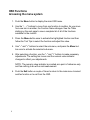
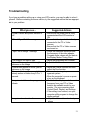
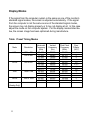
Troubleshooting If you have a problem setting up or using your LCD monitor, you may be able to solve it yourself. Before contacting customer service, try the suggested actions that are appropriate to your problem. What you see… Suggested Actions Ensure that the power cord is firmly connected and the LCD monitor is ON. “Check Signal Cable” message Ensure that the signal cable is firmly connected to the PC or Video sources. Ensure that the PC or Video sources are turned on. “Sync. Out of Range” message Check the maximum resolution and the frequency of the video adapter. Compare these values with the data in the Display Modes Timing Chart. The image is too light or dark Adjust the Brightness and Contrast. Horizontal bars appear to flicker, jitter or Adjust the Fine function. shimmer on the image Vertical bars appear to flicker, jitter or Adjust the Coarse function and then shimmer on the image adjust the Fine function. Screen is blank and the power light is The monitor is using its power mansteady amber or blinks every 0.5 or 1 agement system Move the computer’s mouse or press second. a key on the keyboard Image is not stable and may appear to Check that the display resolution and vibrate frequency from your PC or Video board is an available mode for your monitor. On your computer check Control Panel, Display, and Settings. If the setting is not correct, use your computer utility program to change the display settings. Image is not centered on the screen Adjust the horizontal and vertical positions Screen is blank and power indicator is off 21