1
System Configuration
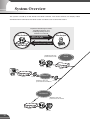
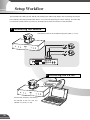
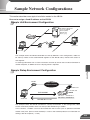
Example of basic system configuration - Viewing videos using a viewer
Sample system configuration
VC-C4
COMMUNICA
f:4-64mm TION CAMERA
1:1.4-2.8
Ethernet
VC-C4
(10/100Mbps)
VC-C4
VB150
COMMUNICA
f:4-64mm TION CAMERA
1:1.4-2.8
VC-C4
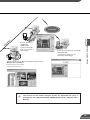
WebView Livescope
Viewer Software
(Viewer for PC or Viewer for Java)
VB
150
Recommended browser
VC-C4
● Netscape Navigator/
Communicator4.78 or later
● Internet Explorer 5.0 or later
VB150
COMMUNICA
f:4-64mm TION CAMERA
1:1.4-2.8
VC-C4
VB
150
Internet
This system configuration consists of the VB150 with Viewer Software (→ P.19). The Viewer Software consists of
the Viewer for PC and the Viewer for Java.
The Viewer for PC must be installed in advance from the supplied CD-ROM, while Viewer for Java is not installed in
advance but automatically downloaded from the VB150. Since Viewer for Java is downloaded each time you want
to view video, it is useful when viewing video for the first time. The Viewer for PC, however, is more convenient when
you want to view video frequently.
If you want to distribute live video of places such as popular tourist destinations from Web pages, it is best for your
Web page visitors to use the Viewer for Java that does not need to be installed in advance.
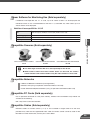
■Viewer software types and functions
Viewer Software
Functions
Video from the VB150 can be displayed by a Web browser that can run Java applet.
Because the Viewer for Java is automatically downloaded and does not need to be pre-installed,
unlike the Viewer for PC, it is compatible with any platform that supports Java-capable environments.
Viewer for Java
Because it uses the HTTP protocol, the Viewer for Java penetrates firewalls. However, it may
not run stably on some platforms or browser types.
Also, because the viewer is downloaded when the Web page loads, start-up times and
execution speeds are slower than the Viewer for PC.
An application for viewing video from the VB150 that is launched from a Web browser.
The Viewer for PC must be pre-installed.
Viewer for PC
Install the Viewer for PC from the supplied CD-ROM.
Compared with the Viewer for Java, start-up is faster because the viewer does not need to be
downloaded. This viewer is recommended for users who use it frequently.
Because it supports the HTTP protocol, the Viewer for PC penetrates firewalls unscathed.
c
Note
● Install the Viewer for PC from "MonSetup.exe" on the supplied CD-ROM.
● The Viewer Software user's manual is on the supplied CD-ROM. (VIEWER-E.pdf)
● To connect the VB150 to the Internet, you require a leased line connection to an
Internet service provider or a LAN-type dialup IP connection. If you are using a LANtype dialup connection, check that the connection supports bidirectional calling.
103