1
NETWORK CAMERA SERVER
VB150
User's Manual
Introduction
Before Using the VB150
1
Setting Up the VB150
2
Detail Settings
3
VB Administration Tools
4
Appendix
Please read this user's manual carefully before operation.
Be sure to read the "aSafe Use of Equipment" section before using this equipment.
Store this manual in a readily accessible location for future reference.
E
ENGLISH
Introduction
Thank you for purchasing the Canon Network Camera Server VB150 (referred to hereafter as the
VB150).
This manual describes how to set up and use the VB150. Read this manual carefully before using
the VB150 to ensure effective operation. In particular make sure that you read the "aSafe Use of
Equipment" in this manual, as well as the supplied CD-ROM Readme file.
Exclusion of Liability
If the Product is connected to a recording device (for example a VCR), Canon Inc. accepts no
responsibility whatsoever for any financial losses that may be incurred as a result of the loss of
recorded information or images, regardless of the internal or external cause of the loss.
Copyright Information
Video or still pictures recorded using your VB150 cannot be used in ways that infringe copyright
laws or without the consent of the owner, unless intended for personal use only.
Notes
1. The unauthorized transfer of all or any part of the contents of this Manual is forbidden.
2. The contents of this Manual are subject to change without notice.
3. Every effort has been made to ensure that this Manual is flawless. However, if you find any
oversights, please let us know.
4. Notwithstanding above, Canon accepts no liability for any results arising from the operation of
this product.
Trademark Notices
● Canon and Canon logo are registered trademarks of Canon Inc.
● Microsoft and Windows are registered trademarks of Microsoft Corporation in the United States
and other countries.
● Windows is legally recognized as Microsoft Windows Operating System.
● Java and all Java-based marks are trademarks or registered trademarks of Sun Microsystems,
Inc. in the United States and other countries.
● Other brand or product names in this manual may be trademarks or registered trademarks of
their respective companies.
Request concerning disclosure of live videos
With respect to the disclosure of live videos, we request that sufficient consideration be given to
matters of privacy and rights not to be photographed. Canon considers the following points concerning
such matters when it operates camera sites for which it has been responsible to install and operate:
- We take measures such as adding limitations on zoom magnifications so that people cannot
make special specifications.
- When videos are taken of specific buildings, interiors and the like, we install the camera only after
receiving approval from the administrator.
Please note that the operator of the camera site and not Canon has full responsibility regarding the
disclosure of live videos.
© Copyright 2003 CANON INC.
ALL RIGHTS RESERVED
1
Checking the Package Contents
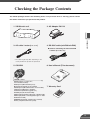
The VB150 package contains the following items. If any of these items is missing, please contact
the retailer from which you purchased the product.
2. AC Adapter PA-V16
3. AC cable 1 meter (3 ft. 3/32 in.)
4. RS-232C cable (miniDIN-miniDIN)
Introduction
1. VB150 main unit
● Used for controlling the VC-C4/VC-C4R
3 meters (9 ft. 10 3/32 in.)
* The cable length may differ depending on the
country in which the product was purchased.
5. CD-ROM
6. User's Manual (This document)
NE
TW
OR
K CA
ME
RA
VB
15
Us
er's
Ma
nu
al
SE
RV
ER
0
Be
Se
VB
Ple
Be
Sto
CD-ROM contents
Readme (Notes of caution, etc.,
not in the main manual)
VBSetup.exe (VB Initial Setup Tool)
MonSetup.exe (Viewer for PC installer)
AdmSetup.exe (VB Administration Tools installer)
CltSetup.exe (VBCollector installer)
vb150rfu.exe (Firmware upgrade tool)
VB150-E.pdf (This manual in PDF)
APEX-E.pdf (Picture Recording User’s Guide in PDF)
HPEX-E.pdf (Guide to Creating Web Pages for Video
Distribution in PDF)
VIEWER-E.pdf (Viewer software user's manual)
Vbfiles (complete built-in file system)
re
sur
this
ase
e to
ma
rea
rea
nua
De
Ad
minis
d this
use
d the
r's
"a manua
l in
Sa
a rea fe Us l carefu
e
dily
lly
bef
acc of Eq
ore
uip
ess
me
ope
ible
loc nt" sec ration
atio
n for tion bef .
futu
ore
re
refe using
this
ren
ce.
equ
Ap
ipm
ent
tratio
pend
ix
ttin
tail
n To
fore
g Up
Se
ttin
Us
the
Introd
ing
VB
the
VB
uctio
n
150
1
150
2
gs
3
ols
4
.
E
ENGL
ISH
7. Warranty Card
2
Contents
Introduction
aSafe Use of Equipment
1
2
3
4
a Important Warnings ................................................. 7
a Important Operational Instructions .......................... 7
a IMPORTANT SAFETY INSTRUCTIONS ................. 9
Maintenance ............................................................... 12
Chapter 1 Before Using the VB150
Features of the VB150 .......................................... 15
System Overview .................................................. 17
Operating Environment ........................................ 19
Viewer Software .......................................................... 19
VB Administration Tools .............................................. 19
VBCollector ................................................................. 19
Viewer Software for Monitoring Use (Sold separately) ... 20
Compatible Cameras (Sold separately) ..................... 20
Compatible Networks ................................................. 20
Compatible PC Cards (Sold separately) .................... 20
Compatible Cables (Sold separately) ......................... 20
System Components and Their Operation ......... 21
Chapter 2 Setting Up the VB150
Setup Workflow ..................................................... 25
1. Connecting the camera .................................... 27
2. Initializing the VB150 ........................................ 28
3. Checking operation .......................................... 31
Chapter 3 Detail Settings
Detail Settings ....................................................... 33
Accessing the Settings Title Page .............................. 33
Settings Title Page ...................................................... 34
System Settings Page ................................................ 35
Network Settings Page ............................................... 36
Camera and Video Settings Page .............................. 40
Preset Settings Page .................................................. 45
Picture Recording and External Device
I/O Settings Page ................................................. 46
Access Control Settings Page .................................... 51
Webview Livescope Settings Page ............................ 54
Miscellaneous Settings Page ..................................... 55
Administration Tools Settings Page ............................ 57
3
Chapter 4 VB Administration Tools
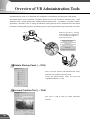
Overview of VB Administration Tools ................. 59
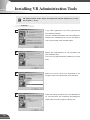
Installing VB Administration Tools ...................... 61
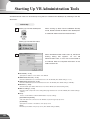
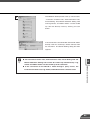
Starting Up VB Administration Tools .................. 63
Panorama Creation Tool ....................................... 65
Panorama Creation Tool Display Screen ................... 66
Capturing Panorama Pictures .................................... 67
Updating/Deleting Panorama Pictures ....................... 68
Reconnecting .............................................................. 69
Opening/Saving Pictures ............................................ 69
Displaying Connection Information ............................ 69
Introduction
View Restriction Tool ............................................ 70
View Restriction Tool Display Screen ......................... 71
Setting View Restrictions ............................................ 73
Preset Setting Tool ................................................ 75
Preset Setting Tool Display Screen ............................ 76
Setting Presets ........................................................... 78
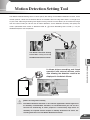
Motion Detection Setting Tool ............................. 80
Motion Detection Setting Tool Display Screen ........... 81
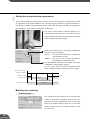
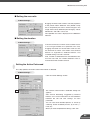
Specifying the Motion Detection Function Settings ... 83
Setting the Frame Rate .............................................. 88
Log Viewer ............................................................. 89
Downloading Log Files ............................................... 89
Viewing the Log .......................................................... 90
Admin Viewer ........................................................ 92
Starting Up Admin Viewer .......................................... 92
Operating External Devices ........................................ 93
Enabling/Disabling View Restrictions ......................... 94
Operating a Camera ................................................... 95
Appendix
Troubleshooting .................................................... 99
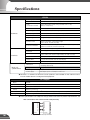
Specifications ..................................................... 101
External Device I/O Terminals .................................. 102
System Configuration ........................................ 103
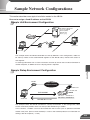
Sample Network Configurations ....................... 104
Sample LAN Environment Configuration ................. 104
Sample Dialup Environment Configuration .............. 104
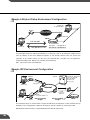
Sample LAN plus Dialup Environment Configuration ... 105
Sample ISP Environment Configuration .................. 105
Sample Wireless LAN Environment Configuration .. 106
Upgrading the Firmware Remotely ................... 107
Restoring the Factory Default Settings ............... 108
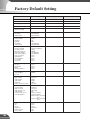
Factory Default Setting ...................................... 109
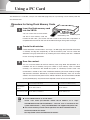
Using a PC Card .................................................. 111
Procedure for Using Flash Memory Cards .............. 111
Index ..................................................................... 112
4
Contents of the PDF on the CD-ROM
Viewer Software User's Manual (VIEWER-E.pdf)
Introduction
WebView Livescope Overview ..................................... 5
Viewer Overview ........................................................... 6
Operating Environment ................................................. 8
Viewer for Java
Preparations for Using the Viewer for Java ................ 10
Starting Up the Viewer for Java .................................. 12
Using the Viewer for Java ........................................... 13
Viewer for PC
Preparations for Using the Viewer for PC .................. 24
Starting Up the Viewer for PC .................................... 27
Connecting to the Camera Server .............................. 28
Using the Viewer for PC ............................................. 30
Viewer for PC Settings
Viewer for PC Settings ............................................... 42
Registering and Changing the Server ........................ 46
Appendix
Error Messages .......................................................... 52
Index ........................................................................... 55
Guide to Creating Web Pages for Video Distribution (HPEX-E.pdf)
Web Pages for Video Distribution ......................... 1
Viewer Overview ..................................................... 2
Viewing Sample Pages ........................................... 3
Using the Viewer for Java to Distribute Videos ... 4
Using the Viewer for PC to Distribute Videos .... 17
Distributing Videos Using a Browser Only ........ 20
Example of Video Distribution Using One
Global Address ..................................................... 22
Log Messages ....................................................... 23
Picture Recording User's Guide (APEX-E.pdf)
Using the Still Picture Recording Function
Linked to an External Device ................................. 1
Using the Still Picture Recording Function
with a Predetermined Schedule ............................ 3
Using the Motion Detection Function
with a Predetermined Schedule ............................ 5
Viewing and Distributing Recorded Pictures ...... 8
Using VBCollector ................................................ 13
5
How to Read This Manual
For information about
picture recording
For information about
setting up the VB150
NE
VB
Use
r's
TW
OR
K CA
ME
15
Man
ual
RA
SE
0
RV
Read
ER
Bef
ore
Set
ting
VB
Plea
se
Be
read
Stor sure
this
e this to read
user
's
man
the
"aS manual
ual
in a
afe
read
Use carefully
ily
befo
acce of Equ
ipme re
ssib
le loca nt" operatio
sect
n.
tion
ion
for
befo
futu
re
re
refe using
this
renc
equ
e.
Det
Adm
inis
App
trat
end
ail
Up
Too
Intr
Usi
the
ng
the
VB1
odu
ctio
This guide describes a
carefully before using
couple of specific examples
the VB150.
of the picture recording
n
50
2
s
3
ls
manual
1
VB1
50
Set
ting
ion
ix
this
4
ipme
nt.
E
Picture
function using the VB150. A
User's Manual
Recording
list of the log messages is
(This document)
User’s Guide
also contained in this guide.
ENG
LISH
(APEX-E.pdf)
Introduction
Sections where the user
should refer to this manual
are indicated by the d icon
accompanied by the relevant
page number.
For information about
creating a web page
for video distribution
For information about
using the Viewer
This manual describes how
This guide describes how
to use the Viewer for Java
to create a dedicated Web
and the Viewer for PC.
page for distributing live
video using the VB150.
Guide to
Creating Web
Sections where the user
Sections where the user
Viewer Software
User's Manual
(VIEWER-E.pdf)
should refer to this manual
are indicated by the d
Pages for Video
should refer to this manual
icon accompanied by the
Distribution
are indicated by the d
relevant page number.
(HPEX-E.pdf)
icon accompanied by the
relevant page number.
6
a Safe Use of Equipment
An exclamation point, within a triangle, is intended to alert the user to the presence of important operating
and maintenance (servicing) instructions in the literature accompanying the equipment.
1
a Important Warnings
a CAUTION:
TO REDUCE THE RISK OF ELECTRIC SHOCK, DO NOT REMOVE COVER (OR BACK).
NO USER-SERVICEABLE PARTS INSIDE. REFER SERVICING TO QUALIFIED
SERVICE PERSONNEL.
The serial number of this equipment may be found on the botton of the
equipment. No others have the same serial number as yours.
You should record the number and other vital information here and retain this
book as a permanent record of your purchase to aid identification in case of theft.
Date of Purchase
Dealer Purchased from
Dealer Address
Dealer Phone No.
Model No. VB150
Serial No.
MAC Address
2
a Important Operational Instructions
a WARNING:
TO REDUCE THE RISK OF ELECTRIC SHOCK, DO NOT EXPOSE THIS EQUIPMENT
TO RAIN OR MOISTURE.
a CAUTION:
TO REDUCE THE RISK OF ELECTRIC SHOCK AND TO REDUCE ANNOYING
INTERFERENCE, USE THE RECOMMENDED ACCESSORIES ONLY.
FDA regulation
This network camera server has not been evaluated by the Food and Drug
Administration (FDA) for use as a medical device. When incorporated into a
system with medical applications, FDA regulations may apply. Therefore,
please consult your legal advisor to determine whether FDA regulations apply.
7
6
FCC NOTICE
Network Camera Server VB150 (D78-0147)
Introduction
This device complies with Part 15 of the FCC Rules. Operation is subject to
the following two conditions: (1) This device may not cause harmful
interference, and (2) this device must accept any interference received,
including interference that may cause undesired operation.
Note: This equipment has been tested and found to comply with the limits for
a Class B digital device, pursuant to Part 15 of the FCC Rules. These limits
are designed to provide reasonable protection against harmful interference in
a residential installation. This equipment generates, uses and can radiate radio
frequency energy and, if not installed and used in accordance with the
instructions, may cause harmful interference to radio communications.
However, there is no guarantee that interference will not occur in a particular
installation. If this equipment does cause harmful interference to radio or
television reception, which can be determined by turning the equipment off
and on, the user is encouraged to try to correct the interference by one or
more of the following measures:
- Reorient or relocate the receiving antenna.
- Increase the separation between the equipment and receiver.
- Connect the equipment into an outlet on a circuit different from that to which
the receiver is connected.
- Consult the dealer or an experienced radio/TV technician for help.
Use of shielded cable is required to comply with class B limits in Subpart B of
Part 15 of FCC Rules.
Do not make any changes or modifications to the equipment unless otherwise
specified in the manual. If such changes or modifications should be made,
you could be required to stop operation of the equipment.
Canon U.S.A. Inc.
One Canon Plaza, Lake Success, NY 11042, U.S.A.
Tel No. (516) 328-5600
IC NOTICE
This product does not exceed the Class B limits for radio noise emissions
from digital apparatus as set out in the Interference-causing equipment
standard entitled ‘Digital Apparatus’, ICES-003 of the Industry Canada.
NOTIFICATION IC
Cet appareil numériquw respecte les limites de bruits radioélectriques
applicables aux appareils numériques de Classe B prescrites dans la norma
sur le matériel brouilleur: “Appareils Numériques”, NMB-003 édictées par
I’lndustrie Canada.
Dieses Produkt ist zum Gebrauch im Wohnbereich, Geschäfts- und
Gewerbebereich sowie in Kleinbetrieben vorgesehen.
9
8
3
a IMPORTANT SAFETY INSTRUCTIONS
In these safety instructions, the word
“equipment” refers to the Canon Network
Camera Server VB150 and all its
accessories.
Quick stops, excessive force, and
uneven surfaces may cause the
equipment and cart combination to
overturn.
1. Read Instructions - All the safety and
operating instructions should be read
before the equipment is operated.
9. Power Sources - The PA-V16 AC
adapter should be operated only from
the type of power source indicated on
the marking label. If you are not sure of
the type of power supply to your home,
consult your equipment dealer or local
power company.
10. Polarization - The PA-V16 AC adapter
is equipped with a polarized 2-prong
plug (a plug having one blade wider than
the other).
The 2-prong polarized plug will fit into
the power outlet only one way. This is a
safety feature. If you are unable to insert
the plug fully into the outlet, try reversing
the plug. If the plug still fails to fit, contact
your electrician to replace your obsolete
outlet. Do not defeat the safety purpose
of the polarized plug.
2. Retain Instructions - The safety and
operating instruction should be retained
for future reference.
3. Heed Warnings - All warnings on the
equipment and in the operating
instructions should be adhered to.
4. Follow Instructions - All operating and
maintenance instructions should be
followed.
5. Cleaning - Unplug this equipment from
the wall outlet before cleaning.
Wipe the equipment with a clean soft
cloth. If necessary, put a cloth in diluted
neutral detergent and wring it well before
wiping the equipment with it. Finally,
clean the equipment with a clean dry
cloth. Do not use benzene, thinner or
other volatile liquids or pesticides as
they may damage the product’s finish.
When using chemically-treated cleaning
cloths, observe those precautions
accordingly.
6. Accessories - Do not use accessories
not recommended in this manual as
they may be hazardous. Always use
specified connection cables. Connect
devices correctly.
7. Water and Moisture - Hazard of electric
shock - Do not use the equipment near
water or in rainy/moist situations. Do not
put a heater near this equipment.
8. Placing or Moving - Do not place on an
unstable cart, stand, tripod, bracket or
table. The equipment may fall, causing
serious injury to a child or adult, and
serious damage to the equipment. An
equipment and cart
combination should
be moved with care.
9
11. Power Cord Protection - Power cords
should be routed so that they are not
likely to be walked on or pinched by
items placed upon or against them. Pay
particular attention to plugs and the point
from which the cords exit the equipment.
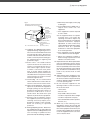
12. Outdoor Antenna Grounding - If an
outside antenna is connected to the
equipment, be sure the antenna is
grounded so as to provide some
protection against voltage surges and
built-up static charges. Section 810 of
the National Electrical Code, ANSI/
NFPA No.70-1984, provides information
with respect to proper grounding of the
mast and supporting structure,
grounding of the lead-in wire to an
antenna discharge unit, size of
grounding conductors, location of
antenna antenna discharge unit,
connection to grounding electrodes,
and requirements for the grounding
electrode. See figure 1.
10
a Safe Use of Equipment
fig-1
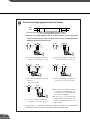
a. When the power-supply cord or plug
is damaged.
EXAMPLE OF ANTENNA GROUNDING AS
PER NATIONAL ELECTRICAL CODE
GROUNDING
CLAMP
ELECTRIC
SERVICE
EQUIPMENT
ANTENNA
LEAD IN WIRE
b. If any liquid has been spilled onto, or
objects have fallen into, the
equipment.
ANTENNA
DISCHARGE
UNIT (NEC
SECTION 810-20)
c. If the equipment has been exposed
to rain or water.
GROUNDING
CONDUCTORS
(NEC SECTION
810-21)
NEC — NATIONAL ELECTRIC CODE
13. Lightning - For added protection of this
equipment during a lightning storm, or
when it is left unattended and unused
for long periods of time, disconnect it
from the wall outlet and disconnect the
antenna. This will prevent damage to
the equipment due to lightning and
power-line surges.
14. Power Lines - An outside antenna
system should not be located in the
vicinity of overhead power lines or
other electric light or power circuits,
or where it can fall into such power
lines or circuits. When installing an
outside antenna system, extreme care
should be taken to keep from touching
such power lines or circuits as contact
with them might be fatal.
15. Overloading - Do not overload wall
outlets and extension cords as this can
result in a risk of fire or electric shock.
16. Object and Liquid Entry - Never push
objects of any kind into this equipment
through openings as they may touch
dangerous voltage points or short out
parts that could result in a fire or
electric shock. Be careful not to spill
liquid of any kind onto the equipment.
17. Servicing - Do not attempt to service
this equipment yourself as opening or
removing covers may expose you to
dangerous voltage or other hazards.
Refer all servicing to qualified
personnel.
11
18. Damage Requiring Service - Disconnect
this equipment from the wall outlet and
all power sources including batteries, and
refer servicing to qualified service
personnel under the following conditions.
Introduction
GROUNDING CLAMPS
POWER SERVICE
GROUNDING ELECTRODE
SYSTEM
(NEC ART 250. PART H)
d. If the equipment does not operate
normally even if you follow the
operating instructions. Adjust only
those controls that are covered by the
operation instructions. Improper
adjustment of other controls may
result in damage and will often require
extensive work by a qualified
technician to restore the equipment
to its normal operation.
e. If the equipment has been dropped
or the cabinet has been damaged.
f. When the equipment exhibits a
distinct change in performance. This
indicates a need for service.
19. Replacement Parts - When replacement
parts are required, be sure the service
technician has used replacement parts
that are specified by Canon or that have
the same characteristics as the original
part. Unauthorized substitutions may
result in fire, electric shock or other
hazards.
20. Safety Check - Upon completion of any
service or repairs to this equipment, ask
the service technician to perform safety
checks to determine that the equipment
is in safe operating order.
21. Do not install the equipment in the
following locations as this can cause a
fire or electric shock:
- Hot locations
- Close to a fire
- Very humid or dusty locations
- Locations exposed to direct sunlight
- Locations exposed to salt spray
- Close to flammable solvents (alcohol,
thinners, etc.)
22. When any of the following occurs,
immediately unplug the PA-V16 AC
adapter from the main power supply to
turn off the equipment and contact your
nearest Canon supplier. Do not continue
to use the equipment as this can cause
a fire or electric shock.
10
- The equipment emits any smoke,
heat, abnormal noise, or unusual
odor.
- A metal object falls into the
equipment.
- The equipment is damaged in some
way.
23. Please observe the following when
using the equipment. Failure to do so
can result in a fire or electric shock.
- Do not use flammable sprays near
the equipment.
- Do not subject the equipment to
strong impacts.
11
12
a Safe Use of Equipment
4
Maintenance
Cleaning the Equipment
1. Unplug the AC adapter from the wall outlet.
2. Carefully wipe the equipment with a soft cloth that has been moistened
with water or a mild detergent.
Introduction
WARNING
Do not use flammable solvents such as alcohol, benzene or thinners.
The use of such substances can cause a fire or electric shock.
3. Wipe with a dry cloth.
4. When you have finished, plug the AC adapter back in to the wall outlet.
Icons Used in This User's Manual
c
Note
e
Tip
d
Indicates important information that must be observed or actions that
are prohibited during an operation. These notes must be read to
prevent possible faults or damage to the equipment.
Indicates supplementary information or a reference to an operation.
Users are advised to read these memos.
Refer to the PDF manual on the supplied CD-ROM.
12
13
Chapter
1
Before Using the VB150
This chapter contains information that you should read before
using the VB150. It also describes the features of the VB150, the
system overview, the operating environment, and the name and
functions of the system components.
Features of the VB150
The VB150 is a system that distributes live video via the Internet or an intranet. It can be used in a wide
variety of applications such as distributing live video from a Web site or monitoring.
■WebView Livescope built in
The VB150 comes with Canon’s own WebView Livescope network video distribution system built
in.
■Broadband video distribution function
Video can be captured at a maximum of 30 fps. Motion-JPEG is used to compress the video
images. The network auto negotiates between Ethernet 100 Mbps and 10 Mbps. Also, a wireless
LAN card can be used for IEEE 802.11b-compliant 11 Mbps communication. If a PC card modem
is used, the public switched telephone network can also be used. Since video quality (1-99) and
the frame rate (0.1-30 fps) can be freely set, video can be distributed under conditions that best
suit the network bandwidth.
■Simultaneous video reception by up to 50 clients
Up to 50 clients can view video simultaneously with a single VB150 unit.
■Remote camera control from the viewer *
Two types of viewer software are provided: Viewer for PC and Viewer for Java. These viewers
can be used to freely control the angle (pan and tilt) and the zoom magnification of cameras
installed in a remote location, enabling viewing videos with plenty of ambiance.
■Control for up to 4 cameras
Up to 4 video cameras can be connected to the VB150, and videos that you view
can be switched from the viewer. If Canon Communications VC-C4/VC-C4R
cameras are used, you will be able to control all cameras (using the cascade
function of the VC-C4/VC-C4R).
■Compatible with wireless LANs
A wireless LAN card can be used to connect the VB150 to a network.
■Motion-detection based picture recording
The VB150 can detect image changes caused by moving people or objects, perform external
device output and record pictures.
■Panorama picture creation function and various settings *
The camera's entire recordable area can be created as a panorama picture and saved. The saved
picture can then be used to easily and visually set view restrictions and presets.
■Camera position preset function *
When presets such as camera angles (direction in which camera is aimed or zoom position) are
stored in advance, the camera can be controlled by simply selecting the desired preset from the
viewer. Up to 8 sets of presets can be stored.
15
■View restriction function *
Restrictions can be applied to zoom magnifications and angle settings to prevent clients from
seeing certain camera angles. When using the VB150 to operate a fixed point camera over the
Internet, for example, it is possible to consider privacy when distributing videos (→ P.1, "Request
Concerning the Disclosure of Live Pictures").
■Built-in Web server and FTP server
The VB150 has a built-in Web server. If Web page data is written onto a flash memory card (sold
separately), the VB150 will be able to distribute Web pages and videos over the Web. Since the
VB150 also has a built-in FTP server, Web page data can be sent from a remote location as a file
(FTP).
■Easy setting and administration
1
Before Using the VB150
Since the VB150 provides settings pages that utilize the Web, you can use a PC and Web
browser to make settings and perform administrative tasks remotely without going to the location
where the VB150 is installed. The VB Administration Tools can be used to create panorama
pictures, view logs, and to specify preset, view restriction, and motion detection settings.
■Plenty of expandability
The VB150 includes 2 card slots, allowing a modem, wireless LAN or flash memory card to be
added to suit various applications.
■Log function
The Log function lets you save log information such as errors and access conditions in a file
and send it to specific email addresses.
■Strengthened security function
Passwords can be used to restrict destinations where videos are sent. (Up to 50 clients can be
registered).
■Picture recording via link with external device or schedule
Still pictures can be recorded based on ON/OFF events from an external device or schedules set
in advance. Up to 30,000 still pictures can be recorded. Moreover, if VBCollector is used, still
pictures recorded by the VB150 can be automatically collected by a PC and viewed.
* Only available when VC-C4/VC-C4R/NU-700 is connected to the VB150.
16
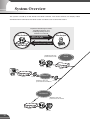
System Overview
The system is made up of the VB150 and viewer software. The viewer software can display videos
distributed from the VB150 on the viewer screen and allows user to control the camera.
Capable of distributing live video,
controlling cameras, and
modifying settings via the
Internet or an intranet
Video Distributor
Video Recipient
Video, recorded pictures
and picture data
VCVC-C4
C4
COMMUNICA
COMMUNICA
f:4-64mm
TION CAMERA
1:1.4-2.8
f:4-64mm
TION
1:1.4-2.8CAMERA
Camera control requests
and camera sever settings
Distributes video and
picture data via a LAN
LAN
VC-C4
COMMUNICA
f:4-64mm TION CAMERA
1:1.4-2.8
VB 150
VC-C4
VC-C4R
VB150
VB 150
NU-700
VB150
ISDNLine
Router
Distributes video and
picture data via an ISDN line
Router
INTERNET
Distributes video and
picture data via the Internet
VC-C4
COMMUNICA
f:4-64mm TION CAMERA
1:1.4-2.8
VB 150
VB150
VC-C4
VC-C4R
17
INTERNET
H
ET
1
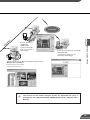
Viewer Software
(Supplied)
Viewer for PC
Controls camera angle,
zoom, etc., and monitors
camera images
Before Using the VB150
ET
N
ER
Viewer Software (Built into the VB150)
Viewer for Java
Controls camera angle, zoom, etc.,
and monitors camera images
Viewer Software for Monitoring (Sold separately)
WebView Livescope MV/LE
Monitors images from multiple
cameras at the same time
d
The manual for the viewer software (Viewer for PC/Viewer for Java) is
provided on the supplied CD-ROM, VIEWER-E.pdf (Viewer Software User's
Manual).
18
Operating Environment
Viewer Software (→ dViewer Software User's Manual)
The viewer software that are supplied with the VB150. They lets you view the video captured by
the camera connected to the VB150 and control the camera.
Viewer for Java Ver. 3.3
Operating System
Windows 98SE / Windows Me / Windows 2000 / Windows XP
Web Browser
Netscape Navigator/Communicator 4.78 or later (except 6.01 and 6.1),
or Microsoft Internet Explorer 5.0 or later recommended
* This viewer is installed on the VB150 and is automatically downloaded when connected to the VB150.
* This viewer may not run stably on operating systems and Web browsers other than those listed above.
Viewer for PC Ver. 3.3
Operating System
Windows 98SE / Windows Me / Windows 2000 / Windows XP
Web Browser
Netscape Navigator/Communicator 4.78 or later,
or Microsoft Internet Explorer 5.0 or later recommended
* Must be installed from the supplied CD-ROM. (→dViewer Software User's Manual P.24)
The latest information on the viewer is available at the following.
URL : http://www.canon.com/webview/
c
Note
● The manual for the viewer software is on the supplied CD-ROM(VIEWERE.pdf).
● Although Ver. 3.2 or earlier viewers can be used, some of the features are
different. Therefore, we recommend you to use the latest version.
On Macintosh computers, some of the features of Ver. 1.2 viewer are not
available.
VB Administration Tools Ver. 1.1 (→ P.59)
This tool lets you create panorama pictures from the VB150 and then easily use them to visually
set view restrictions and presets. The motion detection setting is also available.
Operating System
Web Browser
Windows Me/Windows 2000 (SP 2 or later)/Windows XP
Microsoft Internet Explorer 5.0 or later required and 5.5 or later recommended
* Must be installed from the supplied CD-ROM. (→ P.61)
VBCollector Ver. 1.1 (→ dPicture Recording User’s Guide P.13)
This tool is for collecting and viewing still pictures recorded by the VB150 on a PC.
Operating System
Web Browser
Windows Me/Windows 2000 (SP 2 or later)/Windows XP
Microsoft Internet Explorer 5.0 or later required and 5.5 or later recommended
* Must be installed from the supplied CD-ROM. (→dPicture Recording User’s Guide P.14)
* You need a flash memory card (sold separately) to record still pictures.
19
Viewer Software for Monitoring Use (Sold separately)
If WebView Livescope MV Ver. 2.1 is used, up to 16 viewer screens can be displayed and
monitored. There is also a limited edition of MV Ver. 2.1, called MV LE, which allows up to 4
viewer screens to be displayed.
WebView Livescope MV Ver. 2.1/LE
PC
CPU: Pentium III 600 MHz or better, RAM: 128 MB or better,
Hard disk capacity: 50 Mbytes or better (MV), 20 MB or better (LE),
Operating System
Windows Me / Windows 2000 (SP 1 or later) / Windows XP
Web Browser
Microsoft Internet Explorer 5.0 or later required
Display
XGA (1024 x 768) or better, 16-bit color display or better
1
Canon Communication Camera
Canon Communication Camera
Canon Remote Control Pan-tilt Head
VC-C4
VC-C4R
NU-700
e
Tip
Before Using the VB150
Compatible Cameras (Sold separately)
● The wide-angle converter WL-37 is sold separetely for the VC-C4.
● While cameras other than those shown above can be used, the camera
control functions will not be available. Only the video functions can be used.
Compatible Networks
• 10Base-T/100Base-TX Ethernet (auto-negotiation)
• Wireless LAN (using an operation-confirmed wireless LAN card)
• Public Switched Telephone Networks (using an operation-confirmed modem card)
Compatible PC Cards (Sold separately)
Use an operation-confirmed PC card (flash memory, wireless LAN and modem card). Details are
available at the following.
URL: http://www.canon.com/webview/
Compatible Cables (Sold separately)
RS-232C cables for camera control (→ P.2) is also available in lengths other than the ones
provided. Also, note that the supplied RS-232C cable for camera control cannot be used for the
NU-700. For further information, contact your Canon dealer.
20
System Components and Their Operation
Front View
Power LED
Powered on
System fault
lit green
lit orange (→ e Tip)
Slot-A LED
(Shows the operation status for PC card slot A)
Normal operation
During access
lit green
lit orange
Slot-B LED
(Shows the operation status for PC card slot B)
Normal operation
During access
Power
Slot-A
Slot-B
lit green
lit orange
100
Tx/Lnk
Col/Rx
VB 150
100 LED
(Shows the Ethernet 100/10 operation mode)
100Base-TX
lit green
10Base-T
off
Tx/Lnk LED
(Shows the Ethernet transmission status)
Normal connection
lit green
During transmission
lit orange
Col/Rx LED
(Shows the Ethernet receiving status)
Receiving
lit green
Collision
lit orange
e
Tip
21
When you turn the VB150 power on, the power LED glows orange for several
seconds and then turns green. This is normal and does not indicate a fault.
Rear View
Power connection socket
External device I/O terminals
PC card slot A
(supports modem card, wireless LAN card and flash memory card)
PC card slot B
(supports modem card, wireless LAN card and flash memory card)
1
Factory defaults reset switch
Before Using the VB150
You can return all settings on the VB150 to the factory
default settings by holding down this button with a pointed
object and as you plug the AC adapter into the wall outlet (→P.108).
Slot-B
RS232C
Slot-A
Dc In 13V
A
1
2
In
B
CC1
A B
1
Video In
CC2
V1
V2
V3
V4
2
Ethernet
100/10BT
Out
100/10 BT Ethernet connector
(100Base-TX, 10Base-T auto-negotiation)
Camera control connector CC1, CC2
(RS-232C, with one touch lock)
Video input sockets V1, V2
(RCA pin-jack)
Video input sockets V3, V4
(BNC connector)
c
Note
e
Tip
● Refer to page 111 for information on how to use a PC card.
● Camera control connectors can only be used for the VC-C4/VC-C4R/NU-700.
The video cable supplied with the Canon Communication
Camera VC-C4/VC-C4R is compatible with the RCA pin-jack.
To connect these cameras to a BNC socket, use a third party
Pin → BNC conversion adapter.
22
23
Chapter
2
Setting Up the VB150
This chapter describes how to connect up the equipment in the
system, how to specify the basic system settings and how to check
that the camera image is displayed correctly.
Setup Workflow
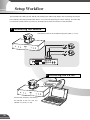
The procedure for setting up the VB150 and checking the video image begins with connecting the camera
to the VB150, connecting the VB150 to the PC via a hub and specifying the various settings. The next step
is to check that video from the camera can be displayed and that the camera can be controlled.
1 Connecting the camera
Connect the cameras to the VB150 using the cables (→ P.27).
VC-C4
COMMU
f:4-64mmNICATION CAMERA
1:1.4-2.8
VC-C4
COMMUNICAT
f:4-64mm ION CAMERA
1:1.4-2.8
VC-C4
COMMUNICAT
f:4-64mm ION CAMERA
1:1.4-2.8
Slot-B
RS232C
Slot-A
Dc In 13V
A
1
2
B
1
In
CC1
A B
Video In
CC2
V1
V2
V3
V4
2
Out
Ethernet
100/10BT
2 Initializing the VB150
VC-C4
COMMU
f:4-64mmNICATION CAMERA
1:1.4-2.8
Initialize the VB150 by connecting
the VB150 to the PC and the
network via a hub (→ P.28).
25
3 Checking operation
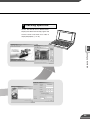
Access the VB150 from a Web browser.
Display the video from the top page of the
camera server and check that video is
displayed properly (→ P.31).
2
Setting Up the VB150
26
1. Connecting the camera
In this description, we begin by connecting 2 cameras to the VB150. The RS-232C cables are connected to
the CC1 and CC2 port on the VB150 and the video cables are connected to V1 and V2. In this way, one
camera is connected to CC1-V1 and the other to CC2-V2. The video cable is supplied with the VC-C4/VCC4R.
VC-C4
COMMUNIC
f:4-64mm ATION CAMERA
1:1.4-2.8
RS-232C cable
Video cable(RCA)
Camera
VC-C4
COMMUNIC
f:4-64mm ATION CAMERA
1:1.4-2.8
RS-232C cable
Video cable(RCA)
Camera
Slot-B
VB150 Rear panel
A
1
2
In
AC adapter
RS232C
Slot-A
Dc In 13V
B
CC1
A B
1
Video In
CC2
V1
V2
V3
V4
2
Out
Ethernet
100/10BT
At this stage, please do not plug the AC adapter
into the wall outlet yet.
AC cable
Camera connection is now complete.
c
Note
● The video cable supplied with the Canon Communication Camera VC-C4/
VC-C4R, is compatible with the RCA pin-jack. To connect these cameras to
a BNC socket, use a third party Pin → BNC conversion adapter. (→ P.22)
● Canon Communication Camera VC-C4/VC-C4Rs can be cascade-connected
and controlled (→ P.42).
27
2. Initializing the VB150
When you have completed connecting the cameras, the next step is to initialize the VB150.
1
Connect the VB150 to the network using a
Slot-B
Dc In 13V
A
B
A B
Slot-A
RS232C
CC1
1
2
In
1
CC2
V1
Video In
V2
V3
V4
LAN cable. Turn on the power to your
2
Out
Ethernet
100/10BT
equipment in the following order: Network
LAN cable
device (hub in this case), PC, camera, and
then VB150.
HUB
a Precautions for Turning the VB150 On and Off
The VB150 has no power switch. To turn the VB150 off and on, unplug the AC adapter. When you
unplug the AC adapter from the wall outlet, wait at least 5 seconds and then plug the AC adapter
2
into the wall outlet. Be sure to observe the precautions given in "aImportant Safety Instructions"
Setting Up the VB150
(→ P.9).
Wall Outlet
VB150
AC adapter
AC cable
● If the VB150 will not be used for some time, unplug the AC adapter from the wall
outlet.
2
Insert the supplied CD-ROM into the PC
and double click the VB Initial Setup Tool,
“VBSetup.exe” to launch the program.
Supplied CD-ROM
28
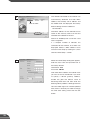
The VB150s connected to the network are
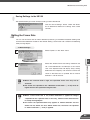
3
automatically detected and their MAC
address, the currently set IP address and
Click to select
the model name are displayed. The factory
default settings for the IP address is
192.168.100.1.
The MAC address for the VB150 can be
found on the warranty card or on the seal
attached on the bottom of the unit.
Note that VBSetup.exe cannot be used
across segments.
If a multiple number of VB150s are
connected to the network, all of them are
displayed. Select a MAC address to be
used for initial setup by clicking on it, then
click the “Initial Setup...” button.
4
When the “Initial Setup” dialog box appears,
enter the user name and password set as
the factory defaults.
User Name : root
Password : VB150
Then enter the IP address and subnet mask
you want to set for the VB150. If you want
to specify a default gateway address,
enable the [Set the default route to
Ethernet] check box and then enter the
default gateway address. Although the time
zone and video signal can also be specified
here, there is basically no need to change
the time zone setting. Then click the OK
button.
29
Initializing the VB150
A setup progress window appears and your
5
settings will be saved. To setup more than
one VB150, repeat steps 3 through 5.
Initial settings are now complete.
2
Note
Setting Up the VB150
c
● Set the IP address to a value that suits your environment.
● Assign a fixed IP address to the VB150.
● Please consult with your network administrator for the IP address, subnet
mask and default gateway address settings.
● If 20 minutes or more passes after the VB150 is turned on, the VB150 stops
sending requests for IP addresses allocation and they cannot be detected
using this tool. If this occurs, restart the VB150.
● VBSetup.exe can only be used for the Ethernet settings. Use the Network
Settings page for the wireless LAN and PPP settings (→ P.37-38).
● To restore the factory default settings, refer to page 108.
● Be sure to turn off the power to the VB150 and to the camera before you
change the camera’s connection to the VB150. After you have changed the
connection, turn on the power to the camera first, and then to the VB150.
30
3. Checking operation
When you have completed the initial setup, check that the VB150 works properly. Use the VB150 top page
to simplify checking.
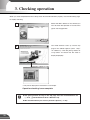
Select the MAC address of the VB150 you
1
want to check the operation of and click the
[Open Test Page] button.
Your Web browser starts up and the top
2
page of the VB150 appears (URL: http://
<IP address>/). Click the [Using Viewer for
Java] button and check that the video is
displayed properly.
Example of Viewer for Java
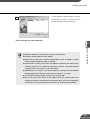
* The picture displayed in the viewer is an example.
Operation checking is now complete.
e
Tip
31
● The [Using Viewer for PC] on the top page must be installed before use
(→ P.19, dViewer Software User's Manual P.24).
● We recommend that you create a panorama picture (→ P.65).
Chapter
3
Detail Settings
This chapter describes the method for specifying detailed settings.
The VB Administration Tools described in Chapter 4 provide a
convenient way to set view restrictions and presets.
Detail Settings
Accessing the Settings Title Page
The various settings on the VB150 are specified by using a browser to access Web pages on the
VB150. You begin by accessing the Settings Title Page.
1
Use the browser to access
http://"IP address"/"path".
Use the IP address specified in "Initializing the VB150" (→ P.28). If this is the first time
you have accessed the VB150, enter “admin”, which is the default setting for “path”, in
the “path” field. The “path” component can be changed at any time on the System
Settings page (→ P. 35)
You are now asked for your user
2
name and password. In the factory
default settings, the user name is
"root" and the password is "VB150".
Enter these settings. These can also
be changed on the System Settings
page. (→ P.35)
Settings Title Page
The Setting Title Page appears.
33
Settings Title Page
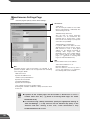
From this settings title page, you can move to each settings pages and confirm the changes to the
settings, write the changes to the VB150 memory and perform restarts.
Settings Title Page for VB150
"Japanese" button
Click this button to display the settings page
in Japanese. The button then changes to
"English" and switches the display back to
English when clicked.
"Send Config. and Reboot VB150" button
After you have changed the settings on a
page, click the "OK" button on that page.
This returns you to the title page. At that
point, the changes have not been sent to the
VB150. Clicking this button confirms the
changes, writes them into the VB150
memory and automatically restarts the
VB150 to validate the changes. If the
changes do not require restarting, the "Send
Config. to VB150" button is displayed
instead of this button.
Detail Settings
Clicking on the titles displays
each setting pages.
3
"Restore to previous VB150 Config." button
Click this button when you want to cancel
the changes you have made to the settings
page. All the changes are discarded and
returns to its previous values.
If no settings have been changed, these 2
buttons are not displayed.
c
Note
● Do not open multiple browser windows at the same time to change settings
in parallel.
● Do not use the "Back" and "Forward" buttons in your browser to move
between settings pages. Due to the effects of caching, there are
possibilities that an old settings page will appear, settings will return to
their original values, or unintended changes will occur.
● When you change the settings, you should always click the "Send Config.
to VB150", or the "Send Config. and Reboot VB150" button.
e
Tip
Those settings that require the VB150 to
be restarted for the changes to take effect
are marked with a red tick.
34
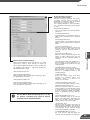
System Settings Page
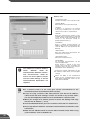
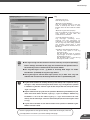
Use this page to set the administrator ID and password as well as the date and time.
Administration Account
"Administrator ID"
Sets the ID used by the administrator. Up
to 15 characters can be set consisting of
alphanumeric characters, underscores
and hyphens. The default setting is "root".
"Password"
Sets the password. Up to 15 ASCII
characters can be used (spaces or printable
characters). The default setting is "VB150".
"Confirm password"
Confirms the password in the field above.
Others
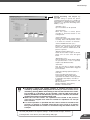
"Device Name"
Sets the device name. The device name is used as the
subject in log mail (→ P.55), as a message body
parameter specification in picture mail (→ P.47) and is
used in MV 2.1 (→ MV Manual P.23). The device name
can consist of up to 31 alphanumeric characters and can
include underscores and hyphens.
Example: If “Tokyo-showroom” is set as the device name
and log mail is set, the log mail will be sent with the
following subject line:
Subject: Syslog message from Tokyo-showroom
If no device name is specified, “VB150” is used.
c
Note
Settings Web page URL
Sets the "path" component for the settings
title page (→ P.34). This URL is used
subsequently when you access the settings
title page after restarting the system. (Up to
31 characters can be set consisting of
alphanumeric characters, underscores and
hyphens.).
The default setting is "admin".
Date and Time
"Time difference with Greenwich Mean Time"
The factory default time difference setting is
set to +9 hours from Greenwich Mean Time.
Please change this setting as needed.
You can only change the date and time on the
VB150 when the "Set the clock to the following
time" option is ticked. Because this setting is
returned to the VB150 when the "Send Config.
and Reboot VB150" button is clicked, the values
for the settings from year to second must be
matched to the time when the button is clicked.
● For reasons of system security, we recommend that you change the
administrator ID and password at regular intervals. It is also a good idea to
change the URL of the settings page. However, be sure to make a note of
the new settings (→ P.109) so that you do not forget them.
● If you have forgotten the Administrator ID or password, press the Factory
Defaults Reset switch to return these settings to their factory default values
(→ P.108). However, note that all settings are returned to the factory default
settings.
Click the [OK] button to change the settings. To discard the changes, click the
[Cancel] button. This returns you to the settings title page.
35
Detail Settings
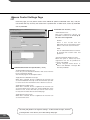
Network Settings Page
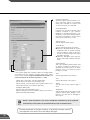
Use this page to specify the settings for connecting to an Ethernet, Wireless LAN or PPP network.
For a LAN connection, specify Ethernet settings and for a wireless LAN connection,
specify wireless LAN settings. For connection made with a modem, specify PPP settings.
Ethernet
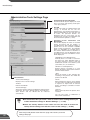
"Use Ethernet"
Tick this checkbox to use Ethernet.
"IP Address"
Enter a network interface-specific IP
address.
"Subnet Mask"
Enter the subnet mask specified for the
network to be connected.
Be sure to specify the gateway address in
the Default Route field (→ P. 39).
Contact the network administrator for the
IP address, subnet mask, and default
gateway address settings.
3
Detail Settings
c
Note
● If you are using Ethernet, take particular care with the IP address, subnet mask and
route settings. If errors are found in any of these items, you may be completely
unable to access the VB150 via Ethernet and it may only be possible to recover the
problem by using the Initial Setup Tool (→ P.28) to correct the error.
● When you change an IP address, please re-access the Settings Title Page
with the new IP address (→ P.34).
36
Wireless LAN
"Use Wireless LAN"
Tick this check box to use a wireless LAN.
"Network Mode"
Select Ad-Hoc or Infrastructure mode.
"Channel"
If "Ad-Hoc" is selected as the network
mode, select a number from 1 to 14 as the
channel to be used for communication.
"ESS ID"
Enter the ESS ID. This setting is only
available when "Infrastructure" is selected
as the network mode. The ESS ID can
consist of any characters except for
double quotation marks (“).
"IP Address"
Enter a network interface-specific IP
address. Note that you cannot specify the
same IP address as that specified for the
Ethernet.
"Subnet Mask"
Enter the subnet mask specified for the
network to be connected.
"Transmission Rate"
Select the transmission rate.
e
Tip
c
Note
Two modes are used for wireless
LANs: “Ad-Hoc” mode for
communication between stations,
and “Infrastructure” mode for
access via access points. In each
case the same settings as for the
communication destination are
required.
“Enable WEP”
For encrypted communication, set the
same encryption keys.
Select 64 bit or 128 bit as the “Key
Length” used, enter the encryption key
and then select the key to be used for
transmission in the "Default key".
Contact the network administrator for the
IP address, subnet mask, and encryption
settings.
Match the WEP to the hexadecimal
setting for the communications access
point. Only hexadecimal values can be
entered on the VB150.
● If a wireless LAN is to be used, give serious consideration to the
installation location and communications security.
● If you are using a wireless LAN, take particular care with the IP address,
subnet mask and route settings. If errors are found in any of these items,
you may be completely unable to access the VB150 via a wireless LAN.
● When you change an IP address, please re-access the Settings Title Page
with the new IP address (→ P.34).
● Turn the VB150 off before you insert a wireless LAN card or a modem card.
● Physically different networks should be used for Ethernet and wireless LAN
connections.
● Note that the VB150 cannot be used in 802.11 Ad-Hoc mode when using
system software such as Windows XP.
37
Detail Settings
PPP
"Use PPP"
Tick this option to allow PPP connections
using a modem cards.
"Receive and Call"
If Receive only (PPP) is selected, PPP
connection will be established by
incoming call, and if Primarily Call (PPP)
is selected, PPP connection will be
established by outgoing call.
"Country Selector"
When the global modem is used, select
the country where the VB150 will be used.
This setting is ignored if the global modem
is not used.
"Modem max speed"
Select the maximum baud rate as the limit
on the modem speed. Normally, there is no
need to change this setting. Set a low speed
when the line condition is poor.
Specify the following settings when Primary call (PPP)
is selected in the "Receive and Call".
"Phone Number"
Set the phone number to be dialed when PPP
connection is established by outgoing call.
Example: 0312345678
"Dial Timeout"
Sets an upper limit on the time you wait for a
connection when PPP connection is established by
outgoing call.
"Idle Timeout"
Sets the disconnection time (amount of time that the
VB150 can remain connected to the network without
communication) when PPP connection is established
by outgoing call.
"User Name"
Enter the user name to be used when PPP connection
is established by outgoing call.
"Password"
Enter the password to be used when PPP connection
is established by outgoing call.
"Confirm password"
Re-enter the password you entered above to confirm
the password.
c
Note
3
Detail Settings
"Dial Method"
Select the type of line to be used when PPP
connection is established by outgoing call.
"PPP Local Address"
Sets the local address. If PPP connection
is established by incoming call, this
address is set for the VB150 side.
"PPP Remote Address"
Sets the remote address. If PPP
connection is established by incoming
call, this address is set for the viewer PC
or router side.
"PPP Account List"
PPP connection is only permitted to
accounts with combinations of a name
and a password that match those included
in this list. (Passwords are not displayed in
the list.) If you select an account and click
the "Delete" button, the combination of a
account name and a password is removed
from the list. Up to 10 accounts can be
registered on the list.
"Add PPP Account"
Use this to add account and password
combinations to the PPP account list.
Enter the account name and password,
and click the "Add" button. The account
name can be up to 15 characters including
alphanumeric characters, underscores
and hyphens. Passwords can consist of up
to 15 ASCII text characters (space or
printable characters).
● If you are using PPP, take care when entering the phone number. Also, when
Primarily Call(PPP) is selected, the VB150 will continue calling to the
specified phone number. Be mindful of phone charges that apply when using
Primarily Call(PPP).
● If you have selected Primarily Call(PPP), appropriate settings must also be
made on the receiving PC.
38
Static Route Control
Route settings are required when
communicating with a wide-area network
through a router. When using Ethernet or
wireless LAN together with PPP, set the
route as needed.
"Default Route"
Specify the route that would normally be
used. A gateway address is required if a
router on the Ethernet or the wireless LAN
side is used.
"Route 1-3"
Use this setting if you require connection
routes other than the normal route. You
can select from Ethernet, wireless LAN or
PPP as the interface. Specify the
destination route in the Destination and
Mask fields. You must specify a gateway
address if you are using a router on an
Ethernet or wireless LAN network.
Connection Keeping
When this is selected, an ICMP Echo
packet is transmitted periodically to a
specified address in order to maintain the
network connection.
"Send packet regularly"
Tick this check box to enable this function.
"Target Address"
Specify where the packet should be sent.
"Interval(min.)"
In minutes from 1 to 60, specify the
interval at which packet should be sent.
c
Note
For the packet target address in the connection keeping function, we
recommend that you consider the impact on traffic conditions and set the IP
address that is nearest after the auto dial-up router.
Click the [OK] button to change the settings. To discard the changes, click the
[Cancel] button. This returns you to the settings title page.
39
Detail Settings
Camera and Video Settings Page
Use this page to set the camera control parameters and the video capture size and quality.
Using the VB Administration Tools is a convenient way to set the view restrictions (→ P.
70).
Common Settings
"Main Camera"
Sets the camera selected when the
VB150 starts up.
"Video Signal"
Select NTSC or PAL. The default setting is
NTSC.
"Video Input" (See "Note")
Select Single or Multiple. If Multiple is
selected when more than one camera is
connected to the VB150, multiple camera
video images can be displayed at the
same time.
"Baud rate of camera control port CC1/CC2"
For CC1 and CC2, select the same baud
rate as that set on the camera.
On the VC-C4/VC-C4R/NU-700, the
default setting is 9600.There is basically
no need to change this.
3
Detail Settings
"Return to Home Position when nobody
has control privileges"
The camera is moved to its home position
if there is no request for control privileges.
(→ P.41)
Settings for cameras 1 to 4
The camera1 to 4 correspond to cameras
which are connected to V1 to V4. (→ P.22)
"Use this Camera"
When you tick this option, this camera is
used and the settings below are enabled.
"Camera Name"
Used in the camera selection bar on the
viewers (→ P.6). This setting is required.
c
● If multiple cameras are connected to the
VB150, the bundled viewer software (→ P.19)
Note
can be used to switch between video
images. However, the MV2.1/LE software
(sold separately P.20) allows the images to
be displayed concurrently. When this
software is used, set “Video Input” to
“Multiple”. The frame rate for each camera is
between 3 and 5 fps.
"Wide Converter"
Always select "Used" when a wide-angle
converter (sold separately for VC-C4) is
mounted on the camera.
"Video Capture Size"
The available settings are 640x240,
320x240 and 160x120.
"Video Quality"
Enter a value between 1 and 99. The
greater the value, the better the quality.
However, since picture data will also be
larger, higher-quality pictures may lower
the frame rate.
40
"Camera Control Port"
Select the camera control connector (→ P.
22) to which the camera is connected.
Select "Not controlled" for cameras that
are not connected or not controlled.
"Cascade Number"
If cameras are cascade connected, select
numbers assigned to the cameras.
Numbers in ascending order from 1 are
assigned to each camera starting with the
first camera connected to camera control
connector CC1 and CC2 (→ P. 42).
"Shutter speed "
Sets the camera shutter speed.
"Focus Mode"
Sets the focusing mode for the camera.
● When the VC-C4/VC-C4R are used in
combination with an outdoor housing,
set Focus Mode to "Auto (for domes),"
in order to avoid focusing on the wall of
the outdoor housing.
● When the NU-700 is used, "Auto (for
domes) and "Fixed at infinity" cannot be
used.
"View Restriction"
If you tick the "Apply view restriction" option, the settings below
are enabled. Use this setting to prevent clients from seeing
certain camera angles. Using the VB Administration Tools is a
convenient way to set the view restrictions (→ P.70).
"Upper value, Lower value, Left value, Right value"
Sets the extent of the field of view provided to users.
(Specify settings so that the upper value is greater than the lower
value and the left value is less than the right value.)
"Telephoto, Wide-angle"
Sets the zoom angles provided to users.
(Specify settings so that the telephoto setting is less than or
equal to the wide-angle setting.)
c
"Home Position"
This is the standard camera position used
for picture recording, etc. When this is
specified, the camera moves to its home
position if there is no request for control
privileges (→ P. 40).
"Pan"
Sets the pan position of the camera.
"Tilt"
Sets the tilt position of the camera.
"Zoom"
Sets the value for the camera's angle of
zoom.
"Brightness"
Sets the target value for the camera's auto
exposure feature. Select "Brighter " if the
picture is too dark due to backlight or
other factors.
When a view restriction is set, areas outside the restrictions may be captured
momentarily if the camera is controlled close to the restriction limits.
Note
Click the [OK] button to change the settings. To discard the changes, click the
[Cancel] button. This returns you to the settings title page.
41
Detail Settings
c
Notes
Cascade connections for the VC-C4 and VC-C4R
The cascade function of the VC-C4/VC-C4R can be used with the VB150. This
enables control of up to 4 cameras from a single VB150.
1
VC-C4
VC-C4
COMMUNICATIO
f:4-64mm
N CAMERA
1:1.4-2.8
COMMUNICATIO
f:4-64mm
N CAMERA
1:1.4-2.8
VB
2
VC-C4
VC-C4
COMMUNICATIO
f:4-64mm
N CAMERA
1:1.4-2.8
VB
150
COMMUNICATIO
f:4-64mm
N CAMERA
1:1.4-2.8
150
Cascade connection
Connection to separate terminals
● When VC-C4/VC-C4Rs are cascade connected, ID numbers in ascending
order from 1 are assigned to each camera starting with the first camera
connected to camera control connectors CC1 and CC2. Cameras can be
connected to video inputs in any desired combination.
CC1-1
CC1-2
VC-C4
CC1-3
VC-C4
COMMUNICATIO
f:4-64mm
N CAMERA
1:1.4-2.8
VC-C4
COMMUNICATIO
f:4-64mm
N CAMERA
1:1.4-2.8
COMMUNICATIO
f:4-64mm
N CAMERA
1:1.4-2.8
CC1-4
3
VC-C4
COMMUNICATIO
f:4-64mm
N CAMERA
1:1.4-2.8
Detail Settings
CC1
V1
V2
Example of 4 cameras cascade
V3
VB
V4
150
CC1-1
connected to 1 camera control connector
CC1-2
VC-C4
CC2-1
VC-C4
COMMUNICATIO
f:4-64mm
N CAMERA
1:1.4-2.8
VC-C4
COMMUNICATIO
f:4-64mm
N CAMERA
1:1.4-2.8
COMMUNICATIO
f:4-64mm
N CAMERA
1:1.4-2.8
CC2-2
VC-C4
COMMUNICATIO
f:4-64mm
N CAMERA
1:1.4-2.8
CC2
CC1
V1
V2
V3
VB
150
V4
Example of 2 cameras cascade
connected to 2 camera control connectors
● In cascade connections, if an abnormality occurs with the first camera in
the connection, control for all other cameras in the cascade may not work
normally.
42
View Restriction Settings
You can set the visible range by restricting the camera pan, tilt and zoom ratio (field of view
angle) settings. Please use the VB Administration Tools (→ P.70) to set view restrictions.
-
Extent of tilt control
Maximum vertical extent
of the video capture range
■Controllable Range and Video Capture Range
+
Field of view at the
maximum wide-angle setting
0°
+
Extent of pan control
Maximum horizontal extent of the video capture range -
The view restriction is specified as the visible range. The visible range is larger than the area
where pan and tilt can be controlled.
■Controllable Range and Video Capture Range for Each Camera
VC-C4
Controllable range
Angle
VC-C4R
Controllable range
Angle
Pan control range
Pan control range
Tilt control range
Tilt control range
-170° to 170°
-90° to 10°
Zoom control range
3.7° to 47°
-100° to 100°
-30° to 90°
3.7° to 47°
Zoom control range
(with wide converter) (4.6° to 61°)
Horizontal video capture range -124° to 124°
(with wide converter) (-131° to 131°)
Horizontal video capture range -180° to 180°
Vertical video capture range -108° to 28°
Vertical video capture range -48° to 108°
(with wide converter) (-53° to 113°)
NU-700
Controllable range
Angle
Pan control range
Tilt control range
-170° to 170°
-50° to 30°
Zoom control range
0.5° to 47°
Horizontal video capture range -180° to 180°
Vertical video capture range
c
Note
43
-67° to 47°
Do not attempt to manually change the camera head angle of the VC-C4/VCC4R/NU-700. If the camera head is accidentally moved by hand or other objects
touching it, be sure to reboot the VB150. (→ P.57)
Detail Settings
e
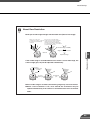
About View Restriction
Tip
● The pan and tilt range changes with the zoom ratio (field of view angle).
When you set the view
restriction, the angles of camera
movement are automatically
restricted.
If the zoom is set to wide-angle
and the angle of camera movement
remains the same, video capture
extends beyond the permitted range.
Consequently, the angle of movement
is automatically reduced.
Restricted range of visibility
Angle of camera movement
UNI
MM 4 m
CO 4 - 6
f:
UNI
MM 4 m
CO 4 - 6
f:
ERA
CAM- 2 . 8
ION 1 . 4
CAT 1 :
m
ERA
CAM- 2 . 8
ION 1 . 4
CAT 1 :
m
Camera
3
Captured range
Detail Settings
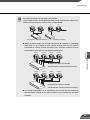
If the visible range is exceeded because the zoom is set to wide range, the
camera angle (pan, tilt) will be adjusted automatically.
Captured range
Restricted range
of visibility
COMMUN
f : 4 - 6 4 ICATION CAMERA
mm 1
:1.4-2
.8
COMMUNICATION CAMERA
f:4-64mm 1:1.4-2.8
COMMUNICATION CAMERA
f:4-64mm 1:1.4-2.8
Zoom out
(wide-angle)
Automatically
pans
● If the visible range is restricted, the zooming range may also be restricted.
● When a view restriction is set, areas outside the restrictions may be
captured momentarily if the camera is controlled close to the restriction
limits.
44
Preset Settings Page
Use this page to specify the settings for preset camera positions provided to users.
Using the VB Administration Tools is a convenient way to set presets (→ P.75).
Common Setting
"Restrict Camera Control to Presets"
Camera control by using the Viewer for PC
and the Viewer for Java can be restricted to
the preset angles specified in Preset 1-8.
Presets 1-8
Up to 8 presets can be specified.
"Application"
Use these options to specify whether this
preset can be used only for picture recording
(→ P.46) or is also made available in the
viewers. If it is also provided in the viewers,
always specify the preset name.
"Preset Name"
Enter a name consisting of up to 15
alphanumeric characters.
"Camera"
Selects the camera for which the preset
position is set.
"Camera Parameter"
Use this to set the video capture settings
to be provided.
c
Note
e
Tip
Changes in the preset settings are not
applied to the viewer while it is
connected.
● Presets can be set visually and more
easily from the VB Administration Tools.
Please use the VB Administration Tools
for the settings (→ P.75).
● If "Restrict Camera Control to Presets" is
selected, the presets can be displayed alone
without displaying the camera control GUI on
the Viewer for Java (→dGuide to Creating
Web Pages for Video Distribution P.9).
"Pan"
Sets the pan position of the camera.
"Tilt"
Sets the tilt position of the camera.
"Zoom"
Sets the value for the camera's angle of zoom.
"Brightness"
Sets the target value for the camera's auto
exposure feature. Select "Brighter " if the
picture is too dark due to backlight or other
factors.
Click the [OK] button to change the settings. To discard the changes, click the
[Cancel] button. This returns you to the settings title page.
45
Detail Settings
Picture Recording and External Device I/O Settings Page
Use this page to specify the operating condition for the picture recording function. Settings on this
page can be used to record still pictures in response to inputs from an external device (sensor,
etc.) and based on a predetermined schedule (up to 30,000 picures).
Picture Recording Common Settings
"Max Picture size"
Sets an upper limit for the picture size. If
the picture data size exceeds this value,
pictures will not be recorded.
"Max Number of Pictures"
Sets an upper limit for the number of
pictures to be recorded. This value can be
from 1 to 30,000. The number of recorded
pictures can be confirmed on the
Administration Tools Settings Page (→ P.57).
"Auto Deletion of Recorded Pictures"
Recorded pictures can automatically be
deleted on the specified time after the
specified number of days has passed.
Check this setting before you start
recording pictures.
Note
e
Tip
● Still pictures are recorded on a flash
memory card (sold separately). Even
if the settings on this page are
specified, the picture recording
function does not perform if there is
no memory card in the VB150 slot.
● The data size that can be recorded for
a still picture is less than or equal to
the size specified in the "Max Picture
size". If this amount is exceeded, the
picture will not be recorded. The
number of pictures that can be
recorded depends on flash memory
card capacity, however the maximum
number of pictures that can be
recorded is 30,000.
Detail Settings
c
3
"No. of days recorded pictures held"
Specifies how many days the recorded
picture data will be kept in a flash memory
card. The recorded data which exceeded
the days specified in "No. of days
recorded pictures held" is erased daily at
the time specified in "Recoreded picture
delete time". We recommend that you use
VBCollector for saving recorded pictures
to a PC (dPicture Recording User's
Guide P.13).
● Picture files are placed in the /card /images
directory.
A Flash Memory card is required for
recording pictures.
Files created at yyyy/mm/dd HH:MM:SS:CC
(CC = 1/100th sec. units) are placed in the
yyyymmdd/HHQQ (QQ = 15-min. units)
subdirectory under the name
"HHMMSSCC.jpg".
"Recorded picture delete time"
Sets the time at which picture files are deleted.
● The data size for a still picture varies depending on the settings for video capture
size and video quality (→ P.40), and the subject. As a guide, approximately 5-10
KB is the standard when the video capture size is set to 320x240 and the video
quality is set to 30 (In some cases this may be exceeded). To check the amount of
data for a still picture, select "View" - "Video information" from the menu after you
start up the Viewer for PC then check the "Size" value.
● When recording pictures, it is convenient to do so in combination with
VBCollector, which automatically collects recorded still pictures.
(→dPicture Recording User's Guide P.13)
46
"Recording Priority"
When there is a conflict between the timing of
recording specified in a schedule and "Recording
between ON event and OFF event", this setting
specifies which recording takes priority. Tick
"Recording triggered by external device" or
"Recording triggered by schedule" (Recording
triggered by external device P.48, Recording
triggered by Schedule P.50). The factory default
setting gives priority to "Recording triggered by
external device" .
"Picture Mail Message Body"
When pictures that were recorded using
“Recording triggered by external device” (→ P.48)
are sent via e-mail, the information given here is
sent as the message body. You can specify ASCII
text (spaces or printable characters, excluding
quotation marks) or parameters denoted by
percentage symbols (%). Be sure to make the
"Picture recording and output: triggered by
external device" settings (→ P.48) and "Mail"
settings (→ P.55).
● With picture recording triggered by schedule,
(→ P.50) recorded pictures cannot be sent as
Picture Mail.
Specifying parameters in Picture Mail messages
By using a percentage symbol (%), the parameters listed below can be included in the body of a
Picture Mail message.
Parameter
47
Description
Values
%n
Reason for shot (number)
1 (external device input 1), 2 (external device input 2), 129 (Motion detection)
%N
Reason for shot (text)
“External Device Input Name”
(“External Device Input 1/2” if omitted), Motion detection
%X
Image width
No. of horizontal pixels
%Y
Image height
No. of vertical pixels
%Q
Video quality
1-99
%C
Camera number
1-4
%D
Camera name
“Camera Name” setting
%P
Pan position
-179.99 to 180.00
%T
Tilt position
-179.99 to 180.00
%Z
Zoom position
0.01 to
%V
Camera server
“Device Name” setting (or VB150)
%y
Year of shot
1999-2037
%m
Month of shot
1-12
%d
Date of shot
1-31
%w
Day of shot
0-6 (correspond to Sun. to Sat.)
%H
Hour of shot
00-23
%M
Minute of shot
00-59
%S
Second of shot
00-59
%z
Time zone of shot
-1200 to +1300
%a
Weekday of shot
Sun, Mon, Tue, Wed, Thu, Fri, Sat
%b
Name of month of shot Jan, Feb, Mar, Apr, May, Jun, Jul, Aug, Sep, Oct, Nov, Dec
%t
Tab
%q
'”'
%%
'%'
* For undefined characters, the '%' is deleted.
* With the exception of %t, %q and %%, you cannot use the same parameter multiple times on the same line.
(The parameter (including '%') is ignored from the second instance onwards.)
Detail Settings
Picture Recording and output :
triggered by external device
Use this setting to operate the picture
recording function when recording is
performed in conjunction with an external
device such as a sensor or switch.
For a detailed example of actual operation,
see "dPicture Recording User's Guide"
(→ P.1).
"External Device Input 1/2"
Up to 2 recordings from external devices
can be set.
"Recording at ON event"
Tick this option to record pictures when an
"ON" event is detected from an external
device.
"Recording at OFF event"
Tick this option to record pictures when an
"OFF" event is detected from an external
device.
"Pre-event Recording (sec.)"
When you want to record the pictures that
proceeds an ON or OFF event, use this
setting to enter the required number of
seconds.
"Post-event Recording (sec.)"
When you want to record the pictures that
follows an ON or OFF event, use this
setting to enter the required number of
seconds.
"External Device Input 1/2"
"External Device Input Name"
Enter on external device input name consisting of up to
15 alphanumeric characters.
"External Device Output 1/2"
"External Device Output Name"
Enter on external device output name consisting of up
to 15 alphanumeric characters.
e
Tip
Use the Motion Detection Setting Tool (→ P.80)
for picture recording and external device
control based on motion detection.
Detail Settings
External Device Common Settings
When using WebView Livescope MV Ver. 2.1 (sold
separately → P.16), if these settings are made, all
names will be applied to MV. Since these settings are
not applied to the viewers (→ P.6), these settings are
only required if MV is used.
3
"Recording between ON event and OFF event"
Tick this option to record pictures for as
long as an "ON" status continues from the
external device.
"Recording Interval between events"
Records pictures at set intervals between
ON and OFF event. Specify a value
between 1 and 600 seconds as the
sampling interval.
"Camera Position"
Selects the camera angle used when
pictures are recorded. Select "Not
specified", "Home 1" to "Home 4" or
"Preset 1" to "Preset 8".
"Send recorded pictures by e-mail"
You need to make "Mail" settings (→ P.55)
"Output to External Device 1/2"
Tick this check box when you want to
control output to an external device. Keep
in mind that output to an external device
may not always be possible from Admin
Viewer or WebView Livescope MV Ver.
2.0/2.1.
"Delay following OFF event (sec.)
When controlling output to an external
device and output must retain ON after
input is set to OFF, use this setting to
specify a delay of up to 20 seconds.
"Set operation time"
When you tick this option, input from an
external device is limited to the operation
time specified below. Enter the start time
and end time for the intervals during
which external input is acceptable.
"Handle ON/OFF input in reverse"
On some devices, ON and OFF are
reversed. Use this setting for such devices.
48
e
Picture Recording Triggered by External Devices
Tip
ON
OFF
Picture Recording A
B
C
D
E
● Picture recording triggered by an external device can be performed
based on the timing of ON and OFF events or by recording pictures
between ON event and OFF event.
OFF
ON
OFF
ON
VC-C4
VC-C4
COMMUNICATIO
f:4-64mm N CAMERA
1:1.4-2.8
COMMUNICATIO
f:4-64mm N CAMERA
1:1.4-2.8
A: Pre-event recording for an ON event
(Fixed at 1 sec. intervals. -4 to 0.)
ON
OFF
VC-C4
B: Post-event recording for an ON event
(Fixed at 1 sec. intervals. 0 to 10.)
ON
OFF
VC-C4
COMMUNICATIO
f:4-64mm N CAMERA
1:1.4-2.8
COMMUNICATIO
f:4-64mm N CAMERA
1:1.4-2.8
C: Recording between ON event and
OFF event
D: Pre-event recording for an OFF event
(Fixed at 1 sec. intervals. -4 to 0.)
(exclude B and D)
ON
OFF
● For A and D, recording is controlled
to the pre-event recording time, and
VC-C4
COMMUNICATIO
f:4-64mm N CAMERA
1:1.4-2.8
for B and E, it is controlled to the
post-event recording time.
● In the case of C, the "Recording
E: Post-event recording for an OFF event
(Fixed at 1 sec. intervals. 0 to 10.)
between ON event and OFF event"
setting is applied(between 1 and
600 seconds).
For example, if "Pre-event recording" is set to 2 seconds and "Post-event
recording" is set to 5 seconds, 7 pictures will be recorded in total.
49
Detail Settings
Picture Recording and Output: by
Schedule
Use this setting to operate the picture
recording function based on a schedule set
beforehand. For a detailed example of actual
operation, see "dPicture Recording User's
Guide" (→ P.3).
"Schedule 1 to 4"
Up to 4 schedules can be specified.
"Record pictures"
When this option is ticked, picture
recording is performed based on the
settings below.
"Camera Position"
Selects the camera angle used for picture
recording. Select "Not Specified", "Home
1" to "Home 4" or "Preset 1" to "Preset 8".
"Camera Stabilization Time (sec.)"
When the camera moves to the specified
position, this setting specifies the delay
time for the camera to stabilize before still
picture is captured.
"Output to External Device 1/2"
Select this check box if output to external
device 1/2 is to occur at the time given
below.
3
Detail Settings
"Output Time (sec.)"
Sets the duration for which output is ON at
the specified time. If zero is specified,
output is only ON momentarily.
"Start Time"
Sets the start time for picture recording
and output to an external device triggered
by the schedule.
"Apply the following repetition options at
start time"
Picture recording and output to the
external device after the Start Time is
repeated at the number of times specified
in "Repetition interval(min.)" and "No. of
repetitions".
Specify "No. of repetitions" between 1 and
60 at the interval.
Specify "Repetition interval(min.)"
between 1 and 10 minutes.
e
Tip
● In Windows is being used, multiple numbers of schedule start times can be
selected by clicking while holding down the Ctrl key. A series of items can be
selected by pressing SHIFT while clicking on the first and last item in the series.
For example, it is possible to set the schedule "from the 10th to the 15th of
February and March at 10 and 30minutes past every hour". However, the selection
method varies with the environment being used.
● When the start time comes, the repetitions that started at the previous
start time are stopped even when the number of repetitions has not yet
been reached.
● If a camera position is specified and the camera cannot be moved to that
position, no picture is recorded. Note that this may result in no picture
being recorded when the camera is controlled using the Admin Viewer, for
example.
Click the [OK] button to change the settings. To discard the changes, click the
[Cancel] button. This returns you to the settings title page.
50
Access Control Settings Page
From this page, you can permit access to the VB150 to specific authorized users only, and you
can control who may and may not access from a specific host. In either case, access by restricted
user is prohibited.
Authorized User Account (→ P.52)
"Authorized User List"
Only users registered in this list are
permitted to connect to the VB150. Up to
50 users can be registered.
"Delete"
Select a user account from the
Authorized User List and click the delete
button to remove the user from the list.
"Add"
You can add authorized users to the list
by entering their account name and
password.
Authorized/Restricted Host Specification (→ P.52)
"Access permitted to listed users only"
When this option is ticked, only users
registered in the list are permitted to
connect to the VB150.
Access using the viewer Ver.3.1 or
before and WebView Livescope MV
Ver.1.0 is prohibited.
"Authorized/Restricted Host List"
In this list, you can describe the details of how access from the
hosts is permitted or denied.
See the next page for the description format.
"Apply this list to WebView Livescope"
When this is selected, the list is applied to the host that can
access the WebView Livescope server. Use this when you want
to restrict access from the Viewer for PC or Viewer for Java etc.
"Apply this list to HTTP server"
When this is selected, the list is applied to the host that can
access the HTTP server. In this case, control extends also to the
Viewer for Java, etc.Use this when you want to restrict access
not only from the viewer but also to the Web page.
"Apply this list to FTP server"
When this is selected, the list is applied to the host that can
access the FTP server.
Click the [OK] button to change the settings. To discard the changes, click the
[Cancel] button. This returns you to the settings title page.
51
Detail Settings
Authorized/Restricted Host List Descriptions
The Host Restriction function applies to hosts running client applications such as viewer. Access
restrictions are imposed using a list made up of one or more entries written using the format
described below.
Listing Format
[!]addr[-addr2]
● "addr" is written in standard IP address format.
● Because the IP addresses in the “addr” and “addr2” parameters define the range of IP
addresses, if an IP address A is higher than “addr” or lower than “addr2”, A is included in the
addr-addr2 range. The addr2 parameter can be omitted, in which case it is taken to be the
same value as addr.
● For a host IP address A for which access permission is to be authorized or restricted, the first
entry that includes A is requested from the top of the list of authorized/restricted hosts. If the
3
entry obtained begins with “!”, access is denied. If not, access is authorized.
Detail Settings
● Redundant or contradictory entries included in the list are automatically deleted.
● If the given address does not belong to any of the entries, access is authorized.
Listing Guidelines
If the list of authorized and restricted hosts contains an error, access that was originally permitted
may subsequently be denied. To avoid this problem, compile the lists very carefully using the
examples below as a guide.
Example 1: To prohibit access from a host
!172.20.0.0
Access from the host with an IP address of 172.20.0.0 is prohibited.
Example 2: To prohibit access from hosts in a given address range
!172.20.0.0-172.20.0.20
Access from hosts with IP addresses from 172.20.0.0 to 172.20.0.20 is prohibited.
Example 3: To authorize access from hosts in a given address range while prohibiting
access from other hosts
172.20.0.10-172.20.0.12
!0.0.0.0-255.255.255.255
Access is only authorized from hosts with IP addresses from 172.20.0.10 to
172.20.0.12.
52
Example 4: To prohibit access from hosts in a given address range while permitting access
from one host within that range
172.20.0.10
!172.20.0.0-172.20.0.20
Access from hosts with IP addresses from 172.20.0.0 to 172.20.0.20 is prohibited,
except for the host at 172.20.0.10, from which access is permitted.
Example 5:To prohibit access from hosts in a given address range while permitting access
from a range of hosts within that range
172.20.0.10-172.20.0.15
!172.20.0.0-172.20.0.20
Access from hosts with IP addresses from 172.20.0.0 to 172.20.0.20 is prohibited,
except for the hosts with addresses between 172.20.0.10 and 172.20.0.15, from
which access is permitted.
c
Note
● If you do not make a list, access is permitted to all hosts.
● If the list provided prohibits access for all hosts, the Host Restriction
function is disabled and access is permitted to all hosts.
● To prohibit access over HTTP connection via a proxy server, the address of
the proxy server must be set.
● If you set the host restriction incorrectly, access to the settings page itself
may be denied. In this event, the problem can only be recovered by
restoring the factory default settings.
53
Detail Settings
Webview Livescope Settings Page
Use this page to specify settings for WebView Livescope.
WebView Livescope
"Video Transmission Port"
Sets the TCP port number for the video
transmission protocol. Enter a value
between 1 and 65535. The default setting
is 65310. Normally, there is no need to
change this setting.
"Camera Control Port"
Sets the TCP port number for the camera
control protocol. Enter a value between 1
and 65535. The default setting is 65311.
Normally, there is no need to change this
setting.
"Maximum Number of Clients"
Sets the maximum number of clients that
can be connected simultaneously from the
viewers (→ P.6). Enter a value from 1 to 50.
"Control Queue Length"
Sets the length of the queue when multiple
clients are waiting for control privileges
under the viewer.
Enter a value between 0 and 50. The
maximum number is 50. When set to "0",
only the Admin Viewer is permitted to control
the camera.
3
Detail Settings
"Restrict Service Time"
When you want to set video distribution time for the
viewers (→ P.6), tick this option and specify the Start and
End times.
The Admin Viewer can be used to display video at times
other than the time specified. (→ P.92)
"Maximum Frame Rate (fps)"
Sets the maximum number of frames captured
per second. The maximum frame rate is 30.0
fps and enter a number between 0.1 and 30.0.
"Maximum View Time (sec)"
Sets the maximum time the client can view
video using the viewer. Enter a value between
0 and 65535. A setting of 0 disables the time
limitation.
"Maximum Camera Control Time (sec)"
Sets the maximum time for which camera
control privileges can be maintained
under the viewer. Enter a value between 1
and 3600.
e
Tip
● If you want to restrict video service time, use
"Restrict Service Time".
● The “Maximum Frame Rate” and “Maximum
number of Clients” settings are useful in
limiting the volume of network traffic.
"Camera Stabilization Time"
When the GetStillImage command
(dGuide to Creating Web Pages for
Video Distribution P.21) has been
requested, this setting specifies the delay
to allow the camera to stabilize before a
still picture is captured. Enter a value
between 0 and 10000. The maximum
delay is 10000 milliseconds.
Click the [OK] button to change the settings. To discard the changes, click the
[Cancel] button. This returns you to the settings title page.
54
Miscellaneous Settings Page
Use this page to specify various other settings.
HTTP Server
"HTTP Port"
Sets the TCP port number for the HTTP.
Enter a value between 1 and 65535. The
default setting is No. 80.
"Maximum Keep-alive Time"
Sets the time for which keep-alive
connection can be maintained. The
maximum time is 20 and enter a value
from 0 to 20. If the setting is 0, keep-alive
connections are prohibited.
"Global Address for Web Pages"
If a private address has been set in the
VB150 and you want to use the router's
NAT functions to have a fixed global
address for the VB150 (d"Guide to
Creating Web Pages for Video
Distribution" P.22), enter a global address
here, and this will let you view sample
pages (→ "dGuide to Creating Web
Pages for Video Distribution" P.3).
DNS
Sets the domain name server address.
Mail
Recorded pictures and log messages are emailed to the
specified recipient address via the specified mail forwarding
server using the SMTP.
"Name Server Address 1 to 3"
Enter the addresses.
Enter the addresses from the top down. If
you are only registering 1 or 2 addresses,
the remaining fields can be left blank.
"Mail Server Host"
Specifies the SMTP server.
"Sender's (From) Mail Address"
Specifies the mail sender.
"Recipient Mail Address"
Specifies the mail recipient.
"Use a dialup connection for sending e-mail"
Selecting this checkbox establishes a dialup connection when
mail is sent.
c
Note
● A portion of the sample pages will not function if "HTTP Port" is set to a
number other than 80 (→d Guide to Creating Web Pages for Video
Distribution P.18).
● To send mail using a dialup connection, specify the appropriate settings in
“PPP Call Settings” (→ P.38). You can also set “Receive only (PPP)” in the
“Receive and Call” setting. In this case, a PPP connection is only
established when mail is sent.
55
Detail Settings
Log
"Syslog Server Host"
Sets the Syslog server.
"Maximum Log File Number"
Sets the maximum number of log files
saved as back-up files. Enter a value
between 0 and 10. The maximum number
is 10.
"Maximum Log File Size (K bytes)"
Sets the maximum log file size. Enter a
value between 16 and 1024. The
maximum size is 1024 KB.
"Log mail collection time (min.)"
Log messages containing errors,
warnings and other information are
collected for a set period beginning from
the first log entry. This setting specifies
that collection period. Enter a value
between 0 and 60. The maximum time is
60 minutes.
"Handling of Error/Warning/Information"
Tick the "File" option to save log
messages to files.
Tick the "Forward" option to send the
log messages to the host specified in
the Syslog Server Host.
Tick the "Mail" option to send the log
messages by email. (→ P.55)
Note
Detail Settings
c
3
● The log message will be stored on the flash memory card (sold separately).
Even if settings are made for this page, this function will not operate unless a
flash memory card is inserted into the slot on the VB150.
● See Log Messages in the "dGuide to Creating Web Pages for Video
Distribution" (CD-ROM) for log message details.
● The log message for external device input (sensor, etc.) is A023. If the "Log mail
collection time" has been set, this message will be sent after a specified waiting time.
e
Tip
● Log files will be created in the /card/logs directory (a flash memory card is required to save log
messages in a file). The most recent log file will be saved as "log". The log file size is specified
in "Maximum Log File Size" and if the log file exceeds the specified size, back-up files named
"log.0..." are created.
● Only the number of back-up log files that are specified in "Maximum Log File Number (N+1)" will
remain. These will be listed in the order, "log.0, log.1,..., log.N". For example, if "Maximum Log
File Number" is set to 10, files named "log.0, log.1,..., log.9" will be created in the same
directory. The file named "log.0" is the most recent back-up file (the most recent log file is listed
as "log").
● Log files will be overwritten in order after the number of files specified in "Maximum Log File
Number" have been created.
Click the [OK] button to change the settings. To discard the changes, click the
[Cancel] button. This returns you to the settings title page.
56
Detail Settings
Administration Tools Settings Page
On-board File System Information
The On-board File System displays the used
space, free space and capacity (used space
+ free space) in bytes.
Slot A/B
If a PC card, used for communications and
storage, is inserted into the slot, the
"Manufacturer" and "Product Information" is
displayed. Depending on the card type and
its status, the operation buttons are
displayed and the card status can be
controlled. The card slots are labelled A and
B from the bottom upwards (→ P.22).
Recorded Picture Information and
Manipulation
This section displays the status of recorded
picture processing and the number of
recorded pictures. The maximum number of
pictures that can be recorded is 30,000.
Under certain circumstances, the "Rebuild"
button for "Rebuilding of recorded picture
list" and the "Delete" button for "Deletion of
recorded pictures" may be displayed, and if
the pictures cannot be recorded the reason
will be displayed.
"Rebuilding of recorded picture list"
Normally, there is no need to reconstruct
the picture list. Click "Rebuild" button if
you have removed a memory card and
modified the content of that memory card
(erased files, etc.) on another PC.
"Deletion of recorded pictures"
Deletes pictures recorded on a card.
Specify the delete criteria below and then
click the "Delete" button.
"Time"
Select the period of time following the
recording of the pictures after which the
pictures are deleted.
Miscellaneous
"View Current Settings"
Displays a list of current settings.
"Reboot"
Reboots the VB150.
"Restore Settings"
All but the System settings and Network settings will be
restored to the factory default settings. Click "Restore""OK" buttons and the VB150 will be rebooted
automatically.
"Event"
Select whether the pictures to be deleted
are those where recording was performed
in response to inputs from an external
device, according to a schedule or motion
detection.
"Camera"
Select camera by which the pictures were
recorded.
You can also select a combination of
Time, Event and Camera.
e
Tip
● We recommend that you make a note of current server settings before you
restore the default settings in "Restore Settings" (→ P.109).
● While the factory defaults reset switch can also be used to restore the
factory default settings, note that this resets all the settings (→ P.108).
Click the [Cancel] button to exit from this page. This returns you to the
57
settings title page.
Chapter
4
VB Administration Tools
This chapter describes how to use the VB Administrator Tools in
order to create panoramas, set view restrictions, make presets, set
motion detections, view logs, and use the Admin Viewer. Although
view restriction and preset settings can be made following the
procedures described in Chapter 3, the VB Administration Tools
makes it easier to adjust these settings.
Overview of VB Administration Tools
VB Administration Tools is an application that simplifies the management and operation of the VB150.
VB Administration Tools comprises "VBAdmin Startup Panel" and "Panorama Creation Tool," "View
Restriction Tool," "Preset Setting Tool," "Motion Detection Setting Tool," "Log Viewer," and "Admin Viewer"
applications. Operations such as setting the VB150 or viewing pictures from a remote location with special
privileges, checking operating status or obtaining logs are easily performed through the Internet or Intranet.
VC-C4
COMMUNICA
f:4-64mm TION CAMERA
1:1.4-2.8
Remote operation, setting,
and information gathering
are possible through the
Internet/Intranet.
VC-C4
VC-C4
COMMUNICA
f:4-64mm TION CAMERA
1:1.4-2.8
VB
150
Taking panorama pictures
VB150
Setting view restrictions
Setting presets
Setting motion detection
Viewing logs
Privileged viewing and operation
VBAdmin Startup Panel (→ P.63)
This is the main panel of VB Administration Tools.
The tools are started up from this panel.
Install VB Administration Tools first from the
supplied CD-ROM. (→ P.61)
Panorama Creation Tool (→ P.65)
This tool is used to take or create panorama
pictures.
59
View Restriction Tool (→ P.70)
This tool makes it easy to adjust view restrictions.
Restrictions can be set by operating the mouse
while referring to panorama previews.
Preset Setting Tool (→ P.75)
This tool makes it easy to adjust preset camera
positions. Presets can be set by operating the
mouse while referring to panorama previews.
4
Motion Detection Setting Tool (→ P.80)
VB Administration Tools
This is a tool for specifying the Motion Detection
function settings. It allows you to set the sensitivity
while monitoring the motion detection location and
the motion detection conditions, and also allows
scheduled operation, etc.
Log Viewer (→ P.89)
This tool enables viewing of operation status logs
that are output to the VB150.
Admin Viewer (→ P.92)
This tool has a special privileges function aimed at
administrators of the VB150. Use it when setting
presets, view restrictions, etc.
60
Installing VB Administration Tools
c
VB Administration Tools require that Microsoft Internet Explorer 5.0 or later
be installed (→ P.19).
Note
To Install...
1
If any other applications are running, please exit
them before installation.
Load the supplied CD-ROM into the CD-ROM drive.
Double-click “AdmSetup.exe” on the CD-ROM to
start up the installer. Click the Next button.
2
Specify the target directory for the installation and
click the Next button.
If you have no special directory preference, just click
Next.
3
Specify the menu name to be registered in the
Program menu of the Start button, then click Next.
4
Check the settings and items you have selected thus
far, and click Next. The installation will proceed by
copying files and making registry settings, etc.
61
5
Click Finish to complete the installation.
When installation is complete, two icons are created
on the desktop : "VB Admin Tools" and "Admin
Viewer".
Also, When [Program] - [WebView Livescope] is
selected from the Start menu, two shortcuts are
created in the same way.
c
where the VB150-related applications listed below have been installed. Please
VB Administration Tools
Note
4
VB Administration Tools cannot be installed or operate normally in machines
uninstall these applications before installing VB Administration Tools:
● VB Administration Tools Ver.1.0
● WebView Livescope Helper Viewer Ver. 3.1 or earlier
● WebView Livescope Camera Server
● WebView Livescope Manager
● WebView Livescope MV Manager Ver. 1.0
● WebView Livescope MV Station Ver. 1.0
62
Starting Up VB Administration Tools
VB Administration Tools can be started up using the icon created on the desktop or by selecting it from the
Start menu.
To Start Up...
1
Starting up from the desktop icon
When starting up tools from the VBAdmin Startup
Panel, double click the VB Admin Tools desktop icon
or select VB Admin Tools from the Start menu.
Starting up from the Start menu
When VB Administration Tools starts up, the Server
2
Setting
dialog
box
appears.
To
use
VB
Administration Tools, it must first be connected to
the VB150. Enter the required information in the
fields and click OK.
■ Host Name (→ P.36)
Specify the IP address or host name of the VB150.
■ Administrator Account (→ P.35)
Enter the administrator account that has been set in the VB150. (The default setting is "root".)
■ Administrator Password (→ P.35)
Enter the administrator password that has been set in the VB150. (The default setting is "VB150".)
■ HTTP Port (→ P.55)
Enter the HTTP port number that has been set in the VB150. (The default setting is 80.)
■ URL for settings (→ P.35)
Enter the "path" component for the settings title page that has been set in the VB150. (The default setting is
"admin".)
■ Proxy
*Please consult with the network admninistrator for proxy settings.
[Use HTTP Proxy Server]
Select this item if the connection to the VB150 is to pass through a proxy server.
[Host Name]
Specify the host name or IP address of the proxy server.
[Port]
Enter the port number of the proxy server. (The default setting is 8080.)
63
The VBAdmin Startup Panel starts up. The six tools-
3
--Panorama Creation Tool, View Restriction Tool,
Preset Setting Tool, Motion Detection Setting Tool
and Log Viewer, and Admin Viewer---can be started
up from the Startup Panel by clicking on each
button.
If the connection is disconnected after the VB Admin
Startup Panel has started up, choose Connect from
the File menu. The Server Setting dialog box then
appears.
e
Tip
● The Panorama Creation Tool, View Restriction Tool, Preset Setting Tool and
4
Motion Detection Setting Tool cannot be started up simultaneously. Log
Viewer and Admin Viewer can be started up at the same time.
VB Administration Tools
● If the connection to the VB150 is made through a proxy server, the
Panorama Creation Tool, Log Viewer, and Admin Viewer cannot be used.
64
Panorama Creation Tool
The Panorama Creation Tool is used to take and create panorama pictures of the camera connected to the
VB150.
After being created, the panorama picture can be viewed when accessed from the viewer.
VC-C4
COMMUNIC
f:4-64mm ATION CAMERA
1:1.4-2.8
VB
150
The Panorama Creation Tool is used to take
and create panorama pictures and save
them in the VB150.
Without a panorama picture
65
With a panorama picture
Panorama Creation Tool Display Screen
An overview of the functions of the GUI displayed when the Panorama Creation Tool starts up is
shown below.
2
3
1
4
5
6
10
9
8
7
Display Connect Information button
(→ P.69)
Displays the VB150's connection
information in a dialog box.
2
Reload Camera Information button
Loads camera information and
panorama information. If VB150
settings were changed after this tool
was started up, this button can be
used to get the latest information.
3
4
Update Panorama Image button
(→ P.68)
Sends panorama pictures to the
VB150 and reloads them. After taking
a panorama shot, be sure to click
this button.
5
6
Camera model and captured date
display
The model of camera currently
connected and the date the panorama
picture was captured, if one was
captured, are displayed here.
Panorama picture display
Shows the panorama picture that was
captured.
7
Capture button (→ P.67)
Captures panorama pictures.
8
Remove image button (→ P.68)
Deletes panorama pictures.
9
Camera Selection box
In this selection box, cameras for
capturing panorama pictures can be
changed or selected from the cameras
connected to the VB150.
10
VB Administration Tools
1
4
Position of AE Lock switching
Switches AE lock position between
"Center" and "Current position". The
AE Lock function captures pictures
based on the brightness of the
selected position.
Backlight adjust switching
Adjusts backlight when "On" is
selected. When switched on, it is
effective on images that are dark due
to backlight.
66
e
Tip
Since the range that can be captured varies with the model of camera, the
display ranges of the panorama pictures are different.
VC-C4 panorama picture
VC-C4R panorama picture
Capturing Panorama Pictures
c
Note
The entire panorama picture area is displayed during capturing. If the VB150
is accessed from the viewer and pictures are viewed, even when view
restrictions (→ P.41, 70) have been set, there is a possibility that third parties
that were originally not intended to see the pictures may see them. Please
keep this sufficiently in mind when capturing and displaying panorama
pictures.
To Capture...
1
In the Camera Selection box, select the camera to
be used for capturing, select the AE lock position
and whether or not to use backlight adjustment, then
click the Capure button.
* The following dialog appears when NU-700 (→ P.20) is
used.
The capturing process takes approximately 5 minutes in
Quick Mode and 30 minutes in High-quality Mode.
2
Capturing starts. To stop capturing while it is in
progress, click the Stop button.
67
Panorama Creation Tool
When capturing ends and the picture is satisfactory,
click OK.
Panorama creation can be discarded, or the AE lock
position or backlight adjustment settings can be
changed by clicking Cancel button. When clicked,
the captured picture is discarded and the initial
screen returns (→ P.66).
To capture the picture again, click Re-capure. Or, a
square section in the displayed grid can be captured
again by double-clicking on that section.
Updating/Deleting Panorama Pictures
When capturing ends, the panorama picture is reflected when it is sent to the VB150 and loaded.
To Update...
Click the Update Panorama Image button. Or
choose Update Panorama Image from the Server
menu.
4
When the panorama picture is updated, the VB150
VB Administration Tools
automatically restarts and the connection with VB
Administration Tools is cut. A dialog box asking
whether or not to reconnect to the VB150 appears
after the VB150 restarts. Since reconnection occurs
when OK is clicked, it is possible to continue
capturing and updating panorama pictures with a
different camera. You can exit Panorama Creation
Tool while still connected or without reconnecting to
the VB150.
To Delete...
Click the "Remove image" button and then the
Update Panorama Image button to delete the
panorama picture.
The panorama picture saved in the VB150 is
deleted.
68
Panorama Creation Tool
Reconnecting
Reconnections are made when a connection with the VB150 has been cut.
To make a reconnection, choose Reconnect from
the File menu.
Opening/Saving Pictures
Panorama pictures can be retrieved from picture files or saved as picture files.
To retrieve a picture file and use it for a panorama
picture, choose Open from the File menu. When the
dialog box appears, select the picture file you want
to use.
To save a captured panorama picture as a picture
file, choose Save from the File menu. When the
dialog box appears, select the folder where the file is
to be saved and enter the file name.
In both cases, only the JPEG format is supported.
Displaying Connection Information
Connection information during connection with the VB150 can be displayed.
Choose Connect Information from the Server menu
and a dialog box showing the connection information
appears.
The IP address that was set in the VB150 is
displayed in the "Host name" (→ P.36). The "Video
Transmission Port" and the "Camera Control Port"
that were set on page 54 and the "HTTP port" that
was set on page 55 are all displayed.
c
Note
● Panorama pictures must be updated when the location where the VC-C4/
VC-C4R/NU-700 is placed has been changed or when the model has been
changed (from a VC-C4 to a VC-C4R, for instance).
● While the Panorama Creation Tool is starting up, the video capture size (→
P.40) automatically becomes 160 x 120. It returns to the original specified
size when you exit this tool.
69
View Restriction Tool
The View Restriction Tool is used to set view restriction visually and more easily for the VB150. The
viewing range is simply set using mouse operations such as dragging, while viewing the panorama picture.
VC-C4
COMMUNIC
f:4-64mm ATION CAMERA
1:1.4-2.8
VB
150
Setting the viewing area with
the View Restriction Tool
For example, in cases where
you want to set restrictions on
zoom or a portion of the field
of view when videos are distributed live or in other such
4
instances, the View Restriction
Tool lets you easily set view
VB Administration Tools
restrictions.
Only the range set in the view
restriction is displayed in the viewer.
70
View Restriction Tool Display Screen
An overview of the functions of the GUI displayed when the View Restriction Tool starts up is
shown below.
1
2
3
5
6
4
7
8
11
1
2
3
4
10
9
Load Settings button
Loads the view restriction settings currently set in the VB150.
Save Settings button
Saves to the VB150 the view restriction settings that were sent by clicking the Apply
button. After setting the view restrictions, be sure to click the Save Settings button
to save the settings to the VB150.
Stop Communication button
This button can be clicked during communication with the VB150 to cut the connection.
Panorama Preview
Displays the panorama picture of the camera currently selected with this tool. The frames
that reproduce the values of all the view restriction settings are displayed on the panorama
picture. These frames can be displayed when "Apply the view restriction" is selected. The
view restrictions can be set by dragging the mouse to change the shapes of the frames.
● View Restriction Preview frames
Pan · Tilt Preview Frame (red) ............. Upper · Lower · Left · Right value restriction area
Wide-angle Preview Frame (green) .... Zoom field of view (wide angle) restriction area
Telephoto Preview Frame (yellow) ...... Zoom field of view (telephoto) restriction area
5
71
Camera Selection box
Select and switch the camera to be used to apply view restriction settings from the
cameras connected to the VB150.
View Restriction Tool
6
Apply the view restriction
View restriction settings are applied when this item is selected.
7
View Restriction Value Input boxes and Get Value button
The view restriction settings can be edited by entering values in the View Restriction Value
Input boxes. When the Get Value button is clicked, current angle of the camera selected
with this tool can be retrieved and reflected in each setting value listed below.
● View restriction setting values
Upper value ... Value for the upper limit of the view restriction. The upper value of the
selected camera angle is obtained using the Get Value button.
Lower value ... Value for the lower limit of the view restriction. The lower value of the
selected camera angle is obtained using the Get Value button.
Left value ....... Value for the left limit of the view restriction. The left value of the selected
camera angle is obtained using the Get Value button.
Right value .... Value for the right limit of the view restriction. The right value of the
selected camera angle is obtained using the Get Value button.
Telephoto ...... Value for the telephoto limit of the view restriction. The zoom value of the
selected camera angle is obtained using the Get Value button.
Wide-angle .... Value for the wide-angle limit of the view restriction. The zoom value of
the selected camera angle is obtained using the Get Value button.
Apply button
Sends to the VB150 the current view restriction settings edited with this tool. You can go
to the next camera settings by clicking this Apply button. At this stage, the edited settings
are not yet saved to the VB150. Be sure to click the Save Settings button to save the
settings to the VB150.
9
Preview button
Clicking this button allows checking of the set values specified in the View Restriction
Value Input boxes with the View Restriction Preview frame.
10
Admin Viewer button
This button can be used to start up Admin Viewer.
11
Status List
Displays the results of communication between this tool and the VB150. Warning
messages are displayed in blue and error messages are displayed in red.
c
Note
VB Administration Tools
8
4
Edited content will not be reflected in the viewer accessed to the VB150 at the
stage when the Apply button is clicked. After confirming the edited content,
be sure to click the Save Settings button to save the settings to the VB150.
72
Setting View Restrictions
Changing Settings from the View Restriction Preview Frame
The View Restriction Preview frame on the panorama picture can be used to set view restrictions.
To Make Settings...
From the Camera Selection box, select the camera to
1
be set, and select "Apply the view restriction". Set the
view restrictions by using the mouse to move or
change the shape of the Pan · Tilt Preview Frame
(red), Telephoto Preview Frame (yellow), and Wideangle Preview Frame (green) displayed on the
panorama picture.
When enlarging or reducing the Telephoto Preview
and Wide-angle Preview frames, however, the
vertical:horizontal ratio is fixed.
2
Click the Apply button. Check the Status List to be
sure the values were applied correctly. Then when
the Save Settings button is clicked, the values will
be saved to the VB150.
Retrieving values from the camera angle of the Admin Viewer and
changing settings
Admin Viewer can be used to set the view restriction while confirming camera images.
To Make Settings...
1
From the Camera Selection box, select the camera
to be set, and select "Apply the view restriction."
Click the Admin Viewer button to start it up.
73
View Restriction Tool
Use Admin Viewer to move the camera angle to the
2
position you want to set with the Upper, Lower, Left,
Right, Telephoto, and Wide-angle values, then click
the Get Value button for each. The values retrieved
using the Get Value buttons can be checked in the
View Restriction Value Input boxes, or with the View
Restriction Preview frame.
Set these values so that Upper > Lower, Left <
Right, and Telephoto
3
Wide-angle
Click the Apply button. Check the Status List to be
sure the values were sent correctly. Then when the
Save Settings button is clicked, the values will be
saved to the VB150.
4
VB Administration Tools
c
When a view restriction is set, areas outside the restrictions may be captured
momentarily if the camera is controlled close to the restriction limits.
Note
e
Tip
● Since the previews using the Panorama Preview may be slightly different
from the actual picture, after the view restrictions have been set, please
check to be sure the viewer is correctly reflecting the view restrictions in
the actual picture. In this event, since Admin Viewer normally operates the
camera irrespective of the view restriction settings, please choose [View
Restriction] - [ON] from the Privilege menu (→ P.94).
● When you want to clear the view restriction settings, clear the "Apply the
view restriction" check box, click the Apply and then Save Settings button
save to the change the VB150.
● Even the "Apply the view restriction" is selected, view restriction is not
applied when an input box is left blank. In this case, the maximum value is
applied.
● For details on view restriction settings, see p.41.
74
Preset Setting Tool
The Preset Setting Tool is any easy way to set the preset functions of the VB150. Settings can be made
using simple mouse operations such as clicking and dragging while referring to the panorama picture.
VC-C4
COMMUNIC
f:4-64mm ATION CAMERA
1:1.4-2.8
VB
Setting presets using the Preset
Setting Tool
Reflecting preset settings to the viewer
75
150
Preset Setting Tool Display Screen
An overview of the functions of the GUI displayed when the Preset Setting Tool starts up is shown
below.
1
2
4
3
5
7
6
8
9
10
14
13
12
11
Load Settings button
Loads the current preset settings currently set in the VB150.
2
Save Settings button
Saves to the VB150 the preset settings that were sent by clicking the Apply button. After
setting the presets, be sure to click the Save Settings button to save the settings to
the VB150.
3
Stop Communication button
This button can be clicked during communication with the VB150 to cut the connection.
4
Preset Selection box
Select the preset to be set.
5
For picture recording only
Select whether the preset settings can be used by the viewer. When this is checked,
presets are used for picture recording only; when it is not checked, presets can be used
not only for picture recording but for the viewer as well.
6
Panorama Preview
Displays the panorama picture of the camera currently selected with this tool. The Preset
Preview frame (yellow) which reproduces the preset values is displayed on the panorama
picture. The preset settings can be made by dragging this frame to move it or change its
shape, or clicking on the panorama picture.
Also, when a view restriction is set for a currently selected camera, the view restriction
frame is displayed on the panorama picture in blue or red. If the frame is red, this indicates
that the entered preset values are outside the view restriction.
VB Administration Tools
1
4
76
7
Preset Name
A name can be assigned to the preset.
8
Camera Selection box
Select the camera to be used to apply preset settings.
9
Camera Parameters
Use “Pan” and “Tilt” to specify the central angle for the pan and tilt ranges you want to set.
Use “Zoom” to enter the angle for the field of view.
●Camera Angles
Pan ...... Sets the pan position of the camera.
Tilt ........ Sets the tilt position of the camera.
Zoom ... Sets the zoom ratio (field of view angle).
●Brightness
Sets the target value for the camera's auto exposure feature. Select "Brighter" if the
picture is too dark due to backlight or other factors.
10
Get Value button
When the Get Value button is clicked, the current angle of the camera selected at the
VB150 is retrieved as camera parameters.
11
Apply button
Sends to the VB150 the current preset settings edited with this tool. You can go to the
next preset settings by clicking this Apply button. At this stage, the edited settings are not
yet saved to the VB150. Be sure to click the Save Settings button to save the settings to
the VB150.
12
Preview button
Reflects the specified camera parameters to the Preset Preview frame on the panorama
picture and the camera angles currently set in the VB150 are changed to these specified
values.
13
Admin Viewer button
This button can be used to start up Admin Viewer.
14
Status List
Displays the results of communication between this tool and the VB150. Warning
messages are displayed in blue and error messages are displayed in red.
c
Note
Edited content will not be reflected in the viewer accessed to the VB150 at the
stage when the Apply button is clicked. After confirming the edited content,
be sure to click the Save Settings button to save the settings to the VB150.
77
Preset Setting Tool
Setting Presets
Changing Settings from the Preset Preview Frame
The Preset Preview frame on the panorama picture can be used to set presets.
To Make Settings...
From the Preset Selection box, select the preset to
1
be set and enter a name in Preset Name. Next,
select a camera from the Camera Selection box.
Drag the Preset Preview frame shown on the
panorama picture to move or change its shape and
set the preset. Alternatively, you can click at a spot
on the picture to make the center of the frame move
to that point.
Click the Apply button. Check the Status List to be
2
sure the values were applied correctly. Then when
the Save Settings button is clicked, the values will
be saved to the VB150.
4
VB Administration Tools
Retrieving values from the camera angle of the Admin Viewer and
changing settings
Start up Admin Viewer and set the camera angle as a preset.
To Make Settings...
1
From the Preset Selection box, select the preset to
be set, and enter the Preset Name. Click the Admin
Viewer button to start it up.
78
Preset Setting Tool
Use Admin Viewer to move the camera angle to the
2
position you want to set preset camera angle, then
click the Get Value button. The values retrieved
using the Get Value buttons can be checked in the
Preset Values entry box, or with the Preset Preview
frame.
Click the Apply button. Check the Status List to be
3
sure the values were applied correctly. Then when
the Save Settings button is clicked, the values will
be saved to the VB150.
c
Note
e
Tip
Changes in the preset settings are not applied to the viewer while it is
connected.
● If view restrictions are to be used, be sure that the Preset Preview Frame
(yellow) does not protrude outside the View Restriction Frame (blue).
● Since the previews using the Panorama Preview may be slightly different
from the actual picture, after the presets have been set, please check to be
sure the viewer is correctly reflecting the presets in the actual picture.
● Once presets have been set, they cannot be deleted. If you do not want to
these presets to be used, select "For picture recording only" so that the
presets cannot be used in the Viewer for PC. In the Viewer for Java, use of
the presets can be disabled by changing the LiveApplet parameters and
disabling the Preset Selection box display.
79
Motion Detection Setting Tool
The Motion Detection Setting Tool is used to specify the settings for the Motion Detection Function, which
records pictures, sends data to external devices and records data in the log when there is a change to all
or part of the video image resulting from objects moving around. This tool allows you to monitor the image
from the camera while you set the area of motion detection, set the detection sensitivity and specify the
actions performed when motion is detected. Refer to "dPicture Recording User's Guide (→ P.5) for
detailed example of actual operation.
VC-C4
COMMUNIC
f:4-64mm ATION CAMERA
1:1.4-2.8
VB
150
The Motion Detection Setting
Tool makes it easy to set up
the Motion Detection Function.
4
VB Administration Tools
It allows picture recording and linked
operation with external devices, while
also allowing the detection result to be
displayed in the Admin Viewer.
a
Caution
[Notes on Using This Function]
The Motion Detection Function is not suited to applications where high levels
of reliability are demanded. Therefore, we recommend that you not use this
function for monitoring or other purposes if consistently high levels of
reliability are required. Canon accepts no liability whatsoever for faults, etc.
resulting from the use of the Motion Detection Function.
80
Motion Detection Setting Tool Display Screen
An overview of the functions of the GUI displayed when the Motion Detection Setting Tool starts
up is shown below.
1
2
7
3
6
4
8
9
5
10
11
13
14
16
1
2
3
4
5
12
15
Load Settings button
Loads the motion detection settings currently set in the VB150.
Save Settings button
Saves the current motion detection settings edited using this tool to the VB150. After
setting the motion detection function, be sure to click the Save Settings button to
save the settings to the VB150.
Stop Communication button
This button can be clicked during communication with the VB150 to cut the connection.
Camera Selection box
This box allows you to choose which of the cameras connected to the VB150 is shown in
the video display area and to switch between cameras.
Video display area
Displays and controls the camera image. Camera control privileges can be acquired using
the Start Control button, the pan and tilt scroll bars, the zoom scroll bar and the backlight
compensation button and the camera can be controlled in the same way as a normal
viewer. It also displays the location where this tool will look for motion.
• Motion detection area frame ..... The dotted frame specifies the area in the video display
area within which motion is to be detected. The frame
can be reshaped and moved by dragging the mouse.
The portion of the image in which a change was actually
detected is indicated by a red rectangle.
81
6
Enable motion detection
Selecting this checkbox switches the motion detection function on.
7
Always detect motion/Use scheduled motion detection
Selects whether motion is detected constantly or detected according to a set schedule.
Motion Detection Setting Tool
8
9
Action Settings button
Clicking this button opens the "Actions when motion is detected" dialog box, allowing you
to specify the action performed when motion is detected.
Schedule settings
If the “Use scheduled motion detection” checkbox is selected, the schedule settings can
be specified here.
[Schedule selection box]
..........
Eight schedules (1-8) can be set and this box selects the schedule.
[Enable this schedule]
..........
Selecting this checkbox allows you to switch motion detection on
and
off for each schedule setting.
[Start] ..................
Sets the schedule starting time.
[End] ....................
Sets the schedule ending time.
10
11
13
14
15
16
Sensitivity scroll bar
Sets the sensitivity for motion detection. The range of available sensitivity settings is 1 to
256 and the value is selected by dragging the button in the Sensitivity scroll bar. Selecting
the “Low” radio button limits the available sensitivity range to 1 to 128, while selecting
“High” limits the available sensitivity range to 129 to 256.
4
VB Administration Tools
12
Detection preset selection box
Select which of the preset positions set using the Preset Setting Tool (→ P.75) you want
to use to detect motions.
Detection indicator
Shows the “Area Ratio” and the status of the variations in the image. This indicator
provides a guide for checking the motion detection settings.
Area Ratio scroll bar
Dragging the Area Ratio scroll bar sets the proportion of the preset motion detection area
(dotted frame) that is occupied by the area in which changes in the image are actually
detected (red rectangle). The available settings are 0 to 100 percent.
Duration scroll bar
If the size of the area in which motion is detected exceeds the values set above, dragging
the button on the Duration scroll bar sets the time limit for which such motion must
continue before it is regarded as “detected motion”. The available settings are 0 to 5
seconds.
Display motion detection status of the server
Displays the results of motion detection of the server. This allows you to check whether
the settings are valid on the VB150.
Status bar
Upper-left level ..... Displays the "Frame Rate", "Receiving Size" and "Display Size".
Lower-left level ..... Displays the status of this tool and control privileges as well as the
functions of buttons.
Lower-right level ... Displays the elapsed time since this tool was started.
82
Specifying the Motion Detection Function Settings
Use the following procedure to specify the Motion Detection Function settings:
(1) Choose whether motion is detected constantly or detected according to a schedule (→ P.83).
(2) Set the desired detection location and detection area (→ P.84).
(3) Set the detection sensitivity to determine what level of image variation constitutes movement
(→ P.85).
(4) Set the actions to be performed when motion is detected (→ P.86).
(5) Check the motion detection status of the server (→ P.87).
(6) Send the settings to the VB150 to apply the specified settings (→ P.88).
Continuous motion detection
Enable continuous motion detection.
To Make Settings...
Select the “Enable motion detection” checkbox.
Click the “Always detect motion” radio button to select
it.
Scheduled motion detection
Set the schedule and then enable motion detection according to that schedule.
To Make Settings...
1
Select the “Enable motion detection” checkbox.
Click the “Use scheduled motion detection” radio
button to select it.
2
Select the schedule you want to set in the “Schedule
selection box” and then select “Enable this
schedule”.
Set the starting and ending times.
You can continue by selecting another schedule in the “Schedule selection box”, but you
cannot set schedules with overlapping times. For example, if you select the schedules shown
below, a warning message appears and you should reset the schedules so that they no longer
overlap.
• Schedule 1
Start: Sunday, 23:00
End: Monday, 07.00
83
• Schedule 2
Start: Monday, 05:00
End: Monday, 21.00
Motion Detection Setting Tool
A quick and convenient way of setting multiple
schedules with the same detection settings
(Sensitivity, Area Ratio, Duration) is to copy and
paste the settings using “Copy Motion Detection
Parameters” and “Paste Motion Detection
Parameters” in the Edit menu.
Setting the detection location and area
In this procedure, you display the location where you want to detect motions by selecting a preset,
and then set the detection area on the video display area. You cannot specify a random location
other than the presets.
To Make Settings...
Select the registered preset name in the
“Detection preset selection box”. The available
presets must be registered beforehand using the
Preset Setting Tool (→ P.75).
1
4
Note
2
VB Administration Tools
c
To control the camera to the location other than those registered in presets,
choose "-Not Specified-" in the "Detection preset selection box".
To set the detection area on the video display
area, drag the motion detection area frame to
move the frame or change its shape. To change
the shape of the frame, drag the square black
buttons (■) on each corner. To move the frame,
click inside the frame and drag.
84
Setting the motion detection parameters
These settings determine how great the variation must be, how large the changed area must be
as a proportion of the whole detection area, and how long the variation must continue before it is
recognized as motion and the specified action is performed. These 3 parameters are specified as
the “Sensitivity”, “Area Ratio” and “Duration” respectively.
The area in which motion is detected appears as a
red rectangle in the image. You can set the amount of
motion required before the red rectangle is displayed
while monitoring the actual image.
When the variation occurs in the image, the detection
indicator shows the following:
[Green] ..... The area of the change was smaller than
the specified area ratio.
[Yellow] .... The area of the change equalled or
exceeded the specified area ratio.
If all the detection conditions are satisfied and motion
is detected, a red peak block appears.
You can set the amount of motion for which the peak
block is displayed while monitoring the actual image.
(Area ratio for motion)
Set value or above
Duration
Duration
Time
Below set value
Indicator color
Green
Yellow
Green
Peak displayed (red)
Detection results
Not detected
Detected
Not detected
■ Setting the sensitivity
To Make Settings...
The available sensitivity settings are 1 to 256 and the
setting is selected by dragging the button on the
Sensitivity scroll bar. Selecting the “Low” radio button
limits the available sensitivity range to 1 to 128, while
selecting “High” limits the available sensitivity range
to 129 to 256.
85
Motion Detection Setting Tool
■ Setting the area ratio
To Make Settings...
Dragging the Area Ratio scroll bar sets the proportion
of the preset motion detection area (dotted frame)
that is occupied by the area in which changes in the
image were actually detected (red rectangle). Values
between 0% and 100% can be set.
The specified area ratio is displayed in the Detection
Indicator.
■ Setting the duration
To Make Settings...
If the size of the area in which actual variation occurs
in the image exceeds the specified area ratio,
dragging the button on the Duration scroll bar sets
the time limit for which such motion must continue
before it is regarded as "detected motion". The
available settings are 0 to 5 seconds.
Also, if motion is detected but the area becomes less
than the area ratio, the “motion detected” status is
maintained for the duration set here.
4
Setting the Action Performed
VB Administration Tools
This step specifies the actions taken when motion is detected.
To Make Settings...
1
Click the “Action Settings” button.
2
The “Actions when motion is detected” dialog box
appears.
See “Picture Recording Triggered by External
Devices” on P.49 for information on the correlation
between the ON and OFF settings for each
parameter.
You can also send recorded pictures as e-mail by
selecting “Send recorded pictures by e-mail (→
P.48, 55)”.
When you have completed the settings, click “OK”.
86
Displaying Motion Detection Status of the Server
The Motion Detection Setting Tool is a PC-based simulation of the motion detection module on
the VB150. Depending on the processing capacity of the PC and the network status between the
PC and VB150, there may be a divergence between the PC and the actual processing on the
VB150. As a result, the motion detection module on the VB150 is enabled and the detection
statuses are displayed using icons.
If you select the “Display motion detection status of
the server” checkbox, the icons shown below are
used to show the status of motion detection.
[Detection disabled]
[Detected]
[Not detected]
c
Note
● The motion detection status of the server display may not match the
“Motion detected (peak display)” in this tool.
● If the NU-700 is used, setting ND Filter (→ P.97) to ON may cause detection
errors.
● When "Display motion detection status of the server" option is selected,
external device and log output, and picture recording are not performed.
e
Tip
● When the VB150 Motion Detection Function is enabled, the processing load
on the VB150 is high. Consequently, the video distribution frame rate may
be slower than when the function is disabled. Also, because the video
distribution frame rate may be further slowed when the data is sent via a
proxy, the use of proxies is not recommended.
● Because the Motion Detection Function detects motion by comparing
consecutive image frames, small movements are less likely to be detected
when the video quality is poor.
● The motion detection settings should be adjusted and set in conditions that
are as close as possible to those for actual operation.
● For detailed information on specifying the settings, see P.5 in the dPicture
Recording User’s Guide.
87
Motion Detection Setting Tool
Saving Settings to the VB150
The specified settings function initially by being saved to the VB150.
Click the “Save Settings” button. Check the Status
bar to determine whether the settings were saved
correctly.
Setting the Frame Rate
You can set the frame rate for motion detection processing in the Motion Detection Setting Tool
and the motion detection module on the VB150. Setting a slow frame rate is effective for detecting
slowly moving objects.
To Make Settings...
Select “Options” in the “View” menu.
1
4
Select the “Enable frame rate setting” checkbox and
2
VB Administration Tools
set a value between 0.5 and 30.0 fps as the “Frame
rate”. The “Update frame rate display every” setting
determines the frequency with which the frame rate
shown in the Status bar is updated. Set an interval
between 1 and 10 seconds.
c
Note
● When the network load is high, the specified frame rate may not be
achieved.
● The frame rate specified in the "Maximum Frame Rate" (→ P.54) must be
higher than the one specified using this tool.
e
Tip
● When a slow frame rate is set, motion detection is applied to images
sampled from the captured video. In this way, motion can be detected even
in slowly moving objects.
● The frame rate specified above only applies to motion detection. For the
Viewer for PC, Viewer for Java, Admin Viewer etc., the frame rate specified
in "Max Frame Rate" (→ P.54) is applied.
88
Log Viewer
The VB150 includes a feature that writes operating status to a log file and saves it. Log Viewer simplifies
the reading of log files and provides management and resolution of errors. Log Viewer not only displays all
logs, it is also capable of filtering so that only the required information is displayed.
c
Note
To view logs, it is necessary first to make log settings (see p.55 for details) on
the VB150 so that logs will be written into a file on the VB150. Also, Log
Viewer is used only for viewing logs; it cannot save or delete logs.
Downloading Log Files
To Download...
1
When Log Viewer is started up from the VBAdmin
Startup Panel, it automatically retrieves the most
recent log file and displays it. To retrieve a list of log
files, choose Download from the File menu.
To abort the download while it is in progress, click
Cancel in the dialog box.
2
When the list is retrieved, a list of log files appears in
the dialog box. Select the log file you want to view
by clicking on it, then click the Download button and
the selected file will be downloaded.
To abort the download while it is in progress, click
Cancel in the dialog box.
89
Viewing the Log
The following content is displayed in the log.
●Code
The log displays error codes. For error codes, refer to Log Messages on the supplied CDROM (dGuide to Creating Web Pages for Video Distribution).
Error codes are displayed with one of four types of icons according to level.
Information level
Error level
Warning level
Unknown
4
VB Administration Tools
● Date & Time
The date and time when the log was generated is displayed.
● Message
Log messages are displayed.
Using selection criteria to display logs
Logs can be filtered according to type, code, or date and time so that only the required information
is displayed.
To Set Selection Criteria...
1
Choose Filter from the View menu.
90
Log Viewer
2
The Filter dialog box appears. Set the following
selection criteria and click OK to display only the
logs that match those criteria. If no change is
required, click Cancel.
[Error Type]
If logs are to be filtered according to type of error, select Specify Type or Specify
Code; if not, select Not Specified.
● Specify Type
– Specifying the levels of the logs
From Error, Warning, and Information, select the error levels to be displayed.
– Specifying the modules that output the logs
From Application, HTTP Server, System, and Driver, select the output source
modules to be displayed.
● Specify Code
Specify the error code of the logs. The error codes of the logs are compared to the
characters that are entered and only logs with matching error codes will be
displayed. For example, if "A0" is entered, logs whose error codes start with "A0" will
be displayed.
[Date & Time]
● Specify Start Date & Time
Logs generated after the specified date and time can be displayed by selecting this
item and entering a date and time.
● Specify End Date & Time
Logs generated before the specified date and time can be displayed by selecting
this item and entering a date and time.
e
Tip
"Application", "HTTP Server", "Driver", and "System" correspond to the Log
Messages contained in the "Guide to Creating Web Pages for Video
Distribution" (CD-ROM). The page references shown below are for the PDF file.
● Application: Log messages related to applications (→ P.23)
These log messages refer to applications such as WebView and picture
recording.
● HTTP Server: Log messages related to the HTTP server (→ P.27)
These log messages refer to the system’s HTTP server.
● Driver: Log messages related to the driver (→ P.30)
These log messages refer to the PC card.
● System: Log messages related to the system (→ P.31)
These log messages refer to the OS, network, or firmware upgrades.
91
Admin Viewer
Admin Viewer is a viewer containing functions for managing the VB150. Compared to the Viewer for PC
and Viewer for Java (→ P.103) with Admin Viewer, it is possible to retrieve exclusive camera control
privileges, ignore view restrictions, and operate external devices.
[Special privileges of Admin Viewer]
● Connections are also possible outside service times
(→ P.54).
● Connection time is unlimited (→ P.54).
● Exclusive camera control privileges. Invalidates
control privileges held by and requests obtained from
other viewers.
● Ignores view restrictions.
● Operates external devices (→ P.94).
● Displays notification message when motion is
detected (→ P.95).
● Camera control by clicking or using dialog boxes (→ P.95).
● Function operations specific to the NU-700 (→ P.97).
Control button
Click this button to retrieve camera control privileges.
c
Note
Since most operations and settings of Admin Viewer are common with the
Viewer for PC, basic camera control and the like are omitted here. This chapter
describes only the functions and operations that are unique to Admin Viewer.
The manual for the viewer is provided on the supplied CD-ROM
( VIEWER-E.pdf).
4
VB Administration Tools
About the special privileges of administrators
Since Admin Viewer has more special privileges than the Viewer for PC and Viewer
for Java, please keep in mind the following points when using Admin Viewer:
● Since connection time is unlimited, please exit the viewer after viewing.
● When camera control privileges have been obtained, Admin Viewer
forcibly continues to obtain these privileges. After viewing, be sure to exit
the viewer or click the Control button again to release these privileges.
● When making settings, keep in mind that images outside the view
restrictions are displayed also in the Viewer for PC and Viewer for Java that
are connected simultaneously with Admin Viewer.
Starting Up Admin Viewer
Click the "Admin Viewer" on the VBAdmin Startup Panel or double-click the "Admin Viewer" icon
on the desktop.
When the Admin Livescope window appears, click the File
then the Connect. The "Camera server address setting"
dialog box appears. Enter the following items:
● Host Name (The IP address set on the VB150, → P.36)
● User Name (root, → P.35)
● Password (→ P.35)
Then click the OK button. The video will then be displayed.
92
Operating External Devices
Setting notification of changes in external device input status
A message box can be displayed in the event of a change in external device input status.
To Make Settings...
1
Choose Setup Properties from the View menu.
2
When the Setup Properties dialog box appears, click
the "Display option" tab.
Check to be sure the "Display notification message
for external device input and motion detection"
check box is selected, then click OK.
A message appears in the event a change occurs in
the external device input status or when motion is
detected.
c
Note
If the Admin Viewer window is minimized or in full-screen mode, the notification message
for external device input appears after the normal display is restored. Also, this message is
not displayed when the External Device Input & Motion Detect dialog box is displayed.
Displaying and saving the external device input status
The external device input and motion detection statuses can be displayed and, when required,
saved as a log.
To Set External Device Input...
1
Choose External Device Input from the Privilege
menu.
93
Admin Viewer
2
The External Device Input & Motion Detect dialog
box appears and the external device input and
motion detection statuses are displayed.
To save this content as a log, click Save, then
specify a file name and where it should be saved.
To clear the content in the display, click Clear.
To close the dialog box, click Close.
Operating External Device Output
The ON/OFF status of external device output can be changed.
To Set External Device Output...
Click the Control button to get camera control
1
privileges, then choose External Device Output from
the Privilege menu.
The External Device Output dialog box appears. The
2
4
external device output status can be changed using
VB Administration Tools
the ON/OFF buttons for each terminal.
To close the dialog box, click Close.
c
Note
● For more about external device input/output, see "dPicture Recording
User's Guide P.1, 3".
● Depending on the settings content, some operations are not available from
Admin Viewer.
Enabling/Disabling View Restrictions
View restrictions can be enabled or disabled when controlling the camera.
To Enable or Disable View Restrictions...
Choose either "ON" or "OFF" for View Restriction in
the Privilege menu.
94
Operating a Camera
The Admin Viewer provides camera control methods not available in the Viewer for PC or Viewer
for Java.
Advanced Camera Control
In the dialog box, you can set the focus and speed, and control the pan, tilt and zoom by pressing
the respective button to start and releasing the button to stop.
To Make Settings...
1
Click the "Advanced camera control" button on the
toolbars.
2
AF/MF button
Displays a dialog box for switching between Auto Focus and
Manual Focus.
Speed button
Displays a dialog box for camera operation speed.
Zoom button
Lets you zoom in or zoom out. Zoom occurs when the button is
held down and stops when it is released.
Pan & Tilt/Home buttons
Pan and Tilt movements occur in the direction of the arrows on the
buttons. Operation occurs when the button is held down and stops
when it is released. The center button is the Home button which,
when clicked, returns the camera to its home position.
The Focus dialog box appears when the AF/MF
button is clicked.
"Auto" is auto focus, "Auto (for domes)" is for the
camera used in combination with a camera dome so
that auto focus does not focus on the camera dome
wall surface, and "Fixed at infinity" enables focusing
on infinity. Under "Manual" focus, the focus can be
adjusted by holding down the Far or Near buttons.
The Speed dialog box appears when the Speed
button is clicked.
For the camera’s "Pan/Tilt Speed", select pan and
tilt speeds as Fast, Normal or Slow.
For the camera’s "Zoom Speed", select camera
zoom speed as Fast or Slow.
The “Focus Speed” parameter can only be used with
the NU-700. You can select Fast or Slow as the
focusing speed.
95
Admin Viewer
Clicking the screen to control the camera
You can control the pan, tilt and zoom operations by clicking and holding the mouse in the viewer
to start and releasing the mouse to stop.
To Make Settings...
1
Choose Setup Properties from the View menu.
2
When the Setup Properties dialog box appears, click
the Camera Control tab.
Check to be sure the "Use the arrow buttons to
control the camera when connected to a VB150 or
newer model" check box is selected, then click OK.
4
VB Administration Tools
3
Set the mouse cursor over the viewer. There are
eight arrows, such as the up arrow at the top of the
screen and the down arrow at the bottom of the
screen, for making changes with the mouse cursor.
There are also two central buttons, plus on the left
and minus on the right, for making changes with the
mouse cursor. In each case, click and hold to enable
pan, tilt and zoom operations.
96
Admin Viewer
Controlling NU-700
NU-700-specific features can be used.
To Make Settings...
1
Click the "NU Series-specific Features" button on
the toolbars.
2
"Fixed Aperture", "Fixed Shutter Speed", "ND Filter"
and "Wiper" settings can be specified. Refer to the
User's Manual supplied with the NU-700 for details.
97
Appendix
Troubleshooting
Before you contact your Canon dealer or service outlet, check the items listed below. If a log message is
displayed, refer to the Log Messages on the supplied CD-ROM "Guide to Creating Web Pages for Video
Distribution" for the log details and the appropriate response.
The Power LED does not light. The Power LED stays orange.
● Check that the AC cable is connected correctly. (→ P.27)
● If the Power LED stays orange and does not change to green, this indicates that there is a
system fault. Restore the factory default settings (→ P.108). If this does not resolve the
problem, contact your Canon dealer.
The Initial Setup Tool does not work.
● There will no longer be any effect on the Initial Setup Tool 20 minutes or more after power
is turned on. If 20 minutes or more have passed, try turning the VB150 off and then on
again, then repeat the setup procedure from the beginning (→ P.28).
I forgot the password.
● Restore the factory default settings. (→ P.108)
I cannot access the VB150 over the network.
● Check that the LAN cable is connected correctly. (→ P.27)
● If the initial setup (→ P.28) is not performed, the IP address of the VB150 is set to its
factory default value of 192.168.100.1. Perform the initial setup to suit your network
environment.
● Check that the VB150 network settings are correct. In particular, check that the IP address,
subnet mask and default gateway address settings are valid for the network you are using.
(→ P.30, 36)
● If access control for the VB150 is being used, check the settings (→ P.51).
● Check that the IP address or URL settings in the viewer software are correct.
● If the NAT function of the router is used, check that the VB150's IP address noted on the
Web page is correct. (→ dGuide to Creating Web Pages for Video Distribution P.22)
The video does not appear.
● Check that the camera is switched on and that the video cable is connected correctly (→
P.27).
● If the video quality is poor, check the video quality settings on the VB150 (→ P.40). Also,
check settings such as the display color setting as on the viewer PC.
● If you cannot see the video using the Viewer for Java, check system settings such as the
browser version (→ P.19). Up-to-date information is provided at the following.
(URL: http://www.canon.com/webview/)
● To view video using the Viewer for PC, it must first be installed. Please install Viewer for PC
after confirming the operating environment (→ P.19).
● Check whether the video transmission port has been changed. (→ P.54).
● Check whether the video service time has been set. (→ P.54).
99
I cannot control the camera.
● Check that the RS-232C cable for camera control is connected correctly. (→ P.27)
● Check that the VB150 control port for the corresponding camera is set correctly. (→ P.54)
● Check to see if the camera control is restricted (→ P.54) or the camera angle is restricted
by a preset (→ p.45).
● If multiple VC-C4/VC-C4Rs are cascade connected, check that the cables are connected
correctly and that the settings are specified properly (→ P.41).
● Check whether the camera control port is set to "Not Controlled" (→ P.41).
I cannot record or search pictures.
● Check that the flash memory card has been inserted properly. (→ P.111)
● When the number of recorded pictures exceeds the limit, erase pictures that you do not
need or replace the memory card (→ P.46, 57).
● Check that the power to the camera is on and the cable has been connected properly. (→ P.27)
● The system tried to record the picture, but the picture may be bigger than the Max Picture
Size specified on the VB150. Set a larger value as the Max Picture Size (→ P.46).
● If there is an error in the search results, try to recover the index (/card/images/index.vbi).
Click on the "Rebuild" button (Rebuilding of recorded picture list) on the Administration
Tools settings page to recover the index (→ P.57).
The wireless LAN card does not work and communication fails.
● If you are using Infrastructure mode, check whether the ESS ID specified on the VB150
matches the ESS ID of the access point (→ P.37).
on the PC (→ P.37).
● If you are using Infrastructure mode, check with the network administrator to determine
Appendix
● If you are using Ad-Hoc mode, check that the channel set on the VB150 matches channel
whether you have access privileges to the access point.
● If the encryption key is enabled (→ P.37), check that the specified encryption key is the
same as that used by the other party.
● If the wireless LAN card inserted in the VB150 and the wireless LAN devices used by the
other party are made by different manufacturers, the connection itself may not be
guaranteed to work correctly. Check with the wireless LAN device manufacturer.
● There may be something in the installation location that is blocking the radio waves (such
as a concrete or metal wall) or there may be something generating radio interference
(such as a cordless phone). Change the installation location and try again.
c
Note
● If you have a problem, consult the ReadMe also. The ReadMe file may
contain important information not included in this manual. Be sure to read
this file.
● The latest information is available at the following.
URL: http://www.canon.com/webview/)
100
Specifications
VB150
Software
Interface
Main unit
specifications
Operating System
DRYOS (Canon realtime operating system)
Protocols
TCP/IP, HTTP, FTP, SMTP, WebView (from Canon)
Video
compression method
Motion-JPEG (video quality settings variable from 1 to 99)
JPEG (for still pictures)
Video transmission rate
0.1 to 30 fps (variable)
Output image sizes
160 x 120, 320 x 240, 640 x 240 (pixel)
Display image sizes
80 x 60, 160 x 120, 320 x 240, 640 x 480 (pixel)
Server
HTTP, FTP, WebView Livescope
Log management
Syslog format (supports email, syslog and flash memory cards)
Camera control
Pan, tilt, zoom, brightness, shutter speed, focus mode, view restriction,
camera control time, control queue length
(Canon VC-C4, VC-C4R, NU-700)
Connection limitation
Access control (password/host), maximum view time, service period,
number of concurrent connections (max. 50)
Video input
4 (NTSC/PAL, BNC (2), RCA (2))
Serial port
RS-232C (2) (mini-DIN8, camera control)
Network
Ethernet (1) (RJ45, 100Base-TX/10Base-T auto-negotiation,
wireless LAN (1 PC card slot used) PSTN (1 PC card slot used).
PC card slot
2 slots (3.3V/5V)
Display LED
Power, Network and PC card slot status display
External I/O
Input (2), output (2)
Dimensions
248 x 167 x 52 mm (9 3/4 x 6 9/16 x 2 1/16 in.) (W x D x H)
(excluding attachments)
Weight
1.2kg
Operating environment
Temp.: 0-40°C; Humidity: 20-85% RH (condensation free)
Power supply
AC adapter, power consumption 17 W or less
● DRYOS is a realtime OS built into Canon products and intended for the Internet and an
intranet mobile devices and digital office equipment.
AC Adapter
Model
PA-V16
Input
100-240 V AC, 50/60 Hz
Output
13 V DC, 1.8 A
Polarity
Exterior (-), interior (+)
Size
58 x 118 x 25 mm (2 9/32 x 4 21/32 x 1 in.) (W x D x H) (excluding attachments)
Weight
Approx. 205 g
● These specifications are subject to change without notice due to product improvements, etc.
Wire connection of the camera control cable (RS-232C)
1
2
3
4
5
6
7
8
Frame
101
1
2
3
4
5
6
7
8
Frame
Male 8pin mini-DIN Male 8pin mini-DIN
External Device I/O Terminals
External Device Input Terminals (In1, In2)
The external device input terminals consist of 2 terminals (In1 and In2), one of which is '+' (red) and
another is '-' (black). The '-' terminal is grounded on the inside of the main unit. By connecting two
cables to the + and - terminals and then electrically short-circuiting across the terminals (ON) or
separating the connection (OFF), an interrupt can be generated for the internal controller. See "Picture
Recording and External Device I/O Settings Page" (→ P.46) for information on the settings.
Connect any sensors and switches to terminals with electrically separate GND terminals and
power supplies.
External Device Output Terminals (Out1, Out2)
The external device output terminals consist of 2 white terminals (Out1 and Out2). Both terminal
combinations are peers. The Internal controller switches the two output terminals to disconnected
or connected condition. The output terminals use optocouplers and are separate from the internal
circuit in the VB150. Loads connected to the output terminals should be within the following
ratings:
Rating across the output terminals
DC : Up to 50V
Continuous load current: 200 mA
Appendix
■Internal Connection Chart
+3.3V
10kΩ
10kΩ
10kΩ
+
74LVC14
Internal controller
0.1µF
Input terminals
In1, In2
-
Output terminals
Out1, Out2
102
System Configuration
Example of basic system configuration - Viewing videos using a viewer
Sample system configuration
VC-C4
COMMUNICA
f:4-64mm TION CAMERA
1:1.4-2.8
Ethernet
VC-C4
(10/100Mbps)
VC-C4
VB150
COMMUNICA
f:4-64mm TION CAMERA
1:1.4-2.8
VC-C4
WebView Livescope
Viewer Software
(Viewer for PC or Viewer for Java)
VB
150
Recommended browser
VC-C4
● Netscape Navigator/
Communicator4.78 or later
● Internet Explorer 5.0 or later
VB150
COMMUNICA
f:4-64mm TION CAMERA
1:1.4-2.8
VC-C4
VB
150
Internet
This system configuration consists of the VB150 with Viewer Software (→ P.19). The Viewer Software consists of
the Viewer for PC and the Viewer for Java.
The Viewer for PC must be installed in advance from the supplied CD-ROM, while Viewer for Java is not installed in
advance but automatically downloaded from the VB150. Since Viewer for Java is downloaded each time you want
to view video, it is useful when viewing video for the first time. The Viewer for PC, however, is more convenient when
you want to view video frequently.
If you want to distribute live video of places such as popular tourist destinations from Web pages, it is best for your
Web page visitors to use the Viewer for Java that does not need to be installed in advance.
■Viewer software types and functions
Viewer Software
Functions
Video from the VB150 can be displayed by a Web browser that can run Java applet.
Because the Viewer for Java is automatically downloaded and does not need to be pre-installed,
unlike the Viewer for PC, it is compatible with any platform that supports Java-capable environments.
Viewer for Java
Because it uses the HTTP protocol, the Viewer for Java penetrates firewalls. However, it may
not run stably on some platforms or browser types.
Also, because the viewer is downloaded when the Web page loads, start-up times and
execution speeds are slower than the Viewer for PC.
An application for viewing video from the VB150 that is launched from a Web browser.
The Viewer for PC must be pre-installed.
Viewer for PC
Install the Viewer for PC from the supplied CD-ROM.
Compared with the Viewer for Java, start-up is faster because the viewer does not need to be
downloaded. This viewer is recommended for users who use it frequently.
Because it supports the HTTP protocol, the Viewer for PC penetrates firewalls unscathed.
c
Note
● Install the Viewer for PC from "MonSetup.exe" on the supplied CD-ROM.
● The Viewer Software user's manual is on the supplied CD-ROM. (VIEWER-E.pdf)
● To connect the VB150 to the Internet, you require a leased line connection to an
Internet service provider or a LAN-type dialup IP connection. If you are using a LANtype dialup connection, check that the connection supports bidirectional calling.
103
Sample Network Configurations
This section describes some typical installation modes for the VB150.
Be sure to assign a fixed IP address on the VB150.
Sample LAN Environment Configuration
Provide the appropriate
server as required:
● HTTP (WWW)
● SMTP (mail)
● Syslog (log)
VB 150
Server
VB150
Viewer PC
Router
Router
Viewer PC
This example shows the VB150 connected to a LAN by Ethernet. In this configuration, video can
be seen by viewers in the same Ethernet segment as the VB150 and by viewers with access to
that segment.
To send log information such as faults and access statuses by e-mail and save that information to
another computer, an SMTP server or a Syslog server is required.
Sample Dialup Environment Configuration
Appendix
Modem
Public switched
telephone network
Modem card
Insert modem card.
Call 123-4567
VB 150
Viewer PC
VB150
PPP local : 192.168.101.1
PPP remote : 192.168.101.2
192.168.101.2 is set.
This example shows the VB150 connected in a dialup environment. In this configuration, video
can be accessed by viewers which can dial up to the VB150 using a modem.
In this situation, a modem card must be inserted into the card slot (use an operation-confirmed
modem card). PPP (Point to Point Protocol) is used as the network protocol. For information on
settings, refer to Chapter 3 (→ P.33).
104
Sample LAN plus Dialup Environment Configuration
Viewer PC
IP 192.168.100.2
Modem
Public switched
telephone network
Modem card
VB150
Call 123-4567
Viewer PC
VB 150
192.168.101.2 is set.
IP 192.168.100.1
PPP local
: 192.168.101.1
PPP remote : 192.168.101.2
This example shows the VB150 connected to a LAN and a dial up environment. Video can be
seen by viewers in the same Ethernet segment as the VB150, viewers who can access the
segment, or by viewers which can dial up to the VB150 with a modem. Use an operationconfirmed modem card. Details are available at the following.
URL : http://www.canon.com/webview/
Sample ISP Environment Configuration
Provide the appropriate
server as required:
Servers
Modem
● HTTP (WWW)
● SMTP (mail)
● Syslog (log)
Analog line
Viewer PC
Internet
ISDN/
leased line/ADSL, etc
ISDN/
leased line,
ADSL/etc
Router
VB 150
Viewer PC
Router
Client receiving
images
Server sending
images
VB150
This example shows an environment in which the VB150 is connected to an ISP (Internet service
provider). In this configuration, video can be seen by viewers capable of accessing the ISP.
Bidirectional communication is required between the VB150 and the ISP.
105
Sample Network Configurations
Sample Wireless LAN Environment Configuration
Provide the appropriate
server as required:
● HTTP (WWW)
● SMTP (mail)
● Syslog (log)
Servers
Wireless LAN access point
Insert a
wireless LAN Card
VB 150
VB150
Viewer PC
This example shows the VB150 connected to a wireless LAN. In this configuration, you need to
insert a wireless LAN card into the VB150 card slot. Refer to P.37 for details about the settings.
Use an operation-confirmed wireless LAN card. Details are available at the following.
URL : http://www.canon.com/webview/
Appendix
106
Upgrading the Firmware Remotely
When a new version of the firmware is released, the firmware can be upgraded remotely. To
upgrade remotely, use the "vb150rfu.exe" program on the CD-ROM and the new firmware.
Obtain the new firmware.
1
Visit the following Web site (URL:http://www.canon.com/webview) for the latest
information on new firmware.
Launch the "vb150rfu.exe" program on the enclosed CD-ROM and
use the procedure below to perform the remote upgrade.
2
1
Enter the IP address, user name and password.
●
●
●
●
3
5
2
The current version is displayed.
4
Store the transferred firmware in
flash ROM.
Specify the firmware file to be transferred to the server.
The completion window appears.
c
Note
Do not turn the VB150 off until the completion window appears. Turning the
VB150 off before the completion window appears may prevent the VB150 from
starting up properly.
107
Server Address: Camera server IP address (→ P.36)
HTTP Port : The HTTP port No. of the camera server (→ P.56)
Administrator Name: Server administrator user name (→ P.35)
Administrator Password: Server administrator password (→ P.35)
Restoring the Factory Default Settings
There are 2 ways to restore the factory default settings on the VB150, as described below. When
you restore the factory default settings, the procedure in “Initializing settings other than system/
network settings” resets all the settings except the system settings (→ P.35) and the network
settings (→ P.36). The procedure in “Initializing all settings” resets all the settings to their factory
default values.
Initializing settings other than system/network settings
Launch the Web browser to access the VB150 Settings Title Page (→ P.34) and open the
Administration Tools Settings Page (→ P.57). Click the Restore button to restore all the factory
default settings, except for the System (→ P.35) and Network (→ P.36) settings. Note that once
this button is clicked, the VB150 will restart automatically to restore the settings so that you
cannot cancel the process.
This button can be used when the VB150 is accessible via the network. Use this button when you
want to restore the settings other than the System and Network settings.
Initializing all settings
Factory Defaults Reset switch
Slot-B
Dc In 13V
A
B
A B
Slot-A
RS232C
CC1
1
2
In
1
CC2
V1
Video In
V2
V3
V4
2
Out
Ethernet
100/10BT
Unplug the AC adapter to turn the VB150 off. Use a pointed object such as the end of a paper clip
Appendix
VB150 rear panel
to press the Factory Defaults Reset switch and then plug the AC adapter to turn the VB150 on. Be
sure to hold down the Factory Defaults Reset switch for at least 5 seconds after the power is
turned on. All VB150 settings will return to the factory default values, but the content of Web
pages used for distributing videos that is saved on the VB150 will remain as is. Note that once the
process is executed, it cannot be canceled.
Use the Factory Defaults Reset switch when you have forgotten the password or IP address and
that you cannot access the VB150 via the network.
c
Note
● Be sure to make a note of the current settings before you restore the
factory default settings using the Restore button (→ P.109).
● Once the Factory Defaults Reset switch is pressed, the VB150’s networkrelated settings, such as the IP address, subnet mask, and default gateway
address will return to their factory default values, making it impossible to
operate the VB150 from a PC connected to it. In this event, reset the IP
address for your environment (→ P.29).
108
Factory Default Setting
Item
root
●Administrator password
VB150
●Settings page path
admin
●Device name
None
●Date and time
Offset from GMT
9
●Ethernet
IP address
Subnet mask
Use
192.168.100.1
255.255.255.0
●Wireless LAN
Network Mode
Channel
ESS ID
IP address
Subnet mask
Use
Ad-Hoc
10
ANY
192.168.150.1
255.255.255.0
●PPP
Receive and Call
Country Selector
Modem max speed
PPP local address
PPP remote address
PPP account list
Dial Method
Phone Number
User Name
Password
Use
Receive only(PPP)
Japan
57600
192.168.101.1
192.168.101.2
None
None
None
None
None
●Static route settings
Interface
Destination
Mask
Gateway address
None
None
None
None
●Connection keeping
Target Address
Interval
No check
0.0.0.0
1
●Camera Common Settings
Main camera
Video Signal
Video Input
Baud rate
Return to Home Position
Camera 1
NTSC
Single
9600
No check
●Camera Settings
Camera Name
Wide converter
Video Capture size
Video Quality
Camera control port/
Cascade Number
●Home position
Pan
Tilt
Zoom
Brightness
Shutter speed
Focus mode
109
Setting
●Administrator ID
Check
Camera 1
Not Used
320 x 240
50
Camera 1: CC1/1
Camera 2: CC2/1
Camera 3: Not controlled/
None
Camera 4: Not controlled/
None
None
None
None
Standard
Auto
Auto
Item Setting 1 ( (y) (m) (d))
Item setting 2 ( (y) (m) (d))
Item
Setting
●View restrictions
Upper/Lower value
Left/Right value
Telephoto/Wide
None/None
None/None
None/None
●Preset
None
●Picture recording
None
●Access Control
None
●Webview Livescope
Video Transmission Port
Camera Control Port
Max Clients
Control Queue Length
Max Frame rate (fps)
Max View Time (sec)
Max Camera Control Time (sec)
Camera Stabilization Time
Service time restriction
65310
65311
50
50
30.0
0
20
1500
None
●Miscellaneous Settings
HTTP Port
Maximum keep-alive
Time (sec)
Global Address for
Web pages
Item setting 1 ( (y) (m) (d))
Item setting 2 ( (y) (m) (d))
80
10
None
None
None
None
Mail Server Host
Sender's Mail Address
Recipient Mail Address
Use a dialup connection
for sending e-mail
None
None
None
No check
Syslog Server Host
Max Log File Number
Max Log File Size
(Kbytes)
Log mail collection time
None
10
64
Handling of Error
Handling of Warning
Handling of Information
No checks
No checks
No checks
0
Appendix
Name Server Address (1)
Name Server Address (2)
Name Server Address (3)
110
Using a PC Card
The VB150 has 2 card slots, and you can store Web page data, etc. by inserting a flash memory card into
one of these slots.
Procedure for Using Flash Memory Cards
1
Insert the flash memory card
into the VB150.
Slot-B
Dc In 13V
A
B
A B
Slot-A
RS232C
CC1
1
2
1
In
CC2
V1
Video In
V2
V3
V4
2
Out
Ethernet
100/10BT
You can insert the card into either
slot. But if flash memory cards are
Flash memory card VB150 rear panel
inserted in both slots, you cannot use both cards at the same time. Preparation is
complete when the LED on the front of the VB150 changes from green to orange.
2
Create the directories.
Create directories named "htdocs" and "logs", for Web page data (hereafter referred to
as content) and log data respectively, on the flash memory card. You can create the
directories using ftp commands or by inserting the flash memory card into a notebook
PC etc and using file operations.
3
Save the content.
You can save the content to the flash memory card using either file operations on a
notebook PC etc or remotely using FTP. When a flash memory card is inserted
correctly, it is mounted in the VB150 file system as a directory named "/card". The
content data is stored as files in the /card/htdocs directory (file names made up of eight
alphanumeric characters followed by a three-character extension). Data can also be
stored in the flash memory built into the VB150. However, due to the limited available
space (550 kilobytes), only the minimum required amount of data can be stored.
Device
File system
(accessed by an ftp client)
URL
(accessed from a Web browser)
On-board flash
memory
ftp://IP address/htdocs
http://IP address/
Flash memory card
ftp://IP address/card/htdocs
http://IP address/opt/
c
Note
● To use a Web browser as an FTP client:
Insert "user name: password@" before the IP address, as in "ftp://
root:[email protected]/card/htdocs". The FTP user is restricted to the
system administrator (→ P.35). The VB150 does not support anonymous FTP.
● Use a flash memory card for which operation has been checked. Refer to
the Canon website for details.
See http://www.canon.com/webview/ for details.
111
Index
<A>
<E>
Access control ........................................... 51
Error code ........................................... 90, 91
Account ................................... 35, 38, 51, 63
ESS ID .............................................. 37, 100
Ad-Hoc mode .................................... 37, 100
Event ............................................. 48, 49, 57
Admin Viewer ............. 48, 50, 54, 60, 62, 64,
External device ................ 22, 46, 47, 48, 49,
72, 73, 77, 78, 92
50, 56, 57, 80, 92, 93, 94, 102
Administrator ID ................................ 35, 107
Advanced camera control ......................... 95
<F>
AE lock ................................................ 66, 67
Applet ...................................................... 103
Area ratio ................................. 82, 84, 85, 86
Factory default setting ............ 22, 33, 35, 47,
53, 57, 99, 108, 109
Field of view angle .................. 41, 43, 45, 77
<B>
Filter .............................................. 89, 90, 91
Firewall .................................................... 103
Backlight adjustment ........................... 66, 81
Firmware ................................................. 107
Baud rate ............................................. 38, 40
Flash memory card ..... 19, 22, 46, 56, 100, 111
BNC socket ......................................... 22, 27
Focus mode .............................................. 41
Frame rate ......................... 40, 54, 82, 87, 88
<C>
<G>
Camera control connector ................... 22, 42
Gateway address .......................... 29, 36, 39
Camera name ..................................... 40, 47
Global address .......................................... 55
Cascade ................................ 27, 41, 42, 100
Channel ..................................................... 37
<H>
Appendix
Camera control time .................................. 54
Connection information ....................... 66, 69
Connection keeping .................................. 39
Control queue length ................................. 54
Controllable range and video capture range ..... 43
Country selector ........................................ 38
Create the directories .............................. 111
<D>
Device name ....................................... 35, 47
Detection indicator .............................. 82, 85
Dial timeout ............................................... 38
Dialup ........................................................ 55
DNS .......................................................... 55
Home position ..................................... 41, 95
Host ....................... 51, 52, 55, 56, 63, 69, 92
HTTP ........................................... 53, 91, 103
HTTP port ............................. 55, 63, 69, 107
HTTP server .................................. 51, 55, 91
<I>
Idle timeout ............................................... 38
Infrastructure mode ........................... 37, 100
Install ......................... 19, 31, 59, 61, 99, 103
IP address .................. 29, 30, 31, 33, 36, 37,
52, 53, 63, 69, 92, 107, 108, 111
Duration ................................... 82, 84, 85, 86
112
<K>
Password .................... 29, 33, 35, 38, 51, 63,
92, 99, 107, 108
Keep-alive time .......................................... 55
PC card ..................... 20, 21, 22, 57, 91, 111
Picture mail ......................................... 35, 47
<L>
Picture recording .............. 41, 46, 48, 49, 50,
57, 76, 79, 80, 91
Port number ........................................ 63, 69
LAN ....................... 17, 28, 36, 103, 104, 105
LiveApplet ................................................. 79
Log ............................ 35, 55, 56, 91, 93, 111
Log Viewer .......................................... 60, 89
Power supply .......................... 21, 27, 28, 30,
37, 99, 107, 108
PPP ........... 30, 36, 38, 39, 55, 104, 105, 106
Preset ........................ 45, 48, 50, 82, 84, 100
Preset Setting Tool ........................ 60, 75, 82
<M>
Preview ................................... 71, 73, 76, 78
Proxy ............................................. 53, 63, 87
MAC address ................................ 29, 30, 31
Mail ................................... 35, 48, 55, 56, 86
<R>
Main camera ............................................. 40
Max number of pictures ..................... 46, 100
Max picture size ................................ 46, 100
Maximum number of clients ...................... 54
RCA pin-jack ....................................... 22, 27
Restart ................ 30, 34, 35, 43, 57, 68, 108
RS-232C ................................... 2, 20, 22, 27
Modem .................... 20, 22, 37, 38, 104, 105
Motion detection .......... 47, 48, 60, 80, 92, 93
<S>
<N>
Sample page ............................................. 55
Save the content ..................................... 111
NAT ..................................................... 55, 99
ND filter ............................................... 87, 97
Network ...................... 20, 25, 28, 36, 37, 39,
87, 91, 99, 104, 108
Network mode ........................................... 37
No. of days recorded pictures held ............ 46
Notification message ................................. 93
NU-700 20, 22, 40, 41, 43, 67, 87, 92, 95, 97
Schedule ........................... 47, 50, 57, 81, 83
Sensitivity ...................................... 82, 84, 85
Shutter speed ...................................... 41, 97
Sold separatery ................ 18, 19, 20, 40, 46,
48, 56, 111
Static route control .................................... 39
Status list .................... 72, 73, 74, 77, 78, 79
Still picture .............................. 46, 47, 50, 54
Subnet mask ................... 29, 36, 37, 99, 108
<P>
<T>
Pan .................. 41, 43, 45, 47, 71, 73, 77, 95
Panorama preview .................. 71, 74, 76, 79
Panorama Creation Tool ...................... 59, 65
Parameter ................... 40, 45, 47, 77, 79, 84
113
TCP port .............................................. 54, 55
Tilt ................... 41, 43, 45, 47, 71, 73, 77, 95
Transmission rate ...................................... 37
Index
<U>
URL for settings ........................................ 63
<V>
VB Administration Tools .... 40, 45, 59, 61, 63
VBAdmin Startup Panel ...................... 59, 64
VBCollector ......................................... 19, 46
VC-C4(VC-C4R) .............. 20, 22, 27, 40, 41,
42, 43, 67, 69, 100
Video capture size ......................... 40, 46, 69
Video input ................................................ 40
Video input socket ......................... 22, 40, 42
Video quality ........................... 40, 46, 87, 99
Video signal ........................................ 29, 40
View restriction ................. 40, 41, 43, 44, 71,
73, 76, 79, 94
View Restriction Tool ..................... 60, 64, 70
View time ................................................... 54
Viewer for Java ................. 18, 19, 31, 45, 51,
79, 92, 99, 103
Viewer for PC ............. 18, 19, 31, 45, 46, 51,
<W>
Appendix
79, 92, 99, 103
Web browser ................. 19, 20, 31, 103, 111
WebView Livescope MV/LE ......... 17, 20, 35,
40, 48, 51, 61
WEP .......................................................... 37
Wide converter .............................. 20, 40, 43
Wireless LAN ................... 20, 22, 30, 36, 37,
39, 100, 106
<Z>
Zoom ..................... 41, 43, 45, 47, 72, 77, 95
114
CANON INC.
30-2, Shimomaruko 3-chome, Ohta-ku, Tokyo 146-8501, Japan
U.S.A.
CANON U.S.A.,INC. NEW JERSEY OFFICE
100 Jamesburg Road, Jamesburg, NJ 08831 USA
CANON U.S.A.,INC. CHICAGO OFFICE
100 Park Blvd., Itasca, IL 60143 USA
CANON U.S.A.,INC. LOS ANGELES OFFICE
15955 Alton Parkway, Irvine, CA 92618 USA
CANON U.S.A.,INC. HONOLULU OFFICE
210 Ward Avenue, Suite 200 Honolulu, HI 96814 USA
● If you have any questions, call the Canon U.S.A. Information
Center toll-free at 1-800-OK-CANON (652-2666) (U.S.A.only)
CANADA
CANON CANADA INC.NATIONAL HEADQUARTERS
6390 Dixie Road, Mississauga, Ontario L5T 1P7
CANON CANADA INC. CALGARY
2828, 16th Street, N.E, Calgary, Alberta T2E 7K7
CANON CANADA INC. MONTRÉAL
5990 Côte-de-Liesse, Montréal, Québec H4T 1V7
● If you have any questions, call the CANON CANADA Customer Information
Centre toll-free at 1-800-OK-CANON (652-2666) (Canada only)
MEXICO
CENTROY
SURAMERICA
ASIA
CANON MEXICANA, S. DE R.L.DE C.V.
Periferco Sur No. 4124, Col. Ex-Rancho de Anzaldo, C.P. 01900
México, D.F.,México
CANON LATIN AMERICA, INC.
6505 Blue Lagoon Drive, Suite 325, Miami, FL 33126, USA
CANON SINGAPORE PTE. LTD.
79 Anson Road, #09-01/06, Singapore 079906 Republic of Singapore
CANON HONGKONG CO., LTD.
9/F., The Hong Kong Club Building, 3A, Chater Road, Central, Hong Kong
OCEANIA
CANON AUSTRALIA PTY.LTD.
1 Thomas Holt Drive, North Ryde, Sydney, N.S.W. 2113, Australia
EUROPE
CANON EUROPA N.V.
P.O.Box 2262, 1180 EG Amstelveen, The Netherlands
CANON EUROPE LTD.
6 Roundwood Avenue, Stockley Park, Uxbridge Middlesex,
UB11 1JA, United Kingdom
PUB. YT1-1334-000
©CANON INC. 2003
IMPRIMÉ AU JAPON
PRINTED IN JAPAN