1
AV-MUX
Rev. 9
6.2 Front panel – Status monitoring
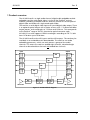
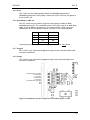
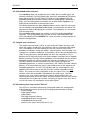
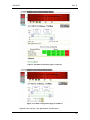
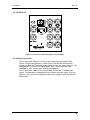
The status of the module can be easily monitored visually by the LED’s at the
front of the module. The LED’s are visible through the front panel as shown in
the figure below.
Power
SDI / Laser
AES 1 & 2
AES 3 & 4
Figure 9: Front panel indicators for the AV-MUX (text not printed on the front panel).
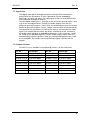
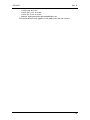
The AV-MUX has 4 LED’s. The colours of each of the LED’s have different
meanings as shown in the table below:
Diode \ State
Red LED
Orange LED
Green LED
No light
Power
PTC fuse has been
triggered - remove
the module.
Video signal
absent.
No AES signals
present
No AES signals
present
N/A
Module power is
OK
Module has no
power
Laser failure.
Video input signal
Present
Both AES signals
present
Both AES signals
present
SDI / Laser
AES 1 & 2
AES 3 & 4
One AES signal
present
One AES signal
present
If all of the lower three LED are orange, then the card is not in operation.
Check that the two lower DIP switches are in the OFF position. If the lower
three LEDs are still orange after power-up, the card should be replaced.
Contact Network Support.
19