1
User Manual DR-512
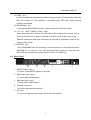
5 LCD Display
I01
MANUAL
Sh01
■
00:00:00
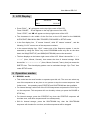
• Press “PLAY” , “►” will appear on the top right corner of the LCD;
Press “PAUSE”,
“ll” will appear on the top right corner of the LCD;
Press “STOP”, and “■” will appear on the top right corner of the LCD.
• The characters in the middle of the first line on the LCD stand for the MANUAL,
AUTOSTART, DMX MON, DMX TRIGGER, PRG MODE or SETUP mode.
• In the first display line , “I” means “internal”, while “E” means “external” , and the
following “01~33” means one of the sequence numbers.
• In the second display line, “Sh01” means one of the Sequence names. It can be
amended by using the “Enter” key under PROGRAM mode only. But on the other
hand, the StUp(START UP) and StDN(SHUTDOWN) can not be amended.
• The time displays on the bottom right corner of the LCD. When it shows like “××:×
×:××” (Hour, Minute, Second), that means the time of internal storage. While
shows like “××:××:××:××” (Hour, Minute, Second, Frame), that just means the
SMPTE time. The time-display pattern can be switched through “Sys Time” item
under SETUP mode.
6 Operation modes
6.1 MANUAL mode
• This mode has the most freedom to operate upon this unit. The user can select any
one of the sequences at any time to run, pause or stop the current sequence. And
further more, the operating upon STARTUP and SHUTDOWN are also available.
• For internal storage, select one of the I01-I04 sequences and press the PLAY key to
run the sequence. This sequence will run circularly unless you press the PAUSE or
STOP key.
• For internal storage, press the STARTUP key, then the STARTUP sequence will
circulate once, and other sequences will run subsequently.
• Still for internal storage, press the SHUTDOWN key, then the SHUTDOWN
sequence will circulate for one time, and other sequences will be stopped.
6