1
PRODUCT
DA TA
I Yy‘-’
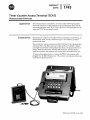
Timer CounterAccess Terminal (TCAT)
Demonstrator Exercises
Application
Components
This demonstrator is intended for use with an SLC 100 Programmable
Controller Demo Unit. The exercises in this product data sheet and the
keystroke examples in the
TCAT User’s Manual will help prepare
you to
apply theTCAT to your specific needs.
Demonstrator components include a TCAT mounted in a metal frame, an
interconnect cable,two keys with keyring,a User’s Manual, and this
product data sheet.
We assume thatyou have accessto a n SLC 100 Demo Unit, demonstrator
exercises (Pub. 1745-802), and
User’s Manual (Pub. 1745-800). Before
you begin the exercises in this product data sheet, the program shown on
Page 2 must be entered into the
SLC 100 processor. In many demonstration situations, the program
will already have been entered
for you.
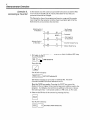
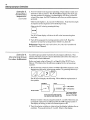
A typical setup appearsbelow. It shows the TCAT interconnect cable
plugged into theSLC 100 processor. The systemis energized, andyou are
ready for the
TCAT exercises.
Publication 1745-852 -April, 1986
Demonstrator Exercises
If the program is already entered, go on to Page 3.
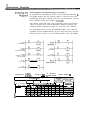
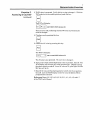
In preparation for performing the TCAT exercises, enter the following 9rung ladder diagram into the processor memory. Follow the setup and
programming procedures outlined in the SLC 100 demonstrator exercises
(Pub. 17458021 and the User’s Manual (1745-800).
Note that the counter PR value (rung 2) should be protected, and the PR
values of sequencer steps 0 and 4 (data table) should be protected. (Protecting PR values is discussed on Page 14-7 of the SLC User’s Manual.)
We recommend that you remove the EEPROM module. This avoids the
possibility of losing modified data if you power down, then power up again
during the TCAT exercises (see Auto-Load Procedure, SLC 100 manual).
Rung 1
On Delay Timer
Rung 2
Rung 7
Up Counter
(PR Value Protected)
Timer Reset
Rung 3
Rung 8
Sequencer Output
(See Data Table)
Counter
Reset
Rung 4
Timer
Status
Rung 5
Counter
Status
CLASSIFICATION:
I
!J
El
+QO4SQW
ADDRESS:
q
TIME DRIVEN
0 EVENT DRIVEN
903
GROUP
NUMBER: 0
BIT ADDRESSi DATA
6
I
A d d r e s s e s + I018 ;
B i t
Mask
Data+
0
Step Data
8
1
n”
,1 0
I
A
I I017
n1r; I 1016
n1fl I _,_
nl? _.I i-l17
rlll _.
_._ I_._
B
I
A
.
1
Oand4are.
protected.
0
1
1
1
1
0
F
talc3
0
0
0
0
0
0
0
!
!o.! 3P
8
@
1
0
0
0
8
;
; 0 . ; 3P
0
EJ Masked address. Used as0 for coding purposes
1
3
Demonstrator Exercises
TCAT Keyboard
and Displays
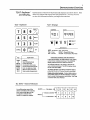
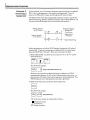
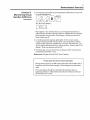
Explanations of the TCAT keyboard and displays are shownbelow. SLC
demo unit inputs and outputs are also pointed out.
You may want to
review this information before
you begin the exercises.
TCAT - Displays
TCAT- Keyboard
DATA
Key
Explanation
ADDR
Address
InpuffOutput groups
Preset (PR) value
Accumulator (AC) value
Cancel previous keystroke
Enter an address or data
Move to nextinstruction
Step number (sequencers)
I/O
PRESET
ACCUM
CANCEL
ENTER
NEXT
STEP
1
ADDRESS
Abbreviations
PROT- Protected SEQ -Sequencer
TME -Timer
PRESET Preset (PR) Value
CNT - Counter
ACCUM Accumulator (AC) Value
-
Explanation of displays and LED indicators
In this typical
display, the TME indicator is lit, telling
us that a timeris being monitored. The ADDRESS
display indicatesthe timeraddress t o be 901.
The ACCUM indicator is lit, telling us that theAC
value is being monitored. The DATA display shows
the AC value t o be 999.9.
The PROTindicator is lit, telling us that the timeris
protected (theAC or PR value cannot be modified).
Display Instruction Symbols: Various abbreviations
and symbols appearin the DATA display t o indicate
timer, counter, and sequencer instructions. See Page
3-3 of theTCAT User's Manual.
SLC Demo - Inputs and Outputs
~~~
You will be usingsome of the
selector switches in the exercises.
be
Also, certain pilot lights will
energized t o indicate timer,
counter, or sequencer outputs.
OUTPUTS
INPUTS
- Pilotlights-+
11
Selector switches-+
Push buttons -b
12
13
14
1
2
3
6
7
8
16
15
5
9
10
4
4
Demonstrator Exercises
EXerCke 1.
Accessing a Simea
This exercise will show you how to access an On-Delay timer instruction
at address 901. You will observe and change the PR and AC values.
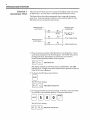
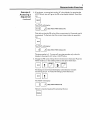
The figurebelow shows the programmed timer rungs and the master
reset rung. Note that selector switches 1 and 4 and pilot light 15
of the
SLC demo unit areinvolved in this exercise.
Timer
On Delay
Address 901
Switch
Selector
1
on SLC Demo
Pilot Light 1 5 o n
SLC Demo
+-Tm
i er
Selector Switch 4
o n SLC Demo
-Master
Output Rung
Reset Rung
1. Place all selector switches of the SLC demo in theoff position. Power
up thedemo and observe the TCAT displays. TheTCAT will perform
its diagnostic tests, then display the instruction
at thelowest
timerlcounterlsequencer address in the program:
1
4
indicator
(TME
lit)
The display indicates an On-Delay timer
at address 901. TheTME
indicator is lit. (Display instruction symbols are explained on Page
3-3
of the TCAT User’s Manual.)
2. To observe thePR value, press this key:
U
m a.[I
PRESET
The TCATwill display:
I [1
(TME, PRESET indicators lit)
3. Now change thePR value to 50.0 seconds. To do this, insert theTCAT
key and turn it
to the modify position. Then press these keys:
The TCAT will display:
(TME, PRESET indicators lit)
3
Demonstrator Exercises
Exercise 7.
Accessing a Timer
(CQntinUed)
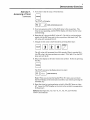
4.Now observe the AC value. Press this key:
0
ACCUM
The TCAT will display:
(TME, ACCUMindicators lit)
5. Now turn selector switch1of the SLC demoto the onposition. The
will show theAC value
timer is now operating, and the TCAT display
incrementing.
6. Reset theAC value to the RAC value of 0. Do this by turning selector
switch 4 of the SLC demo unit to the on
position, then back to
off. The
AC value will increment from
0.
7. Change theAC value to 32.0 seconds by pressing these keys:
50.0
The AC value will increment from32.0 seconds. When it reaches
(the PR value), the timer produces an output. Pilot
light
15 on
the SLC
demo unit will be lit.
8. Return the displayto the timer instruction symbol.Do this by pressing
this key:
n
CANCEL
The TCAT returns to the display shown in step
1:
(TME indicator lit)
Note: When you are monitoring the PR AC
or value, you can return
the TCAT display to the instructionsymbol at any timeby pressing the
CANCEL key.
9. Reset the timer
by turning selector switch4 of the SLC demo on, then
off. Leave theTCAT display on the instruction symbol, in preparation
for Exercise2.
References: Pages 3-2,3-3,3-5,3-11,4-1,4-2,4-4,
and 4-6of the
TCAT User’s Manual.
6
Demonstrator Exercises
~
In this exercise you will access an up counter instruction at address 902.
You will observe thePR and AC values, then discover that they are
protected and cannotbe changed.
The figurebelow shows the programmed counter rungs and the master
reset rung. Note that selector switches 2 and
4 and pilot light 16 of the
SLC demo unit areinvolved in this exercise.
Switch
Selector
2
o n SLC Demo
Up Counter
Address 902
PR 0015
Protected
Pilot Light 16
o n SLC Demo
Selector Switch 4
Output
Counter
o n SLC Demo
Rung
-Master
Reset Rung
1. We begin with theTCAT display onthe RTO timer at address
901 (step
8 and 9of exercise 1):
I 0 I I Ir k I
(TMEindicator lit)
Press this key:
The TCAT will display:
00
902
ku
(CNT, PROT indicators lit)
The display indicates an up counter
a t address 902. The CNT
(Counter) andPROT (Protect) indicators are lit.
How the NEXT key works: Pressing the NEXT key
moves the
display to the next highest timerlcounterlsequencer address used
in the
program. As the displaymoves from one addressto the next, itshows
the sametype of data - instruction symbol, orPR value, orAC value.
0
2. Observe the PR value of the counterby pressing thiskey:
PRESET
The TCAT will display:
(CNT, PRESET, PROTindicators lit)
7
Demonstrator Exercises
Exercise 2.
Accessing a Counter
(continued)
3. The PR value is protected. Verify this by trying to change it. With the
TCAT modekey in the modify position, press this key:
0
PRESET
/Protl
The TCAT will display:
(CNT, PRESET, PROT indicators lit)
This is an error
code, indicating that the
PR value is protected and
cannot be changed.
0
0
4. Clear the errorby pressing this key:
CANCEL
5. Observe the AC value by pressing this key:
ACCUM
The TCAT will display:
(CNT, ACCUM, PROTindicators lit)
The AC value is also protected. Wewon’t try to change it.
6. Turn selector switch2 of the SLC demo to theon position, thenoff. The
TCAT display will show the AC value increment to 1. Repeat turning
the selector switchon and off. At an AC value of 15, pilot light 16
of the
SLC demo willbe lit.
7. Reset theAC value to 0 by placing selector switch4 in theon position,
then off. Leave theTCAT display on theAC value of address 902 in
preparation for exercise 3.
References: Pages 3-2,3-3,3-4,3-9,3-10,3-11,4-1,4-3,4-5,and 4-7
of the TCAT User’s Manual.
8
Demonstrator Exerciser
Exercise 3.
Accessing a
eqerencer
In this exercise,you will access a sequencer output instruction at address
903. It is a 5-step sequencer, with steps0 and 4 protected. YOUwill
observe thePR and AC values, and change the
PR value of step 1.
The figurebelow shows the programmed sequencer output rung and the
4 as well as pilot lights 11,12,
master reset rung. Selector switches 3 and
13, and14 of the SLC demo unit are involved in this exercise.
Switch Selector
3
on SLC Demo
Sequencer Output
Address 903
Time Driven
Steps 0 and 4
Protected
on SLC Demo
-Master
Reset Rung
In the last exercise,
we left theTCAT display showing the
AC value of
counter 902. To access the sequencerat address 903,we could simply
press the NEXT key. But don’t. We’ll use an alternate method.
You don’t have toenter the “9” or the
1. Select address 903.
“0” in 903
Press these keys:
m u
The TCAT will display:
.I(SEQ, ACCUM, PROT indicators lit)
Whenever you use this method
of selecting an address, the TCAT
automatically displays theAC value of the particular instruction. In
this case, the
AC value of the current sequencer step is displayed. The
PROT indicator is lit, indicating that the step
is protected.
u
2. Observe the instructionsymbol by pressing this key:
CANCEL
The TCAT will display:
b
1
(SEQ indicator lit)
The instruction symbol is interpreted
a s follows:
Sequencer output
Time driven
0 0 Group number 0
9
Demonstrator Exercises
Exercise 3.
Accessing a
Sequencer
(continued)
3. If we choose, we can go back to the AC value display (by pressing the
ACCUM key), but we’llgo to the PR value display instead. Press this
key:
~-,
U
PRESET
m u
The TCAT will display:
3
(SEQ, PRESET,PROT indicators lit)
This tellsus that thePR value of the current step
is 0.3 seconds, and it
is, press this
is protected. To find out what the current step number
key:
The TCAT will display:
(SEQ, PRESET, PROT indicators lit)
The step number is
0. You can call upa step numberonly when the
AC value or the PR value.
display is showing the
4.Change thePR value of step 1from 0.3 second to 0.5 second. Place the
TCAT mode key in themodify position, then press these keys:
The changeis entered and the display automatically resumes
monitoring step0. To verify the change, press these keys:
The TCAT will display:
(SEQ, PRESET indicators lit)
Return to monitoring step0 by pressing thiskey:
n
I
CANCEL
I
70
Demonstrator Exercises
5. Now we’ll observe the sequencer operating. Place selector switch
3 of
the demo in theon position. The TCAT address display willshow you
the step numbers in sequence; the data display show
will youthe PR
values of the steps; thePROT indicator will show you whichsteps are
protected.
Observe pilot lights11,12,13, and 14 of the demo. Note that they light
in sequenceas the sequencermoves from step to step.
0
Observe theAC value by pressing thiskey:
ACCUM
The TCAT data displaywill show the AC value incrementing thru
each step.
6. Turn off the sequencerby turning selector switch 3 off. Reset the
sequencer to step 0 by turning selector switch4 on, thenoff.
References: Pages 3-2,3-3,3-4,3-9,3-11,5-1,5-2,5-3,5-4,and 5-5 of
the TCAT User’s Manual.
An address group number represents
8 user program addresses. This
exercise will showyou how to access addresses and monitor the status
of
instructions at these addresses.
Before you begin, referto Figure 6.1 on Page 6-2 of the TCAT User’s
Manual. This figure lists the addresses assigned to the various group
numbers.
1. We left exercise3 with all selector switches
off and the sequencer reset.
Beginning at thispoint, select group number7 by pressing these keys:
,1
The TCAT will display thefollowing. We’ve added an explanationof
the symbols:
,ADDRESS
Group number
~
I
,DATA
_I
ON position
II IIII
’-/
/
8 lines represent addresses 001,
002,003,004,005,006,007,008.
OFF position
‘The lowest address
(001 in this case) is
always on the right.
Selector switches1 thru 5 and push buttons6 , 7 , and 8 of the demo unit
correspond respectivelyto addresses 001 thru 008 of group number7.
The displayis telling you that allof these inputs are
off.
2. Turn the selector switches
on. observe how the display indicates the
on
condition. Press push buttons6 , 7 , and 8. Observe the display.
11
Demonstrator Exercises
Exercise 4.
3. Now select group number 0, corresponding to addresses 011 thru018,
The TCAT will display:
Pilot lights 11 thru 16 of the demo unit correspond respectivelyto
addresses 011 thru
016 of group number0. (Addresses 017 and 018
of
group number 0 are internal.) The display
is telling you that allof
these outputs are
off.
4.In the demonstrator program, pilot lights
11thru 14 are
used as
outputs of sequencer 903. We can observe the odoff status
of these
outputs under operating conditions
by turning on the sequencer. Do
this by placing selector switch3 in theon position. Observe theTCAT
display. Then turn selector switch3 off.
5 . One final step. You can move from one group number to the next
by
pressing the NEXT key. Try it.
References: Chapter 6 of the TCAT User’s Manual.
Preparation for the next demonstration
During these exercises, the
PR value of the timer and the
PR value of
sequencer step3 have been changed. Other changes may have been
made.
The user program should be examined and restored
to the one
appearing on Page2. Make certain allselector switches are off and
the instructions are reset.
a
ALLEN-BRADLEY
A ROCKWELL INTERNATIONAL COMPANY
Industrial Control Group
Milwaukee, Wisconsin 53204