1
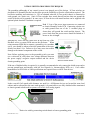
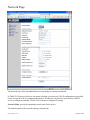
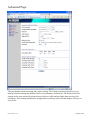
Bridge operating mode is selected by default as it is widely used by subscriber stations, while
connecting to Access Point or using WDS. In this mode the device will act as a transparent bridge
and will operate in Layer 2. There will be no network segmentation while broadcast domain will be
the same. Bridge mode will not block any broadcast or multicast traffic. Additional Firewall settings
can be configured for Layer 2 packet filtering and access control in Bridge mode.
Router operating mode can be configured in order to operate in Layer 3 to perform routing and
enable network segmentation. Wireless clients will be on a different IP subnet. Router mode will
block broadcasts while it is not transparent.
N-TRON 702-W supports Multicast packet pass-through in Router mode.
N-TRON 702-W powered Router can act as a DHCP server and supports Network Address
Translation (Masquerading) feature which is widely used by Access Points. NAT will act as the
firewall between LAN and WLAN networks. Addition Firewall settings can be configured for Layer
3 packet filtering and access control in Router mode.
Bridge Mode
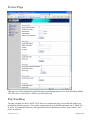
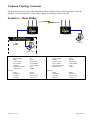
In bridge mode, the N-TRON 702-W will simply forward the network management and data packets to the
client PC without any intelligent routing. For some applications, this can provide a more efficient and
simple network solution. WLAN (wireless) and LAN (Ethernet) interfaces belong to the same network
segment which has the same IP address space. WLAN and LAN interfaces form the virtual bridge interface
while acting as bridge ports. The bridge has assigned IP settings for management purposes:
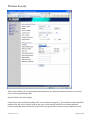
Bridge IP Address: The device can be set for static IP or can be set to obtain an IP address from the DHCP
server connected to it.
One of the IP assignment modes must be selected:
DHCP – choose this option to assign the dynamic IP address, Gateway and DNS address by the local
DHCP server.
Static – choose this option to assign static IP settings for the bridge interface.
IP Address: enter the IP address of the device while Static Bridge IP Address mode is selected. This IP will
be used for the N-TRON 702-W device management purposes.
IP Address and Netmask settings should be consistent with the address space of the network segment where
the 702-W resides. If the 702-W’s and the administrator PC’s (which is connected to the device on the wired
or wireless interface) IP settings reside in different address spaces, the 702-W will become unreachable.
Netmask: This is a value which when expanded into binary provides a mapping to define which portions of
the IP address groups can be classified as host devices and network devices. Netmask defines the address
space of the network segment where N-TRON 702-W device resides. 255.255.255.0 (or /24) Netmask is
commonly used among many C Class IP networks.
Gateway IP: Typically, this is the IP address of the host router which provides the point of connection to
the Internet. This can be a DSL modem, Cable modem, or a WISP gateway router. The 702-W will direct
the packets of data to the gateway if the destination host is not within the local network.
(Revised 2010-11-15)
Page 37 of 60