1
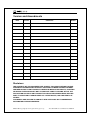
Button and Remote Control Functions
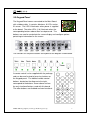
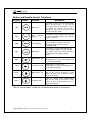
Keypad Remote
Function
Description
SW4
Menu/Lock
This button displays the main configuration
“Menu” on the screen. It can also be
pressed to return to the previous screen.
This button can also be pressed for 3
seconds to either lock the menu or to
release it from lock mode.
SW5
Auto
Sequence
Display
This button is used to Automatically display
the different display modes, one after the
other, in sequence
Freeze/Debug
Freezes the video on all panels. Also can
be pressed for 3 seconds to enter I2C
debugging mode or to release from
debugging mode.
SW7
Mode/Enter
This button is used to switch between the
different display modes (1-panel, 2-panel
etc.). Also is used as the ”Enter” key when
using the Menu to configure display
options.
SW8
Right Arrow / CH4
Arrow to the right (during menu
configurations). Is also used to display CH4 in single panel display.
SW9
Left Arrow / CH-3
Arrow to the left (during menu
configurations). Is also used to display CH3 in single panel display.
SW10
Down Arrow / CH2
Arrow down (during menu configurations).
Also can be used to decrement a value
setting. Is also used to display CH-2 in
single panel display.
Up Arrow / CH-1
Arrow up (during menu configurations).
Also can be used to increment a value
setting. Is also used to display CH-1 in
single panel display.
SW6
SW11
See the “System Menu” section for a complete description of all functions.
©2008-2009 Copyright by AverLogic Technologies, Corp.
8