1
Notebook PC
User’s Guide
REV2.0
Notational Conventions
Throughout this manual, the following conventions are used to distinguish elements of text.
Note:
Identifies additional information that requires special attention.
Warning :
Identifies additional information that requires special attention.
Tip :
Identifies additional information that requires special attention.
Caution:
Identifies important information that, if not followed,
may result in loss of data or damage to the computer.
Keyboard keys are shown in a bold typeset. For example: Press Enter to complete.
When keys are joined by a plus sign (+), press the first key, and, while keeping the first key down, press the
remaining keys, finally release all the keys. When necessary, keys are also shown in graphics.
A title, command, setup item, or button that you can see on the screen is shown in boldface.
Overview
Chapter - 1
Introducing the Notebook PC
1-1
Chapter - 2
Knowing the Parts
2-1
Chapter - 3
Getting Started
3-1
Chapter - 4
Using the Notebook PC
4-1
Chapter - 5
Troubleshooting
5-1
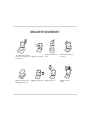
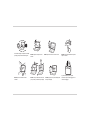
TAKING CARE OF YOUR NOTEBOOK PC
To prevent possible overheating of the computer's
processor, make sure you don't block the openings
provided for ventilation.
DO NOT press or touch the display panel.
DO NOT place or drop objects on the computer
and DO NOT apply heavy pressure on it.
DO NOT subject the computer to magnetic
fields.
DO NOT place on uneven or unstable work
surfaces.
DO NOT use your notebook computer under
harsh conditions.
DO NOT expose to direct sunlight.
DO NOT use or store in extreme
temperatures.
Avoid sudden changes in temperature or humidity
by keeping it away fromA/C and heating vents.
DO NOT expose to dust and/or corrosive
chemicals.
DO NOT expose the computer to rain or
moisture.
DO NOT slam your notebook shut and never
pick up or hold your notebook by the display.
DO NOT place near fire or other sources of heat.
DO NOT spray water or any other cleaning fluids
directly on the display.
DO NOT tamper with the batteries. Keep them
away from children.
If you are traveling with your computer,
remember to carry it as hand luggage. Do not
check it in as baggage.
User's Guide
Introducing the Notebook PC
Chapter - 1
Introducing the Notebook PC
Congratulation on the purchase of new HCL Notebook Computer!
Transportation Precautions
To prepare the Notebook PC for transport, you should turn it OFF and disconnect all
external peripherals to prevent damage to the connectors. The hard disk drive's head
retracts when the power is turned OFF to prevent scratching of the hard disk surface
during transport. Therefore, you should not transport the Notebook PC while the power is
still ON. Close the display panel to protect the keyboard and display panel.
Operating Environment
Since users are likely to maintain the same posture for a long period of time when using the computer, they
will be exhausted more easily if compared with other users engaged in other general operations. This
section will illustrate the suggested posture and the operating environment for the use of the computer.
Health Management
Take a 2 to 3-minute break every 30 minutes after you have operated the machine for a long time.
Sedentariness will also cause stress. Do some gentle gymnastics during your break for recreation. When
you have symptoms such as eyestrain, sleepiness, dizziness, stiff in the shoulders, or numbness of the
wrists or hands, have a rest right away. In case these symptoms remain the next day, please contact your
doctor as soon as possible.
1-1
User's Guide
Introducing the Notebook PC
Posture When You Are Using the Computer
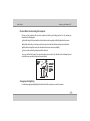
Please use the computer with your body relaxed and with a good sitting posture. For this, please pay
attention to the following tips.
Adjust the height of the desk and the chair to look down from a position a little bit higher than the screen.
Adjust the chair until you can lean your back closely on the chair and sit down with your back stretched.
Relax with no strength put onto your shoulders and bend your knees comfortably.
Put your wrist comfortably to keep it parallel to the desk.
Your eyes will feel tired easily if you cannot see the screen clearly. Pay attention to the following tips and
adjust the screen constantly to ensure its clear visibility.
Use appropriate lighting
Use the same appropriate lighting that is intended for office use when you use the computer.
1-2
User's Guide
Introducing the Notebook PC
Adjust the angle of the display to the position with which you can see the display
clearly
You won't see the screen clearly if the display reflects light. In addition, the visibility of the display varies with
the angle due to its feature. Adjust the angle of the display to ensure its clear visibility.
Clean the display
A dusty display makes the screen hard to see clearly. Wipe gently with a soft, dry cloth to clean the display
regularly.
Cover Your Notebook PC
You can purchase an optional carrying case to protect it from dirt, water, shock, and scratches.
Note :
The Notebook surface is easily dulled if not properly cared for. Be careful not to rub or scrap the Notebook PC
surfaces when transporting your Notebook PC.
Cover Your Batteries
If you intend to use battery power, be sure to fully charge your battery pack and any optional battery packs
before going on long trips. Remember that the power adapter charges the battery pack as long as it is
plugged into the computer and an AC power source. Be aware that it takes much longer to charge the
battery pack when the Notebook PC is in use.
1-3
User's Guide
Introducing the Notebook PC
Important Safety Instructions
Portable computers take the most beating from end users. This section gives you detailed information about
how to maintain a safe working environment while using the notebook computer. You can maintain its
condition and performance by following these guidelines. Please read it carefully to ensure maximum safety.
Before cleaning the notebook computer, make sure it is disconnected from any external power supplies
(i.e. AC adapter, car adapter and so on).
When cleaning, do not use liquid or sprayed detergent for cleaning. Instead, use moisture sheet or a
cloth for cleaning.
Use your Notebook where the socket outlet is nearby and easily accessible.
Please keep the notebook computer away from humidity.
Lay the notebook computer on a reliable surface when installing. A drop or fall may cause injury.
The openings on the enclosure are for air convection hence the notebook computer can be protected
from overheating. DO NOT COVER THE OPENINGS.
Be careful of using power supply. The notebook computer has specific power requirements.
Use only a power adapter approved for use with this notebook computer.
While unplugging the power cord, disconnect it by the plug head, not by its wire.
1-4
User's Guide
Introducing the Notebook PC
Make sure the socket and any extension cords you may use can support the total current load of all the
connected devices.
Place the power cord in such a way that people can not step on it. Do not place anything over the power
cord.
All cautions and warnings on the notebook computer should be noted.
If the notebook computer is not in use for a long time, disconnect it from mains to avoid possible damage
by transient over-voltage.
Never pour any liquid into openings as this may cause fire or electrical shock.
Never open the body of notebook computer. For safety reason, the notebook computer should only be
opened by qualified service personnel.
Do not leave this notebook computer in an environment unconditioned. Storage temperature above
60ºC (140ºF) may damage the notebook computer.
To avoid any damage to the internal device, you should first disconnect the AC adapter and remove the
battery pack from the notebook when replacing any internal device.
1-5
User's Guide
Introducing the Notebook PC
Airplane Precautions
Contact your airlines personnel if you want to use the Notebook PC in the airplane. Most airlines will have
restrictions for using electronic devices. Most airlines will allow electronic use only between and not during
takeoffs and landings.
Caution :
There are three main types of airport security devices: X-ray machines (used on items placed on conveyor belts),
magnetic detectors (used on people walking through security checks), and magnetic wands (hand-held devices
used on people or individual items). You can send your Notebook PC and diskettes through airport X-ray
machines. However, it is recommended that you do not send your Notebook PC or diskettes through airport
magnetic detectors or expose them to magnetic wands.
Cleaning Your Computer
When it is necessary to clean the plastic case and keyboard, use a soft, lint-free cloth, slightly dampened
with a mild detergent solution or use the contents of any commercially available computer cleaning kit.
Never use alcohol, petroleum-based solvents, or harsh detergents to clean the notebook. Also never spray
any liquids directly on the computer case, keyboard, or screen. If the liquid-crystal display (LCD) screen has
become smeared or dusty, clean the screen by first applying a mild glass cleaner to a soft, clean, lint-free
cloth and gently wipe the glass. Never apply liquids directly on the screen surface. Moreover, do not use
paper towels to clean the display screen. Paper can scratch the display screen matte.
1-6
User's Guide
Introducing the Notebook PC
Preparing your Notebook PC
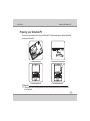
These are only quick instructions for using your Notebook PC. Read the later pages for detailed information
on using your notebook PC.
1. Install the battery pack
2. Connect the AC Power Adapter
1. 3
1. 3
MEGA
MEGA
3. Open the Display Panel
4. Turn ON the Notebook PC
Important :
When opening, do not force the display panel down to the table or else the hinges may break! Never lift the notebook PC
by the display panel!
1-7
User's Guide
Knowing the Parts
Chapter - 2
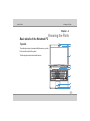
Basic details of the Notebook PC
Knowing the Parts
1
Top side
1.3 ME GA
2
3
The notebook computer is compact with features on every side.
First, look at the inside of the system.
The following sections describe inside features.
4
5
5
6
7
8
9
10
11
2-1
User's Guide
Knowing
theyou
Parts
Before
Start
Camera (on selected models)
u
The built-in camera allows picture taking or video recording. Can be used with video conferencing and other
interactive applications.
v
Camera Indicator
The camera indicator indicates whether the built-in camera is in operation or not.
w
Microphone (Built-in)
The built-in mono microphone can be used for video conferencing, voice narrations, or simple audio
recordings.
x
Display Panel
The Notebook PC uses an ultra-clear fat panel which provides excellent viewing like that of desktop monitors
without any harmful radiation or flickering, so it is easier on the eyes Use a soft cloth without chemical liquids
(use plain water if necessary) to clean the display panel.
Warning :
The display panel is fragile. Do not to bend or press the panel.
y
Audio Speakers
The built-in stereo speaker system allows you to hear audio without additional attachments. The multimedia
sound system features an integrated digital audio controller that produces rich, vibrant sound (results
improved with external stereo headphones or speakers). Audio features are software controlled.
2-2
User's Guide
Knowing the Parts
z
Status Indicators (top)
Status indicators represent various hardware/software conditions. See indicator details in Chapter 3 Getting
started.
{
Function Switches
Function switches control various functions/operations for the Notebook PC. See details for the switches in
Chapter 3 Getting started.
|
Keyboard
The keyboard provides full-sized keys with comfortable travel (depth at which the keys can be depressed)
and palm rest for both hands. One Windows function key is provided to help ease navigation in the Windows
operating system.
}
Touchpad and Buttons
The touchpad with its buttons is a pointing device that provides the same functions as a desktop mouse. A
software-controlled scrolling function is available after setting up the included touchpad utility to allow easy
Windows or web navigation.
Fingerprint Scanner (on selected models)
~
The built-in fingerprint scanner allows use of security software using your fingerprint as your identification
key.
Status indicators (front)
Status indicators represent various hardware/software conditions. See indicator details in Chapter 3
Getting started.
2-3
User's Guide
Knowing the Parts
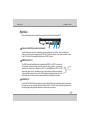
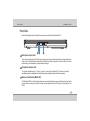
Right Side
Refer to the diagram below to identify the components on this side of the Notebook PC.
1
Express Card Slot (on selected models)
1
2
3
4
One 26pin Express card slot is available to support one Express Card /34mm. This new interface is
faster by using a serial bus supporting USB 2.0 and PCI Express instead of the slower parallel bus used
in the PC card slot. (Not compatible with previous PCMCIA cards.)
2
USB Port (2.0/1.1)
The USB (Universal Serial Bus) port is compatible with USB 2.0 or USB 1.1 devices such
as keyboards, pointing devices, cameras, hard disk drives, printers, and scanners
connected in a series up to 12Mbits/sec (USB 1.1) and 480Mbits/sec (USB 2.0). USB
allows many devices to run simultaneously on a single computer, with some peripherals
acting as additional plug-in sites or hubs. USB supports hot-swapping of devices so that
most peripherals can be connected or disconnected without restarting the computer.
3
E-SATA Port
External SATA or ESATA allows external connection of Serial-ATA devices originally designed for use inside
the computer. It is up to six times faster than existing USB 2.0, & 1394 for external storage solutions and is
also hot pluggable using shielded cables and connectors up to two meters.
2-4
User's Guide
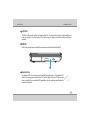
4
Knowing the Parts
LAN Port
The RJ-45 LAN port with eight pins is larger than the RJ-11 modem port and supports a standard Ethernet
cable for connection to a local network. The built-in connector allows convenient use without additional
adapters.
Left Side
Refer to the diagram below to identify the components on this side of the Notebook PC.
1
1
Optical Drive
The Notebook PC comes in various models with different optical drives. The Notebook PC’s
optical drive may support compact discs (CD) and/or digital video discs (DVD) and may
have recordable (R) or re-writable (RW) capabilities. See the marketing specifications for
details on each model.
2-5
User's Guide
Knowing the Parts
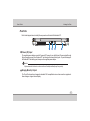
Front Side
Refer to the diagram below to identify the components on this side of the Notebook PC.
MMC .S D
1 2
1
3
Microphone Input Jack
The mono microphone jack (1/8 inch) can be used to connect an external microphone or output signals from
audio devices. Using this jack automatically disables the built-in microphone. Use this feature for video
conferencing, voice narrations, or simple audio recordings.
2
Headphone Output Jack
The stereo headphone jack (1/8 inch) is used to connect the Notebook PC’s audio out signal to
amplified speakers or headphones. Using this jack automatically disables the built-in speakers.
3
Memory Card Reader (MMC /SD)
This Notebook PC has a built-in high-speed memory card reader that can conveniently read from and write
to many flash memory cards used in devices such as digital cameras, MP3 players, mobile phones, and
PDAs.
2-6
User's Guide
Knowing the Parts
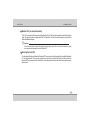
1
Rear
Side
Refer to the diagram below to identify the components on this side of the Notebook PC.
1
1
2
3
4
Power (DC) Input
The supplied power adapter converts AC power to DC power for use with this jack. Power supplied through
this jack supplies power to the Notebook PC and charges the internal battery pack. To prevent damage to
the Notebook PC and battery pack, always use the supplied power adapter.
Caution:
May become warm to hot when in use. be sure not to cover the adapter and keep it away from your body.
2
Display (Monitor) Output
The 15-pin D-sub monitor port supports a standard VGA-compatible device such as a monitor or projector to
allow viewing on a larger external display.
2-7
User's Guide
3
Knowing the Parts
Modem Port (on selected models)
The RJ-11 modem port with two pins is smaller than the RJ-45 LAN port and supports a standard telephone
cable. The internal modem supports up to 56K V.90 transfers. The built-in connector allows convenient use
without additional adapters.
Important :
The built-in modem does not support the voltage used in digital phone systems. Do not connect the modem port to a digital
phone system or else damage will occur to the Notebook PC.
4
Kensington Lock Port
The Kensington® lock port allows the Notebook PC to be secured using Kensington® compatible Notebook
PC security products. These security products usually include a metal cable and lock that prevent the
Notebook PC to be removed from a fixed object. Some may also include a motion detector to sound an alarm
when moved.
2-8
User's Guide
Getting Started
Chapter - 3
Getting Started
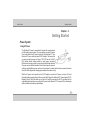
Power System
Using AC Power
The Notebook PC power is comprised of two parts, the power adapter
and the battery power system. The power adapter converts AC power
from a wall outlet to the DC power required by the Notebook PC. Your
Notebook PC comes with a universal AC-DC adapter. That means that
you may connect the power cord to any 100V-120V as well as 220V240V outlets without setting switches or using power converters.
Different countries may require to connect the provided Indian-standard
AC power cord to a different standard. Most hotels will provide universal
outlets to support different power cords as well as voltages. It is always best to ask an experienced traveler
about AC outlet voltages when bringing power adapters to another country.
With the AC power cord connected to the AC-DC adapter, connect the AC power cord to an AC outlet
(preferably with surge-protection) and then connect the DC plug to the Notebook PC. Connecting the AC-DC
adapter to the AC outlet first allows you to test the AC outlet's power and the AC-DC converter itself for
compatibility problems before connecting the DC power to the Notebook PC. The power LED on the adapter
lights up if the power is within accepted ranges.
3-1
User's Guide
Getting Started
Important :
Damage may occur if you use a different adapter to power the Notebook PC or use the Notebook PC's adapter to
power other electrical devices. If there is smoke, burning scent or extreme heat coming from the AC-DC adapter,
seek servicing. You may damage both your battery pack and the Notebook PC with a faulty AC-DC adapter.
Note:
This Notebook PC may come with a three-prong plug. You must use a grounded AC outlet to ensure safe operation of
the Notebook PC.
Warning:
The power adapter may become warm to hot when in use, be sure not to cover the adapter and keep it away from your
body.
Using Battery Power
The Notebook PC is designed to work with a removable battery pack. The battery pack consists of a set of
battery cells housed together. A fully charged pack will provide few hours of battery life.
3-2
User's Guide
Getting Started
Installing and Removing the battery Pack
Your Notebook PC may or may not have its battery pack installed. If your Notebook PC does not have its
battery pack installed, use the following procedures to install the battery pack.
Important :
Never attempt to remove the battery pack while the Notebook PC is turned ON, as this may result in the loss of
working data.
To Install the battery Pack :
To remove the battery pack :
1
2
3
2
1
3
1
Important :
Only use battery packs and power adapters supplied with the Notebook PC or specifically approved by the
manufacturer for use with this model or else damage may occur to the Notebook PC.
3-3
User's Guide
Getting Started
Warning!
For safety reasons, DO NOT throw the battery in fire, DO NOT short circuit the contacts, and DO not disassemble the
battery. If there is any abnormal operation or damage to the battery pack caused by impact, turn OFF the Notebook
PC and contact HCL authorised service center
Note:
To achieve optimal battery performance, you may need to do a battery calibration at a 3-month interval. To do this:
Fully charge the battery.
Fully discharge the battery in idle mode till it shutdown.
Fully charge the battery again.
3-4
User's Guide
Getting Started
Checking Battery Power
The battery system implements the Smart Battery standard under the
Windows environment, which allows the battery to accurately report the
amount of charge left in the battery. A fully-charged battery pack provides the
Notebook PC a few hours of working power. But the actual figure varies
depending on how you use the power saving features, your general work
habits, the CPU and system memory size.
To check the remaining battery power, move your cursor over the power
icon. The power icon is a " battery" when not using AC power and a "plug"
when using AC power. Click on the icon for more information and settings.
Note:
If you ignore the low battery warning, eventually the Notebook PC enters
suspend mode (Windows default settings)
Warning :
Suspend-to-RAM (STR) does not last long when the battery power is depleted. Suspend-to-Disk (STD) is not the
same as power OFF. STD requires a small amount of power and will fail if no power is available due to complete
battery depletion or no power supply (e.g. removing both the power adapter and battery pack).
Remaining Battery power may be shown in terms of percentage or hours, and these units may vary
depending upon the operating system versions or hardware configuration.
3-5
User's Guide
Getting Started
Charging the Battery Pack
Before you use your Notebook PC you will have to charge the battery pack. The battery pack begins to
charge as soon as the Notebook PC is connected to external power using the power adapter. Fully charge
the battery pack before using it for the first time. A new battery pack must completely charge before the
Notebook PC is disconnected from external power. It takes a few hours to fully charge the battery when the
Notebook PC is turned OFF and may take twice the time when the Notebook PC is turned on. The battery
charge light turns OFF when the battery pack is charged.
Note:
The battery stops charging if the temperature is too high or the battery voltage is too high.
Power Options
The power switch turns ON and OFF the Notebook PC or putting the Notebook PC into sleep mode. Actual
behavior of the power switch can be customized in Windows Control Panel "Power Options.”
For other options, such as "Switch User, Restart, Sleep, or Shut Down," click the arrowhead icon.
Restarting or Rebooting
After making changes to your operating system, you may be prompted to
restart the system. Some installation processes will provide a dialog box
to allow restart. To restart the system manually, click Windows Start
button and select “Restart” by clicking the arrow as shown in figure.
Powering Off
In Windows Vista, power OFF the Notebook PC by clicking Windows
Start button and click the arrowhead icon and select “Shut down” as
shown in figure.
3-6
User's Guide
Getting Started
Important :
To protect the hard drive, wait at least 5 seconds after turning OFF your Notebook PC before turning it back ON.
Emergency Shutdown
In case your operating system cannot properly turn OFF or restart, there is a additional way to
shutdown your Notebook PC:
Hold the power button
over 4 seconds
Important :
Do not use emergency shutdown while data is being written; doing so can result in loss or destruction of your
data.
Power Management Options in Windows
Windows Power Management provides basic power saving features. In the Windows Power Options
Properties, you may enter time-out values for display and hard disk drive. Windows power manager saves
power by turning off hard drive after 1 minute of inactivity and so on. Also the power management settings
can be found in Windows > Control Panel > Power options. Choose the required power configuration like
Sleep, Hibernate, Shutdown etc.,
3-7
User's Guide
Getting Started
Special Keyboard Functions
Colored Hot keys
The following define the colored function keys on the Notebook PC's keyboard. The colored commands can
only be accessed by first pressing and holding the function key while pressing a key with a colored
command.
Note:
The Hot Key locations on the function keys may vary depending on model but the functions should remain the same.
Follow the icons instead of the function keys.
Fn + F1: System Sleep button
Fn + F2: To Enable / Disable the WLAN & Bluetooth function
Fn + F3: To Launch E-Mail application
Fn + F4:To Launch Internet browser
Fn + F5:To Decrease the brightness of LCD display
Fn + F6:To increase the brightness of LCD display
Fn + F7:To Turn off/on the LCD Backlit
Fn + F8:To Toggle display between Inbuilt LCD and External Monitor
3-8
User's Guide
Getting Started
Fn + F9 : To Enable / Disable the Touchpad function
Fn + F10 : To Mute/Unmute the inbuilt speaker volume
Fn + F11 : To Decrease the inbuilt speaker volume
Fn + F12 : To Increase the inbuilt speaker volume
Fn +
: To Stop the running Audio/Video file
Fn +
: To Play/Pause the running Audio/Video file
Fn +
: To move next track (in Audio/Video applications)
Fn +
: To move previous track (in Audio/Video applications)
3-9
User's Guide
Getting Started
Hot Keys and Status Indicators
2
MEGA
1.3
Hot Keys
1
3
1
Power switch
The power switch allows powering ON and OFF the Notebook PC and recovering from hibernation.
Use the switch once to tun ON and once to turn OFF the notebook PC. In Windows Vista ,this button
can also be used to safely turn OFF the Notebook PC. The power switch only works when the display
panel is opened.
2
Touchpad Lock Key
Pressing this button will lock (disable) the built-in touchpad. Locking the touchpad will prevent you
from accidentally moving the cursor while typing and when using the notebook PC with an external
mouse (pointing device). To unlock (enable) the touchpad, simply press this button again.
3
Wireless Switch
Wireless Models only: Toggles the internal wireless LAN or Bluetooth (on selected models)ON or OFF with
an on-screen display. When WLAN enabled, the corresponding wireless indicator will light. Windows
software settings are necessary to use the wireless LAN or Bluetooth.
3-10
User's Guide
Getting Started
Status indicators
1. 3MEGA
2
1
5
4
1
Number Lock Indicator
3
Indicates that number lock [Num Lk] is activated when lighted. Number lock allows some of the keyboard
letters to act as numbers for easier numeric data input.
12
Capital Lock Indicator
Indicates that capital lock [Caps Lock] is activated when lighted. Capital lock allows some of the keyboard
letters to type using capitalized letters (e.g. A, B, C). When the capital lock light is OFF, the typed letters will
be in the lower case form (e.g. a, b, c).
13
Battery Charge Indicator
The battery charge indicator shows the status of the battery’s power as follows:
ON: The Notebook PC’s battery is charging when AC power is connected.
OFF: The Notebook PC’s battery is charged or completely drained.
Blinking: Battery power is less than 10% and the AC power is not connected.
3-11
User's Guide
Getting Started
14 Drive Activity Indicator
1
5
1
Indicates that the Notebook PC is accessing one or more storage device(s) such as the hard disk. The light
flashes proportional to the access time.
Wireless Indicator
This is only applicable on models with built-in wireless LAN and/or built-in Bluetooth. When the built-in wireless
LAN and/or built-in Bluetooth is enabled, this indicator will light. (Windows software settings are necessary.)
1
3-12
User's Guide
Using the Notebook PC
Chapter - 4
Using the Notebook PC
Operating System
This Notebook PC may offer its customers the choice of a pre-installed operating system such as Windows
Vista & Windows 7. The levels of hardware and software support may vary depending on the installed
operating system.
Support Software (On selected models only)
This Notebook PC comes with a driver CD / DVD’s (optional) that provides,
drivers and applications to enable hardware features, extend functionality,
help manage your Notebook PC, or add functionality not provided by the
native operating system. The driver CD / DVD’s does not include the
operating system itself.
Note :
Some of the Notebook PC's components and features may not work until the device drivers and utilities are installed.
4-1
User's Guide
Using the Notebook PC
Pointing Device
The Notebook PC's integrated touchpad pointing device is fully compatible with
all two button and scrolling knob PS/2 mouse. The touchpad is pressure
sensitive and contains no moving parts therefore, mechanical failures can be
avoided. A device driver is still required for working with some applications
software.
Important :
Do not use any object in place of your finger to operate the touchpad or else
damage may occur to the touchpad's surface
Cursor
Movement
Left Click
Right Click
Here how to use the touchpad pointing device:
1.The flat surface acts like a miniature duplicate of your display screen. To move the mouse cursor, place the
finger lightly on the sensor pad and move in the desired direction. If you reach the end of the pad, lift your
finger and place it back down on the other side of the pad.
2.To select an item, click on the item by pressing the left button or by simply tapping on the surface once. A
light, quick tap always works best. To execute an item, click the left button twice or do a quick double tap on
the surface.
3.To simulate holding the mouse button down (dragging an icon or selection), use the tap-and-drag gesture.
This feels much like a double-click, except that the finger remains on the pad after the second tap: Tap, lift,
tap, hold and move. The simulated button remains held as long as the finger remains on the pad.
Important :
Avoid spilling any liquid on the touchpad surface and always keep the touchpad surface and pointing finger dry
from sweat built-up. Also do not expose touchpad to any magnetic source object.
4-2
User's Guide
Using the Notebook PC
Caring for the Touchpad
The touchpad is pressure sensitive. If not properly cared for, it can be easily damaged. Take note of the
following precaution:
Make sure the touchpad does not come into contact with dirt, liquids or grease.
Do not touch the touchpad if your fingers are dirty or wet.
Do not rest heavy objects on the touchpad or the touchpad buttons.
Do not scratch the touchpad with your finger nails or any hard object.
Note :
The touchpad responds to movement not to force. There is no need to tap the surface too hard. Tapping too hard
does not increase the responsiveness of the touchpad. The touchpad responds best to light pressure.
4-3
User's Guide
Using the Notebook PC
Storage Devices
Storage devices allow the Notebook PC to read or write documents, pictures, and other files to
various data storage devices. This Notebook PC has the following storage devices :
Expansion Card
Optical drive
Flash memory reader
Expansion Card
One 26pin Express card slot is available to support one Express card/34mm expansion card. This new
interface is faster by using a serial bus supporting USB 2.0 and PCI Express instead of the slower parallel
bus used in the PC card slot. (Not compatible with previous PCMCIA cards.)
Inserting an Expansion Card
1. If there is an Express card socket protector, remove it using the "Removing an Express card" instructions
below.
2. Insert the Express card with the connector side first and label side up. Standard Express cards will be flush
with the Notebook PC when fully inserted.
3. Carefully connect any cables or adapters needed by the Express card. Usually connectors can only be
inserted in one orientation. Look for a sticker, icon, or marking on one side of the connector representing
the top side.
4-4
User's Guide
Using the Notebook PC
Be sure the ExpressCard is
level when inserting.
Removing an Expansion Card
The Express Card slot does not have an eject button. Press the Express Card inwards and release to eject the
Express Card. Carefully pull the ejected Express Card out of the socket.
4-5
User's Guide
Using the Notebook PC
Optical Drive
Inserting an optical disc
1. While the Notebook PC's power is ON, press
the drive's eject button and the tray will eject
out partially.
2. Gently pull on the drive's front panel and slide
the tray completely out. Be careful not to touch
the Optical drive lens and other mechanisms.
Make sure there are no obstructions that may
get jammed under the drive's tray.
4-6
User's Guide
Using the Notebook PC
Optical Drive (Cont')
1. Hole the disc by the edge and face the disc's
printed side up. Push down on both sides of
the disc's center until the disc snaps onto the
hub. The hub should be higher than the
disc when correctly mounted.
2. Slowly push the drive's tray back in. The drive
will begin reading the table of contents (TOC)
on the disc. When the drive stops, the disc is
ready to be used.
Note :
It is normal to hear as well as feel the Media spinning with great intensity in the Optical drive while data is read.
4-7
User's Guide
Using the Notebook PC
Optical Drive (Cont')
Removing an optical disc
Eject the tray and gently force the edge of the disc
upwards at an angle to remove the disc from the
hub.
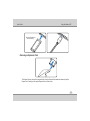
Emergency eject
The emergency eject is located in a hole on the
optical drive and is used to eject the optical drive
tray in case the electronic eject does not work. Do
not use the emergency eject in place of the
electronic eject. Note : Make sure not to stab the
activity indicator located in the same area.
Using the Optical Drive
Optical discs and equipment must be handled with care because of the precise mechanics involved. Keep in
mind the important safety instructions form your CD suppliers. Unlike desktop optical drives, the Notebook
PC uses a hub to hold the CD in place regardless of the angle. When inserting a CD, it is important that the CD
be pressed onto the center hub or else the optical drive tray will scratch the CD.
4-8
User's Guide
Using the Notebook PC
Warning :
If the CD disc is not properly locked onto the center hub, to CD can be damaged when the tray is closed. Always watch
the CD closely while closing the tray slowly to prevent damage.
A CD drive letter should be present regardless of the presence of a CD disc in the drive. After the CD is properly
inserted, data can be accessed just like with hard disk drives except that nothing can be written to or changed
on the CD. Using the proper software, a CD-RW drive or DVD+CD-RW drive can allow CD-RW discs to be used
like a hard drive with writing, deleting, and editing capabilities.
Vibration is normal for all high-speed optical drives due to unbalanced CD’s or CD print. To decrease vibration,
use the Notebook PC on an even surface and do not place labels on the CD.
Flash Memory Card Reader
This Notebook PC has a single built-in memory card reader that can read the following flash memory cards:
Secure Digital (SD), Multi-Media Card (MMC), Memory Stick (MS), Memory Stick Pro. The built-in memory
card reader is not only convenient, but faster than most other forms of memory card readers because it utilizes
the high-bandwidth PCI bus.
MMC .SD
Important :
Never remove cards while or immediately after reading, copying, formatting or deleting data on the card or else data
loss may occur.
Warning:
To prevent data loss, use Windows ” Safely Remove Hardware" on the taskbar before removing the flash memory
card.
4-9
User's Guide
Using the Notebook PC
Connections
Modem Connection
The telephone wire used to connect the Notebook PC's internal modem should
have either two or four wires (only two wires (telephone line#1) is used by the
modem) and should have an RJ -11 connector on both ends. Connect one end
to the modem port and the other end to an analog telephone wall socket (the
ones found in residential buildings). Once the driver is setup, the modem is
ready to use.
Note:
1.When you are connected to an online service, do not place the Notebook PC in suspend (or sleep mode)or else you
will disconnect the modem connections.
2.The built-in modem cannot be installed later as an upgrade. After purchase, modem and/or network can be
installed as express card.
Warning :
Only use analog telephone outlets. The built-in modem does not support the voltage used in digital phone systems.
Do not connect the RJ -11 to digital phone systems found in many commercial buildings or else damage will occur!
Caution :
For electrical safety concerns, only use telephone cables rated 26AWG or higher.
4-10
User's Guide
Using the Notebook PC
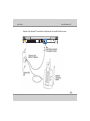
Example of the Notebook PC connected to a telephone jack for use with the built-in modem :
4-11
User's Guide
Using the Notebook PC
Network Connection
Connect a network cable, with RJ-45 connectors on each end, to the network port on the Notebook PC and
the other end to a hub or switch. For 100 BASE-TX speed, your network cable must be category 5 or better
(not category 3) with twisted-pair wiring. If you plan on running the interface at 100Mbps, it must be connected
to a 100 BASE-TX / 1000 BASE-T hub (not a BASET4 hub). For 10Base-T, use category 3, 4, or 5 twisted-pair
wiring. 10/100/1000 Mbps Full-Duplex is supported on this Notebook PC but requires connection to a network
switching hub with “duplex” enabled. The software default is to use the fastest setting so no user-intervention
is required.
Twisted-Pair Cable
The cable used to connect the Ethernet card to a host (generally a Hub or Switch) is called a straight-through
Twisted Pair Ethernet (TPE). The end connectors are called RJ-45 connectors, which are not compatible with
RJ-11 telephone connectors. If connecting two computers together without a hub in between, a crossover
LAN cable is required (Fast-Ethernet model). (Gigabit models support auto-crossover so a crossover LAN
cable is optional.)
4-12
User's Guide
Using the Notebook PC
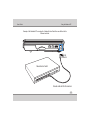
Example of the Notebook PC connected to a Network Hub or Switch for use with the built-in
Ethernet controller.
LAN
connector
Network Hub or Switch
Network cable with RJ-45 connectors
4-13
User's Guide
Using the Notebook PC
Wireless LAN Connection (on selected models)
The optional built-in wireless LAN is a compact easy-to-use wireless Ethernet adapter. Implementing the
IEEE 802.11 standard for wireless LAN (WLAN), the optional built-in wireless LAN is capable of fast data
transmission rates using Direct Sequence Spread Spectrum (DSSS) and Orthogonal Frequency Division
Multiplexing (OFDM) technologies on 2.4 Ghz or 5 Ghz frequencies (depending of the card specifications).
The optional built-in wireless LAN is backward compatible with the earlier IEEE 802.11 standards allowing
seamless interfacing of wireless LAN standards.
The optional built-in wireless LAN is a client adapter that supports Infrastructure and Ad-hoc modes giving
you flexibility on your existing or future wireless network configurations for distances up to 40 meters between
the client and the access point. But this depends upon the environmental conditions like presence of high
magnetic and electrical field etc.
To provide efficient security to your wireless communication, the optional built-in wireless LAN comes with a
64-bit/128-bit Wired Equivalent Privacy (WEP) encryption and Wi-Fi Protected Access (WPA) features.
4-14
User's Guide
Using the Notebook PC
If you have included an PCIe Wireless LAN card make sure that the Wireless LAN module is on before
installing the driver.
Use the Fn + F2 key combination to toggle power to the Wireless LAN module. Make sure you install the
drivers in the order indicated.
Warning:
Wireless Device Operation Aboard Aircraft: The use of any portable electronic transmission devices aboard
aircraft is usually prohibited. Make sure the module(s) are OFF if you are using the computer aboard aircraft. Use
the Fn + F2 key combination to toggle power to the WLAN module, and check the indicator to see if the module is
powered on or not (or) use aeroplane hot key to switch off Wireless and Bluetooth simultaneously.
Connecting to a Wireless Network
Make sure the Wireless LAN module is turned on.
1. Click the taskbar wireless icon
click Connect to a network).
, and then click Connect to a network (or right click the icon
, and then
2. In the Show list, click to choose Wireless from the drop-down menu.
4-15
User's Guide
Using the Notebook PC
3. A list of currently available networks will appear.
Note:
Network and Sharing Center: You can also use the Network and Sharing Center control panel in Windows
(Network and Internet) to connect to any available wireless networks.
4. Click a network, and then click Connect.
5. If you do not see a network you want to connect to, click Set up a connection or network (a list of options
will appear allowing manual searching, and creating a new network).
4-16
User's Guide
Using the Notebook PC
6. Move the cursor over the taskbar icon to see the connection status (see below).
7. To disconnect from the wireless network you can
click the taskbar wireless icon , and then select
Connect or disconnect to access the network
menu, and click Disconnect (or right-click the icon ,
and then click Disconnect from).
Warning:
Security Enabled Networks: You should try to make sure that any network you are connecting to is a secure
network. Connecting to unsecure networks may allow unauthorized access to your computer, documents,
websites and files etc.
4-17
User's Guide
Using the Notebook PC
Using the USB Port
USB (Universal Serial Bus) is a hardware interface that enables you to connect multiple devices (such as
printers, mouse, keyboards, storage devices, joysticks, digital cameras, and video conference cameras,
etc.) to your notebook computer, and up to 127 devices can be attached. Besides, USB’s hot swap
capability allows everything to be plugged in and unplugged without turning the system off.
USB 2.0 offers data transfer rate up to 480Mbps (megabits per second) compared to USB 1.1 devices,
which transfer at speeds of 12Mbps. So, you could know that USB 2.0 can transfer data between the
computer and its peripherals 40 times faster than USB 1.1. However, USB 2.0 is fully backward compatible,
you will be able to use a USB 1.1 device in a USB 2.0 compliant system.
Removing USB Device
1. Double click the removable device icon on the right bottom side of the taskbar.
2. Select the socket from the list that you want to remove, and click stop button. The system then
disables the function of USB device.
3. Then you can remove the inserted USB device.
4-18
User's Guide
Using the Notebook PC
Using the External Monitor Port
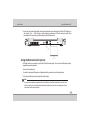
Your computer has a 15-pin Monitor port for supporting any external CRT or LCD color monitor. You need a
display signal cable (usually provided with the monitor). One end of the cable must have a 15-pin connector
for the system.
To connect an external monitor:
1.Turn off your computer and make sure the monitor power switch is turned off.
The notebook computer must be powered off or suspended while the monitor is being connected.
Although you can connect the external Monitor without power off the computer and the external monitor,
however, it is harmful to both devices and it shortens the life of these devices.
2.Connect the connector cable of the monitor to the VGA port of your computer. Secure the cable connection
with the screws provided.
3.Connect the monitor power cable and plug it into a properly grounded wall outlet.
4.Turn on the power of the monitor.
5.Turn on your computer. Both the LCD panel and the monitor screen will show the display. Your computer is
set at default to run at simultaneous display mode.
4-19
User's Guide
Using the Notebook PC
6.If you only want to show the display on the external monitor or projector and shut off the LCD display, you
can use the <Fn> + <F8> hot-key to switch display type between LCD and external monitor. Keep
pressing the hot-key until you get the display to external monitor only.
Using the External Audio System
At the right side of your computer, you will find the built-in audio ports. You can connect Microphone jacks,
earphone or powered speaker.
To connect to a audio jack:
1. Locate the audio port (Microphone, Headphone) that you want to use to the target device.
2. Plug the jack into the port on the right side of the system.
Note:
If you use external speakers and experience the sound distortion or feedback, please lower the volume. Some
factors is caused by too close locating the microphone and speakers from each other, moving away the external
audio option from the unit may also help.
4-20
User's Guide
Using the Notebook PC
Dolby Experience (for selected SKUs only):
Selected models of HCL notebooks are certified for 'Dolby Advanced Audio' by Dolby Laboratories. Dolby
enablement is possible only under supported SKUs of Windows Vista and Windows 7 only (not in any other
operating systems). The Dolby technologies are controlled from the Dolby tab from the “properties” page of the
speaker's playback endpoint from the sound control panel. There is a box for enabling the Audio Enhancer
which controls the Natural Bass, High Frequency enhancer and inverse filtering on internal speakers
processing, and natural bass and high frequency enhancer on the headphones and external speakers. The
Surround Sound check box enables Dolby Headphone feature on Headphones only.
To use the above said Dolby settings,
(i).Right Click “Volume icon” in the System tray and select “Playback Devices”. In the pop up window, double
click on the “Speakers”.
(ii).Then in the popup windows, you can see these settings under “Dolby” tab (Sorround sound will not appear if
no device is connected to the Audio out jack)
4-21
User's Guide
Using the Notebook PC
Bluetooth Module (on selected models)
Before installing the Bluetooth driver, make sure that the optional Bluetooth module is on. And then install
Bluetooth driver from the driver CD.
Warning:
Wireless Device Operation Aboard Aircraft: The use of any portable electronic transmission devices aboard
aircraft is usually prohibited. Make sure the module(s) are OFF if you are using the computer aboard aircraft. Use
the Fn + F2 key combination to switch ON & OFF the Bluetooth module.
Bluetooth Wireless Connection (on selected models)
Notebook PCs with Bluetooth technology eliminates the need for cables for connecting Bluetooth enabled
devices. Examples of Bluetooth- enabled devices may be Notebook PCs, Desktop PCs, mobile phones,
and PDAs.
Note:
If your Notebook PC did not come with built-in Bluetooth, you need to connect a USB or Express Card Bluetooth
module in order to use Bluetooth.
To send a Data/File
1. Power on the Bluetooth by pressing Fn+F2, then Bluetooth will be enabled.
2. Right click on Bluetooth tray icon and select send a file option.
3. Bluetooth file transfer wizard will be opened, browse & select the device the file need to be sent.
4. During file sending the machine will ask for passkey & use passkey to connect the other machine if
required.
4-22
User's Guide
Using the Notebook PC
5. Then select the sending and give send file.
To Receive a Data/File
1. Power on the Bluetooth by pressing Fn+F2 function key or Hot Key.
2. Right click on the Bluetooth tray icon is select Receive a file.
3. Waiting for a connection form another computer or device dialog box will appear.
4. Then send the file from other machine to this machine.
5. Accept the sent file.
Note:
While receiving file, select receive a file from tray icon, before selecting this you shouldn't send file from other
machine.
PC Camera Module (on selected models)
The 1.3Megapixel or 2.0Megapixel(Megapixel will vary according to your configuration) camera module is
UVC ( USB Video Class) and uses the OS inbuilt driver and application to capture pictures (Windows XP).In
Windows Vista and Windows 7 OS, use the freeware utility provided along with the driver CD.
Note:
Vista OS doesn't have inbuilt webcam preview function by default. But still the VoIP applications (video chat) will
have these features and work normally. However a free utility is included in the driver CD for basic testing
purpose only.
4-23
User's Guide
Using the Notebook PC
Security Modules (Fingerprint ) (on selected models only)
Fingerprint recognition is feature that enrolls your fingerprint information into the computer and helps
prevent unauthorized access by others. Instead of inputting password from the keyboard, the following
function can be carried out just by swiping the registered finger against the fingerprint sensor.
Points to note about the Fingerprint Sensor
Due to the use of advance technology to manufacture the fingerprint sensor, please abide by the
following guidelines when using it. Please take extra care when handling the sensor surface.
Failure to follow these guidelines might result in (1) damage to the sensor or cause sensor failure,
(2)finger recognition problems, or lower finger recognition success rate.
Do not scratch or poke the sensor with your nails or any hard or sharp objects.
Do not press the sensor strongly.
Do not touch the sensor with a wet finger or any wet objects. Keep sensor surface dry and free of
water vapor.
Do not touch the sensor with a soiled finger. Minute foreign particles on a soiled or dirty finger
may scratch the sensor.
Do not paste sticker or write on the sensor.
Do not touch the sensor with a finger or any object with built-up static electricity.
4-24
User's Guide
Using the Notebook PC
Observe the following before you place your finger on the sensor whether for fingerprint
enrollment/registration or recognition.
Wash and dry your hands thoroughly.
Remove static electricity form your finger by touching any metal surface. Static electricity is a
common cause of sensor failures, especially when the weather is dry.
Avoid the following finger conditions for enrollment or recognition as they may result in
fingerprint enrollment errors or a drop in the fingerprint recognition success rate.
Soaked or swollen finger (e.g. after taking bath)
Injured finger
Wet finger
Soiled or oily finger
Extremely dry skin condition on finger
Observe the following to improve the fingerprint recognition success rate.
Enroll two or more fingers.
Enroll additional fingers if recognition failure occurs often using enrolled fingers.
Check your finger condition. Changed conditions, such as injured, rough, extremely dry, wet,
soiled, dirty, soaked, swollen fingers, may lower the recognition success rate. Also if the
fingerprint is worn down or the finger becomes thinner or fatter, the recognition success rate may
be lowered.
4-25
User's Guide
Using the Notebook PC
The fingerprint for each finger is different and unique. Please ensure that only the registered or
enrolled fingerprint or fingerprints are used for identification.
Fingerprint sensor limitations
The finger print sensor compares and analyzes the unique characteristics in a fingerprint.
However, there may be instances where certain users are unable to register their fingerprints
due to insufficient unique characteristics in their fingerprints.
A warning message will be displayed when recognition is abnormal or recognition is not
successful within a fixed duration.
The recognition success rate may differ from user to user.
HCL does not guarantee that is fingerprint recognition technology will be error-free.
HCL does not guarantee that the fingerprint sensor will recognize the enrolled user or
accurately screen out unauthorized users at all times. HCL is not liable for any failure or damage
that might arise out of the use of this fingerprint recognition software or utility
4-26
User's Guide
Using the Notebook PC
The fingerprint reader and Protector Suite Software allow you to:
!
Access or Lock your computer
!
Protect sensitive files
!
Display and file your favorite web pages
!
Fill in frequently used dialogs
!
Run your favorite applications
Warning !
If you set passwords for any of the security modules, NEVER forget your password. The consequences of
this could be serious. If you cannot remember your boot password you must contact your vendor and you may
lose all of the information on your hard disk.
4-27
User's Guide
Using the Notebook PC
Fingerprint Reader Module
If you have included the fingerprint reader in your purchase option you will need to install the driver as per
the instructions below.
Make sure you have administrator’s rights to your computer, and have a Windows password enabled for
full security protection.
Before beginning the enrollment process it is recommended that you go through the fingerprint tutorial. To
run the tutorial click Start > Programs/All Programs > Finger Print > Help & Reference after installing the
driver.
Note:
Help & Manual Right-click the taskbar icon
to bring up the menu to select Help.
User Enrollment
1. If you have not set a Windows password you will be prompted to do so (note: If you have not set a
password, Finger Print cannot secure access to your computer).
2. Click Start > Programs/All Programs > Finger Print Software > User Enrollment, or double click the
finger print icon on the taskbar .
3. On the first run of the program you will be asked to fill up the Windows logon settings .
4-28
User's Guide
Using the Notebook PC
4. You will then be prompted to enter your Windows password.
5. Click OK.
6. Now Finger Print Registration Dialogue Box Will appear on the screen.
7. Click any of the finger that appears on the screen to begin the registration process for that finger. The
selected finger will get highlighted with Blue colour. Click Next.
4-29
User's Guide
Using the Notebook PC
8. Swipe the finger for five times to register that finger.
9. Once the finger print is registered successfully, the finger that you registered will appear Green on the
screen.
10. Click Finish.
11. You can repeat the process to register any other finger that you wish to register.
12. Restart the computer.
13. Double click the finger print icon in the taskbar
.
Warning !
Fingerprint Enrollment Note that it is strongly recommended that you enroll more than one finger in case of
injury etc.
14. Swipe your registered finger over the reader.
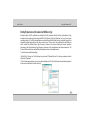
15. It will show the Finger Print menu as shown in the figure.
16. For more information, use the Help & Reference option provided in the Finger Print menu.
4-30
User's Guide
Using the Notebook PC
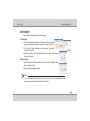
HOTFINGER
To specify shortcut Fingerprints for specific program.
Set HotFinger
1. On Finger Registration Wizard, Left click to one of the registered
finger (green finger as shown), choose the Hot Finger from menu.
2. From the Hot Finger Settings you can add your “AutoLogin/
Favorites/ Programs”.
3. Finally the registered HotFinger will appear in Green colour with IE icon as
shown in the figure .
Delete HotFinger
1. Right-Click on the HotFinger which you want to delete. From the list, select
Delete HotFinger option.
2. Now the HotFinger will get deleted.
Note:
You can’t delete the registered finger that remains at last, Instead of that you can change the Windows Logon
settings or uninstall the FingerPrint Software in the control Panel.
4-31
User's Guide
Troubleshooting
Chapter - 5
Troubleshooting
Overview
When you have any problems with your computer, before consulting your service representative, you may
want to try to solve the problem yourself. This chapter lists some common problems and their possible
solutions. This can’t anticipate every problem, but you should check here before you panic. If you don’t find
the answer in these pages, make sure you have followed the instructions carefully and observed the safety
precautions in the preface. If all else fails, talk to your service representative. You should also make a record
of what happened and what remedies you tried.
Of course, if something goes wrong, it will happen at the most inconvenient time possible, so you should
preview this section just in case. If, after you’ve tried everything, and the system still won’t cooperate, try
turning it off for a few minutes and then reboot. You will lose any unsaved data, but it may start working again.
Else approach for your service representative.
Basic Hints and Tips
Many of the following may seem obvious but they are often the solution to a problem when your computer
appears not to be working.
Power - Is the computer actually plugged into a working electrical outlet? If plugged into a power strip,
make sure it is actually working. Check the LED Power & Communication Indicators to see the
computer’s power status.
Connections - Check all the cables to make sure that there are no loose connections battery, adapter
anywhere.
5-1
User's Guide
Troubleshooting
Power Savings - Make sure that the system is not in Hibernate or Sleep mode use power button to
wake-up the system.
Brightness - Check the brightness of the screen by pressing the Fn+F5 and Fn+F6 keys to adjust the
brightness.
Display Choice - Press Fn + F8 to make sure the system is not set to “external only” display.
Boot Drive - Make sure there are no disc and/or USB storage devices in any connected drive (this is a
common cause of the message “Invalid system disk - Replace the disk, and then press any key”/
“Remove disks or other media. Press any key to restart”).
Check to see if the problem persists when all the external devices are removed.
Check to see if your keyboard is operational by pressing and holding any key.
Be sure you have not performed an incorrect setting on the hardware devices in the BIOS Setup utility.
A faulty setting may cause the system to misbehave. If you are not sure of the changes you made, try to
restore all the settings to factory defaults.
Be sure all the device drivers are installed properly. For example, without the audio driver properly
installed, the speakers and microphone will not work.
If external devices such as USB camera, scanner, printer do not function correctly when connected to
the system, it is usually the device's own problem. Consult the device's manufacturer first.
Some software programs, which have not gone through rigorous coding and testing, may cause
problems during your routine use. Consult the software vendor for problem solving.
5-2
User's Guide
Troubleshooting
Backup and General Maintenance
Always backup your important data, and keep copies of your OS and programs safe, but close to hand.
Don’t forget to note the serial numbers if you are storing them out of their original cases, e.g. in a CD
wallet.
Run maintenance programs on your hard disk and OS as often as you can. You may schedule these
programs to run at times when you are not using your computer. You can use those that are provided
free with your OS, or buy the more powerful dedicated programs to do so.
Write down your passwords and keep them safe (away from your computer). This is especially
important if you choose to use a Supervisor password for the BIOS password.
Keep copies of vital settings files such as network, mail settings etc.(even if just brief notes).
Viruses
Install an Anti-Virus program and keep the definitions file (the file which tells your program which
viruses to look for) up to date. New computer viruses are discovered daily, and some of them may
seriously harm your computer and cause you to lose data. Anti-Virus programs are commercially
available and the definitions file updates are usually downloadable directly from the internet. Be aware
when e-mail, downloading file from internet, ensure those are virus free.
5-3
User's Guide
Troubleshooting
Upgrading and Adding New Hardware/Software
Do not be tempted to make changes to your Windows Registry unless you are very sure of what you
are doing, otherwise you will risk severely damaging your system.
Don’t open your computer or undertake any repair or upgrade work if you are not comfortable with what
you are doing. This will void your warranty.
Read the documentation. We can assume, since you are reading this that you are looking at the
computer’s manual, but what about any new peripheral devices you have just purchased? Many
problems are caused by the installation of new hardware and/or software. Always refer to the
documentation of any new hardware and/or software, and pay particular attention to files entitled
“READ ME” or “READ ME FIRST”.
When installing a new device always make sure the device is powered on, and in many cases you will
need to restart the computer. Always check that all the cables are correctly connected.
Make sure you have installed the drivers for any new hardware you have installed.
Thoroughly check any recent changes you made to your system as these changes may affect one or
more system components, or software programs. If possible, go back and undo the change you just
made and see if the problem still occurs.
Don’t over complicate things. The less you have to deal with then the easier the source of the problem
may be found; Example - if your computer has many devices plugged into its ports, and a number of
programs running, then it will be difficult to determine the cause of a problem. Try disconnecting all of
the devices and restarting the computer with all the peripheral devices unplugged. A process of
elimination (adding and removing devices and restarting where necessary) will often find the source of
a problem, although this may be time consuming.
5-4
User's Guide
Troubleshooting
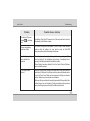
Problem
Possible Cause - Solution
The battery LED power
indicator
, is blinking
Red.
Low Battery. Plug in the DC power source. If the computer doesn’t start up
immediately, turn it off then on again.
You are losing battery
power too quickly.
The system is using too much power. If your OS has a Power Options
scheme check its settings. You may also be using an Card/USB
device/external device that is drawing a lot of power.
Actual battery operating
time is shorter than
expected.
The battery has not been fully discharged before being recharged. Make
sure the battery is fully discharged and recharge it completely before
reusing. Refer battery tips which care with the machine.
Power Options have been disabled. Go to the Control Panel in Windows
and re-enable the options.
The computer feels
too hot.
Make sure the computer is properly ventilated and the Vent/Fan intakes are
not blocked. If this doesn’t cool it down, put the system into Hibernate mode
or turn it off for an hour. Make sure the computer isn’t sitting on a thermal
surface . Make sure you’re using the correct adapter.
Make sure that your notebook is completely powered off before putting it into
a travel bag (or any such container). Putting a notebook which is powered
on in a travel bag may cause the Vent/Fan intakes to be blocked.
5-5
User's Guide
Troubleshooting
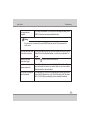
You forget the boot
password.
If you forget the password, you may have to discharge the battery of the
CMOS. Contact your service representative for help.
Warning:
If you choose to set a boot password, (If supported) NEVER forget your password. The consequences of this
could be serious.
The sound cannot be heard
or the volume is very low.
The volume might be set too low. Check the volume control in the Volume
Control Panel in the Windows taskbar, or use the key combination Fn +
keys.
Unwelcome numbers
appear when typing.
If the LED
The system never goes into
a power saving mode.
Power Options features are not enabled. Go to the Windows Power Options
menu and enable the features you prefer. Make sure you have enabled
Hibernate mode from the control panel.
The Wireless LAN modules
cannot be detected.
The modules are off. Check the LED indicator and/or function key indicator
to see if the WLAN switch is on or off. If the LED indicator is off, then press
the Fn + F2 (WLAN) key combination(s) in order to enable the modules.
is lit, then Num Lock is turned ON.
5-6