1
If the current session is using the FTP protocol, a message can be sent to the user before disconnecting them
by typing it in the box labeled Message to user. This option is not available for HTTP or SFTP sessions as
neither protocol defines a method for chatting with users.
Spy & Chat
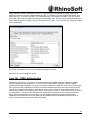
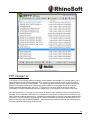
Any type of session can be spied on by clicking the Spy & Chat button or double-clicking on a session from the
list. Spying on a user displays all the detailed information normally visible by highlighting the session, but also
includes a complete copy of the session's log since it first connected to the File Server. This allows an
administrator to browse the log and view all actions taken by the session's user.
If the current session is using the FTP protocol, additional options are available for chatting with the user. The
Chat group shows all messages sent to and received from the session since beginning to "spy" on the session.
To send a message to the session, enter the message text in the box labeled Message Content and click the
Send button. When a message is received from the session, it is automatically displayed here.
NOTE: Not all FTP clients support chatting with system administrators. The command used to send a message
to the server is SITE MSG. In order for a client to receive messages, the client application must be capable of
receiving unsolicited responses from the server (instead of just discarding them).
Broadcast
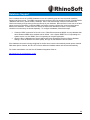
A message can be sent to all currently connected FTP sessions by clicking the Broadcast button. Sending a
message via broadcast is equivalent to opening the Spy & Chat dialog to each individual FTP session and
sending it a chat message.
Abort
If a session is performing a file transfer, the file transfer can be terminated without disconnecting the session by
clicking the Abort button. After confirming the abort command, the current file transfer for that session is
terminated by the Server. Some clients (especially FTP and SFTP clients) may automatically restart the
aborted transfer making it appear that the abort failed. If this is the case, try Disconnecting the session instead.
69