1
normal operations it’s necessary to substitute the battery with a
new one and to verify the alarm sound is no more present.
BLACK BOX – IR/RF
Alarm sound description
7 x beeps – Low Battery
Substitute the battery with a new one and verify the sound alarm
stops. Before inserting the new battery pack, remove the old one and
wait until the sound disappears. Wait at least 2 minutes before
adding the new batteries. If the sound is still present after adding
new batteries, execute an ignition sequence.
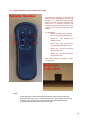
3 x beeps – Manual Wall Switch Keyboard Failure
Substitute the keyboard with another one and verify the sound alarm
stops.
4 x beeps – Valve Motor Failure
Substitute the valve with another one. Repeat the ignition sequence
and verify the sound alarm stops.
5 x beeps – Driver Leakage [Black Box Faulty]
Substitute the board: the motor drive circuit is damaged. Execute an
ignition sequence and verify there’s no sound alarm.
6 x beeps – Under Voltage Low battery
Substitute the battery with a new one and verify the sound alarm
stops. Before inserting the new battery pack, remove the old one and
wait until the sound disappears. Wait at least 2 minutes before
adding the new batteries. If the sound is still present after adding
new batteries, execute an ignition sequence.
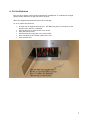
Battery Replacement:
When replacing the batteries they must be replaced as a
complete set and a full new set used. The system has a memory
and if any old batteries are used the alarm sequence will not be
reset.
To reset the alarm:
Remove the old batteries.
Wait 10 minutes.
Fit a set of 6 new Alkaline or Lithium batteries.
Start the fire.
16