1
Elnec s. r. o.
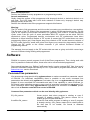
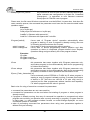
1. loads data file c:\15001-25001\file_10.bin
2. saves the currently selected device settings and buffer data to project file
c:\projects\project_10.eprj
If the result of operations performed is OK, PG4UWcmd application will return ExitCode (or
ErrorLevel) value 0.
If there are some errors (can not load file or save to project file), PG4UWcmd application will
return ExitCode value equal or greater than 1.
Note: When using the above commands, user must be sure the PG4UW is not performing any
device operation, for example device programming. If the PG4UW is busy, it will refuse the
commands and returns error status (ExitCode equal or greater than value 1).
Hardware
Due a large variety of parallel port types, a case may occur when the programmer cannot "get
concerted" with the PC. This problem may be shown as none communication between the PC
and the programmer, or by unreliable communication. If this behavior occurs, try to connect
your programmer to some other PCs or other parallel ports near you.
If you find none solution, please document the situation, i.e., provide us an accurate
description of your PC configuration, including some other circumstances bearing on the
problem in question, and advise the manufacturer of your problem. Don’t forget please enter of
PC type, manufacturer, speed, operation system, resident programs; your parallel port I/O
manufacturer and type. Use please Device problem report form for this purpose.
Warning:
Class A ITE notice
Devices described at this manual are class A products. In domestic
environment this products may cause radio interference in which case the
user may be required to take adequate measures.
Because BeeHive204, BeeProg2 and BeeProg2C have internal power supply, follow these
special precautions:
Circuit breakers (overcurrent protection) must be a part of building electrical installation.
Pull out power cord plug from outlet to disconnect programmer from mains. The outlet must
be placed near to programmer and must be easy accessible.
ISP (In-System Programming)
Definition
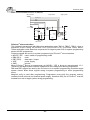
In-system programming allows programming and reprogramming of device positioned inside
the end system. Using a simple interface, the ISP programmer communicates serially with the
device, reprogramming nonvolatile memories on the chip. In-system programming eliminates
the physical removal of chips from the system. This will save time and money, both during
development in the lab, and when updating the software or parameters in the field.
Target device is the device (microcontroller, PLD, etc…), which is to be in-system
programmed.
166