1
Installation, Sensors and Connections
Figure 3
Figure 4
Figure 5
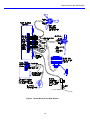
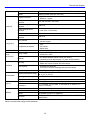
Attach the sensor stub mast to your chosen installation site, and run sensor cables to the Wind Explorer.
To connect the anemometer to the Wind Explorer, first connect the anemometer’s shield wire to the Earth Ground
terminal. Touch the 2 signal wires to the earth terminal to ensure there is no static electricity built up in the sensor, then
connect the 2 wires from the anemometer to the top 2 terminals on the Wind Explorer, labeled "SPD" . NRG supplied
cables use a black wire and a white or clear wire. There is no polarity; the 2 wires may be connected either way, but by
convention, the black wire is connected to terminal 2.
Connecting the Wind Direction Vane
To connect the wind direction vane, first connect the shield wire to the Earth Ground terminal. Touch the three signal
wires to the earth terminal to ensure there is no static electricity built up in the sensor, then connect the three wires from
the sensor to the Wind Explorer. NRG cables use red, white and black wires for the vane. The black wire is connected
from the end terminal on the wind vane without the red polarity mark, to terminal 5 on the logger, labeled "V-". The white
wire is connected from the center terminal on the wind vane to terminal 4 on the logger, labeled "VS". The red wire is
connected from the end terminal on the wind vane, with the red polarity mark, to terminal 3 on the logger, labeled "V+".
Using the Extra Channel for Temperature
The Wind Explorer supports one of 2 NRG sensors on the Extra channel. If you are using the model 110S air
temperature sensor, first connect the shield wire to the Earth Ground terminal. Connect the sensor’s black wire is
connected to terminal 8 on the logger, labeled "E -". The sensor's white wire is connected to terminal 7 on the Logger,
labeled "ES". The red wire from the sensor is connected to terminal 6 on the logger, labeled "E+".
Using the Extra Channel for the Solar Pyranometer
The Wind Explorer also supports the Licor total solar pyranometer on the extra channel. To use the pyranometer, you
must turn on the pyranometer switch on the logger to configure the input for this sensor. With the batteries out, there are
2 tiny switches accessible behind the front panel, above the right battery socket. Turn the left switch on by pushing it
upward with a small screwdriver or a pen tip to configure the Wind Explorer for the pyranometer input.
17