1
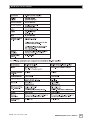
RS232 Commands
.
Activity
Command
Format
Acceptable
n Values
Example(s)
Comments
Volume Control
#VOnn$,
#VO+$,
#VO-$,
#VO?$
00 – 80
#VO25$,
#VO+$,
#VO-$,
#VO?$
Sets volume to a value,
increments volume up
or down, or requests
current volume setting
Preset Control
#PSn$,
#PS?$
1, 2, 3, 4
#PS1$, #PS2$,
#PS3$, #PS4$,
#PS?$
Activates the indicated
preset, or requests
the current preset
Logo Light
Control
#LTn$,
#LT?$
0: Light Off
1: Light On
#LT0$
#LT1$
#LT?$
Turns the Logo Light
on or off, or requests
light state
Night Mode
Control
#NMn$,
#NM?$
0: Night
Mode Off
1: Night
Mode On
#NM0$
#NM1$
#NM?$
Activates/Deactivates
Night Mode, or
requests light
mode state
Mute Control
#MUn$,
#MU?$
#MU0$
0: Mute Off
1: Mute On
#MU1$
#MU?$
Mutes/Unmutes the
woofer, or requests
mute state
Power Control
#JUn$,
#JU?$
0: Power Off
1: Power On
#JU0$
#JU1$
#JU?$
Powers On/Powers
Off the woofer, or
requests power state
www.velodyne.com
SC-600 Amplifier User’s Manual
18