1
c) Program the message using the PC Set Easy software
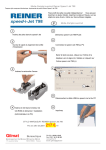
This is achieved using the supplied “PC Set Easy” software. Install and open the software to begin. Note, this is a
brief guide only. For more detailed instructions choose “Help” from the PC Set Easy menu.
1.
1. Type your text in the text area provided, eg; “TR3205 S6 X 12”
2. Drag the pen icon underneath the text area to an available box
1
2
2.
3. Re-type the text “SN:” in the edit box and drag the icon to the bottom line
4. Double-click the “Numberer” icon and choose the number of digits in your serial number.
Now drag the icon to a spare box.
5. Note: The 5 “Up Down” arrows allow you to program 4x different messages. These will be
messages #01 – #10 on the JetStamp
4
3
4
3
5
4
TRANSFER
* Note that the preview will update to reflect the message entered
A division of Trend Agencies International Pty Ltd.
ACN 081 018 911 ABN 33081 018 911
PO Box 1311 Castle Hill NSW 2154 Australia
TEL: (02) 9629-9535 FAX: (02) 9629-7535
INTERNET: www.trendmarking.com.au
EMAIL: [email protected]