1
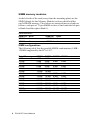
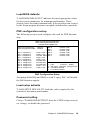
Load BIOS defaults
"LOAD BIOS DEFAULTS" indicates the most appropriate values
for the system parameters for minimum performance. These
default values are loaded automatically if the stored record created
by the Setup program becomes corrupted (and therefore unusable).
PNP configuration set-up
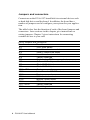
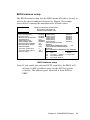
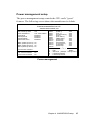
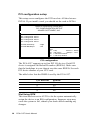
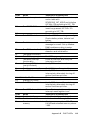
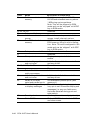
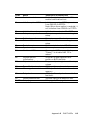
The following set-up screen configures the card for PNP functionality.
ROM PCI/ISA BIOS (2A59CAK2)
PNP CONFIGURATION SETUP
AWARD SOFTWARE INC.
Resources controlled by:
Reset Configuration Data:
IRQ-3 assigned to:
IRQ-4 assigned to:
IRQ-5 assigned to:
IRQ-7 assigned to:
IRQ-9 assigned to:
IRQ-10 assigned to:
IRQ-11 assigned to:
IRQ-12 assigned to:
IRQ-14 assigned to:
IRQ-15 assigned to:
Manual
Disable
DMA-0
PCI/ISA PNP
DMA-1
PCI/ISA PNP
DMA-3
PCI/ISA PNP
Legacy ISA DMA-5
PCI/ISA PNP
Legacy ISA DMA-6
PCI/ISA PNP
PCI/ISA PNP DMA-7
PCI/ISA PNP
Legacy ISA
Legacy ISA
PCI/ISA PNP
PCI/ISA PNP ESC: QUIT
←↑↓→ : Select Item
PCI/ISA PNP F1 : Help
PU/PD/+/- : Modify
Legacy ISA F5 : Old Value (Shift)F2 : Change Color
Legacy ISA F6 : Load BIOS Default
F7 : Load Setup Default
PNP Configuration Setup
Assigning all the IRQ and DMA to read "Legacy ISA" will disable
the PnP function support.
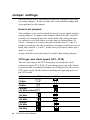
Load setup defaults
"LOAD SETUP DEFAULTS" loads the values required by the
system for maximum performance.
Password setting
Choose "PASSWORD SETTING" from the CMOS setup screen to
set, change, or disable the password.
Chapter 4 AWARD BIOS setup
39