1
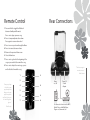
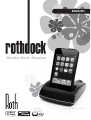
Remote Control
Rear Connections
1 Press and hold to toggle the Rothdock
between Standby and On mode.
Press once to play or pause a song.
2 Press to temporarily mute the volume.
Press again to resume volume level
3 Press to move up or down through the Menu
4 Press to increase/decrease volume
5 Return to the previous Menu screen
6 Select a Menu item
7 Press once to go back to the beginning of the
song or press and hold to rewind the song
8 Press once to skip to the next song, or press
“The best revenge is
massive success.”
and hold to fast forward the song.
1
3
“Some people tap
their feet, some
people snap their
fingers, and some
people sway back
and forth. I just sorta
do ‘em all together,
I guess.”
Elvis Presley
4
Frank Sinatra
2
4
Power
on / off
Power 5V
700mA
Adapter
3
5
6
7
8
For other audio devices such as MP3/
Mobile Phone or MiniDisk Player.
Plug-in via 3.5mm mini Jack