1
Neevia PDFsign/encrypt v3.5 user’s manual
last modified: May 20, 2013
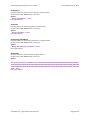
PDF Encryption related properties
PDFEncrypt
Specifies whether the output PDF file should be encrypted.
Possible values: true, false (Default value: false)
Syntax
NVsign.PDFEncrypt = value
Data Type: Boolean
PDFEncryptMetaData
Specifies whether the metadata in the output PDF file should be encrypted.
Possible values: true, false (Default value: true)
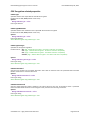
Syntax
NVsign.PDFEncrypt = value
Data Type: Boolean
Note: Will have effect only if PDFEncrypt = true.
PDFEncryptionType
Specifies the encryption algorithm
Possible values: "40" (low - 40 bits RC4 encryption - Acrobat 3-and-later compatible)
"rc4" (high - 128 bits RC4 encryption - Acrobat 5-and-later compatible)
"aes" (high - 128 bits AES encryption - Acrobat 6-and-later compatible)
"aes256" (high - 256 bits AES encryption - Acrobat 9-and-later compatible)
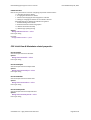
Syntax
NVsign.PDFEncryptionType = value
Data Type: String
Note: Will have effect only if PDFEncrypt = true.
PDFUserPassword
Sets the user password in the output document. Users will be asked to enter this password before Acrobat
Reader allows them to view the document.
Syntax
NVsign.PDFUserPassword = value
Data Type: String
Note: Will have effect only if PDFEncrypt = true.
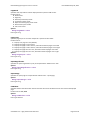
PDFOwnerPassword
Sets the output document owner password. This option will force the user of the PDF to enter a password
before Acrobat Reader allows them to change the user password and security permissions.
Syntax
NVsign.PDFOwnerPassword = value
Data Type: String
Note: Will have effect only if PDFEncrypt = true.
neeviaPDF.com - high performance PDF tools
Page 19 of 42