1
INTRODUCTION
What is Fle3?
Fle3 is a webbased
software for
collaborative
learning
Fle3 is a web-based learning environment. To be more specific, Fle3 is a server software for
computer supported collaborative learning (CSCL).
Fle3 is designed for group centered work that concentrates on creating and developing expressions of knowledge (i.e. knowledge artefacts).
What do I need to run Fle3?
You need a
computer
connected to a
network and a
standard web
browser
To use Fle3 you need a computer connected to a computer network. The network you will be using is most
likely, the Internet. However, a connection to “public Internet” is not a requirement as it is possible to
use Fle3 just in a local area network or Intranet using
the Internet protocol. Contact your administration
to figure out how to do this in practice.
Fle3 works with all standard web-browsers. In your
web browser you just have to point to the location
of your Fle3 server installation and log in.
What are the tools of Fle3?
Webtop
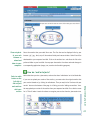
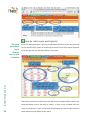
Each user gets a personal Webtop. WebTops can be used to store different items (documents,
files, links to web & knowledge building notes) related to their studies, organize them into
folders and share them with others. You can also visit other users’ WebTops.
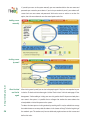
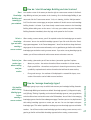
Knowledge Building is a discussion environment for structured knowledge building in groups.
The knowledge building discussion is scaffolded by knowledge types, which label the thinking
mode of each discussion note.
Jamming
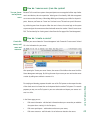
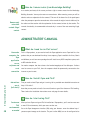
Jamming is a tool for collaborative construction of digital artefacts. In jamming you may explore the possibilites of changing a file (picture, audio, video, text, etc) by making new versions of the original artefact together with others.
The staff and other people taking care of the courses and course participants have tools for
http://fle3.uiah.fi
Knowledge
Building
managing users, courses and participants of the courses. Ordinary users (students, pupils) don’t
use these tools.
3