1
Introduction
AllSync Ethernet Option
User Manual
The AllSync Master can be set up as a
timeserver on the Public Internet, allowing
computers and other devices to retrieve the
current time from the unit remotely. The time
information provided by this method may not
be traceable to UTC (NIST) and is dependent
on the timekeeping and/or time synchronization
of the AllSync Master unit acting as the
timeserver. The AllSync Master uses the
DAYTIME PROTOCOL (RFC-867).
Troubleshooting
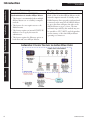
CONFIGURATION 4: TRANSMIT Time
Synchronization via the Public Internet
• This feature is recommended when the AllSync Master is on a computer network connected to the Public Internet and it is desired to query the facility time from this AllSync Master via a remote PC or another Master connected to the Internet
• This feature can be used to synchronize the time of one facility to that of another, even if they are not on the same computer network
• This feature requires an internal STATIC IP Address to be set up by the network administrator
• This feature requires access to the Public Internet via port 13 (firewall may require configuration by the network administrator)
Installation
Explanation
Introduction
Feature Summary
Appendix
Glossary
© American Time
7