1
Table of Contents
Getting started
33 Using notifications
35 Transferring files
35 Upgrading the Gear
6 About Gear 2
6 Package contents
7 Device layout
8Button
10 Charging the battery
13 Wearing the Gear
14 Replacing the strap
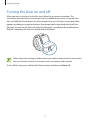
17 Turning the Gear on and off
18 Notices for using Bluetooth
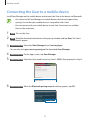
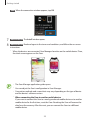
19 Connecting the Gear to a mobile
device
21 Locking and unlocking the Gear
21 Adjusting the brightness of the display
21 Adjusting the volume
21 Switching to silent mode
Applications
37 S Voice
38 WatchON Remote
39Gallery
40Weather
40 Find My Device
41 Health Management Applications
44Pedometer
45 Heart Rate
47Exercise
49Messages
50 Music Player
51 Media Controller
52Stopwatch
52Contacts
52 Voice Memo
53Email
54Schedule
54Controls
54Logs
55Camera
57Timer
Basics
22 Viewing mobile device connection
status and battery status
22 Using the touch screen
26 Viewing the Home screen
30 Apps screen
30 Using applications
31 Securing the Gear
31 Using calling features
4