1
Getting started
Device layout
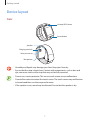
Gear
Infrared LED/Camera
Power button
Speaker
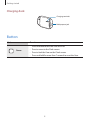
Charging terminals
Heart rate sensor
Microphone
• Humidity and liquids may damage your Gear. Keep your Gear dry.
• Ensure that the strap is kept clean. Contact with contaminants, such as dust and
dye, can cause stains on the strap that may not be fully removed.
• Do not use a screen protector. This causes touch screen sensor malfunctions.
• Do not allow water to contact the touch screen. The touch screen may malfunction
in humid conditions or when exposed to water.
• If the speaker is wet, sound may be distorted. Ensure that the speaker is dry.
7