1
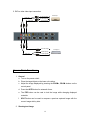
5. DVD or other video input connection
To Audio Output(L)
Audio cable
DVD Player 1
To Audio Output(R)
Video cable
S-Video cable
To Video Output
To S-Video output
DVD player 2
To audio output(L)
Audio cable
To audio output(R)
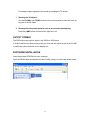
Access Basic Functions:
1. General
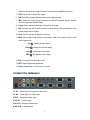
a. Turn on the power switch.
b. Place the target object on the base unit surface.
c. Adjust the image displayed by pressing the ZOOM+, ZOOM- buttons on the
control panel.
d. Press the AUTO button for automatic focus.
e. The FRZ button can be used to lock the image while changing displayed
materials.
f.
SPLIT button can be used to compare a previous captured image with the
current image side by side.
2. Showing text image
12