1
Deployment Option 1: Single User
VetTracker can be used by a single user in your agency. In this configuration, a single
user can become the “data queen” (or king) and take care of all data management in
VetTracker on a single workstation. A license of FileMaker and VetTracker can be
installed on that one computer, and that one computer holds all the information.
This option is attractive from the standpoint of simplicity and configurability. It also
requires only a single license of FileMaker to be purchased. However, it is somewhat
restrictive from an operational standpoint - your data will be accessible only from that
single machine - and carries the risk of a hard drive crash destroying the data. It is
highly recommended that good backups be kept, and an alternate installation plan be in
place.
Deployment Option 2: Single Computer Installation with Instant
Web Publishing
FileMaker has the capability to “publish” a database application to a web browser, a
capability known as Instant Web Publishing (IWP). VetTracker has been designed to
take advantage of this feature. In this deployment option, a single computer “hosts” the
database using FileMaker Pro, and other users access it using the web browsers
(Internet Explorer {version 9 or higher}, Firefox, Google Chrome, and Safari are all
supported) installed on their workstations. The experience over the web is very similar
to the experience through the FileMaker client, albeit with some limitations.
This option can be very attractive to small organizations with limited budgets, since they
can have multiple users (up to 6, one hosting the database and 5 sharing it over IWP)
without purchasing multiple FileMaker licenses. Where resources are tight, and all users
are within the same office (i.e. inside the same intranet), IWP is relatively easy to
configure.
However, this option is usually unsuitable for situations where all the users are not colocated (where they have to communicate through the open Internet), since special
network setup is usually required. In addition, this option carries with it the same risks of
data loss associated with option 1, so stringent backup discipline is strongly
recommended.
Sharing VetTracker From a Single Computer Via IWP
1.
2.
3.
4.
5.
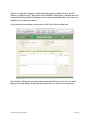
Open VetTracker from your hard drive into FileMaker Pro (see “Logging In” below).
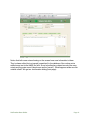
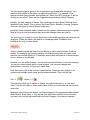
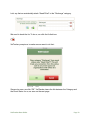
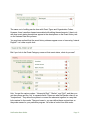
Select File > Sharing > Instant Web Publishing.
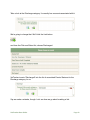
Turn on Instant Web Publishing.
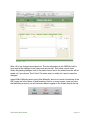
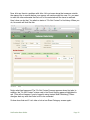
Record the IP address of the computer (it will be needed by users wanting to log in).
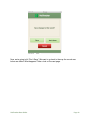
Click “OK”.
VetTracker User Guide!
Page 8