1
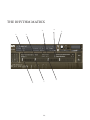
7a. CC1 Mapped Velocity
Control the note velocity with the mod wheel rather than key velocity. Especially handy for riding the mod wheel
during a roll.
8. Purge Unused
This control keeps unloading any samples you are not using to keep your memory usage as low as possible.
9. Articulation Lock
This pull down let’s you modify the way articulations are accessed, if for example you wish to have each articulation on a separate instance of percussion/ midi channel/ DAW-track you will want to load the articulation you need,
unload all others then click “locked artic” so you don’t hit a KS by mistake and mute your sound!
Unlocked artic. - Articulations can be freely switched with keyswitches or by clicking the icons in the UI
Locked artic. - Articulations cannot be changed at all
Locked KS. - Articulations cannot be changed by the keyswitches, but can be changed by clicking the UI icons.
10. Round Robin x 8
This refers to the number of round robins* your patch uses, the number can be dragged up and down (1-8) to
save you memory.
11. Reset From C1
Enable/Disable and configure the note that the Round Robin selection starts at. eg, if it’s set to F1, F1 will set RR
to 1, F#1 to 2, G to 3, etc.
12. Reset On Transport
An ingenious device that ensures uniform playback every time you run your DAW. Click this on and Kontakt
will start the round robin cycle from either RR1 or the selected RR from F1 above every time you hit play on your DAW.
13. Dynamics, Expression, Rls Vol.
A visual/ front end depiction of your modulation wheel or CC1 input. Expression (C11) and the volume of the
release triggers. Mapable to any CC or simply tweak direct fro the UI.
14. Neighbour(ing) Zones
This will fake round robins based on neighbouring zones, this can be used in conjunction with the true round
robins (10.) to give you a real variety of samples when playing fast or repetitive phrases.
15. Custom Velocity
Toggle on/ off the following:
16. Custom Velocity Chart
Change the pattern/ shape of this chart to suit your keyboards weight, velocity handling, or indeed you playing
style.
* Round Robins are a method of recording a number of versions of the same sample so that when playing repeated notes
in fast succession you don’t get “machine gunning” a rapid repeat of the same sample that gives the game away immediately.
12.