1
// K3020 // Dual VCO
6p
LFO Switch - Low Frequency Oscillator
The LFO switch puts the oscillator into LFO (Low Frequency Oscillator) mode. All other controls and
inputs work identically when in LFO mode except that the frequency range of the waveforms is altered.
Note that LFO mode is designed for frequencies below the audio range, however it is possible to
modulate up into low bass frequencies. The maximum period is more than 70 seconds. The LED beside
the LFO switch is lit when LFO mode is enabled.
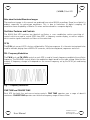
WAVE – Waveform Selection
The WAVE switch is used to select the primary waveform for the oscillator. Sine, Triangle and Ramp
waves are possible. The LEDs beside the WAVE switch indicate the currently selected wave.
Fig. 2 – Sine Mode
Fig. 3 – Triangle Mode
Fig. 4 – Ramp Mode
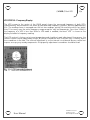
PULSE – Pulse Selection
The pulse section takes the currently selected wave as its input and produces a pulse output using three
PWM circuits plus combining circuitry on each channel. The PWM controls affect the pulse output. (see
below) The PULSE switch selects one of three different pulse output types. Either a single, dual or multipulse output can be selected. The dual and multi-pulse modes have the effect of adding additional
transitions to the waveform during each cycle. This creates interesting timbres and harmonics which
can be modulated with the PWM controls. The LEDs next to the PULSE switch indicate the currently
selected pulse mode.
Fig. 5 – Single Pulse Mode
User Manual
Fig. 6 – Dual Pulse Mode
Fig. 7 – Multi-pulse Mode
Hardware Version E
October 26, 2010
© 2010 Kilpatrick Audio