1
Connecting the SL-12 Master Room Controller
5.4
Connecting the RS-485 Interface
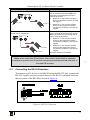
To connect an AV device to the SL-12 using the RS-485 port, connect the
RS-485 port on your device to the RS-485 terminal block on the rear panel
of the SL-12 as shown in Figure 5:
Figure 5: RS-485 Connection
5.5
Connecting the Ethernet Port
The Ethernet connection of the SL-12 allows you to perform all control
functions of the SL-12 over the Internet using a PC running the Kramer
Site-CTRL control program.
To connect the SL-12 to a network:
1. Connect the Ethernet port of the SL-12 to the Ethernet port on a network hub
or network router, via a straight cable with RJ-45 connectors.
2. At the other end, connect the Internet to a PC running Site-CTRL.
After connecting the Ethernet port, you have to install and configure it. For
detailed instructions on how to install and configure your Ethernet port, see
the K-Config Guide 1.
1 Available for download at the Kramer Web site: www.kramerelectronics.com
10
KRAMER: SIMPLE CREATIVE TECHNOLOGY